An ultrafast, lightweight agent runtime for coding and CI
A coding agent at your terminal, on any model: a ChatGPT sign-in, OpenRouter, your own key or a local model (Ollama, LM Studio, llama.cpp). The same agent runs one task in CI and helps your other agents. One binary under 4 MB.
Every step a real run on Claude Haiku 5.5: any model · a fix · answers · agents · a decision · a ship check. It plays on cli.localix.ai too, by chapter, where it can be paused and copied from.
Quick start
1. Install on macOS or Linux:
curl -fsSL https://raw.githubusercontent.com/localixai/localix-cli/main/scripts/install.sh | sh
2. Run it in your project:
cd your-project
llx
3. Sign in and ask:
/login
the median test fails, fix it
/login takes a ChatGPT sign-in, OpenRouter or a key for any of 200+ providers; a model on your own machine (Ollama, LM Studio) needs none. llx doctor says what is missing. Other ways to install: Installing llx.
Installed with the script? Run llx --update to install the latest stable release. A session
only notifies you when one is available.
Why llx
llx is a model in a loop over five tools: bash, apply_patch, ask, agents and jobs. It reads, searches and runs your checks through the shell, and changes files with patches.
Fast and small. One Rust binary under 4 MB. On the larger task below it finished in 60% of the time for a ninth of the cost.
Any model. 1,000+ models from 200+ providers, and the ones on your own machine; /model lists every one you are signed in to (models).
Sandboxed by default. Commands run in the system's sandbox, which writes only inside your project (never its .git) and opens no network. What must reach further is asked first (modes and trust).
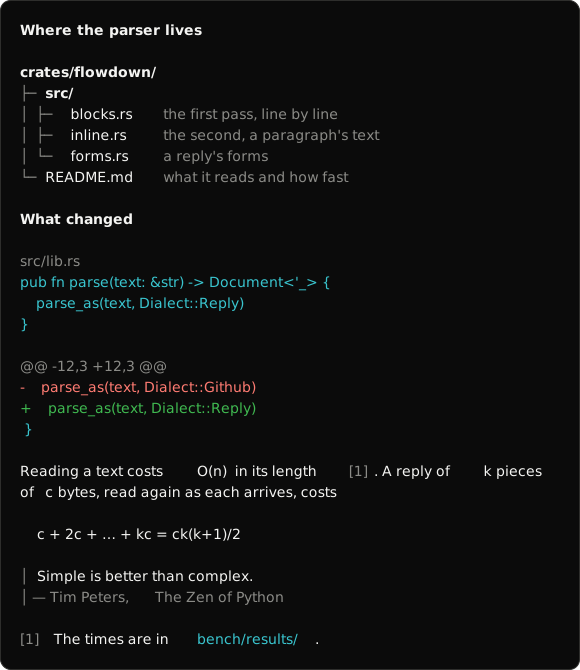
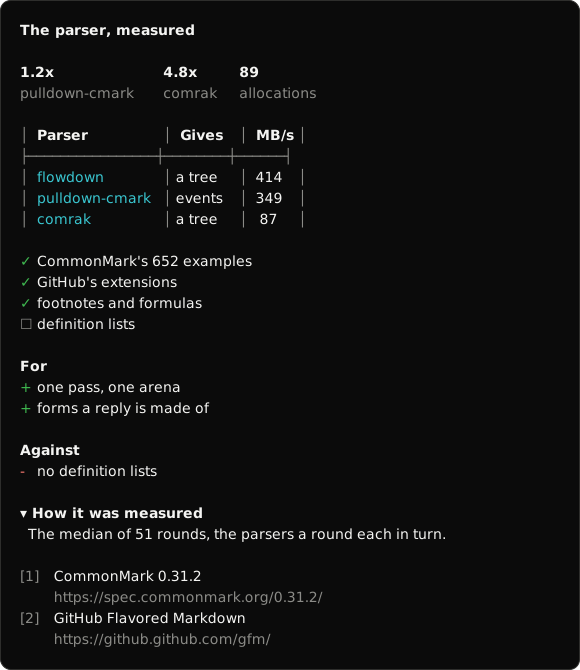
Answers you can read. Code under its file's name, a diff in green and red, tables, steps and formulas, drawn in the terminal with no markup left over.
Saved. Every run is a session: llx -c goes on with the newest one here, llx sessions lists them and llx resume ID opens one (sessions).
At your terminal
What finished goes into the terminal's own scrollback, so scrolling, selecting and copying stay the terminal's. Several sessions can work in one project at once, each with agents of its own.
The renderer's own rows, written as SVG. The Markdown is read by flowdown, the lab's library.
Key
What it does
Enter
Sends. While a task works, what you type goes to it, read at its next step
Shift+Tab
Goes round the modes: default → plan (read-only) → bypass → your own
/
The commands: /login, /model, /mode, /new, /rewind, /diff, /copy, /usage and more
@
Mentions a file of the project; a dragged file or picture is attached
←
On an empty prompt, lists the sessions in this project
Esc, Ctrl+C
Steps back out of what is open; Ctrl+C also stops work
The same task, the same model, the same Anthropic key, started in the same minute; the tests that score a run were written before it.
Task
Model
Agent
Solved
Time
Turns
Cost
evalkit, 238 tests
Haiku 5.5
llx
238 of 238
286 s
14
$0.050
Claude Code 2.1.321
238 of 238
478 s
25
$0.46
shopkit, 69 tests
Haiku 5.5
llx
69 of 69
69 s
5
$0.012
Claude Code 2.1.321
69 of 69
67 s
4
$0.011
One run of each agent, on one machine: a measurement, not a law. Every run's log, code and test output are in benchmark/, the slower runs too (history); bun benchmark/run.ts repeats it on your key.
In CI and scripts
llx exec is the same agent given one task: it ends with an answer, in the shape a JSON Schema defines if you pass one, and an exit code your pipeline can branch on (0 done, 1 no data, 2 out of turns, time or budget, 3 error). It works through bash with gh, git and your project's tools, with no MCP server and no built-in prompt, so the same task runs on GitHub, GitLab or any runner with a shell.
# a step of a job, after actions/checkout
- uses: localixai/localix-cli@v0
  id: llx
  env:
    OPENROUTER_API_KEY: ${{ secrets.OPENROUTER_API_KEY }}
    GH_TOKEN: ${{ github.token }} # read-only in this job; a second job posts the answer
    PR: ${{ github.event.pull_request.number }}
  with:
    model: anthropic/claude-haiku-5.5
    allow: bash
    schema: '{"type":"object","properties":{"summary":{"type":"string"}},"required":["summary"]}'
    prompt: |
      Review pull request #$PR with gh and git. Run something to confirm a problem
      before you report it.
Claude Code, Codex or a script of yours can call llx from its shell: llx exec hands a task to a helper on any model, so the agent's own tokens go where they matter, and llx decide picks one of a few options about some text in about a second. A skill tells any agent that takes skills when each pays:
npx skills add localixai/localix-cli
In Claude Code it is also a plugin: /plugin install llx --marketplace localixai/localix-cli. More: In other agents.
Before Localix CLI, this repository was auto-copilot-cli (2023, TypeScript), its author's first AI command line. llx is its successor, written anew in Rust.




 一个用 Rust 编写的终端编程智能体。它是一个小于 4 MB 的单一可执行文件,可以搭配任何模型使用,包括运行在你自己电脑上的本地模型。命令名是 llx。