
M3E Canvas
Sketch Material 3 Expressive screens in the browser, link them, tap through them, and copy a prompt for your AI coding tool.




-2E6A45)

日本語 · 中文 · 한국어 · Open the app
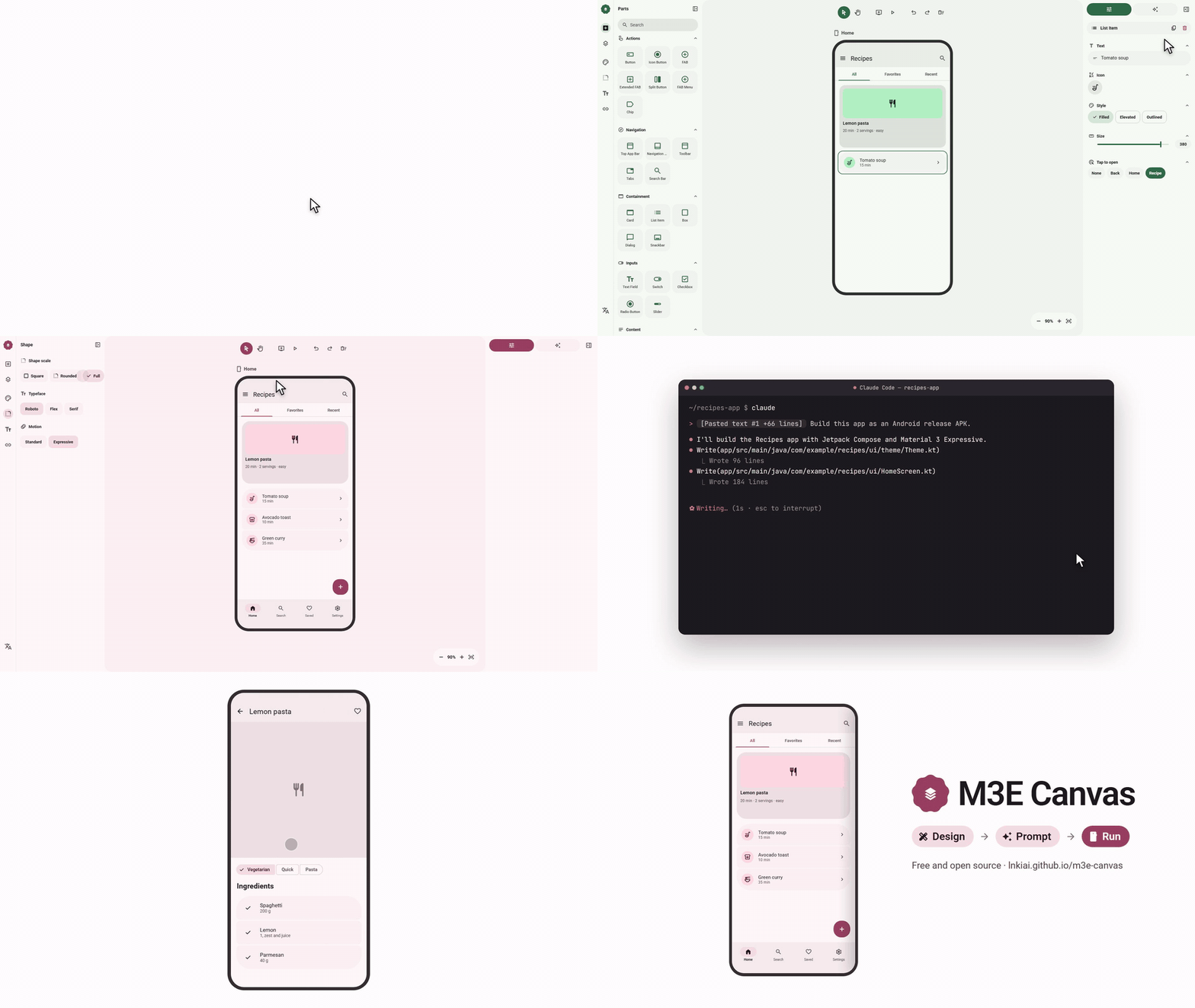
Sketch a recipes app, retheme it, copy the prompt, hand it to an AI coding tool, and run the result on Android. (mp4)
Works with any AI coding tool that takes a prompt, such as Claude Code, Codex, Gemini CLI or Cursor: copy the prompt, paste it into the tool, and ask for the app.
What it does
- Drag-and-drop parts – buttons, icon buttons, FABs, split buttons, FAB menus, chips, app bars, navigation bars, floating toolbars, tabs, search bars, cards, lists, dialogs, snackbars, text fields, dropdowns, switches, checkboxes, radio buttons, sliders, text, images, camera and map placeholders, badges, boxes and dividers, all drawn to Material 3 Expressive.
- Magnetic connections – bring two buttons or list items close and they fuse into a connected group; the corners soften as they meet.
- Real M3 Expressive loading – the shape-morphing Loading Indicator (ported from material-components-android) and wavy linear / circular progress indicators.
- Phone and desktop screens – add as many screens as you like, name them, pick a background, and drag a screen to move everything on it. Switch any screen between a 412×892 phone and a 1280×800 desktop from its label: bars stretch, the navigation bar becomes a rail (and a rail becomes a bar again on a phone), and the parts are laid out again beside it. Screens of both sizes can share one design; same-named screens are written into the prompt as one screen at two widths.
- Tap to navigate – give any tappable part, an app bar icon or a navigation bar destination a target screen (or "back") and a transition: slide from any of the four sides, fade, expand or none. Arrows show the flow on the canvas; the preview lets you tap through it, and back plays the transition in reverse.
- Swipe to navigate – a screen can open another on a left / right / up / down swipe. In the preview the screen follows your finger, and the reverse swipe goes back.
- Toggle buttons – any button can flip on tap, changing its icon and style.
- Layers and groups – a layers panel lists the z-order of each screen; drag a row to bring parts forward or send them back, and open a group or a connected run to reorder what is inside it. Select several parts and group them to keep their overlap and move them as one. The prompt describes overlaps and side-by-side rows explicitly so the generated layout keeps them.
- Theme – the four M3 Expressive axes in one panel. Color: seven presets or one seed color that becomes a full Material 3 scheme you can fine-tune, light / dark, three contrast levels and a dynamic-color switch (match the phone wallpaper). Shape: square, rounded or full corners for every part at once. Type: Roboto, Roboto Flex, Roboto Serif or the system font, with the emphasized styles. Motion: the standard or the expressive spring scheme, which also drives the preview.
- Prompt output – the whole design (or a single screen) becomes a concise natural-language prompt in Japanese, English, Chinese or Korean, including your own notes on what each part does. Pick Android (the default) or the web as the target and the prompt asks for the matching stack.
- Tidy – one button snaps bars to the edges, the FAB to the corner, joins neighbouring list items and buttons, and stacks the rest on 16dp margins. Press it again to undo.
- Optional AI helper – bring your own key (OpenAI, Claude, Gemini or DeepSeek) and let the model write a part's behavior note or a screen's description, in your language. Each rewrite can be undone. The key stays in your browser and the request goes straight to the provider; there is no server in between.
- Export – copy the prompt (edit it by hand first if you like) or save a screen as a PNG.
- Share links and AI drafts (beta) – copy a link that opens your design on anyone's canvas, or copy an instruction for Claude Code, Codex or another coding agent: it reads agent.md, sketches what you described, and replies with such a link.
- Alignment guides, undo/redo, keyboard shortcuts, seven color themes, a favorites row in the parts panel, and everything is saved in your browser (localStorage).
- Phone-friendly – on a phone you get one fixed screen and a buttons-only editor: tap the plus to add a button, tap a button to move it, and edit its text, icon and style in a bottom sheet. The full multi-screen editor is for desktop browsers.
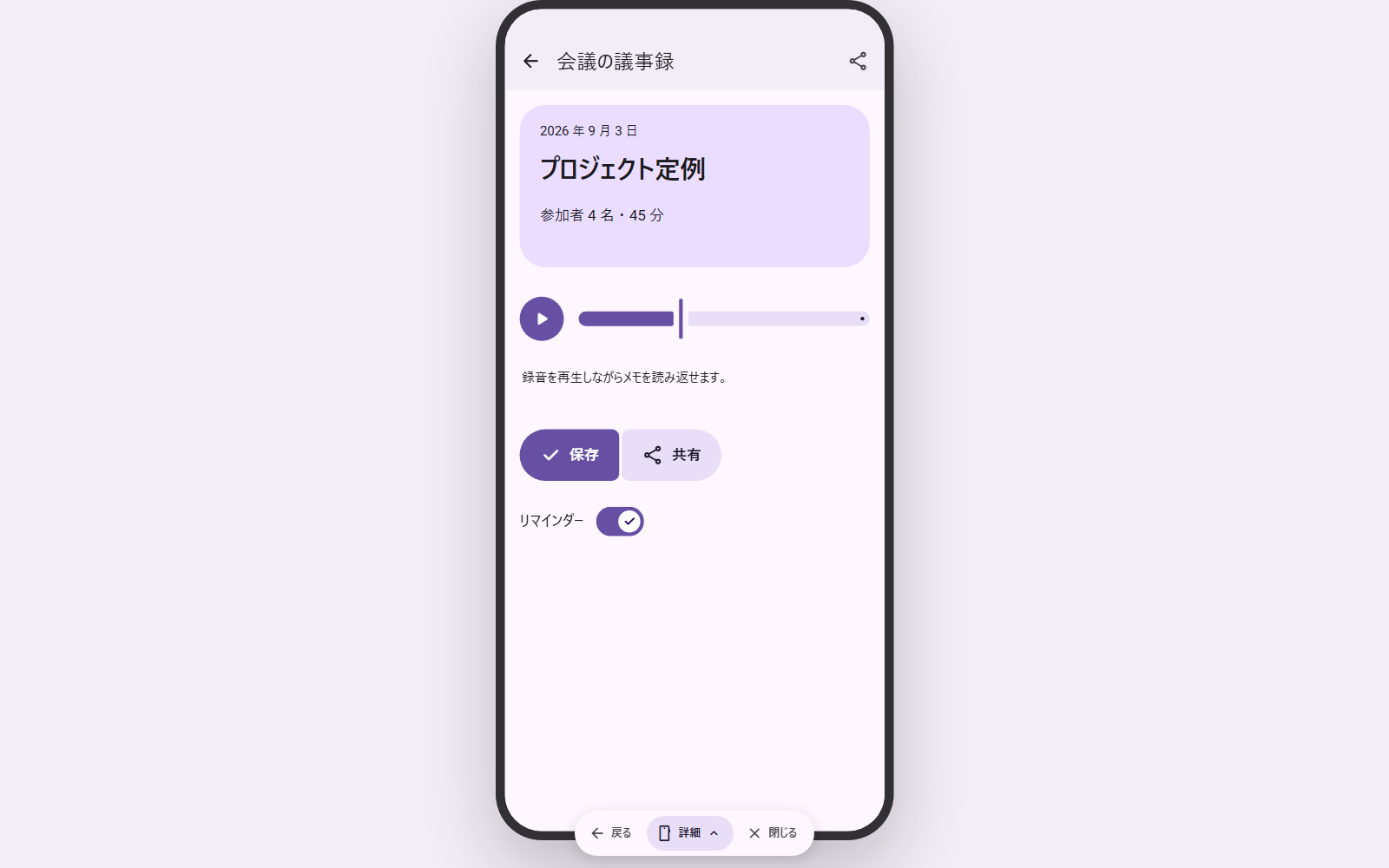
Preview: tap a part and the linked screen slides in. |
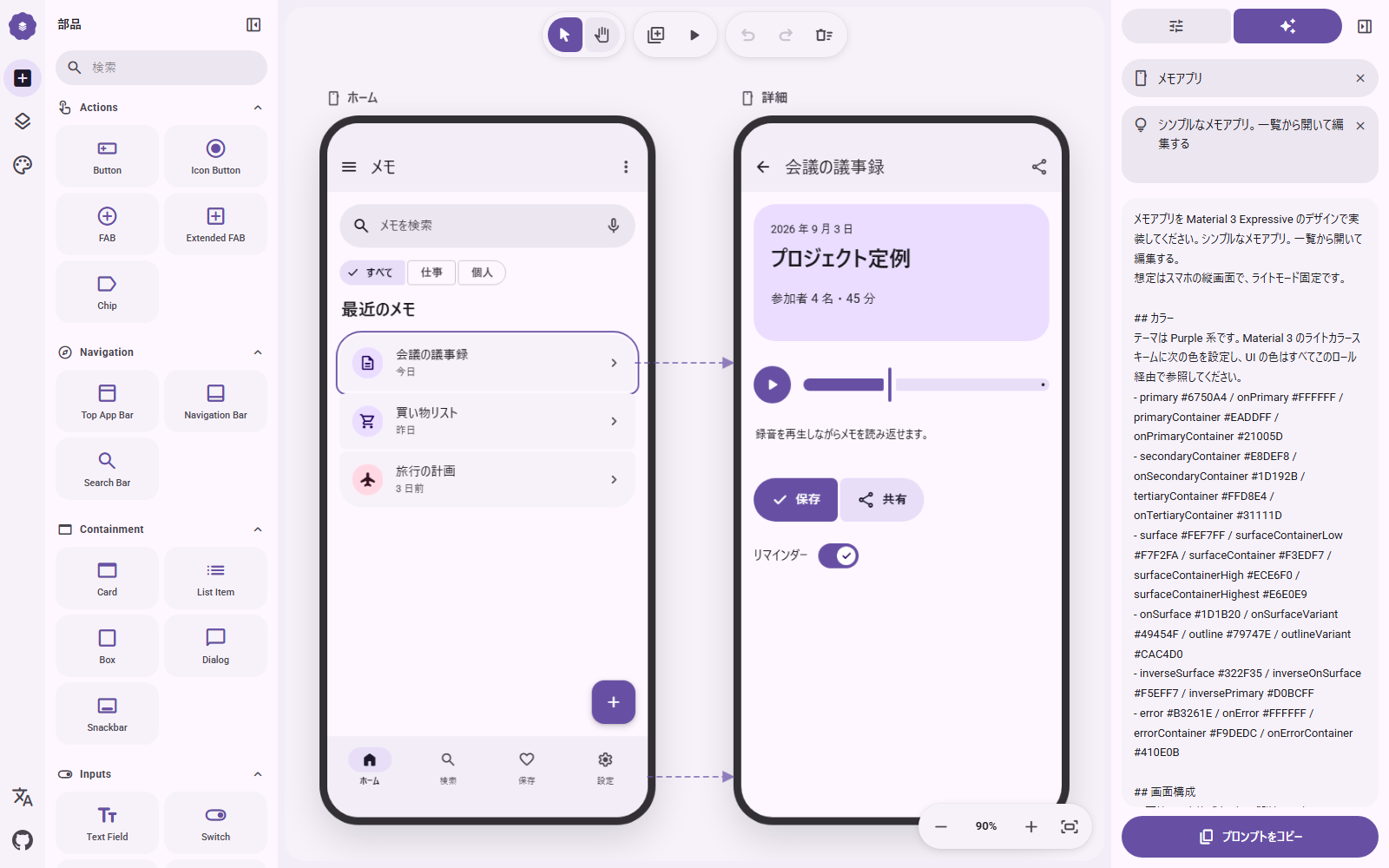
Prompt: the design as a concise brief in the selected language. |
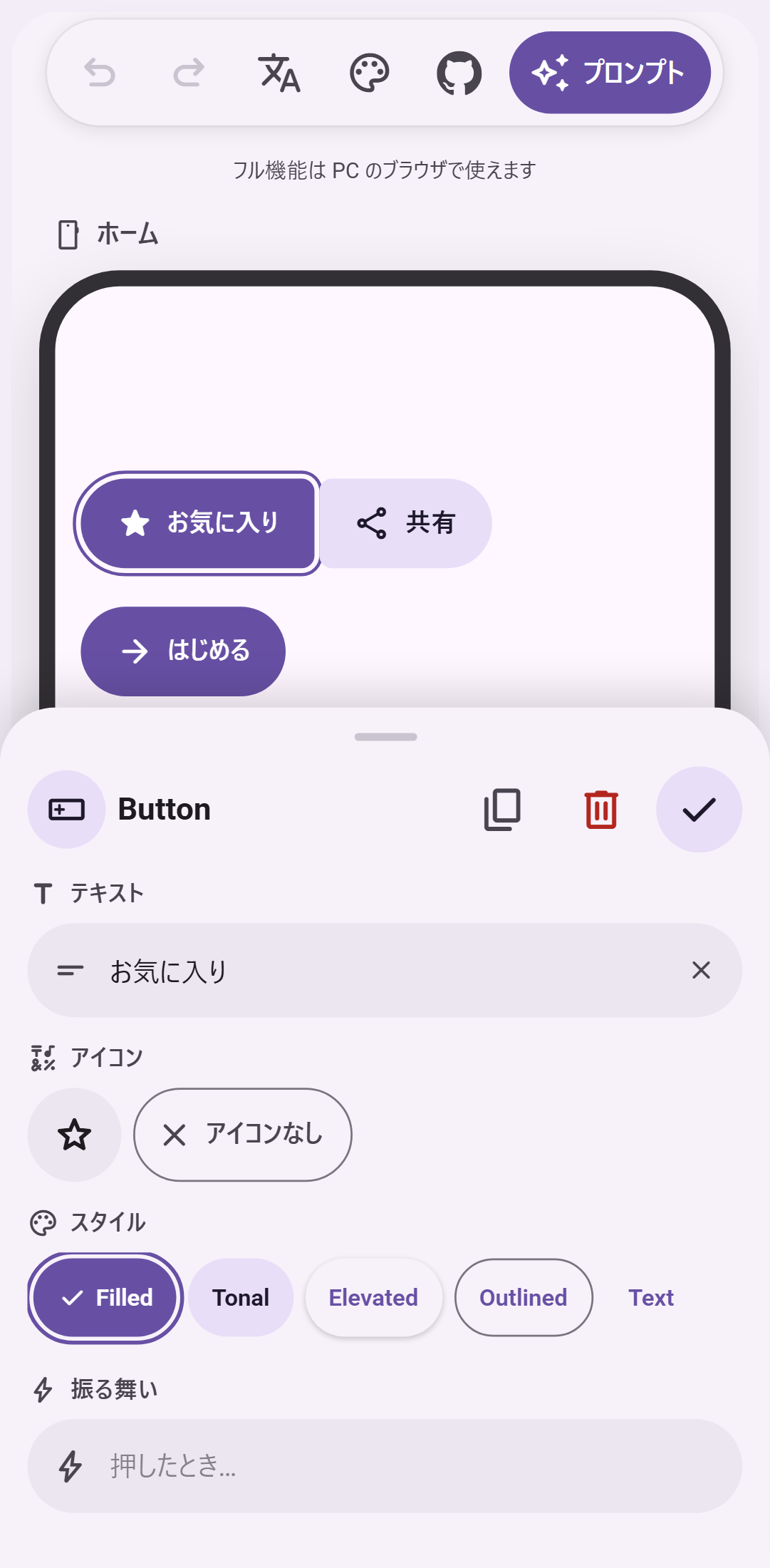
Phone: one screen, buttons only, edited in a bottom sheet.
Keyboard
| Key |
Action |
V / H |
Select / hand tool (hold Space to pan) |
Wheel, Ctrl + wheel |
Pan, zoom |
+ - 0 |
Zoom in, zoom out, fit |
Ctrl+Z / Ctrl+Shift+Z |
Undo / redo |
Ctrl+D |
Duplicate |
Arrows (Shift = 8dp) |
Nudge |
Ctrl + drag |
Move without snapping (no guides, no 4dp grid) |
Delete |
Delete part or screen |
P |
Preview |
Develop
npm install
npm run dev        # http://localhost:3000
npm run build      # static export to ./out
The app is a static Next.js export. To host it under a sub-path (for example a GitHub Pages project site), set NEXT_PUBLIC_BASE_PATH=/your-repo at build time. .github/workflows/deploy.yml does this automatically and publishes out/ to GitHub Pages on every push to main.
Contributing
Bug reports, part requests and pull requests are welcome. CONTRIBUTING.md explains the setup, the conventions (English comments, four languages for every string) and where each kind of change lives. Questions go to Discussions.
Support
M3E Canvas is free and MIT-licensed, and stays that way. If it saves you time, you can sponsor the work on GitHub; it pays for the hours that go into new parts, the prompt, and reviewing contributions. No feature is behind sponsorship.
Thanks to the sponsors who keep this going:
Credits
See also
- matraic/m3e – Material 3 Expressive as Lit web components (MIT), with React bindings and an icon package. A good home for the screens you sketch here.
- Beer CSS – Material Design 3 as a plain CSS framework (MIT). Another way to build the web version of a screen you sketch here.
License
MIT © lnkiai
日本語
Material 3 Expressive の画面をブラウザで組み立てて、画面同士をつなぎ、タップして確かめ、そのまま AI コーディング用のプロンプトにするツールです。
公開版: https://lnkiai.github.io/m3e-canvas/
レシピアプリを組み、テーマを変え、プロンプトをコピーして AI コーディングツールに渡し、できたアプリを Android で動かすまで。(mp4)
Claude Code、Codex、Gemini CLI、Cursor など、プロンプトを受け取れる AI コーディングツールならどれでも使えます。プロンプトをコピーしてツールに貼り、アプリを作ってと頼むだけです。
できること
- ドラッグ&ドロップ – ボタン、アイコンボタン、FAB、スプリットボタン、FAB メニュー、チップ、アプリバー、ナビゲーションバー、フローティングツールバー、タブ、検索バー、カード、リスト、ダイアログ、スナックバー、テキスト入力、ドロップダウン、スイッチ、チェックボックス、ラジオボタン、スライダー、テキスト、画像、カメラと地図のプレースホルダー、バッジ、ボックス、区切り線。
- 磁石のような連結 – ボタンやリスト項目を近づけると 1 つのグループにくっつき、角が溶けてつながります。
- 本物の M3 Expressive ローディング – 形が変化する Loading Indicator(Android 実装からの移植)と、波形のリニア/サーキュラープログレス。
- スマホ画面とデスクトップ画面 – 画面を何枚でも追加して名前や背景色を付け、画面ごと動かせます。画面のラベルから 412×892 のスマホと 1280×800 のデスクトップを切り替えられ、バーは伸び、ナビゲーションバーはレールに(スマホに戻せばレールはバーに)なり、部品はその横に並べ直されます。両方のサイズを 1 つのデザインに混在でき、同じ名前の画面はプロンプトで「1 つの画面の 2 つの幅」として書かれます。
- タップで遷移 – 部品、アプリバーのアイコン、ナビゲーションバーの項目に移動先の画面(または「戻る」)と遷移を設定。スライドは上下左右の 4 方向、ほかにフェード/拡大/なし。キャンバスに矢印が出て、プレビューでは実際にタップして確かめられ、戻るときは遷移が逆再生されます。
- スワイプで遷移 – 画面に左右上下のスワイプ先を設定できます。プレビューでは指の動きに画面が追従し、逆方向のスワイプで戻れます。
- 切り替えボタン – ボタンをタップでオン/オフが切り替わるトグルにして、オン時のアイコンとスタイルを指定できます。
- レイヤーとグループ – 画面ごとの重なり順をレイヤーパネルで確認し、ドラッグで前後を入れ替えられます。グループや連結した列は開いて、中の順番も入れ替えられます。複数選択してグループ化すると、重なりを保ったまま一緒に動かせます。プロンプトには重なりや横並びが明示され、生成されるレイアウトが崩れにくくなります。
- テーマ – M3 Expressive の 4 つの軸を 1 つのパネルで。カラーは 7 種のプリセットか、ベース色 1 つから Material 3 のスキーム全体を生成して微調整でき、ライト/ダーク、3 段階のコントラスト、壁紙に合わせるダイナミックカラーも指定できます。シェイプは全部品の角丸をスクエア/標準/フルでまとめて切り替え。タイポグラフィは Roboto、Roboto Flex、Roboto Serif、システムフォントと強調スタイル。モーションはスタンダード/エクスプレッシブで、プレビューの遷移にも反映されます。
- プロンプト出力 – デザイン全体、または 1 画面だけを、日本語・英語・中国語・韓国語の簡潔な文章にします。部品ごとの「振る舞い」メモもそのまま入ります。実装先は Android(既定)と Web から選べ、プロンプトはそれに合った技術で書かれます。
- 整える – ボタンひとつでバーを端に、FAB を隅に寄せ、隣り合うリスト項目やボタンをつなげ、残りを余白 16dp で積み直します。もう一度押すと元に戻ります。
- AI 補助(任意) – 自分のキー(OpenAI、Claude、Gemini、DeepSeek)を入れると、部品の動作や画面の説明を UI の言語で書いてもらえます。書き換えは元に戻せます。キーはブラウザ内にだけ保存され、リクエストはプロバイダへ直接送られます(間にサーバーはありません)。
- 書き出し – プロンプトのコピー(手で編集してからも可)、画面の PNG 保存。
- 共有リンクと AI の下書き(ベータ) – 設計を相手のキャンバスで開けるリンクをコピーできます。Claude Code や Codex などのコーディングエージェント向けの指示もコピーでき、エージェントが agent.md を読んでスケッチを作り、そのリンクで返してきます。
- 補助線スナップ、Undo/Redo、キーボードショートカット、7 種のカラーテーマ、お気に入り部品。作業内容はブラウザ(localStorage)に自動保存されます。
- スマホでも – スマホでは 1 画面固定のボタン専用エディタになります。プラスでボタンを追加し、タップして動かし、ボトムシートでテキスト・アイコン・スタイルを編集できます。複数画面のフル機能は PC のブラウザ向けです。
開発
npm install
npm run dev        # http://localhost:3000
npm run build      # ./out に静的書き出し
静的サイトとして書き出す構成です。サブパス(GitHub Pages のプロジェクトサイトなど)で配信するときはビルド時に NEXT_PUBLIC_BASE_PATH=/リポジトリ名 を指定してください。.github/workflows/deploy.yml が main への push ごとにこれを行い、GitHub Pages に公開します。
貢献
バグ報告、部品のリクエスト、PR を歓迎します。手順と約束事は CONTRIBUTING.md にまとめています。質問は Discussions へどうぞ。
支援
M3E Canvas は無料で MIT ライセンスのまま続けます。時間の節約になったら、GitHub Sponsors で開発を支えてもらえると助かります。新しい部品、プロンプトの調整、貢献のレビューにかかる時間に充てます。支援の有無で使える機能は変わりません。
開発を支えてくださっているスポンサーの方々に感謝します。
ライセンス
MIT © lnkiai
中文
在浏览器中拼装 Material 3 Expressive 界面,把屏幕连起来、点一点试试,然后直接变成给 AI 编程工具的提示词。
在线版本:https://lnkiai.github.io/m3e-canvas/
拼装一个食谱应用、更换主题、复制提示词、交给 AI 编程工具,然后在 Android 上运行成品。(mp4)
可配合任何接受提示词的 AI 编程工具使用,例如 Claude Code、Codex、Gemini CLI 或 Cursor:复制提示词,粘贴到工具里,让它把应用做出来。
功能
- 拖放组件 – 按钮、图标按钮、FAB、拆分按钮、FAB 菜单、标签片、应用栏、导航栏、悬浮工具栏、标签页、搜索栏、卡片、列表、对话框、消息条、文本输入框、下拉菜单、开关、复选框、单选按钮、滑块、文本、图片、相机和地图占位符、徽标、容器框和分割线,全部按 Material 3 Expressive 绘制。
- 磁吸连接 – 把两个按钮或列表项靠近,它们会合并成一个相连的组,圆角随之融合。
- 真正的 M3 Expressive 加载动画 – 形状变化的 Loading Indicator(移植自 material-components-android)以及波浪形的线性/圆形进度条。
- 手机与桌面屏幕 – 想加多少个屏幕都可以,为它们命名、选择背景,拖动屏幕即可整体移动。在屏幕标签上可在 412×892 的手机和 1280×800 的桌面之间切换:栏会拉伸,导航栏变为侧边导航栏(切回手机时侧边导航栏又变回导航栏),组件在其旁边重新排列。两种尺寸可以共存于一个设计中,同名屏幕会在提示词中写成“同一个屏幕的两种宽度”。
- 点击跳转 – 给任意可点击的组件、应用栏图标或导航栏项目设置目标屏幕(或“返回”)和过渡:从四个方向滑入、淡入、放大或无动画。画布上会显示流程箭头,预览中可以真的点击跳转,返回时反向播放过渡。
- 滑动跳转 – 屏幕可以设置左右上下滑动的目标。预览中屏幕会跟随手指移动。
- 切换按钮 – 任何按钮都可以做成点击切换的按钮,开启时改变文字、图标和样式。
- 图层与编组 – 图层面板显示每个屏幕的层叠顺序,可拖动调整前后,展开编组或相连的组件还能调整其内部顺序;多选后可编组,保持叠放关系并一起移动。提示词会明确写出叠放和横向排列,让生成的布局不走样。
- 主题 – 在一个面板里调整 M3 Expressive 的四个维度。配色:七套预设,或用一个基准色生成整套 Material 3 配色并微调,支持浅色/深色、三档对比度和动态配色(跟随手机�

 M3E Canvas 让你在浏览器里绘制 Material 3 Expressive 界面,可以把界面之间连接起来并点击切换,还能把整个设计转换成一段自然语言提示词,交给 AI 编程工具使用。