OpenClaw Zero Token
Use LLMs without API tokens — log in via browser once, then call ChatGPT, Claude, Gemini, DeepSeek, Qwen (intl/cn), Doubao, Kimi, Zhipu GLM, Grok, Xiaomi MiMo, Manus and more for free through a unified gateway.
License: MIT
English | 简体中文
Table of Contents
Overview
OpenClaw Zero Token is a fork of OpenClaw that focuses on removing API token cost by driving the official web UIs (browser login) instead of paid API keys.
Why Zero Token?
| Traditional usage |
Zero Token way |
| Buy API tokens |
Completely free |
| Pay per request |
No enforced quota |
| Credit card required |
Browser login only |
| API tokens may leak |
Credentials stored local |
Supported providers
| Provider |
Status |
Models (examples) |
| DeepSeek |
✅ tested |
deepseek-chat, deepseek-reasoner |
| Qwen International |
✅ tested |
Qwen 3.5 Plus, Qwen 3.5 Turbo |
| Qwen China |
✅ tested |
Qwen 3.5 Plus, Qwen 3.5 Turbo |
| Kimi |
✅ tested |
Moonshot v1 8K / 32K / 128K |
| Claude Web |
✅ tested |
claude-sonnet-4-6, claude-opus-4-6, claude-haiku-4-6 |
| Doubao |
✅ tested |
doubao-seed-2.0, doubao-pro |
| ChatGPT Web |
✅ tested |
GPT-4, GPT-4 Turbo |
| Gemini Web |
✅ tested |
Gemini Pro, Gemini Ultra |
| Grok Web |
✅ tested |
Grok 1, Grok 2 |
| GLM Web (Zhipu) |
✅ tested |
glm-4-Plus, glm-4-Think |
| GLM Web (International) |
✅ tested |
GLM-4 Plus, GLM-4 Think |
| Xiaomi MiMo |
✅ tested |
MiMo 2.0, MiMo 2.5 Pro |
| Manus API |
✅ tested |
Manus 1.6, Manus 1.6 Lite (API key, free quota) |
Web models can call local tools (web_search, web_fetch, exec, read, write, message) via prompt-injected tool definitions. Based on arXiv:2407.04997 and ComfyUI LLM Party (5k+ stars).
11/13 web models support tool calling (verified):
| Model |
Tool Calling |
Chat |
Notes |
| DeepSeek |
✅ |
✅ |
exec: list desktop files |
| Kimi |
✅ |
✅ |
All 6 tools verified |
| Claude |
✅ |
✅ |
web_search OK |
| ChatGPT |
✅ |
✅ |
web_search OK |
| Qwen CN |
✅ |
✅ |
web_search OK |
| Qwen Web |
✅ |
✅ |
web_search OK |
| Grok |
✅ |
✅ |
web_search OK |
| Gemini |
✅ |
⚠️ |
web_search OK, DOM polling unstable |
| Xiaomi MiMo |
✅ |
✅ |
web_search OK |
| GLM |
✅ |
✅ |
Tool calling and chat OK |
| GLM Intl |
✅ |
✅ |
Tool calling and chat OK |
| Doubao |
❌ |
⚠️ |
Excluded (stream parser limitation) |
| Perplexity |
— |
✅ |
Search engine, no tool injection |
The middleware (src/zero-token/tool-calling/) only injects tool prompts when keywords in the user message suggest a tool action — normal chat stays short to reduce ban risk.
Agent file access is restricted by the configured workspace directory (see agents.defaults.workspace).
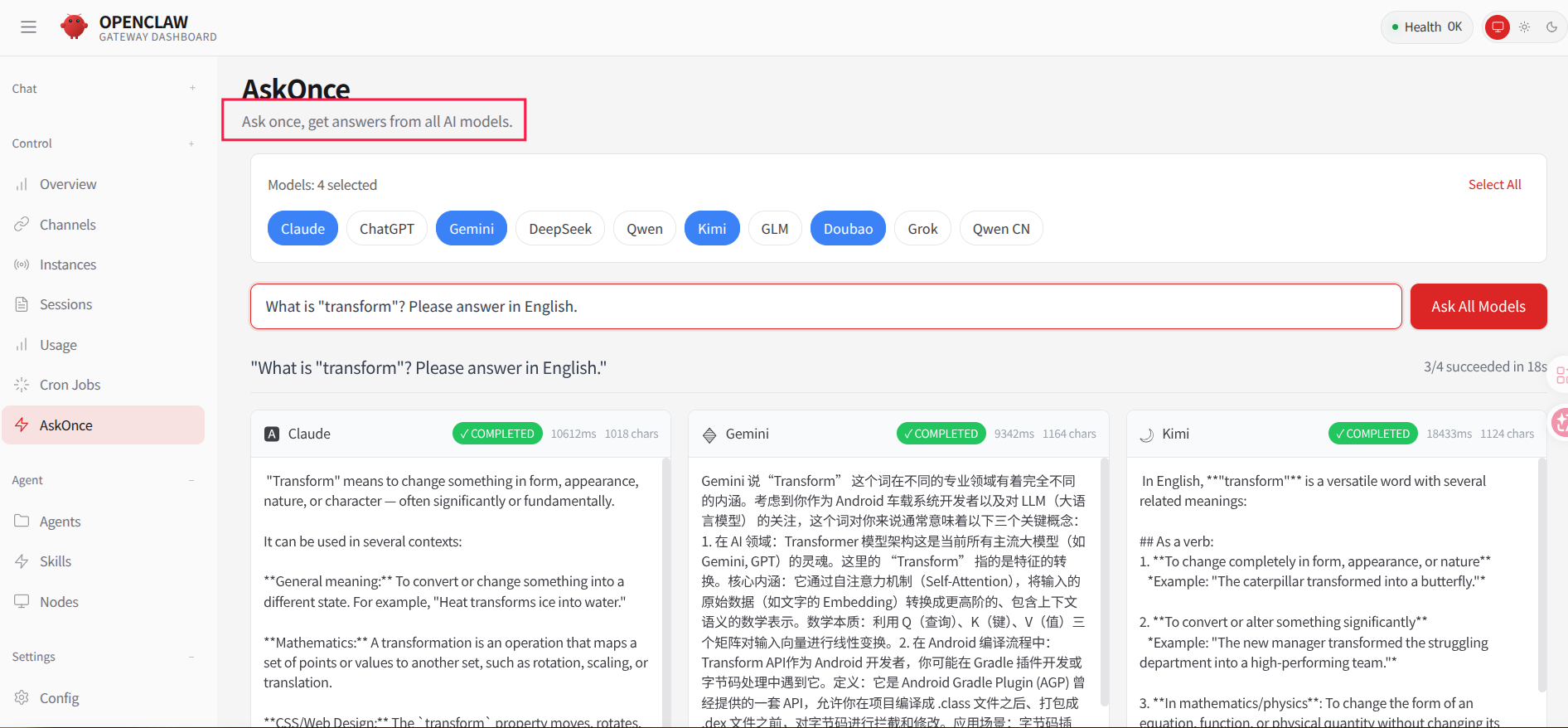
AskOnce: one question, answers from all models.
AskOnce can broadcast a single query to multiple configured providers and show their replies side by side.
How It Works
High-level architecture
┌─────────────────────────────────────────────────────────────────────────────┐
│                              OpenClaw Zero Token                            │
├─────────────────────────────────────────────────────────────────────────────┤
│                                                                              │
│  ┌─────────────┐    ┌─────────────┐    ┌─────────────┐    ┌─────────────┐  │
│  │   Web UI    │    │  CLI/TUI    │    │   Gateway   │    │  Channels   │  │
│  │  (Lit 3.x)  │    │             │    │  (Port API) │    │ (Telegram…) │  │
│  └──────┬──────┘    └──────┬──────┘    └──────┬──────┘    └──────┬──────┘  │
│         │                  │                  │                  │          │
│         └──────────────────┴──────────────────┴──────────────────┘          │
│                                    │                                         │
│                           ┌────────▼────────┐                               │
│                           │   Agent Core    │                               │
│                           │  (PI-AI Engine) │                               │
│                           └────────┬────────┘                               │
│                                    │                                         │
│  ┌───────────────────────────────────────────────────────────────────────┐  │
│  │  Provider Layer                                                       │  │
│  │  DeepSeek Web (Zero Token)                                       ✅   │  │
│  │  Qwen Web intl/cn (Zero Token)                                  ✅   │  │
│  │  Kimi (Zero Token)                                              ✅   │  │
│  │  Claude Web (Zero Token)                                        ✅   │  │
│  │  Doubao (Zero Token)                                            ✅   │  │
│  │  ChatGPT Web (Zero Token)                                       ✅   │  │
│  │  Gemini Web (Zero Token)                                        ✅   │  │
│  │  Grok Web (Zero Token)                                          ✅   │  │
│  │  GLM Web (Zero Token)                                           ✅   │  │
│  │  Xiaomi MiMo (Zero Token)                                       ✅   │  │
│  │  Manus API (Token)                                              ✅   │  │
│  └───────────────────────────────────────────────────────────────────────┘  │
│                                                                              │
└─────────────────────────────────────────────────────────────────────────────┘
DeepSeek auth flow (example)
1. Start browser
   openclaw gateway  ──▶  Chrome (CDP: 18892, user-data-dir)

2. User logs in
   Browser  ──▶  https://chat.deepseek.com  (scan / password login)

3. Capture credentials
   Playwright CDP  ──▶  listen network requests
                    └─▶ intercept Authorization header + cookies

4. Store credentials
   auth.json  ◀──  { cookie, bearer, userAgent }

5. Call web API
   DeepSeek WebClient  ──▶  DeepSeek Web API  ──▶  chat.deepseek.com
   (reuses stored cookie + bearer token)
Quick Start
Platforms
Requirements
- Node.js >= 22.12.0
- pnpm >= 9.0.0
- Chrome browser
- OS: macOS, Linux, or Windows (via WSL2)
Helper scripts (first-time & daily use)
First-time:
  1. Build          pnpm install && pnpm build && pnpm ui:build
  2. Start Chrome   ./start-chrome-debug.sh
  3. Login sites    Qwen intl/cn, Kimi, DeepSeek, ...
  4. Onboard        ./onboard.sh webauth
  5. Start server   ./server.sh

Daily:
  start-chrome-debug.sh → onboard.sh → server.sh
  server.sh [start|stop|restart|status] manages the gateway
Script overview (core 3 scripts):
| Script |
Purpose |
When to use |
start-chrome-debug.sh |
Start Chrome in debug mode |
Step 2: open browser on port 9222 for logins + onboarding |
onboard.sh |
Auth/onboarding wizard |
Step 4/5: select provider (e.g. deepseek-web) and capture credentials |
server.sh |
Manage gateway service |
Step 5 & daily use: start / stop / restart / status on port 3001 |
Installation
Clone and build
git clone https://github.com/linuxhsj/openclaw-zero-token.git
cd openclaw-zero-token
pnpm install
pnpm build
pnpm ui:build
# Start Chrome in debug mode (keep this terminal open)
./start-chrome-debug.sh

# Log into each web model in the browser tabs that open
# (DeepSeek, Qwen, Kimi, Claude, ChatGPT, Gemini, Grok, etc.)

# In a NEW terminal, run the auth wizard
./onboard.sh webauth
Start the gateway
./server.sh
Open the Web UI at the URL printed in the terminal.
Clean rebuild (if you get ERR_MODULE_NOT_FOUND)
rm -rf dist dist-runtime node_modules
pnpm install
pnpm build
pnpm ui:build
./server.sh restart
Note: Always use pnpm build (not npm run build). If you see hash mismatch errors like Cannot find module dist/xxx-HASH.js, do a clean rebuild as shown above.
Step 3: Start the gateway
./server.sh
This will start the HTTP gateway and Web UI.
Usage
Web UI
After ./server.sh the Web UI is started automatically. Open it in your browser and chat with any configured model.
Switch models
Use /model inside the chat box:
# Switch to Claude Web
/model claude-web

# Switch to Doubao
/model doubao-web

# Switch to DeepSeek
/model deepseek-web

# Or specify exact models
/model claude-web/claude-sonnet-4-6
/model doubao-web/doubao-seed-2.0
/model deepseek-web/deepseek-chat
Claude Web: Prefer the full model id: /model claude-web/claude-sonnet-4-6 (matches the catalog default). /model claude-web alone can fail to resolve or pick the intended model in some setups.
List available models
/models
Important: Only providers configured via ./onboard.sh webauth are written into openclaw.json and shown in /models.
The output shows:
- All available providers (e.g.
claude-web, doubao-web, deepseek-web)
- Models under each provider
- Currently active model
- Aliases and config
Example:
Model                                      Input      Ctx      Local Auth  Tags
doubao-web/doubao-seed-2.0                 text       63k      no    no    default,configured,alias:Doubao Browser
claude-web/claude-sonnet-4-6         text+image 195k     no    no    configured,alias:Claude Web
deepseek-web/deepseek-chat                 text       64k      no    no    configured
HTTP API
curl http://127.0.0.1:3001/v1/chat/completions \
  -H "Authorization: Bearer YOUR_GATEWAY_TOKEN" \
  -H "Content-Type: application/json" \
  -d '{
    "model": "deepseek-web/deepseek-chat",
    "messages": [{"role": "user", "content": "Hello!"}]
  }'
CLI / TUI
node openclaw.mjs tui
Configuration
Example openclaw.json
{
  "auth": {
    "profiles": {
      "deepseek-web:default": {
        "provider": "deepseek-web",
        "mode": "api_key"
      }
    }
  },
  "models": {
    "providers": {
      "deepseek-web": {
        "baseUrl": "https://chat.deepseek.com",
        "api": "deepseek-web",
        "models": [
          {
            "id": "deepseek-chat",
            "name": "DeepSeek Chat",
            "contextWindow": 64000,
            "maxTokens": 4096
          },
          {
            "id": "deepseek-reasoner",
            "name": "DeepSeek Reasoner",
            "reasoning": true,
            "contextWindow": 64000,
            "maxTokens": 8192
          }
        ]
      }
    }
  },
  "gateway": {
    "port": 3001,
    "auth": {
      "mode": "token",
      "token": "your-gateway-token"
    }
  }
}
Troubleshooting
First run: use the onboarding wizard (recommended)
./onboard.sh webauth
The wizard will create all required directories and basic files.
Fix issues: doctor command
If you already ran the project but see missing-directories or similar errors:
node dist/index.mjs doctor
The doctor command will:
- ✅ Check all required directories
- ✅ Create missing directories
- ✅ Fix common permission issues
- ✅ Validate config file structure
- ✅ Detect multiple conflicting state directories
- ✅ Print detailed suggestions
Limitations:
- ❌ Does not create
openclaw.json
- ❌ Does not create
auth-profiles.json
- ✅ If those are missing/corrupt, rerun
./onboard.sh webauth
Roadmap
Current focus
- ✅ DeepSeek Web, Qwen intl/cn, Kimi, Claude Web, Doubao, ChatGPT Web, Gemini Web, Grok Web, GLM Web, GLM intl, Xiaomi MiMo, Manus API — all tested
- 🔧 Improve credential capture robustness
- 📝 Documentation improvements
Planned
- 🔜 Auto-refresh for expired web sessions
To add a new web provider you usually need:
export async function loginPlatformWeb(params: {
  onProgress: (msg: string) => void;
  openUrl: (url: string) => Promise<boolean>;
}): Promise<{ cookie: string; bearer: string; userAgent: string }> {
  // Automate browser login and capture credentials
}
export class PlatformWebClient {
  constructor(options: { cookie: string; bearer?: string }) {}

  async chatCompletions(params: ChatParams): Promise<ReadableStream> {
    // Call platform web API
  }
}
export function createPlatformWebStreamFn(credentials: string): StreamFn {
  // Handle provider-specific streaming format
}
File Structure
openclaw-zero-token/
├── src/
│   ├── zero-token/
│   │   ├── providers/                    # Web clients + *-web-auth.ts
│   │   └── streams/                      # *-web-stream.ts + web-stream-factories.ts
│   ├── agents/
│   │   └── web-stream-factories.ts       # Re-export (stable import for runner)
│   ├── commands/
│   │   └── auth-choice.apply.deepseek-web.ts  # Auth flow
│   └── browser/
│       └── chrome.ts                     # Chrome automation
├── ui/                                   # Web UI (Lit 3.x)
├── .openclaw-zero-state/                 # Local state (ignored)
│   ├── openclaw.json                     # Config
│   └── agents/main/agent/
│       └── auth.json                     # Credentials (sensitive)
└── .gitignore                            # Includes .openclaw-zero-state/
Security Notes
- Credential storage: cookies and bearer tokens live in local
auth.json and must never be committed.
- Session lifetime: web sessions expire; you may need to re-login from time to time.
- Rate limiting: web endpoints may enforce rate limits; they are not suited for heavy production workloads.
- Compliance: this project is for personal learning and experimentation. Always follow each platform’s Terms of Service.
Sync With Upstream OpenClaw
For a Zero Token–specific file checklist and merge playbook, see Upstream sync (Zero Token).
This project is based on OpenClaw. To sync upstream changes:
git remote add upstream https://github.com/openclaw/openclaw.git
git fetch upstream
git merge upstream/main
Contributing
PRs are welcome, especially for:
- Bug fixes
- Documentation improvements
License
MIT License
Acknowledgments
Disclaimer
This project is for learning and research only.
When using it to access any third-party service, you are responsible for complying with that service’s Terms of Use.
The authors are not liable for any issues caused by misuse of this project.

 OpenClaw Zero Token 是 OpenClaw 的一个分支,让你可以免费使用 Claude、ChatGPT、Gemini、DeepSeek、Qwen、Doubao、Grok、Kimi、GLM 等主流 AI 对话模型。你只需在浏览器中登录一次各家的官方网页版,无需支付 API 令牌费用,然后通过一个统一的网关把调用转发给它们。