









design-agent README

README проекта с github.com/langchain-ai/design-agent. Одним файлом markdown: README.md.

LangChainLangChain

Content Studio: one design brain for your whole company

License: Apache 2.0License: Apache 2.0 Python 3.11+Python 3.11+ Built on Deep AgentsBuilt on Deep Agents Deploy with Managed Deep AgentsDeploy with Managed Deep Agents

Distribute Content Studio to your team → · Try it locally, no keys needed · How we built it · Docs

English · 简体中文 · 日本語

Content Studio is the design agent LangChain runs, now open source. Add your brand and deploy it to your team's Slack with Managed Deep Agents. Anyone can ask it like they'd ask a designer, attach what they have, and get finished, on-brand files back, from a resized ad to a launch film.

Since August it has shipped over 3,000 assets for us, posts with its work drew about 4.5M views on X, and three in four requests come from outside marketing. How we built it goes deeper into each part.

See it work

We asked Content Studio for its own launch film. It went full Rocky.

https://github.com/user-attachments/assets/ee5b98e0-7ec6-4b24-ada6-1f27087947a3

From a 1-bit chick to champion in 47 seconds.

How it works

Content Studio is a Deep Agents agent deployed on Managed Deep Agents. Managed Deep Agents runs the infrastructure: Slack, sandboxes, memory, schedules and tracing. This repo is the design agent on top. The model makes the creative calls, and code renders, checks and delivers.

Content Studio on Managed Deep Agents: a Slack thread goes to the main agent, which reads skills and the wiki, keeps team and personal memory, uses managed tools and MCP servers with each person's own account, and works in a sandbox per thread with Chromium, ffmpeg, HyperFrames, motion-studio and async subagents in parallel, then posts the film back to the same thread

How we run it at LangChain. Your copy starts with the integrations you turn on (Integrations).

Watch it explain itself

We asked it to explain its own harness as a nature documentary, starring a pixel parrot. It walks through the computer, the tools and the context behind its work.

https://github.com/user-attachments/assets/65eac8e4-0fac-4a5a-9cca-02e26a0a8baa

Storyboarded, built and narrated by the agent, in one Slack thread.

The prompt that made this film

The agent made it from this ask and a few rounds of notes:

Make a short explainer of how you create videos in code, end to end, for our blog post on the media harness we built on Deep Agents. Narrate it like a David Attenborough nature documentary, starring the pixel parrot from our promo, with your subagents as its flock. Keep it technical enough for an engineer, in real terms: skills, wiki, tools, apps. Storyboard it before you build, and end on "Built on Managed Deep Agents".

Read the architecture, or start changing it: instructions.md · skills/ · Customization · Evals · Operations · Contributing.

Why it doesn't look like AI

The same prompt for a hiring chart to a local coding agent with a brand skill and to Content Studio: a broken logo lockup, a generic font, no axis and an off-brand bar on the left; a clean lockup, the brand typeface, an axis with gridlines and brand-blue bars on the right

The same prompt to a local coding agent with a brand skill, and to Content Studio.

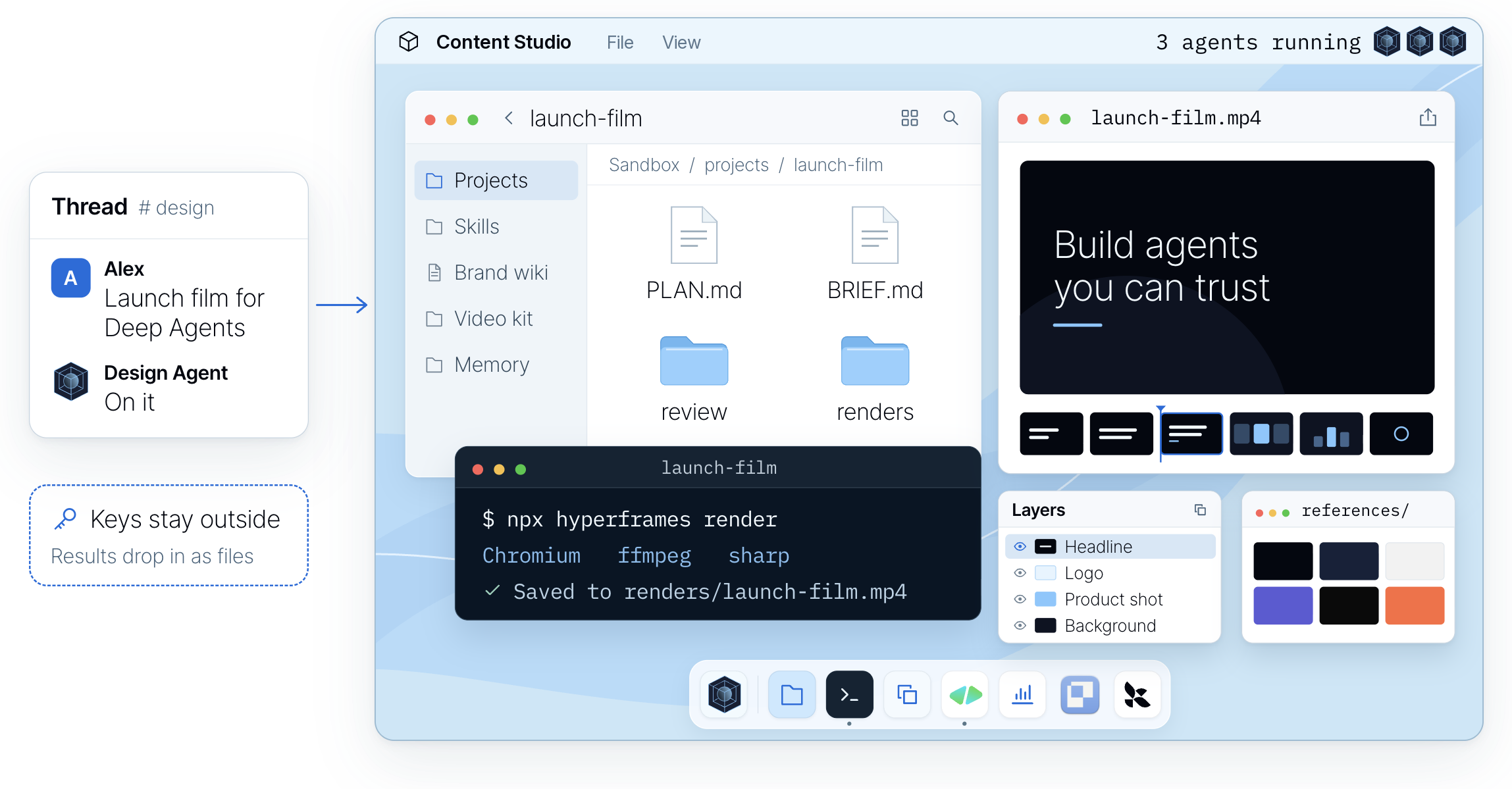
The agent's computer: a Slack request for a launch film, project folders, a HyperFrames render in the terminal, the film preview, layers and references

Quickstart

Building it yourself Starting here
Months on a harness, a sandbox, skills and a Slack UX Fork it, add your brand, deploy with one command
Polished work that looks like a hundred others Work that follows your brand, checked on every render
Design requests wait in a queue Anyone asks in Slack: a graphic in minutes, a long deck overnight
Every team fixes the same mistakes Fix a skill once, and every asset after it follows

This repository is a Managed Deep Agents project, so it deploys to your LangSmith workspace as it is. You need a LangSmith account (Managed Deep Agents is in public beta on LangSmith Cloud) and a model key:

curl -fsSL https://raw.githubusercontent.com/langchain-ai/design-agent/main/install.sh | bash
cd design-agent
uv run design-agent config set LANGSMITH_API_KEY ANTHROPIC_API_KEY   # type each key; it stays hidden
uv run design-agent sandbox publish   # once per workspace, 10-15 min: the agent's computer
uv run mda deploy                     # the agent itself, and its Slack app

The installer gets uv if you don't have it, clones the repository and installs its dependencies; git clone and uv sync do the same.

The two last commands do different things. sandbox publish builds the Linux machine every thread works on, as a snapshot in your LangSmith workspace; nothing you can talk to exists yet. mda deploy deploys the agent, which clones that machine for each thread. Publish again only when sandbox/setup.sh changes.

On the LangSmith Gateway? Skip the provider key and run uv run design-agent config set DESIGN_AGENT_MODEL=langsmith:anthropic/claude-opus-5-5. The agent then uses LANGSMITH_GATEWAY_API_KEY, else LANGSMITH_API_KEY, and image generation goes through the gateway too when there is no OPENAI_API_KEY. For any other OpenAI-compatible endpoint, set DESIGN_AGENT_MODEL_BASE_URL and DESIGN_AGENT_MODEL_API_KEY_ENV (Models).

The first deploy sets up the agent's Slack app: mda deploy prints a Slack link, you approve the app for your workspace (an admin may need to), and press Enter. The agent then sends you a DM; reply to it, or /invite it to a channel and mention it. It's how we run ours at LangChain. Try changes on a separate copy with uv run mda deploy --name design-agent-test. In a workspace with agent mode, uv run mda deploy --agent-environment production (or staging, development) deploys into that environment of the agent, and each environment keeps its own traces: open the agent in LangSmith and pick the environment. uv run mda dev traces to its Local environment. Deploy with MDA covers keys, what ships and checking it works.

Or ask your coding agent. Paste this into Claude Code, Codex or Cursor, from any folder:

Deploy LangChain's open-source design agent to my Slack workspace with Managed Deep Agents.

1. Install it with `curl -fsSL https://raw.githubusercontent.com/langchain-ai/design-agent/main/install.sh | bash`, then work in the `design-agent` folder it creates.
2. Read `AGENTS.md` and follow the `design-agent-deploy` skill.
3. Tell me which keys you need. I'll type them myself with `uv run design-agent config set <KEY>` in my terminal; never ask me to paste a key in chat.
4. Run `uv run design-agent doctor` and fix what it flags. Its `mda-deploy` line lists what a deploy still needs.
5. Ask me before `uv run design-agent sandbox publish`, which bills. Then have me run the first deploy, `uv run mda deploy`, in my own terminal, since it sets up the Slack app.
6. When it's live, walk me through messaging the agent in Slack and sending a first request.

Once the repo is open, say what you want. AGENTS.md routes each request to a step-by-step skill:

Say It will
"Deploy it to our Slack." publish the sandbox, check what ships, and deploy after your yes
"Build our brand pack from our website and brand guide." draft the pack, validate it, and ask you to review it
"Teach it to make our weekly newsletter header." add a skill for it and try it on a real request
"Did that change make it better?" run the evals before and after, and show you the numbers

Try it locally

The demo runs the real agent, sandbox and checks with a scripted model and no API keys. It needs Docker, and leaves a launch card in three sizes and a 4-second teaser in workspace/out/demo/:

uv run design-agent sandbox build
uv run design-agent demo

With a model key in .env, ask for something real. Files land in workspace/out/<thread>/, and the last line tells you what the run cost:

uv run design-agent ask "A LinkedIn card announcing our design review service, 1200x627."

Make it yours

This repo has two kinds of skills. The ones in .agents/skills/ are for your coding agent, to set up, brand, deploy and change this repo. The ones in skills/ are what Content Studio reads while it works. Customization covers both.

Want Add Guide
Your brand workspace/brand/ (until then, a neutral sample brand), then redeploy brand-onboarding skill
Generated images OPENAI_API_KEY, GOOGLE_API_KEY, or the LangSmith Gateway Models
Voice, music, sound effects ELEVENLABS_API_KEY sound skill
The Paper canvas PAPER_MODE=local with Paper Desktop, or bridged when deployed Paper
Web search, your docs, other tools MCP servers in config/mcp.toml Customization

Once it's yours, ask it in Slack like you'd ask a designer:

Everything on this page uses LangChain's brand, because that's the one we run. Licensed fonts go in private-fonts/, which Git ignores.

Questions

What does it cost? The code is free (Apache 2.0). You pay your model provider: at LangChain the median request costs about 50 cents in model spend, and long films and decks cost more. Managed Deep Agents hosting is paid; it runs the agent, the sandboxes, the Slack app and the schedules that you'd otherwise build and operate yourself.

Will it use my brand? Yes. Add your brand pack and every file follows it. The brand-onboarding skill builds the pack with you from your brand guide, website, files or a Paper file.

Where do I start? With the graphic your team asks for every week. Let people brief the agent, review the work and ask for changes in Slack, then teach it the next thing.

Do I need Slack? No. Call the deployment's API, open it in LangSmith Studio, or use the terminal (design-agent ask). On Managed Deep Agents, long jobs that work in the background (films, parallel looks) report back in Slack; over the API, keep to requests that finish in one turn.

Is it safe with my keys? The sandbox never holds a credential and has no network by default. Host tools do the fetching, generating and delivering, and drop results in as files.

Which models? Claude Opus 5.5 by default. OpenAI and Google models, any OpenAI-compatible endpoint and the LangSmith Gateway work too. See Models.

Can I run it on my own servers? Yes. It's Apache 2.0, and Self-hosting runs the same agent with Docker, an HTTP API and your own Slack app.

Why two names? Content Studio is what we call the agent at LangChain, and the name its Slack app gets unless you set DESIGN_AGENT_SLACK_NAME. The repository, package and command are design-agent.

Does it replace a designer? No. It takes the repetitive requests, so designers spend their time on the work only they can do, and their judgment lives on in its skills and checks.

Build your own. Fork it, add your brand tokens, fonts and skills, and deploy it to your team's Slack. Quickstart. If it's useful, a star helps other teams find it.

Built with

Deep Agents    Managed Deep Agents    HyperFrames    Paper

Also: LangSmith · Chrome Headless Shell · FFmpeg · D2 · Apache ECharts · sharp. Logos belong to their owners. HyperFrames and Paper are partner projects we build on.


Apache 2.0 · Notices · Changelog · Security · Code of conduct

design-agent (langchain-ai/design-agent)

Ищем в базе…

Что это такое?Content Studio — это агент-дизайнер с открытым исходным кодом, который создаёт фирменные изображения, презентации, диаграммы, графики и анимированную графику из треда в чате Slack. Он построен на основе Deep Agents от LangChain.
Это фреймворк, с которым я пишу код, или готовый агент, который я развёртываю?Это готовый агент на основе Deep Agents, который вы форкаете и развёртываете в Managed Deep Agents на LangSmith, а не библиотеку для импорта. Модель принимает творческие решения, а код рендерит, проверяет и доставляет файлы.
Как это запустить?Запустите установщик: он скачает uv, если его нет, клонирует репозиторий и установит зависимости (git clone и uv sync). Затем выполните uv run mda deploy, чтобы настроить Slack-приложение агента в вашем рабочем пространстве LangSmith.
Нужны ли мне аккаунт LangSmith и ключ модели?Да, нужен аккаунт LangSmith, так как Managed Deep Agents находится в публичной бете на LangSmith Cloud, а также ключ модели. По умолчанию используется Claude Opus 5.5, но работают и OpenAI, и Google, а также эндпоинты, совместимые с OpenAI.
В чём подвох при запуске?Сам код бесплатный, но хостинг Managed Deep Agents платный. Он запускает Slack-приложение, песочницы, память, расписания и трассировку. Кроме того, медианный запрос всё равно обходится примерно в 50 центов на оплату модели.
Можно ли попробовать без аккаунта LangSmith и API-ключей?Да, локальная демо-версия запускает настоящего агента, песочницу и проверки с моделью по заранее заданному сценарию без API-ключей. Для неё нужен только Docker. Она сохраняет карточку запуска и короткий тизер в папку workspace/out/demo/.
Обязательно ли общаться с ним через Slack?Нет. Помимо Slack, можно обращаться к API развёртывания, открыть агента в LangSmith Studio или использовать команду терминала design-agent ask. Фоновые задачи, например создание фильмов, всё равно присылают отчёт в Slack.
Безопасно ли подключать к нему свои инструменты и ключи?Да. Песочница каждого треда никогда не хранит учётные данные и по умолчанию не имеет доступа к сети. Все загрузки, генерацию и доставку выполняют инструменты на хост-машине, а в песочницу возвращаются только готовые файлы.
Код действительно бесплатный или я всё равно буду платить?Код распространяется по лицензии Apache 2.0 и бесплатен. Вы платите только провайдеру модели (около 50 центов за медианный запрос в LangChain) и, если не разворачиваете систему у себя, за хостинг Managed Deep Agents.
Что такое Paper?Paper — это общий холст внутри Content Studio, где можно редактировать раскадровку или макет прямо вместе с агентом.
Что такое HyperFrames?HyperFrames — это видеоинструмент, с помощью которого агент создаёт фильмы. Он рассматривает фильм как веб-страницу с таймлайном, поэтому правки — это просто изменения в коде и повторный рендер.
Какими моделями ИИ он может пользоваться?По умолчанию используется Claude Opus 5.5, но также работают модели OpenAI и Google, любой эндпоинт, совместимый с OpenAI, и LangSmith Gateway.
Становится ли он лучше со временем?После каждой задачи шаг learnfromjob записывает заметки о том, что сработало для использованного навыка. Последующие задачи читают и оценивают эти заметки, а те, что не подтверждаются, отбрасываются.
Какие есть похожие проекты?Raven, EvoQuant, langgraph, brigade, mem0, ruflo, ai-agents-the-definitive-guide, omnara
Автор
langchain-ai
Размер
52.8 MB
Звёзды
631
Обновлён
КоммитNov 17
Возраст
1 мес
Коммиты · 90 дней
