awesome-grokbot
725 live x.ai/bot shares for Grok Bot.
Every link status-checked. Every row attributed to where it came from.

)





English | 简体中文
Grok Bot gives named AI teammates their own always-on cloud computer. This repo is not Grok Bot, not an installer, and not source code — it is the index of public bot configurations you can preview on x.ai and add to your own account in one click.
⚡️ What's different
| 725 | live shares, every link fetched on 2026-09-10 — not copied from another list |
| daily | re-checked and synced against four upstream catalogs by a scheduled job, not a one-off scrape |
| 5 | dead links quarantined in retired.json, not left rotting in place |
| 725 | rows with a hand-written Chinese summary |
| 725 | rows naming the catalog they came from — 561 also link the original post |
| 42 | rows whose name had drifted from the live page, kept searchable as aka |
Names and blurbs are read from the live share page, not from another catalog. How the catalog was built, and what it does not verify: docs/method.md.
🌐 Browse it as a site
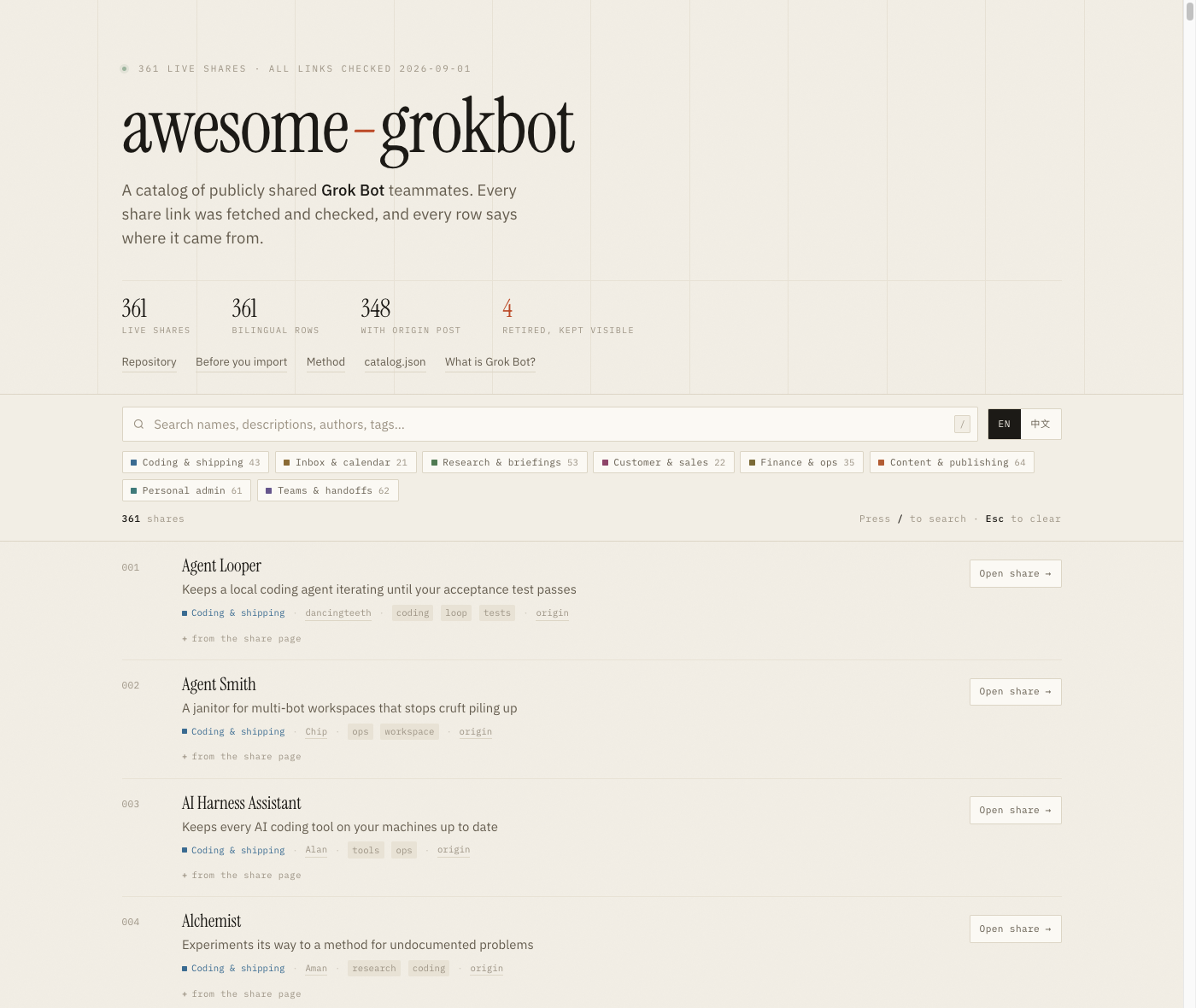
kydlikebtc.github.io/awesome-grokbot
Instant search over all 725 rows · eight category filters · EN/中文 · shareable filtered URLs · no build step, no tracking, no cookies
Every filter lives in the URL. These links open a pre-filtered view — and stay shareable:
🛠️ Coding & shipping 68 · 📥 Inbox & calendar 34 · 🔍 Research & briefings 126 · 🤝 Customer & sales 37
💰 Finance & ops 48 · ✍️ Content & publishing 100 · 🏠 Personal admin 210 · 🧭 Teams & handoffs 102
📖 Quick links
🚀 How to use
- Install Grok Bot on Mac, Windows or iPhone. There is no official Linux desktop build — the bot's own computer is already Linux, in the cloud.
- Open any share link below and read the public preview before you add it.
- Press Add to Grok Bot. That copies the name, instructions, skills, routines and first-party plugin ids.
- It does not copy the author's computer, files, logins or API keys. Reconnect connectors yourself, one at a time.
- Run one read-only task first. Only then enable routines or anything that writes.
[!WARNING]
A community share is untrusted third-party software. All bots on one account share a single computer — a second bot is not a security boundary. Full checklist: docs/vetting.md.
🗂️ Categories
🛠️ Coding & shipping
68 bots Write code, review PRs, babysit coding agents, keep the box healthy.
filter on the site ↗ |
📥 Inbox & calendar
34 bots Triage mail, draft replies, defend the calendar, run the weekday rhythm.
filter on the site ↗ |
🔍 Research & briefings
126 bots Watch a beat, verify claims, and hand back one short brief.
filter on the site ↗ |
🤝 Customer & sales
37 bots Prospecting, outbound drafts, call support, and account follow-through.
filter on the site ↗ |
💰 Finance & ops
48 bots Receipts, subscriptions, invoices, spend audits, and back-office chores.
filter on the site ↗ |
✍️ Content & publishing
100 bots Drafting, editing, design, video, and the queue that ships it.
filter on the site ↗ |
🏠 Personal admin
210 bots Groceries, household logistics, family schedules, health, and shopping.
filter on the site ↗ |
🧭 Teams & handoffs
102 bots Bots that run other bots: rosters, delegation, budgets, and handoffs.
filter on the site ↗ |
🛠️ Coding & shipping
Write code, review PRs, babysit coding agents, keep the box healthy. — 68 bots
- Agent Looper — Keeps a local coding agent iterating until your acceptance test passes. by dancingteeth · origin
- Agent Smith — A janitor for multi-bot workspaces that stops cruft piling up. by Chip · origin
- AI Harness Assistant — Keeps every AI coding tool on your machines up to date. by Alan · origin
- Alchemist — Experiments its way to a method for undocumented problems. by Aman · origin
- Apps — Describe an app in one sentence and get a running build back. by Wayne · origin
- Baut — A copilot for shipping Grok.me games and making cash-honest product calls. by 𝕏 (@XAmandaMoore)
- BeTree — Turns a plan spread across several bots into one live graph. by Nicolas · origin
- Blockchain Data Expert — Answers on-chain questions by querying The Graph's subgraphs directly. by Derek (@data_nexus) · origin
- CarmackBot — A first-principles game-engine and firmware specialist for small hobby games. Ships the smallest stack that runs. by Marcus · origin
- Changelog Stand-down — Every Monday, a plain summary of what the team shipped. by Andrea (@acolombiadev) · origin
- Claude Code — A dedicated coding agent that runs all software work through the Claude Code CLI. by Daniel (@DanielZambrini)
- Claudey — Hands frontend and architecture jobs to the Claude Code CLI, then opens the PR. by Farzad (@farzyness) · origin
- Code Red — A rehearsed emergency stop for systems you own, gated behind your own confirmation. by Knock · origin
- Code Team Spawn — Sits idle until you need a coding team, then interviews and spawns a hidden five-person crew. by Bryan (@bryanofearth)
- Code Team Spawn — Updated spawn that interviews, then stands up a Conductor plus a hidden five-person coding crew. by Bryan (@bryanofearth)
- CodeDR - ExamBot — Runs CodeDR exams on vibe-coded apps and delivers the report. by Gavin (@codedrai)
- Critiquito — A design critic that reviews your UI screenshots and only has notes. by Manuel (@mamuso) · origin
- Cursor Agent — Runs the cursor-agent CLI locally for experiments and shop-floor work. by Ryan (@ryanthawks) · aka Cursor Agent (Local) · origin
- Design Expert — Reviews AI-made interfaces the way a design lead would. by Ashish (@inqusit) · origin
- dr eggbot — A bot that builds other Grok bots for you. by Lauren · origin
- Dr.Binary — Reverse-engineering help for malware, firmware, and vuln-research binaries. by Deepbits (@drbinaryai)
- Engineering QA — Guards the merge bar on repos you pick, escalating only the real judgment calls. by Andre (@andreleibovici) · origin
- Examiner — When something breaks it shows you what changed just before. by Liam (@liam_fallen) · origin
- Fable 5.1 Oracle — Thinks the build through and checks the work, but never writes the code itself. by Matt (@bossriceshark) · origin
- Feedback — Turns a bug you have already confirmed into a clean report, filed with the right team. by NYTEMODE (@nytemodeonly) · origin
- Flowsery — Turns session recordings into a ranked list of things to fix. by Taras (@tarasshyn) · origin
- Forge — One keyword in, a production-ready Grok Bot recipe out. by Robert (@rryssf) · aka Forge (Template Foundry) · origin
- Forge — Hand it a spec you have signed off, and collect the pull request in the morning. by Daniel (@DanKillenberger) · origin
- Frontier Model Watch — One verified daily digest of releases from ten frontier AI labs. by Amina · origin
- Gardener — Pulls provable dead code in tiny behaviour-preserving pull requests. by Tyler · origin
- Grimoire — A 50-skill coding wizard with a 20-member advisory council. by Nick (@NickADobos) · aka Grimoire's Tome & The Grim Council · origin
- Grok Build — Gives the Grok Build CLI its own machine to work on. by Bill (@BillZanetti) · origin
- Grok Build — Grok Build variant for shipping client sites with preview links. by B (@DAssetBuzz) · origin
- Grok Build — Builds client websites, deploys a Vercel preview, and emails the client the link. by Beau (@beaudenison) · origin
- Grok VM maintenance — Sysadmin sidekick for the Linux VM behind your bot: health, disk, services, packages. by Will (@old_pgmrs_will) · origin
- GTM Outbound — Adds screen recording, screenshots and UI input to your registered Macs. by Brandon (@brandon_ai) · aka Peekaboo Mac · origin
- Helidon Engineer — Writes and reviews Helidon 4 code on modern Java. by Suren (@TheSurenk) · origin
- Interaction Designer — Designs the flow and every screen state before the visuals. by UCDOps (@ucdco) · origin
- Korean Public API — Suggests Korean government open-data APIs for your build. by Moon (@reallygood83) · origin
- lgtm the pr closer — Wakes up each morning and burns down your open pull requests. by Claire · origin
- Linky — Send it any file, folder or bot output and it hands back a shareable URL. by Adam (@adamludwin) · origin
- loops — An engineering outer loop that sits above your coding agents. by Matt (@mattyp) · origin
- Multi-model consensus — Runs Claude Code, Codex,

 一个精心整理的 Grok Bot 的 x.ai/bot 分享链接目录,共 725 个有效链接,每个链接都经过状态检查,每个条目都标注了来源,提供中英双语摘要、JSON schema、CI 和一个可搜索的网站。