Worse Query Files
WQ Files is a file browser, app data manager and cache cleaner for iOS 26
and 27. "WQ" stands for worse_query, the sandbox technique it is built on. It
reaches other apps' and system containers with no jailbreak and no kernel
exploit. Tested on iOS 26.5 to 27.3 beta 1; see Tested devices.
[!WARNING]
Apple patched worse_query in iOS 27.3 beta 2 (build 24C5049d). WQ Files
can't open other apps' folders there or on any later build, and its startup
check says so. It works up to iOS 27.3 beta 1 (24C5037i) and on iOS 26.0 to
26.7.2. Don't update to the 27.3 beta 2 or later if you want to keep using it.
iOS 26 (26.0 to 26.7.2): supported since 0.7; tested on 26.7.1. worse_query reaches the app, extension, daemon and app group
containers there, but not System Data or the system groups, so WQ Files hides
those two and the Cache Cleaner has no crash-log section. A full inode scan
would take most of an hour on iOS 26, so App Data, Extension Data and App
Groups are listed from the LaunchServices database instead (found once and
remembered). Internal Daemons aren't in that database: the first scan for them
takes long, later ones only check new files. Apps, backups, restores, clearing
app data, the Cache Cleaner and the file browser work as on iOS 27. App icons
don't: iOS 26 hands WQ Files only placeholder icons and doesn't let it read
other apps' bundles, so apps show symbol tiles.
WQ Files is available in English, German, Italian, Spanish, Portuguese
(Brazil), Russian, Polish, Turkish, Thai, Vietnamese, Korean, Arabic and Simplified Chinese. It follows
the device language; Language in WQ Files' Settings picks another, used
from the next start.
Tested devices
Tested by the maintainer on:
| Device |
iOS |
| iPhone 16 Pro Max (iPhone17,2) |
27.2.1 |
| iPhone 17 Pro Max (iPhone18,2) |
27.0.1 |
| iPad Air 5 |
iPadOS 27.0.1 |
| iPhone 14 Pro (iPhone15,2) |
26.7.1 |
Users have also reported it working on iOS 26.5, 27.2 and 27.3 beta 1. It does
not work on 27.3 beta 2 or later (see above).
Works on a device or iOS version not listed here? Open an issue with the Log
(Settings → Log → Share).
Not supported: iOS 18 and older. worse_query doesn't exist there; WQ Files shows a notice instead of scanning. On iOS 17 and 18 use
Cyanide.
What it opens
- App Data: every app's data container (
Containers/Data/Application),
shown with the app's name, bundle ID and icon instead of a UUID.
- App Groups: shared group containers.
- Extension Data and Internal Daemons.
- App Bundles: each installed app's bundle container
(
/var/containers/Bundle/Application) with its .app, labeled with the
app's name; also from Apps: long-press an app → Open App Bundle. Shown
only where iOS lets WQ Files open these folders (the startup check tries;
iOS 26 and 27.0.1 don't).
- System Data:
/var/containers/Data/System (listing only; its contents
are owned by root).
- System Groups: the parent cannot be listed on 27.0.1, so known container
names are tried one by one; tap + to try another name. Covers the
MobileGestalt cache and the configuration-profiles (Supervision) folder.
- Go to Path for any absolute path.
The container parents can't be listed, so App Data, Extension Data and App
Groups come from the LaunchServices database, which lists every installed
app's and extension's containers. It is found once (among the newest files,
usually within seconds) and remembered. Internal Daemons, and the app folders
when the database can't be read, need a scan of every file id (fsgetpath,
the way KAMUI does it): minutes on a well-used device the first time, so WQ
Files asks before it starts and shows a scan window; later scans only check
new files.
- Apps: every app with its data size. Back up an app's Documents and
Library, restore the latest backup (also from App Backups: long-press the app → Restore Backup), clear its data (Documents, Library,
and tmp), open its folder, or share a backup as a ZIP over AirDrop, Files,
Mail and so on. Import as Backup… (tap an app) turns a folder or ZIP with
Documents/Library (another device's shared backup, another tool's export)
into a normal verified backup of that app, ready to restore; data that says
it belongs to a different app asks first. Show all apps, only Apple's, only others, only backed-up
ones, or only installed or offloaded ones (when nearly every app's state can be read); long-press to copy the bundle ID or container path.
Apps and the Cache Cleaner keep their last results, including across app
launches. Scanning is a task, not a page lifetime: switch tabs or leave the
screen without discarding work. Pause Scan keeps progress; Resume Scan
continues it. Pull to refresh explicitly starts a new measurement, while the
previous result stays visible with its timestamp. There is no automatic
ten-minute rescan.
When iOS backgrounds the app, scan workers pause at a work boundary and
continue on return. After termination, opening the relevant screen resumes an
interrupted task; an explicitly paused task stays paused. Completed inode
ranges and directory measurements are saved in app-private Application Support
(excluded from backups). A restart may replay the current directory and work
since the last checkpoint (writes are coalesced to about one second), not the
whole scan. Sizes can include earlier measurements: refresh for current sizes.
The filesystem is not a snapshot; cache cleaning still revalidates target
identities before deleting anything, and restored results are not preselected.
Read-only scan orchestration uses its own queue; directory measurement yields
the serial mutation queue between directories so other file operations can run.
iOS still controls when a suspended or terminated app can execute.
tmp is intentionally ephemeral: clear removes it, but app
backups do not include it and restore leaves the current tmp untouched.
- Cache Cleaner: cache and temp size per app, with search, Select All /
None / Large Caches (50 MB+) and crash logs. Long-press an app to jump to its
Caches, tmp or data folder.
- Files: browse, read and share files; each opens in the fitting tool,
and Open As switches between them. Saving writes back in place (same
inode, owner and attributes). Create folders, import files (several at
once) or whole folders with everything inside, rename and
delete (long-press, or swipe a row to the left; deleting always asks
first). Sort by name, date modified, date created or size from the •••
menu; long lists sorted by name get an A–Z sidebar. Long-press a folder to share it as a ZIP.
- Select (top right) several items to move, compress or delete them
together. Move works across apps: pick the items, open the target
folder in any app's data, tap Move Here. Existing items are never
replaced.
- Duplicate, Copy to Folder… (works across apps, like Move) and
Get Info (size, dates, owner, permissions, inode and a file's SHA-256;
tap a row to copy it) are in the long-press menu.
- The ••• menu has Search Inside Folders… (names in all subfolders),
Largest Files (the 100 biggest files below the folder) and Add to
Favorites; favorites are listed on the start screen (under Tools in the
classic design). With Reopen Last
Folder on (Settings), WQ Files starts in the folder you were in.
- Compress creates a ZIP next to the items; Extract (long-press a
.zip, or tap it and choose Extract and Open) unpacks it into a new folder. Entries that would land outside that
folder, encrypted ZIPs and symbolic links are refused or left out.
- Plist editor: browse dictionaries and arrays, edit values by type
(switches for booleans, numbers, text, dates, data as hex), add, delete,
rename and reorder. Saves in the file's own format (binary or XML).
- Hex viewer and editor: any file size (read in pages), go to offset,
find hex bytes or text, overwrite bytes in place. Changed bytes are
highlighted until saved; the file size never changes.
- SQLite viewer and editor: tables and views with row counts, rows,
single rows in full, SQL queries and CSV export. It works on a copy of the
database and its
-wal file; close the app first for an up-to-date copy.
Edit changes that copy: tap a value in a row to change it, swipe a row
to delete it, or run any SQL. Save writes the copy back to the app:
force-quit the app first (WQ Files can't tell whether it's running). Before
writing, WQ Files checks the copy with SQLite's integrity check and refuses
if the app changed the database since it was opened; the previous
database goes to Backups. SQLite writes the edited database in a
transaction and handles its journal or WAL so the target app can recover
even if WQ Files is interrupted.
- Media player: audio and video (mp3, m4a, wav, mp4, mov…) play in the
system player. WQ Files streams the file to the player itself, so playback
starts right away; formats that can't stream this way (or a stream that
fails) are copied to WQ Files' temporary folder first.
- Text and images: text is editable, images render, plists can also be
edited as XML text. Code and data files get syntax colors (XML/plist,
JSON, YAML, INI/TOML, CSS, SQL, Markdown, C/Objective-C, Swift,
JavaScript/TypeScript, Java/Kotlin, Go, Rust, Python, shell, Ruby, Lua;
up to 1 MB).
- Log: file writes, backups, deletions, restores and errors the app handled, plus the App Group it received.
- Allow Deleting (Settings, on by default): turn it off and nothing
can be deleted, cleared or cleaned; saving, moving and restoring still work.
- Show Item Counts (Settings, off by default): folders show how many
items they hold. Every subfolder is listed for this, which slows down
folders with many subfolders.
- Show Folder Sizes (Settings, off by default): folders, App Data included,
show how much space they take, measured in the background with the rows on
screen first. Sizes are kept for ten minutes; pull down to measure again.
Sorting by size uses them once every folder is measured.
- Keep Data Before Restore (Settings, on by default): restoring an app
backup or a file backup first backs up what's there now, so a failed restore
can be undone. Turn it off to delete that backup once the restore succeeded.
- Reopen Last Folder (Settings, on by default): WQ Files starts in the
folder you were in, once the startup check has passed.
- Check for Updates (Settings, on by default): at most twice a day WQ
Files downloads the public
source.json from this repository and shows a
note on the start screen when a newer version is out. This is the only
connection WQ Files makes itself (Wi-Fi Sharing only listens while its screen
is open); nothing about the device or its data is sent. Turn it off to keep
WQ Files fully offline.
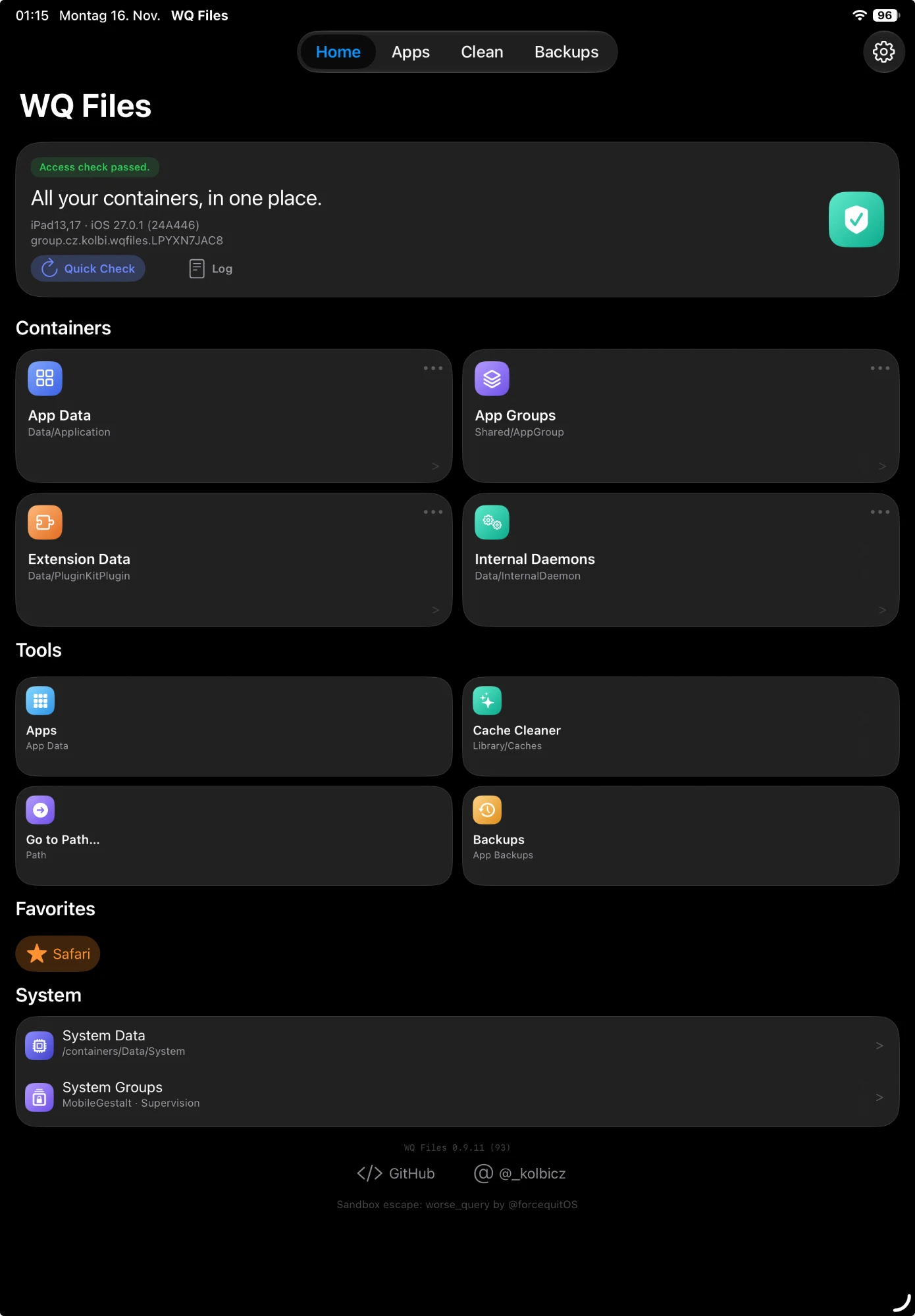
- New Design (Settings, on by default): the start screen with container
cards and Home, Apps, Clean and Backups tabs; Settings opens from the gear.
Turn it off for the classic design: one list with Containers, Tools and
Settings. The switch takes effect right away.
- Wi-Fi Sharing (a folder's ⋯ menu → Share on Wi-Fi…): a web page for
that folder, opened in any browser on the same Wi-Fi (address and QR code on
screen). Browse, open and download files, download folders as ZIP, and with
Allow Uploads add files by button or drag and drop; nothing is ever
overwritten or deleted. Password protected (user
wq, a new random password
each time, or a fixed one in Settings → Sharing Password, kept in the
keychain). It stops when you close the screen or leave WQ Files. The page
follows the design and theme.
- Recent: the clock button on the start screen lists the last folders and
files you opened, with the app they belong to; Show All has long-press
actions (Add to Favorites, Copy Path, Remove).
App names come from LaunchServices' own database, read from lsd's container
(the LaunchServices API itself refuses this app on 27.x). Apple services that
only have localized names use a built-in table. Services without an icon get a
symbol tile.
Themes
Settings → Theme sets the colors of the new design: Default, Custom Color (pick one color, WQ Files derives the rest) or a theme you import. Plain Background works with all of them, and Colored Cards (on by default) tints the start screen's cards in the color of their icon. A theme also colors the Wi-Fi Sharing page.
A theme is a small JSON file with the extension .wqtheme. Open one with WQ Files (share sheet or Files app) or use Import Theme…; Export Current Colors… writes the colors you use now as a starting point. WQ Files comes with the two themes in themes/ (Midnight and Sunset) built in; an imported theme with the same name replaces the built-in one.
{
  "name": "Midnight",
  "author": "you",
  "dark": {
    "background": ["#05070F", "#0B1226"],
    "glows": ["#2F6BFF9E", "#00C2FF66", "#7A5CFF55", "#00E0B03A"],
    "accent": "#5AA9FF",
    "card": "#1A2A5C33",
    "plain": "#05070F"
  },
  "light": {
    "background": ["#EEF3FF", "#DCE6FF"],
    "glows": ["#7FA8FF80", "#7FE0FF60"],
    "accent": "#2F6BFF"
  }
}
| Key |
Meaning |
name |
1–40 characters, required. A theme with the same name replaces the installed one. |
author |
Optional. |
dark, light |
Colors for each appearance. At least one is required; a missing one uses the other. |
background |
One color, or two for a top-to-bottom gradient. Required. |
glows |
Up to four soft color spots on the background, usually semi-transparent. |
accent |
Buttons, tabs and links. |
card |
A tint laid over the cards' blur. |
plain |
The solid color used with Plain Background (default: the first background color). |
tiles |
Top level, next to name: colors of the icon tiles (and Colored Cards) by name: blue, sky, violet, indigo, mint, amber, orange, pink, gray, or all for every tile not named. One color or two (gradient), e.g. "tiles": {"sky": ["#8AD9FF", "#2C94E8"], "all": "#5B3FE0"}. |
Colors are #RRGGBB or #RRGGBBAA. Unknown keys are ignored, files over 64 KB are refused, and WQ Files names the problem when a file isn't valid. Themes change colors only, not the layout.
Safety
Before a regular file is overwritten or deleted, its contents are copied to
Backups inside the app (also reachable in the Files app). Long-press a
backup to restore it to its original location. Recently Deleted (in the
Backups tab, or under Tools in the classic design) lists the backed-up files whose original is gone,
newest first: restore one to where it was (missing folders are created), or
delete it from Backups for good. Deleting a folder deletes everything in it
after saying how many files that is; every file is copied to Backups first
(one backup for the whole folder), so it can be restored from Recently
Deleted. App and system containers themselves (and the folders above them)
can't be deleted. Symbolic links are removed as links. Clearing an app's
data and cleaning caches delete without a file-by-file backup; Apps offers to
back up Documents and Library first, while tmp is discarded and cannot be
restored. Close the target app before backup, restore, or clear. App copies are
verified by a source-stability digest, a destination-shape digest and stored
part content hashes (rechecked before restore and rollback), and purge
postconditions are rechecked, but the operations are not filesystem snapshots
if the target app keeps running. Target data is changed only in response to
explicit actions; interrupted safety transactions may be recovered on startup.
File saves retain the original inode and verify descriptor identity and saved
contents. Locks are advisory: another app that ignores them can still write
concurrently, and in-place writes are not crash-atomic. Close the target app and
keep the durable backups. Recovery fails closed when required safety material is
missing. Generic overwrite/delete operations on backup-storage files are refused
to avoid recursively backing up backups; valid backups can still be restored.
App backups live in App Backups (also in the Files app); old ones are never
pruned automatically. Tap Select in Backups or App Backups to
choose one or more complete backup folders and delete them together; a single
folder can still be removed with Delete Backup. Automatic pruning is
intentionally left out so a safety copy is never discarded without a user
decision.
Editing another app's or the system's files can break things. Keep the backups
and only change what you understand.
Troubleshooting
Startup check: while the start screen is up, WQ Files checks in the
background the App Group, whether it finds other apps' folders, whether its
sandbox access really opens a sample of them, and whether the app database
identifies them. A new iOS version can break any of these; instead of empty
or wrong lists, WQ Files then covers everything with what failed (Try Again,
Log, Continue Anyway). Problems that
leave it partly usable (app names, an untested iOS version) are shown once as
a warning. The result is in Log as health: ….
iOS 27.3 beta 2 or later: Apple patched worse_query there. The startup
check recognizes these builds by their build number: when no folder opens,
it says the patch is the reason (and offers no Reset Access Cache, which
can't help); the iOS version row warns about it even if some folders still
open. Stay on 27.3 beta 1 or earlier.
LiveContainer: inside LiveContainer, iOS reports WQ Files' App Group as
a stand-in folder in LiveContainer's own group, while access tokens are
issued for the real group folder. WQ Files uses the real one (Log:
App group: LiveContainer stand-in …; using the real group folder …).
Every folder refused (token cache recovery failed): WQ Files briefly
swaps its own Library/Caches folder in the App Group to get each access
token. If a swap was interrupted, or another app sharing the App Group
changed that folder, it refuses every token instead of risking the
contents. The Log line says what it found (swap marker, preserved Caches,
what Caches is now). WQ Files now repairs this by itself (at most once a
minute; Log: grant: access cache repaired automatically).
Settings → Troubleshooting → Reset Access Cache
(also on the startup check screen) puts the folder back; nothing is deleted.
If it keeps coming back, another app signed with the same App Group is
changing it.
Apps list is empty: the Apps screen depends on a full fsgetpath scan of
the data volume. A missing/denied container parent, an unavailable inode
probe, or an exhausted scan bound is logged as enumerate: … and
app scan: … in Log. The current build only treats a missing parent as
failure; a denied parent and a completion-probe miss still return the
scanned subset, so refresh instead of assuming there are no apps.
NO TOKEN: the container path was visible but wq_grant could not
obtain a sandbox token. Common causes are a signer that dropped the App
Group, an app-group cache-swap failure, or a container the app-group query
refuses. See the grant failed/enumerate lines in Log.
(no label): a token was obtained, but the container identifier
(com.apple.containermanager.identifier xattr or the container metadata
plist) could not be read. On iOS 27.2 the attribute can't be read at all,
so WQ Files also asks the container manager for a path-to-identifier map
and then looks the container up in the LaunchServices database, which lists
the data container of every app and most extensions. If the identifier is
still missing (for example a system/daemon container with none, or an
extension the database doesn't list), the folder stays browsable but cannot
be backed up or cleared until identity is available.
Install with AltStore or SideStore


Tap Add AltSource on your iPhone to add the source in AltStore, SideStore,
LiveContainer and others (via AltDirect), or add it by hand:
https://raw.githubusercontent.com/kolbicz/WQFiles/main/source.json
Or download WQFiles.ipa from Releases and sign it yourself.
Signing: the App Group
WQ Files needs an App Group to work: worse_query asks for access through
your app's group container. Whatever signs the IPA must give it one. The app
uses whichever group it receives, so the group name doesn't matter. The top
of Log shows the group it got, or "No App Group" when it got none.
- AltStore, SideStore or Impactor
with your Apple ID (free or paid): they create the App Group
automatically. This is the easiest way. Impactor runs on macOS, Windows and
Linux; it's confirmed to work with a paid developer account. Sideloadly
doesn't add the App Group, so WQ Files signed with it reports "No App
Group".
- Feather, ESign and similar tools with a certificate (.p12) and a
provisioning profile: the profile has to contain an App Group. Wildcard
profiles (App ID
*), which most certificate sellers provide, can't contain
one, so signing fails with an entitlement error, or the app reports "No App
Group".
- Your own developer account: in the Apple Developer portal create an App
Group (Identifiers → App Groups), create an explicit App ID with the App
Groups capability and that group assigned, then create a provisioning
profile for that App ID. Sign the IPA with that profile, keeping the App
Group entitlement.
Build and signing
./build.sh compiles an arm64 binary and ad-hoc signs it with an App Group
entitlement (group.cz.kolbi.wqfiles). The technique needs an App Group, so
re-sign with a tool that keeps one; the app uses whichever group it actually
receives and shows it at the top of the Log. If it reports "No App Group",
the signer dropped it.
The deployment minimum is iOS 26.0. Builds first run the host regression suite,
then stage and validate the archive, metadata, signature and App Group before
replacing WQFiles.ipa in the project directory. Set WQ_SKIP_PREFLIGHT=1 for
fixture builds that do not have a test tree. For a separate output, set
WQFILES_FINAL_IPA to an absolute path in an existing directory. The source
updater validates the IPA's embedded metadata before atomically replacing
source.json; its version/build arguments must match the artifact, and an
existing release description is preserved when no new notes are supplied.
Regression tests
Run ./tests/run_all_tests.sh on macOS with Xcode and Python 3. It runs
portable Foundation fixture executables, the Python release fixtures, static
browser checks, and strict iOS arm64 compilation/linkage. Logs and generated
files stay under .work/tests/; the existing IPA is not replaced. With only
Command Line Tools installed, set WQ_SKIP_IOS_CHECK=1 to run the host tests.
Set WQ_ASAN=1 to compile the host fixtures with AddressSanitizer.
For UIKit navigation and recovery checks on a disposable, booted simulator, run
WQ_SIMULATOR_UDID=<device-id> ./tests/run_scan_ui_tests.sh. It runs the real
Apps/Clean controllers with fixture task results, switches tabs, rebuilds a
screen, backgrounds the app via Settings, terminates/relaunches it, and checks
that foreground I/O can run between measurement steps. It does not open
Simulator.app or exercise the sandbox technique. A screenshot and build artifacts
are retained under .work/tests/.
The host recovery fixtures also terminate a scan process without a shutdown
callback and verify recovery in a new process, including out-of-order inode
chunks, changed root identity, failed writes, and rapid pause/resume races.
These tests use disposable files and entitlement/access doubles. They do not
issue sandbox tokens or mutate installed app containers. Real iOS signing,
token issuance, navigation/lifecycle timing, power-loss behavior and app-side
concurrent writes still require supported-device validation.
Translations
WQ Files is in English, German, Italian, Spanish, Portuguese (Brazil), Russian, Polish, Turkish, Thai,
Vietnamese, Korean, Arabic and Simplified Chinese. New languages and corrections are welcome as pull requests:
- Correct a translation: edit the line in
<language>.lproj/Localizable.strings
(for example it.lproj). The English text on the left is the key; change
only the text on the right.
- Add a language: copy
en.lproj to a folder named with the language code
(fr.lproj, pt-PT.lproj…), translate the right-hand side, and add the code
to CFBundleLocalizations in Info.plist and to LANGUAGES in
tests/test_localization.py. The language then appears in WQ Files'
Language setting by itself.
- Keep every placeholder (
%@, %lu, %.1f…) in the same order as in the
English text, and leave paths, file names and WQ Files as they are.
python3 -m unittest tests.test_localization checks this.
German, Italian, Spanish, Portuguese, Polish, Turkish and Thai, and the newest Chinese, Arabic and Korean strings, are
machine translations so far: corrections from native speakers are especially
welcome.
Credit and license
- Sandbox technique: worse_query
by Taj C (forcequit), GPL-3.0-or-later. This app reimplements it.
- Container enumeration with
fsgetpath: from
KAMUI by murk-sus.
- Simplified Chinese translation: iosrxwy
(#38).
- Arabic translation: hfip
(#39).
- Korean translation: hooray804
- Russian translation: Reinascape
(#40).
- Vietnamese translation: romlayvn-93
(#62).
WQ Files is GPL-3.0-or-later (see LICENSE).

 A file browser, app data manager and cache cleaner for iOS 26 and 27. It works on other apps' and system folders that iOS normally keeps out of reach.