
ShellCheck is a GPLv3 tool that gives warnings and suggestions for bash/sh shell scripts:
The goals of ShellCheck are
To point out and clarify typical beginner's syntax issues that cause a shell
to give cryptic error messages.
To point out and clarify typical intermediate level semantic problems that
cause a shell to behave strangely and counter-intuitively.
To point out subtle caveats, corner cases and pitfalls that may cause an
advanced user's otherwise working script to fail under future circumstances.
See the gallery of bad code for examples of what ShellCheck can help you identify!
Table of Contents
How to use
There are a number of ways to use ShellCheck!
On the web
Paste a shell script on https://www.shellcheck.net for instant feedback.
ShellCheck.net is always synchronized to the latest git commit, and is the easiest way to give ShellCheck a go. Tell your friends!
From your terminal
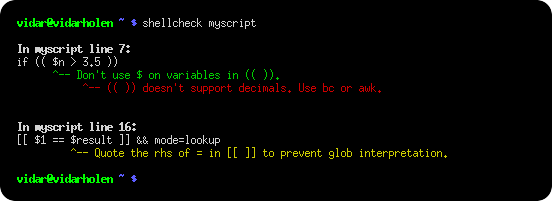
Run shellcheck yourscript in your terminal for instant output, as seen above.
In your editor
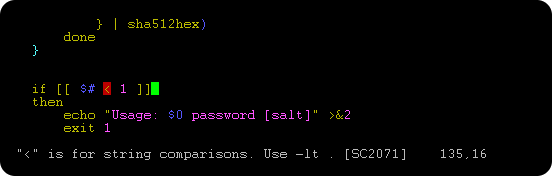
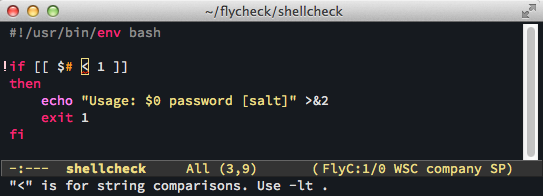
You can see ShellCheck suggestions directly in a variety of editors.
 .
.
 .
.
In your build or test suites
While ShellCheck is mostly intended for interactive use, it can easily be added to builds or test suites.
It makes canonical use of exit codes, so you can just add a shellcheck command as part of the process.
For example, in a Makefile:
check-scripts:
    # Fail if any of these files have warnings
    shellcheck myscripts/*.sh
or in a Travis CI .travis.yml file:
script:
  # Fail if any of these files have warnings
  - shellcheck myscripts/*.sh
Services and platforms that have ShellCheck pre-installed and ready to use:
Most other services, including GitLab, let you install
ShellCheck yourself, either through the system's package manager (see Installing),
or by downloading and unpacking a binary release.
It's a good idea to manually install a specific ShellCheck version regardless. This avoids
any surprise build breaks when a new version with new warnings is published.
For customized filtering or reporting, ShellCheck can output simple JSON, CheckStyle compatible XML,
GCC compatible warnings as well as human readable text (with or without ANSI colors). See the
Integration wiki page for more documentation.
Installing
The easiest way to install ShellCheck locally is through your package manager.
On systems with Cabal (installs to ~/.cabal/bin):
cabal update
cabal install ShellCheck
On systems with Stack (installs to ~/.local/bin):
stack update
stack install ShellCheck
On Debian based distros:
sudo apt install shellcheck
On Arch Linux based distros:
pacman -S shellcheck
or get the dependency free shellcheck-bin from the AUR.
On Gentoo based distros:
emerge --ask shellcheck
On EPEL based distros:
sudo yum -y install epel-release
sudo yum install ShellCheck
On Fedora based distros:
dnf install ShellCheck
On FreeBSD:
pkg install hs-ShellCheck
On macOS (OS X) with Homebrew:
brew install shellcheck
Or with MacPorts:
sudo port install shellcheck
On OpenBSD:
pkg_add shellcheck
On openSUSE
zypper in ShellCheck
Or use OneClickInstall - https://software.opensuse.org/package/ShellCheck
On Solus:
eopkg install shellcheck
On Windows (via chocolatey):
C:\> choco install shellcheck
Or Windows (via winget):
C:\> winget install --id koalaman.shellcheck
Or Windows (via scoop):
C:\> scoop install shellcheck
From conda-forge:
conda install -c conda-forge shellcheck
From Snap Store:
snap install --channel=edge shellcheck
From Docker Hub:
docker run --rm -v "$PWD:/mnt" koalaman/shellcheck:stable myscript
# Or :v0.4.7 for that version, or :latest for daily builds
or use koalaman/shellcheck-alpine if you want a larger Alpine Linux based image to extend. It works exactly like a regular Alpine image, but has shellcheck preinstalled.
Using the nix package manager:
nix-env -iA nixpkgs.shellcheck
Using the Flox package manager
flox install shellcheck
Alternatively, you can download pre-compiled binaries for the latest release here:
or see the GitHub Releases for other releases
(including the latest meta-release for daily git builds).
There are currently no official binaries for Apple Silicon, but third party builds are available via
ShellCheck for Visual Studio Code.
Distro packages already come with a man page. If you are building from source, it can be installed with:
pandoc -s -f markdown-smart -t man shellcheck.1.md -o shellcheck.1
sudo mv shellcheck.1 /usr/share/man/man1
pre-commit
To run ShellCheck via pre-commit, add the hook to your .pre-commit-config.yaml:
repos:
-   repo: https://github.com/koalaman/shellcheck-precommit
    rev: v0.11.0
    hooks:
    -   id: shellcheck
#       args: ["--severity=warning"]  # Optionally only show errors and warnings
Travis CI
Travis CI has now integrated ShellCheck by default, so you don't need to manually install it.
If you still want to do so in order to upgrade at your leisure or ensure you're
using the latest release, follow the steps below to install a binary version.
Installing a pre-compiled binary
The pre-compiled binaries come in tar.xz files. To decompress them, make sure
xz is installed.
On Debian/Ubuntu/Mint, you can apt install xz-utils.
On Redhat/Fedora/CentOS, yum -y install xz.
A simple installer may do something like:
scversion="stable" # or "v0.4.7", or "latest"
wget -qO- "https://github.com/koalaman/shellcheck/releases/download/${scversion?}/shellcheck-${scversion?}.linux.x86_64.tar.xz" | tar -xJv
cp "shellcheck-${scversion}/shellcheck" /usr/bin/
shellcheck --version
Compiling from source
This section describes how to build ShellCheck from a source directory. ShellCheck is written in Haskell and requires 2GB of RAM to compile.
Installing Cabal
ShellCheck is built and packaged using Cabal. Install the package cabal-install from your system's package manager (with e.g. apt-get, brew, emerge, yum, or zypper).
On macOS (OS X), you can do a fast install of Cabal using brew, which takes a couple of minutes instead of more than 30 minutes if you try to compile it from source.
$ brew install cabal-install
On MacPorts, the package is instead called hs-cabal-install, while native Windows users should install the latest version of the Haskell platform from https://www.haskell.org/platform/
Verify that cabal is installed and update its dependency list with
$ cabal update
Compiling ShellCheck
git clone this repository, and cd to the ShellCheck source directory to build/install:
$ cabal install
This will compile ShellCheck and install it to your ~/.cabal/bin directory.
Add this directory to your PATH (for bash, add this to your ~/.bashrc):
export PATH="$HOME/.cabal/bin:$PATH"
Log out and in again, and verify that your PATH is set up correctly:
$ which shellcheck
~/.cabal/bin/shellcheck
On native Windows, the PATH should already be set up, but the system
may use a legacy codepage. In cmd.exe, powershell.exe and Powershell ISE,
make sure to use a TrueType font, not a Raster font, and set the active
codepage to UTF-8 (65001) with chcp:
chcp 65001
In Powershell ISE, you may need to additionally update the output encoding:
[Console]::OutputEncoding = [System.Text.Encoding]::UTF8
Running tests
To run the unit test suite:
$ cabal test
Gallery of bad code
So what kind of things does ShellCheck look for? Here is an incomplete list of detected issues.
Quoting
ShellCheck can recognize several types of incorrect quoting:
echo $1                           # Unquoted variables
find . -name *.ogg                # Unquoted find/grep patterns
rm "~/my file.txt"                # Quoted tilde expansion
v='--verbose="true"'; cmd $v      # Literal quotes in variables
for f in "*.ogg"                  # Incorrectly quoted 'for' loops
touch $@                          # Unquoted $@
echo 'Don't forget to restart!'   # Singlequote closed by apostrophe
echo 'Don\'t try this at home'    # Attempting to escape ' in ''
echo 'Path is $PATH'              # Variables in single quotes
trap "echo Took ${SECONDS}s" 0    # Prematurely expanded trap
unset var[i]                      # Array index treated as glob
Conditionals
ShellCheck can recognize many types of incorrect test statements.
[[ n != 0 ]]                      # Constant test expressions
[[ -e *.mpg ]]                    # Existence checks of globs
[[ $foo==0 ]]                     # Always true due to missing spaces
[[ -n "$foo " ]]                  # Always true due to literals
[[ $foo =~ "fo+" ]]               # Quoted regex in =~
[ foo =~ re ]                     # Unsupported [ ] operators
[ $1 -eq "shellcheck" ]           # Numerical comparison of strings
[ $n && $m ]                      # && in [ .. ]
[ grep -q foo file ]              # Command without $(..)
[[ "$$file" == *.jpg ]]           # Comparisons that can't succeed
(( 1 -lt 2 ))                     # Using test operators in ((..))
[ x ] & [ y ] | [ z ]             # Accidental backgrounding and piping
Frequently misused commands
ShellCheck can recognize instances where commands are used incorrectly:
grep '*foo*' file                 # Globs in regex contexts
find . -exec foo {} && bar {} \;  # Prematurely terminated find -exec
sudo echo 'Var=42' > /etc/profile # Redirecting sudo
time --format=%s sleep 10         # Passing time(1) flags to time builtin
while read h; do ssh "$h" uptime  # Commands eating while loop input
alias archive='mv $1 /backup'     # Defining aliases with arguments
tr -cd '[a-zA-Z0-9]'              # [] around ranges in tr
exec foo; echo "Done!"            # Misused 'exec'
find -name \*.bak -o -name \*~ -delete  # Implicit precedence in find
# find . -exec foo > bar \;       # Redirections in find
f() { whoami; }; sudo f           # External use of internal functions
Common beginner's mistakes
ShellCheck recognizes many common beginner's syntax errors:
var = 42                          # Spaces around = in assignments
$foo=42                           # $ in assignments
for $var in *; do ...             # $ in for loop variables
var$n="Hello"                     # Wrong indirect assignment
echo ${var$n}                     # Wrong indirect reference
var=(1, 2, 3)                     # Comma separated arrays
array=( [index] = value )         # Incorrect index initialization
echo $var[14]                     # Missing {} in array references
echo "Argument 10 is $10"         # Positional parameter misreference
if $(myfunction); then ..; fi     # Wrapping commands in $()
else if othercondition; then ..   # Using 'else if'
f; f() { echo "hello world; }     # Using function before definition
[ false ]                         # 'false' being true
if ( -f file )                    # Using (..) instead of test
Style
ShellCheck can make suggestions to improve style:
[[ -z $(find /tmp | grep mpg) ]]  # Use grep -q instead
a >> log; b >> log; c >> log      # Use a redirection block instead
echo "The time is `date`"         # Use $() instead
cd dir; process *; cd ..;         # Use subshells instead
echo $[1+2]                       # Use standard $((..)) instead of old $[]
echo $(($RANDOM % 6))             # Don't use $ on variables in $((..))
echo "$(date)"                    # Useless use of echo
cat file | grep foo               # Useless use of cat
Data and typing errors
ShellCheck can recognize issues related to data and typing:
args="$@"                         # Assigning arrays to strings
files=(foo bar); echo "$files"    # Referencing arrays as strings
declare -A arr=(foo bar)          # Associative arrays without index
printf "%s\n" "Arguments: $@."    # Concatenating strings and arrays
[[ $# > 2 ]]                      # Comparing numbers as strings
var=World; echo "Hello " var      # Unused lowercase variables
echo "Hello $name"                # Unassigned lowercase variables
cmd | read bar; echo $bar         # Assignments in subshells
cat foo | cp bar                  # Piping to commands that don't read
printf '%s: %s\n' foo             # Mismatches in printf argument count
eval "${array[@]}"                # Lost word boundaries in array eval
for i in "${x[@]}"; do ${x[$i]}   # Using array value as key
Robustness
ShellCheck can make suggestions for improving the robustness of a script:
rm -rf "$STEAMROOT/"*            # Catastrophic rm
touch ./-l; ls *                 # Globs that could become options
find . -exec sh -c 'a && b {}' \; # Find -exec shell injection
printf "Hello $name"             # Variables in printf format
for f in $(ls *.txt); do         # Iterating over ls output
export MYVAR=$(cmd)              # Masked exit codes
case $version in 2.*) :;; 2.6.*) # Shadowed case branches
Portability
ShellCheck will warn when using features not supported by the shebang. For example, if you set the shebang to #!/bin/sh, ShellCheck will warn about portability issues similar to checkbashisms:
echo {1..$n}                     # Works in ksh, but not bash/dash/sh
echo {1..10}                     # Works in ksh and bash, but not dash/sh
echo -n 42                       # Works in ksh, bash and dash, undefined in sh
expr match str regex             # Unportable alias for `expr str : regex`
trap 'exit 42' sigint            # Unportable signal spec
cmd &> file                      # Unportable redirection operator
read foo < /dev/tcp/host/22      # Unportable intercepted files
foo-bar() { ..; }                # Undefined/unsupported function name
[ $UID = 0 ]                     # Variable undefined in dash/sh
local var=value                  # local is undefined in sh
time sleep 1 | sleep 5           # Undefined uses of 'time'
Miscellaneous
ShellCheck recognizes a menagerie of other issues:
PS1='\e[0;32m\$\e[0m '            # PS1 colors not in \[..\]
PATH="$PATH:~/bin"                # Literal tilde in $PATH
rm “file”                         # Unicode quotes
echo "Hello world"                # Carriage return / DOS line endings
echo hello \                      # Trailing spaces after \
var=42 echo $var                  # Expansion of inlined environment
!# bin/bash -x -e                 # Common shebang errors
echo $((n/180*100))               # Unnecessary loss of precision
ls *[:digit:].txt                 # Bad character class globs
sed 's/foo/bar/' file > file      # Redirecting to input
var2=$var2                        # Variable assigned to itself
[ x$var = xval ]                  # Antiquated x-comparisons
ls() { ls -l "$@"; }              # Infinitely recursive wrapper
alias ls='ls -l'; ls foo          # Alias used before it takes effect
for x; do for x; do               # Nested loop uses same variable
while getopts "a" f; do case $f in "b") # Unhandled getopts flags
Testimonials
At first you're like "shellcheck is awesome" but then you're like "wtf are we still using bash"
Alexander Tarasikov,
via Twitter
Ignoring issues
Issues can be ignored via en

 ShellCheck 是一个免费的 shell 脚本静态分析工具:它会读取你的 bash/sh 代码,指出其中存在的问题,并给出警告和建议。