Mac.apk
Run Android apps natively on Apple Silicon Macs. No emulator, no virtual machine, no Linux underneath.









Alpha. Mac.apk is early software under active development. Some apps run
beautifully, some run partially, and some do not run yet. It is stable enough to use
and interesting enough to explore, and it improves with every build.
What it is
Mac.apk runs Android apps directly on Apple Silicon. Apps launch as ordinary macOS
processes, draw through the Mac's GPU, and execute on the CPU at native speed. They
appear in your Dock, get their own windows with a back button next to the traffic
lights, resize and rotate like any Mac window, and switch between light and dark
along with your Mac. Android TV apps work from the keyboard, and game launchers can
start your other installed apps.
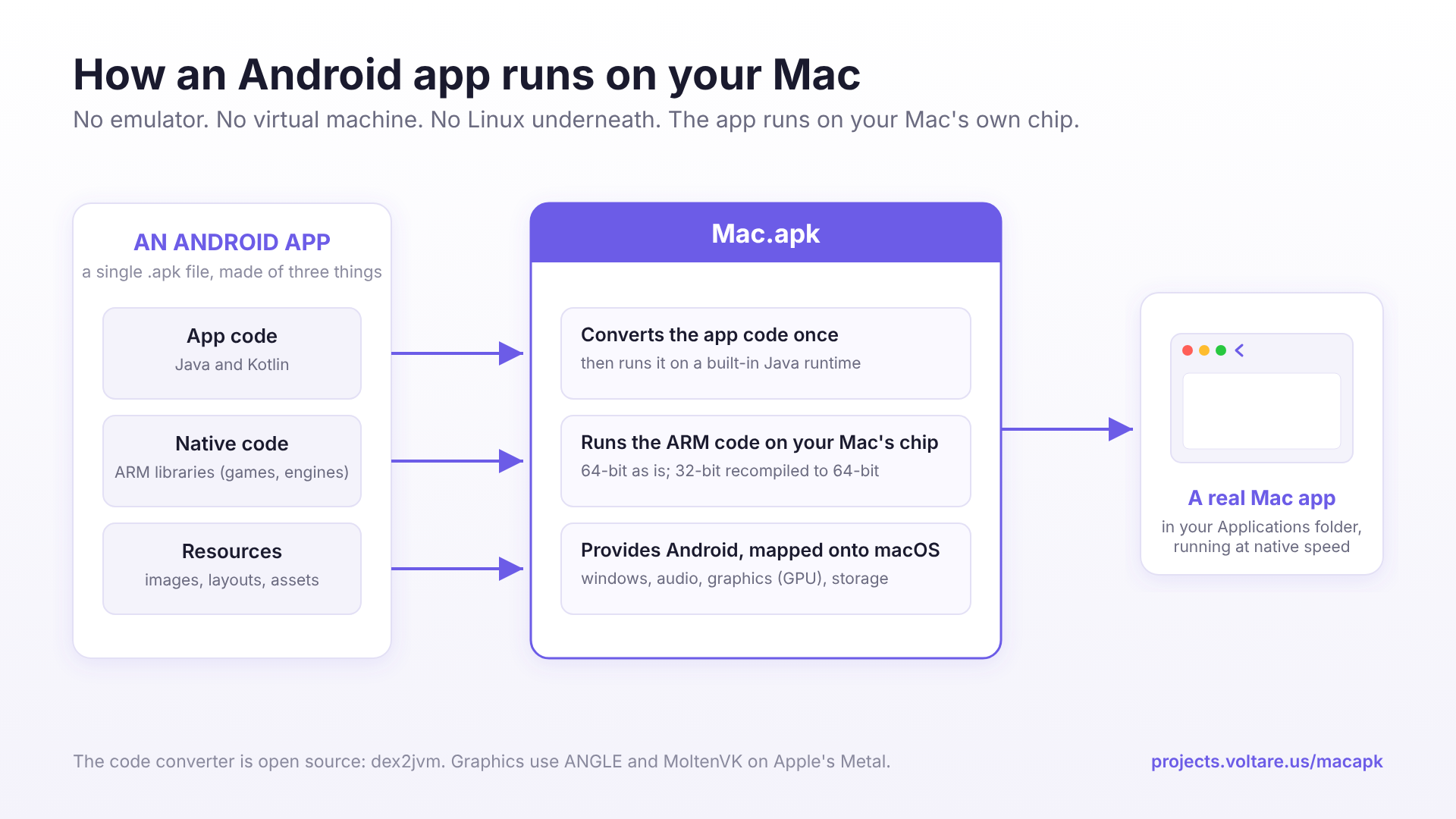
There is no emulator here, and no virtual machine. Nothing boots Android in the
background, there is no Linux kernel running underneath, and nothing is interpreted
instruction-by-instruction. Mac.apk implements the Android application environment
on top of macOS directly. How it works →
System requirements
|
|
| macOS 26.4 (Tahoe) or newer |
Required. macOS 27 works from v1.0.1702 |
| Apple Silicon |
Any Apple Silicon Mac, including MacBook Neo. Intel Macs are not supported |
| Disk |
~280 MB for Mac.apk. Each installed app takes roughly 1.5 to 3 times its APK size |
Quick start
- Download the disk image from the Releases page and drag
Mac.apk into Applications. It is signed and notarized by Apple, so it opens
normally.
- Open Mac.apk and click Install next to Runtime: in the top left.
- Open Settings (the gear), find File types, click Make Default, and
approve the macOS prompt.
- Double-click any
.apk (or .apkm, .xapk, .apks, .apkx), or drag it onto
the Mac.apk window.
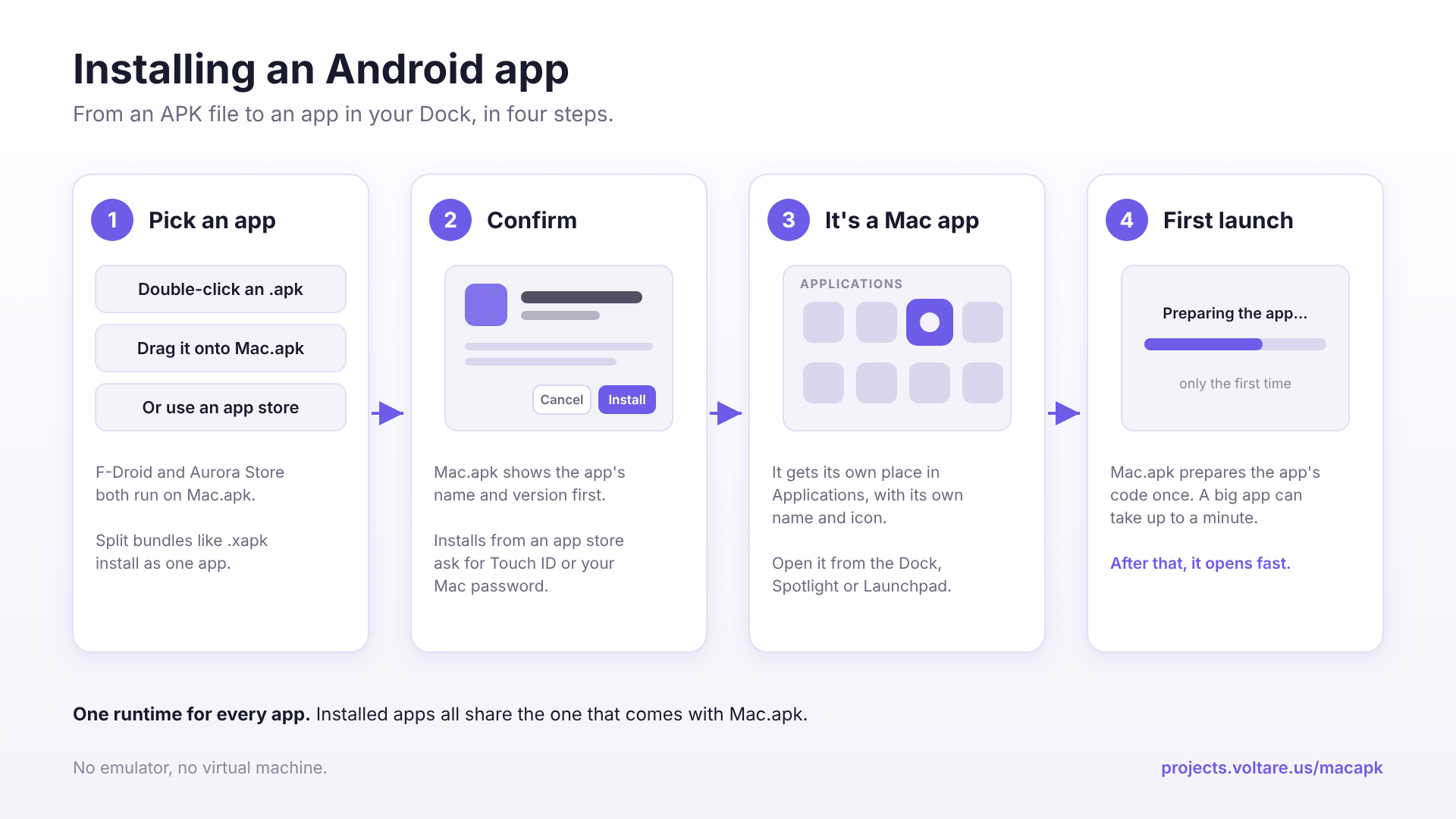
The first launch of any app is slow (up to a minute for a large one) while
Mac.apk prepares it. Later launches are fast. Full details, updating, and the app
stores are in the Installation and
App stores pages.
[!NOTE]
Each app's data lives in ~/Library/Application Support/MacApk/<package>, not
inside its .app. Dragging an app to the Trash leaves that data behind; Uninstall
in the Mac.apk window cleans it up and can keep your saves for a reinstall.
More →
Known issues in v1.0.2379
See Known issues for this release, and the
compatibility list for every app tested by hand.
Contributors
Mac.apk has had a lot of help from people outside the project: @5566brs, @defia, @chuenlok, @Mistarille224, @m9rco, @wishbone305, @kushu7, @YuKongA, @hlwhl, @lxy2500798479 and @blueagler. Thank you. See CONTRIBUTORS.md for who did what, and CONTRIBUTING.md if you would like to join in.
Reporting problems
Send the Mac.apk version, your macOS version, the app and where you got it, what
happened, and the app's log from ~/Library/Logs/macapk/ to [email protected] or
open an issue. Look the log over before posting it publicly.
What to include →
Source code
Everything that makes Mac.apk work is in this repository: the Android framework
reimplementation, the native runtime, the arm64 loader and Bionic shim, the ARM32
recompiler and the macOS app. BUILDING.md explains how to build it, and
CONTRIBUTING.md how to send a fix. App reports are just as useful
as code.
Developers and publishers
Mac.apk serves no ads and supports no in-app purchases, by design. If you publish an
app that runs on Mac.apk and want to talk about a partnership, or would rather it
not run here, email [email protected]. Details →
License
Mac.apk is open source under the GNU AGPL v3.0, and a commercial
license is available for companies that want to ship or offer it without the AGPL's
terms. Using the official app is free. Details: COMMERCIAL.md. The
Mac.apk name and logo are covered separately in TRADEMARKS.md.
Disclaimer
Mac.apk is provided "as is", with no warranty of any kind. You are responsible for the
Android apps you choose to load, and Voltare cannot test, audit, or vouch for any
third-party APK. Voltare is not liable for damages, data loss, malware, security
incidents, copyright disputes, or any other consequence of code that runs through
Mac.apk.
Only install APKs you trust. An Android app running under Mac.apk runs as ordinary
native code with your macOS user account's permissions. There is no phone-style app
sandbox around it: it can read and write your files the same way any Mac app you run
can. Treat an APK exactly as you would any program you download and run yourself, and
get it from a source you trust.
Third-party software
Mac.apk bundles several open-source components (ANGLE, MoltenVK and the Vulkan loader,
Capstone, libpng, libvpx, stb_vorbis, Bouncy Castle, a JRE built from OpenJDK together
with the libraries its font and image code uses, such as FreeType, HarfBuzz and GLib,
and the Android platform resources built from AOSP source). Each is used under its own
licence; the full notices are in THIRD_PARTY_NOTICES.txt,
and a copy ships inside the app at Contents/Resources/THIRD_PARTY_NOTICES.txt.
Two of them, GLib and GNU gettext's libintl, are licensed under the LGPL. Their
complete source for the exact versions in each release (upstream source, patches and
build recipe) is attached to that release on the
Releases page, with
LGPL-SOURCE-README.txt explaining how to use a modified build.
Links

 Mac.apk 可以让你在 Apple Silicon 芯片的 Mac 上原生运行 Android 应用。每个应用都以普通 macOS 进程的形式启动,拥有自己的窗口和程序坞图标,并使用 GPU 加速渲染。