What is this?
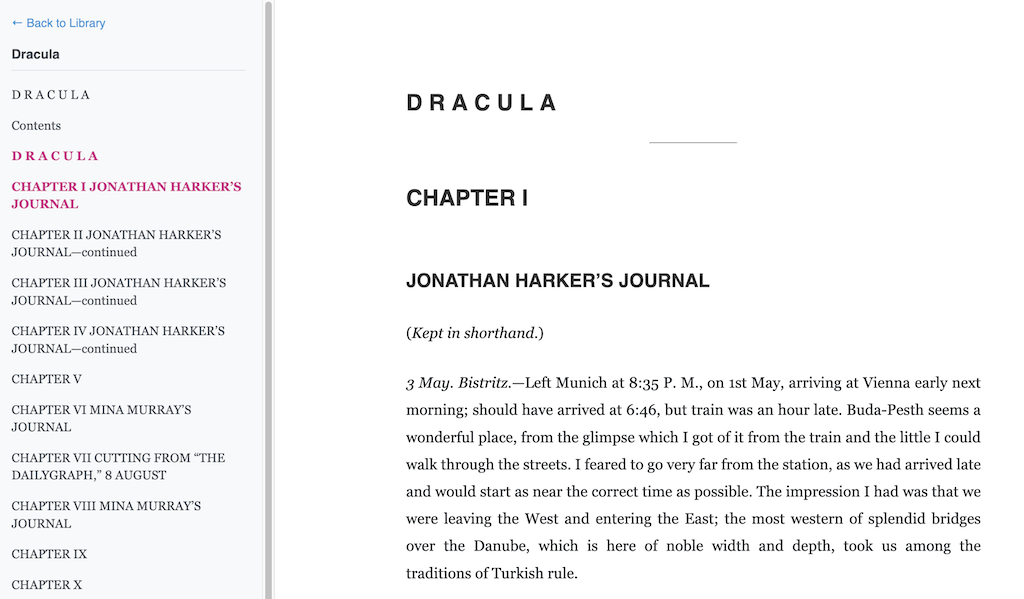
 A lightweight, self-hosted EPUB reader by Andrej Karpathy that shows a book one chapter at a time, making it easy to paste a chapter to an LLM and read along together.
A lightweight, self-hosted EPUB reader by Andrej Karpathy that shows a book one chapter at a time, making it easy to paste a chapter to an LLM and read along together.So is this a website, a desktop app, or something for my e-reader?You run it yourself: it's a small self-hosted web app — start the server on your machine, open localhost:8123 in a browser, and it shows your books as a library.
You run it yourself: it's a small self-hosted web app — start the server on your machine, open localhost:8123 in a browser, and it shows your books as a library.How do I get my first book into it?The project uses uv: download an EPUB into the project folder (e.g. as dracula.epub), run the ingest step to register it — that creates a draculadata folder — then start the server and open localhost:8123.
The project uses uv: download an EPUB into the project folder (e.g. as dracula.epub), run the ingest step to register it — that creates a draculadata folder — then start the server and open localhost:8123.What do I need to have installed before running it?Just Python tooling via uv — the whole project is Python and runs through uv, and the README names no other prerequisites.
Just Python tooling via uv — the whole project is Python and runs through uv, and the README names no other prerequisites.Is this a finished, supported product?No. Karpathy built it as a quick illustration, 90% vibe coded, and says he won't support or improve it — it's provided as-is for other people's inspiration.
No. Karpathy built it as a quick illustration, 90% vibe coded, and says he won't support or improve it — it's provided as-is for other people's inspiration.How does the LLM part work — do I need an API key?No. There's no LLM integration built in — you copy-paste a chapter's text to your favorite LLM yourself and read along with its replies.
No. There's no LLM integration built in — you copy-paste a chapter's text to your favorite LLM yourself and read along with its replies.Where can I get EPUB books to read?The README suggests Project Gutenberg, which has many free EPUBs; any EPUB you place in the project directory can be ingested the same way.
The README suggests Project Gutenberg, which has many free EPUBs; any EPUB you place in the project directory can be ingested the same way.How do I add or remove books from my library?Ingest additional EPUBs the same way as the first; each book lives in its own folder (e.g. draculadata), and deleting that folder removes the book from the library.
Ingest additional EPUBs the same way as the first; each book lives in its own folder (e.g. draculadata), and deleting that folder removes the book from the library.Why did Karpathy build this?As a quick illustration of how easily one can read books together with LLMs — it was 90% vibe coded, meant as inspiration rather than a supported product.
As a quick illustration of how easily one can read books together with LLMs — it was 90% vibe coded, meant as inspiration rather than a supported product.What are similar projects?calibre-web, Kavita, oryx, ai-infra-book, calibre, grimmory, koreader, qiaomu-book-reader-legacy
calibre-web, Kavita, oryx, ai-infra-book, calibre, grimmory, koreader, qiaomu-book-reader-legacyWhich topics is it in?uv, ebook-reader, epub, books, vibe-coding, lightweight, book, web-app, free, llm, self-hosted, ai
uv, ebook-reader, epub, books, vibe-coding, lightweight, book, web-app, free, llm, self-hosted, ai