25.5K ·GitHub
这是什么?
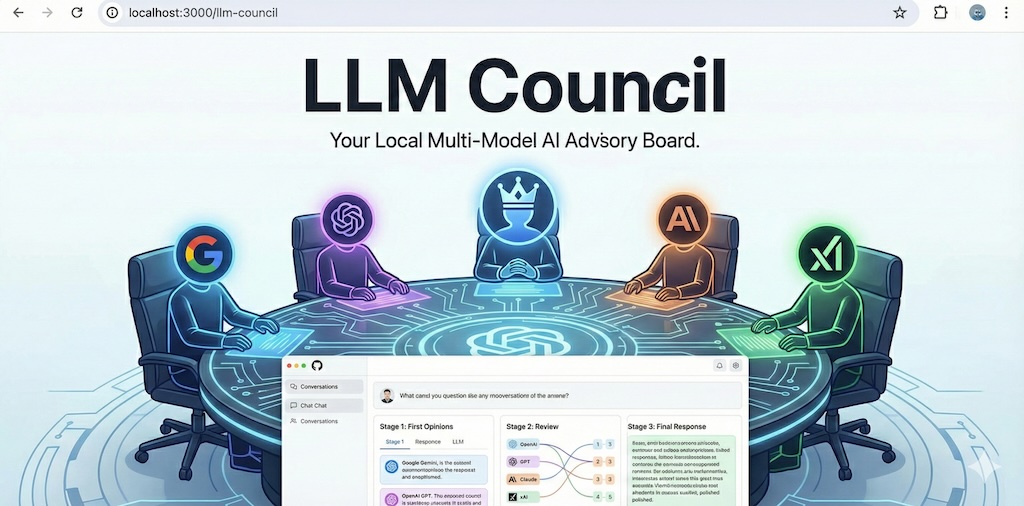
 LLM Council 是一个本地网页应用,它通过 OpenRouter 把你的问题发给一组 LLM。每个 LLM 匿名评审并给其他模型的回答排名,然后由指定的 Chairman 模型把所有内容整合成一个最终回答。
LLM Council 是一个本地网页应用,它通过 OpenRouter 把你的问题发给一组 LLM。每个 LLM 匿名评审并给其他模型的回答排名,然后由指定的 Chairman 模型把所有内容整合成一个最终回答。这是托管服务,还是需要自己运行的程序?它是一个自托管的本地网页应用,不是托管产品:由 FastAPI 后端和 React/Vite 前端组成,在你自己的电脑上运行,界面和使用感受都类似 ChatGPT。
它是一个自托管的本地网页应用,不是托管产品:由 FastAPI 后端和 React/Vite 前端组成,在你自己的电脑上运行,界面和使用感受都类似 ChatGPT。怎么让它跑起来?先用 uv 安装后端依赖,用 npm 安装前端依赖,然后可以使用提供的启动脚本,或者在两个独立的终端里分别运行 FastAPI 后端和 Vite 前端,最后在浏览器中打开应用。
先用 uv 安装后端依赖,用 npm 安装前端依赖,然后可以使用提供的启动脚本,或者在两个独立的终端里分别运行 FastAPI 后端和 Vite 前端,最后在浏览器中打开应用。我需要 OpenRouter API 密钥吗?需要。把你的 OpenRouter API 密钥写进 .env 文件。由于 OpenRouter 按每次模型调用计费,而整个委员会会调用多个模型,所以你需要购买额度或开启自动充值。
需要。把你的 OpenRouter API 密钥写进 .env 文件。由于 OpenRouter 按每次模型调用计费,而整个委员会会调用多个模型,所以你需要购买额度或开启自动充值。这个项目还在维护吗?不再维护。作者称它是一个周末随手做的 hack,其中 99% 的代码是用“氛围编程”生成的,并明确表示不会再提供支持或改进。如果你想修改,建议自己让 LLM 帮忙改。
不再维护。作者称它是一个周末随手做的 hack,其中 99% 的代码是用“氛围编程”生成的,并明确表示不会再提供支持或改进。如果你想修改,建议自己让 LLM 帮忙改。我的对话数据会去哪里?不会存入数据库或外部服务进行存储;对话以普通 JSON 文件的形式保存在本地的 data/conversations/ 目录中。
不会存入数据库或外部服务进行存储;对话以普通 JSON 文件的形式保存在本地的 data/conversations/ 目录中。怎样更换委员会中的模型?编辑 backend/config.py,你可以在其中添加、删除或替换委员会使用的 LLM,以及 Chairman 模型。
编辑 backend/config.py,你可以在其中添加、删除或替换委员会使用的 LLM,以及 Chairman 模型。委员会究竟是怎样产生一个最终答案的?每个 LLM 先独立作答,并匿名给其他模型的回答排名;随后,指定的 Chairman 模型会汇总所有回答,生成一个展示给用户的最终答案。
每个 LLM 先独立作答,并匿名给其他模型的回答排名;随后,指定的 Chairman 模型会汇总所有回答,生成一个展示给用户的最终答案。为什么 karpathy 要做这个项目?他想要一个快速的方法,能并排比较几个 LLM,还能看到它们对彼此输出的看法;那是他在周末用 LLM 一起读书时的需求。
他想要一个快速的方法,能并排比较几个 LLM,还能看到它们对彼此输出的看法;那是他在周末用 LLM 一起读书时的需求。What are similar projects?whirl, searchmirror, DB-GPT, chatgpt-web, jevbox, gin-vue-admin, screenshot-to-code, comfyEz
whirl, searchmirror, DB-GPT, chatgpt-web, jevbox, gin-vue-admin, screenshot-to-code, comfyEz