System Design
Hey, welcome to the course. I hope this course provides a great learning experience.
This course is also available on my website and as an ebook on leanpub. Please leave a ⭐ as motivation if this was helpful!
Table of contents
Getting Started
Chapter I
Chapter II
Chapter III
Chapter IV
Chapter V
Appendix
What is system design?
Before we start this course, let's talk about what even is system design.
System design is the process of defining the architecture, interfaces, and data
for a system that satisfies specific requirements. System design meets the needs
of your business or organization through coherent and efficient systems. It requires
a systematic approach to building and engineering systems. A good system design requires
us to think about everything, from infrastructure all the way down to the data and how it's stored.
Why is System Design so important?
System design helps us define a solution that meets the business requirements. It is
one of the earliest decisions we can make when building a system. Often it is essential
to think from a high level as these decisions are very difficult to correct later. It
also makes it easier to reason about and manage architectural changes as the system evolves.
IP
An IP address is a unique address that identifies a device on the internet or a local network. IP stands for "Internet Protocol", which is the set of rules governing the format of data sent via the internet or local network.
In essence, IP addresses are the identifier that allows information to be sent between devices on a network. They contain location information and make devices accessible for communication. The internet needs a way to differentiate between different computers, routers, and websites. IP addresses provide a way of doing so and form an essential part of how the internet works.
Versions
Now, let's learn about the different versions of IP addresses:
IPv4
The original Internet Protocol is IPv4 which uses a 32-bit numeric dot-decimal notation that only allows for around 4 billion IP addresses. Initially, it was more than enough but as internet adoption grew, we needed something better.
Example: 102.22.192.181
IPv6
IPv6 is a new protocol that was introduced in 1998. Deployment commenced in the mid-2000s and since the internet users have grown exponentially, it is still ongoing.
This new protocol uses 128-bit alphanumeric hexadecimal notation. This means that IPv6 can provide about ~340e+36 IP addresses. That's more than enough to meet the growing demand for years to come.
Example: 2001:0db8:85a3:0000:0000:8a2e:0370:7334
Types
Let's discuss types of IP addresses:
Public
A public IP address is an address where one primary address is associated with your whole network. In this type of IP address, each of the connected devices has the same IP address.
Example: IP address provided to your router by the ISP.
Private
A private IP address is a unique IP number assigned to every device that connects to your internet network, which includes devices like computers, tablets, and smartphones, which are used in your household.
Example: IP addresses generated by your home router for your devices.
Static
A static IP address does not change and is one that was manually created, as opposed to having been assigned. These addresses are usually more expensive but are more reliable.
Example: They are usually used for important things like reliable geo-location services, remote access, server hosting, etc.
Dynamic
A dynamic IP address changes from time to time and is not always the same. It has been assigned by a Dynamic Host Configuration Protocol (DHCP) server. Dynamic IP addresses are the most common type of internet protocol address. They are cheaper to deploy and allow us to reuse IP addresses within a network as needed.
Example: They are more commonly used for consumer equipment and personal use.
OSI Model
The OSI Model is a logical and conceptual model that defines network communication used by systems open to interconnection and communication with other systems. The Open System Interconnection (OSI Model) also defines a logical network and effectively describes computer packet transfer by using various layers of protocols.
The OSI Model can be seen as a universal language for computer networking. It's based on the concept of splitting up a communication system into seven abstract layers, each one stacked upon the last.
Why does the OSI model matter?
The Open System Interconnection (OSI) model has defined the common terminology used in networking discussions and documentation. This allows us to take a very complex communications process apart and evaluate its components.
While this model is not directly implemented in the TCP/IP networks that are most common today, it can still help us do so much more, such as:
- Make troubleshooting easier and help identify threats across the entire stack.
- Encourage hardware manufacturers to create networking products that can communicate with each other over the network.
- Essential for developing a security-first mindset.
- Separate a complex function into simpler components.
Layers
The seven abstraction layers of the OSI model can be defined as follows, from top to bottom:
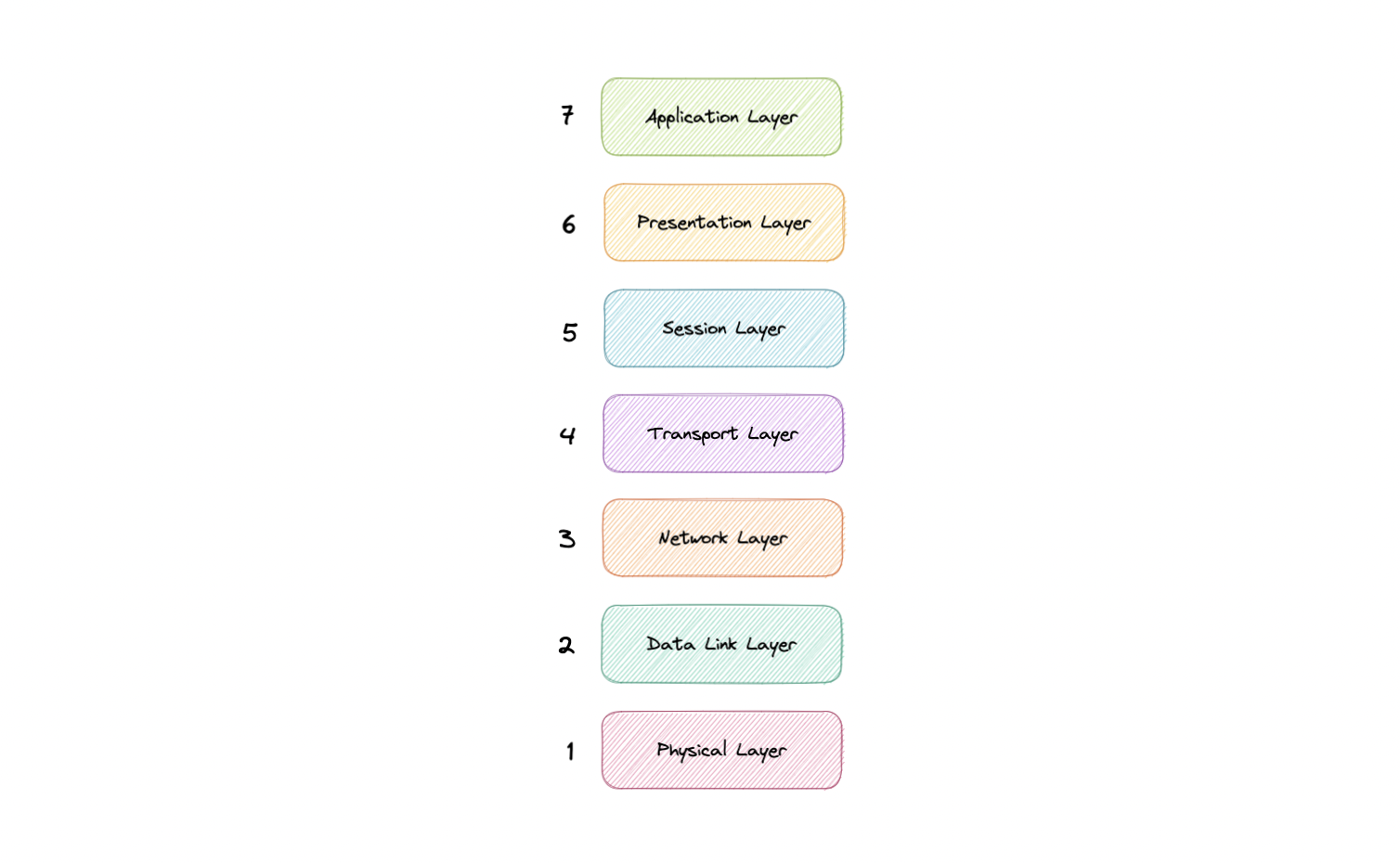
Application
This is the only layer that directly interacts with data from the user. Software applications like web browsers and email clients rely on the application layer to initiate communication. But it should be made clear that client software applications are not part of the application layer, rather the application layer is responsible for the protocols and data manipulation that the software relies on to present meaningful data to the user. Application layer protocols include HTTP as well as SMTP.
Presentation
The presentation layer is also called the Translation layer. The data from the application layer is extracted here and manipulated as per the required format to transmit over the network. The functions of the presentation layer are translation, encryption/decryption, and compression.
Session
This is the layer responsible for opening and closing communication between the two devices. The time between when the communication is opened and closed is known as the session. The session layer ensures that the session stays open long enough to transfer all the data being exchanged, and then promptly closes the session in order to avoid wasting resources. The session layer also synchronizes data transfer with checkpoints.
Transport
The transport layer (also known as layer 4) is responsible for end-to-end communication between the two devices. This includes taking data from the session layer and breaking it up into chunks called segments before sending it to the Network layer (layer 3). It is also responsible for reassembling the segments on the receiving device into data the session layer can consume.
Network
The network layer is responsible for facilitating data transfer between two different networks. The network layer breaks up segments from the transport layer into smaller units, called packets, on the sender's device, and reassembles these packets on the receiving device. The network layer also finds the best physical path for the data to reach its destination this is known as routing. If the two devices communicating are on the same network, then the network layer is unnecessary.
Data Link
The data link layer is very similar to the network layer, except the data link layer facilitates data transfer between two devices on the same network. The data link layer takes packets from the network layer and breaks them into smaller pieces called frames.
Physical
This layer includes the physical equipment involved in the data transfer, such as the cables and switches. This is also the layer where the data gets converted into a bit stream, which is a string of 1s and 0s. The physical layer of both devices must also agree on a signal convention so that the 1s can be distinguished from the 0s on both devices.
TCP and UDP
TCP
Transmission Control Protocol (TCP) is connection-oriented, meaning once a connection has been established, data can be transmitted in both directions. TCP has built-in systems to check for errors and to guarantee data will be delivered in the order it was sent, making it the perfect protocol for transferring information like still images, data files, and web pages.
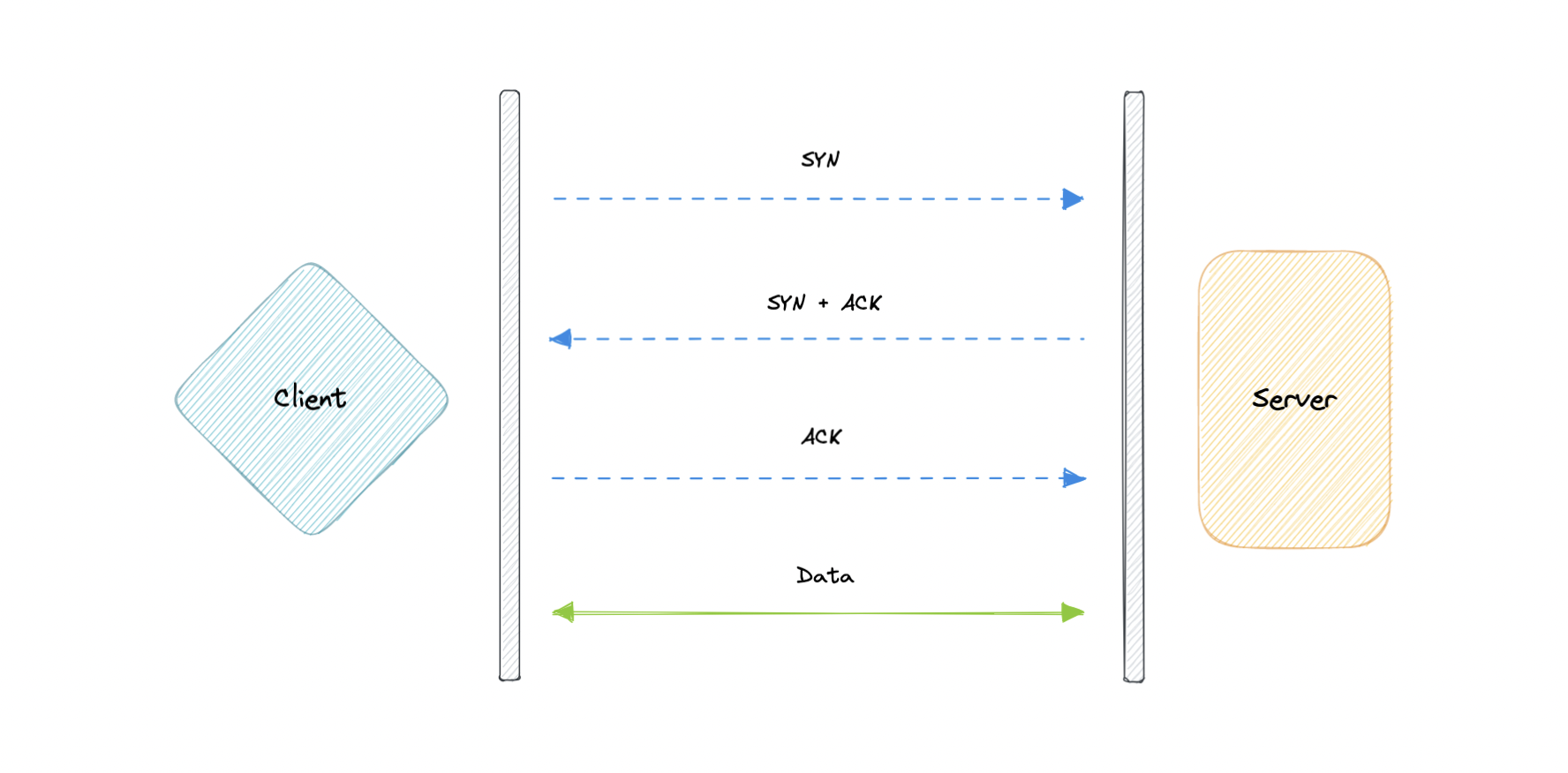
But while TCP is instinctively reliable, its feedback mechanisms also result in a larger overhead, translating to greater use of the available bandwidth on the network.
UDP
User Datagram Protocol (UDP) is a simpler, connectionless internet protocol in which error-checking and recovery services are not required. With UDP, there is no overhead for opening a connection, maintaining a connection, or terminating a connection. Data is continuously sent to the recipient, whether or not they receive it.
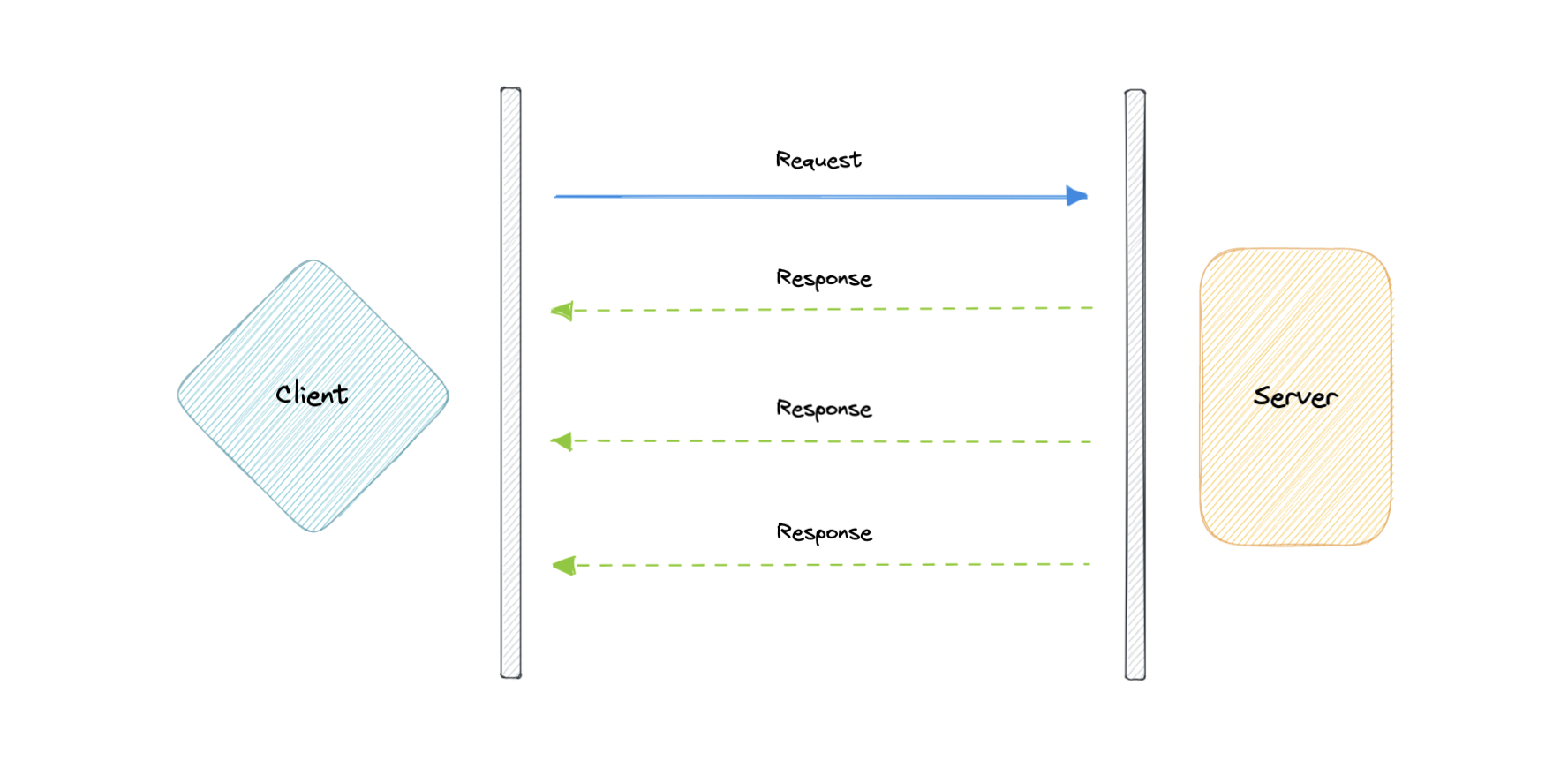
It is largely preferred for real-time communications like broadcast or multicast network transmission. We should use UDP over TCP when we need the lowest latency and late data is worse than the loss of data.
TCP vs UDP
TCP is a connection-oriented protocol, whereas UDP is a connectionless protocol. A key difference between TCP and UDP is speed, as TCP is comparatively slower than UDP. Overall, UDP is a much faster, simpler, and more efficient protocol, however, retransmission of lost data packets is only possible with TCP.
TCP provides ordered delivery of data from user to server (and vice versa), whereas UDP is not dedicated to end-to-end communications, nor does it check the readiness of the receiver.
| Feature |
TCP |
UDP |
| Connection |
Requires an established connection |
Connectionless protocol |
| Guaranteed delivery |
Can guarantee delivery of data |
Cannot guarantee delivery of data |
| Re-transmission |
Re-transmission of lost packets is possible |
No re-transmission of lost packets |
| Speed |
Slower than UDP |
Faster than TCP |
| Broadcasting |
Does not support broadcasting |
Supports broadcasting |
| Use cases |
HTTPS, HTTP, SMTP, POP, FTP, etc |
Video streaming, DNS, VoIP, etc |
Domain Name System (DNS)
Earlier we learned about IP addresses that enable every machine to connect with other machines. But as we know humans are more comfortable with names than numbers. It's easier to remember a name like google.com than something like 122.250.192.232.
This brings us to Domain Name System (DNS) which is a hierarchical and decentralized naming system used for translating human-readable domain names to IP addresses.
How DNS works

DNS lookup involves the following eight steps:
- A client types example.com into a web browser, the query travels to the internet and is received by a DNS resolver.
- The resolver then recursively queries a DNS root nameserver.
- The root server responds to the resolver with the address of a Top-Level Domain (TLD).
- The resolver then makes a request to the
.com TLD.
- The TLD server then responds with the IP address of the domain's nameserver, example.com.
- Lastly, the recursive resolver sends a query to the domain's nameserver.
- The IP address for example.com is then returned to the resolver from the nameserver.
- The DNS resolver then responds to the web browser with the IP address of the domain requested initially.
Once the IP address has been resolved, the client should be able to request content from the resolved IP address. For example, the resolved IP may return a webpage to be rendered in the browser.
Server types
Now, let's look at the four key groups of servers that make up the DNS infrastructure.
DNS Resolver
A DNS resolver (also known as a DNS recursive resolver) is the first stop in a DNS query. The recursive resolver acts as a middleman between a client and a DNS nameserver. After receiving a DNS query from a web client, a recursive resolver will either respond with cached data, or send a request to a root nameserver, followed by another request to a TLD nameserver, and then one last request to an authoritative nameserver. After receiving a response from the authoritative nameserver containing the requested IP address, the recursive resolver then sends a response to the client.
DNS root server
A root server accepts a recursive resolver's query which includes a domain name, and the root nameserver responds by directing the recursive resolver to a TLD nameserver, based on the extension of that domain (.com, .net, .org, etc.). The root nameservers are overseen by a nonprofit called the Internet Corporation for Assigned Names and Numbers (ICANN).
There are 13 DNS root nameservers known to every recursive resolver. Note that while there are 13 root nameservers, that doesn't mean that there are only 13 machines in the root nameserver system. There are 13 types of root nameservers, but there are multiple copies of each one all over the world, which use Anycast routing to provide speedy responses.
TLD nameserver
A TLD nameserver maintains information for all the domain names that share a common domain extension, such as .com, .net, or whatever comes after the last dot in a URL.
Management of TLD nameservers is handled by the Internet Assigned Numbers Authority (IANA), which is a branch of ICANN. The IANA breaks up the TLD servers into two main groups:
- Generic top-level domains: These are domains like
.com, .org, .net, .edu, and .gov.
- Country code top-level domains: These include any domains that are specific to a country or state. Examples include
.uk, .us, .ru, and .jp.
Authoritative DNS server
The authoritative nameserver is usually the resolver's last step in the journey for an IP address. The authoritative nameserver contains information specific to the domain name it serves (e.g. google.com) and it can provide a recursive resolver with the IP address of that server found in the DNS A record, or if the domain has a CNAME record (alias) it will provide the recursive resolver with an alias domain, at which point the recursive resolver will have to perform a whole new DNS lookup to procure a record from an authoritative nameserver (often an A record containing an IP address). If it cannot find the domain, returns the NXDOMAIN message.
Query Types
There are three types of queries in a DNS system:
Recursive
In a recursive query, a DNS client requires that a DNS server (typically a DNS recursive resolver) will respond to the client with either the requested resource record or an error message if the resolver can't find the record.
Iterative
In an iterative query, a DNS client provides a hostname, and the DNS Resolver returns the best answer it can. If the DNS resolver has the relevant DNS records in its cache, it returns them. If not, it refers the DNS client to the Root Server or another Authoritative Name Server that is nearest to the required DNS zone. The DNS client must then repeat the query directly against the DNS server it was referred.
Non-recursive
A non-recursive query is a query in which the DNS Resolver already knows the answer. It either immediately returns a DNS record because it already stores it in a local cache, or queries a DNS Name Server which is authoritative for the record, meaning it definitely holds the correct IP for that hostname. In both cases, there is no need for additional rounds of queries (like in recursive or iterative queries). Rather, a response is immediately returned to the client.
Record Types
DNS records (aka zone files) are instructions that live in authoritative DNS servers and provide information about a domain including what IP address is associated with that domain and how to handle requests for that domain.
These records consist of a series of text files written in what is known as DNS syntax. DNS syntax is just a string of characters used as commands

 It is a free course and ebook that teaches how to design large-scale systems and prepares readers for system design interviews.