Daemonarchy
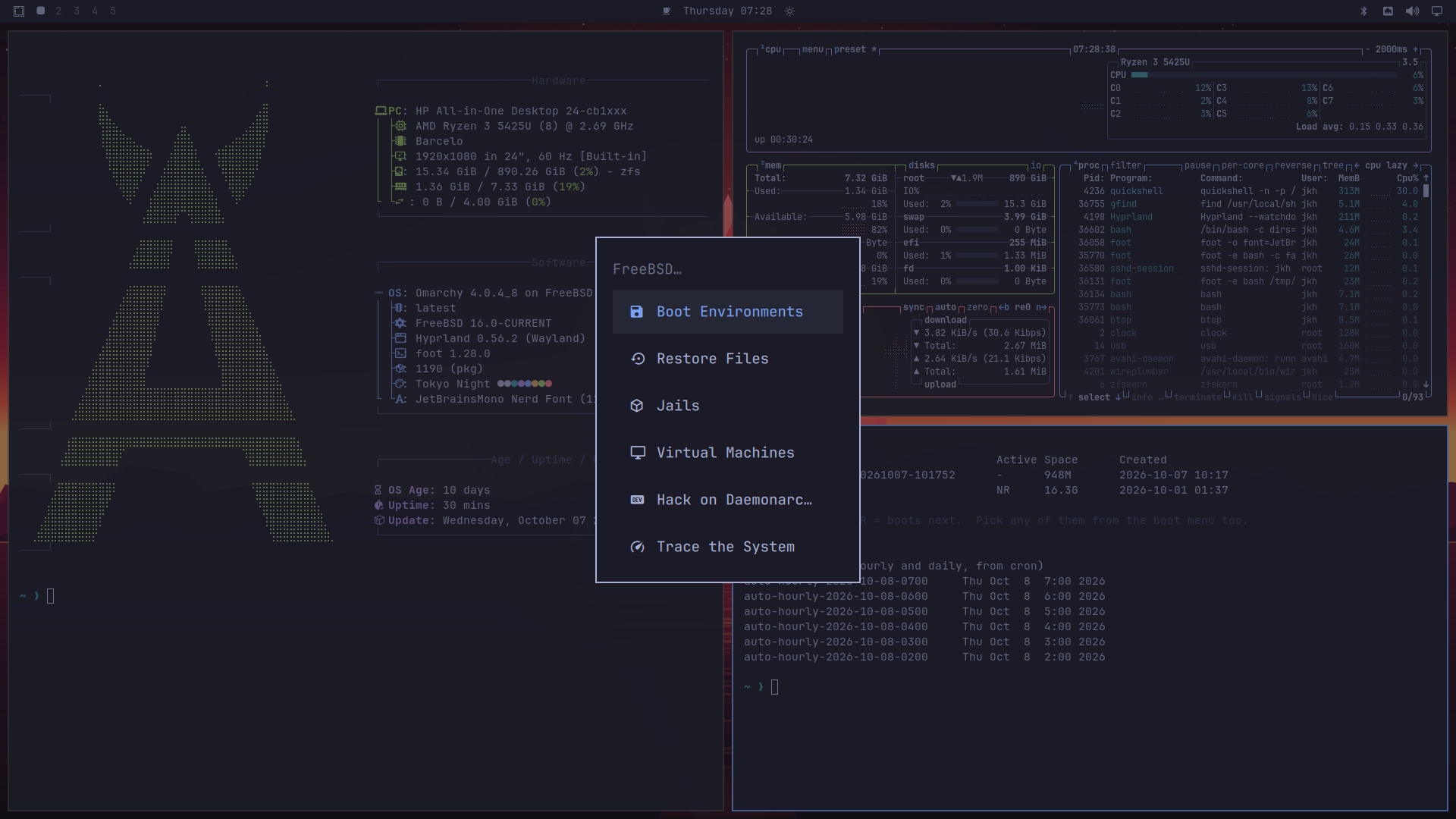
Daemonarchy is the Omarchy desktop on FreeBSD: DHH's opinionated Hyprland desktop, ported to FreeBSD and installed the way the Omarchy ISO installs it on Arch. The name is a homage: Omarchy's -archy, ruled by the BSD daemon.
You write an image to a USB stick, boot it, answer the questions Omarchy's own installer asks (keyboard, account, hostname, time zone) plus the few that are FreeBSD's own (network, disk), and once the packages have downloaded you are looking at a tiled Wayland desktop with a real FreeBSD underneath it: ZFS, boot environments, jails, bhyve, DTrace, pkg. Daemonarchy is not affiliated with Omarchy; the Omarchy software itself comes, unchanged apart from FreeBSD compatibility, from the x11-wm/omarchy port.
Each release is built from a FreeBSD 16.0-CURRENT snapshot. CURRENT moves daily, so an image is tied to the snapshot it was built from.
Which page do I need?
Download
The latest stable release is Daemonarchy 1.5.1 (x86-64, BIOS or UEFI, and a community-validation arm64 image), published November 7, 2026, on FreeBSD 16.0-CURRENT, OSVERSION 1600029. Version 1.2.0 was not published; 1.3.1 followed 1.1.1, 1.4.0 followed 1.3.1, 1.4.1 followed 1.4.0, 1.5.0 followed 1.4.1 and 1.5.1 follows 1.5.0.
- x86-64 ISO, xz-compressed: 1,593,471,020 bytes.
- x86-64 checksum of the compressed file:
de9311416cf29c88525efcec0dcae3990c38cbffe8235035b50b3a8e4d1b84ad.
- arm64 ISO, xz-compressed: 958,315,864 bytes, UEFI only. This is a community-validation image: it was verified to boot and install in QEMU and nothing more. The NVIDIA RTX Spark laptop is tested but not yet working (support is deferred); no other physical aarch64 hardware was tested. See aarch64 and the Spark application note.
- arm64 checksum of the compressed file:
42106836374a3c15116de7d8569dae66a4ddc11ffd595aecc5dfc3f6485d38b6.
- amd64 hardware bring-up trace image, xz-compressed: 20,069,016 bytes, for machines that fail early in kernel start (how to use it).
- amd64 trace image checksum of the compressed file:
89a2769413c1262050b167bd16b9fdd49e7db20f92daa1c6b635b6e2915cfe98.
- arm64 hardware bring-up trace image, xz-compressed: 15,046,456 bytes; its checksum of the compressed file is
63e6f5fee9cb0d393afb0c059bc051651c0af735778214310a2e864ed9b03ce1.
- The release also carries the signed Secure Boot bundle (
daemonarchy-1.5.1-boot.txz and its .sig, amd64 only) and the public certificate in PEM and DER form.
- Read the 1.5.1 release notes and their hardware status and limits before installing. Wi-Fi and Hyprland are not guaranteed on any particular machine.
From download to desktop
You need a 64-bit x86 PC (UEFI or legacy BIOS), a USB stick of 4 GB or more (the image is 3.5 GB once decompressed, and writing it erases the stick), a disk or free region of 40 GB or more, and a network connection during the install, because the desktop's roughly 1,200 packages are downloaded then rather than carried on the stick. The getting-started guide has the long version with pictures; this is the short one.
- Check the download (optional, quick). Put the
.iso.xz and its .sha256 in one folder and run sha256sum -c daemonarchy-*.iso.xz.sha256 on Linux, shasum -a 256 -c daemonarchy-*.iso.xz.sha256 on macOS, or Get-FileHash in PowerShell and compare by eye. The checksum covers the compressed file you downloaded. If it says OK, the bytes are the ones in the release.
- Write it to the stick. The image is copied byte for byte, so dragging the file onto the stick does nothing useful. balenaEtcher flashes the
.iso.xz directly. With dd, find the stick first (lsblk on Linux, diskutil list on macOS) and be sure of the device name, because dd overwrites whatever you point it at: xz -dc daemonarchy-1.5.1-amd64.iso.xz | sudo dd of=/dev/sdX bs=1M status=progress conv=fsync on Linux (on macOS use bs=1m and the /dev/rdiskN name that diskutil list shows).
- Boot from it. Press your machine's boot-menu key at power-on (often F12, F11, F10 or Esc; hold Option on a Mac) and pick the stick. Turn Secure Boot off, or enroll the project's certificate to keep it on; factory keys alone reject the project's loader. The x86-64 image shows a short FreeBSD loader menu: press T to try the desktop live from the stick without touching any disk, or let the countdown run to start the installer.
- Answer the questions. Keyboard, your name and password, a computer name, a time zone; then the network (a plugged-in cable is usually already up; otherwise choose Join Wi-Fi) and the storage choice. Nothing is written to a disk until you confirm the summary. Whole-disk mode erases the selected disk; partition mode replaces only the GPT partition you select, and free-space mode uses existing free space. The installer does not shrink another system's filesystems, so make room from that system first.
- Wait for the success screen. The installer lays out an EFI partition, swap and a ZFS pool (encrypted if you asked), extracts the base system, then installs the desktop with
pkg. While it works you can play one of the four arcade games from its Extensions menu. Do not restart until it says it finished: an unexpected reboot is not a completion signal, and if something stops, the rescue menu keeps the log.
- Log in. Type your password at the login screen (an encrypted install logs straight in after you unlock the disk at boot). The first login takes a few seconds longer while your desktop is set up. Super (the Windows or Command key) plus Space opens the menu; Super + K lists every shortcut.
The installer can also run without a keyboard from an answers file on a second drive; see the installer reference.
The arm64 image is for adventurous people
The arm64 image is a community-validation image: it was verified to boot and install in a QEMU virtual machine and nothing more. No physical arm64 machine is known to work; the NVIDIA RTX Spark laptop boots its kernel but does not reach a desktop, and support for it is deferred. There is no live desktop, no Secure Boot bundle and no Apple silicon install target. There is one known issue: in QEMU with the default virtio-net network card the install stalls during the package fetch, because the guest stops servicing receive on vtnet0. Start QEMU with -device e1000e until this is fixed; with that card the install takes about 20 minutes and boots under UEFI. If you try it, please open an issue with the machine, the image checksum and what happened, whether it worked or not. The full record is in aarch64.
Is it still FreeBSD?
Yes. If you know FreeBSD you already know most of this system, and if you do not, everything you learn about it from the FreeBSD Handbook applies. This section is the map of where Daemonarchy stops being stock FreeBSD.
What is the same
- The kernel and the base system. Both are FreeBSD 16.0-CURRENT, built from daemonarchy-src, a fork that tracks upstream FreeBSD and keeps its source layout and build system. The installer unpacks the release's
base.txz, kernel.txz and lib32.txz, the same kind of tarball sets FreeBSD publishes. The fork carries Daemonarchy's own changes on its integration branch (for example hardware fixes and boot diagnostics), the way any vendor tree would.
- ZFS and the loader. The system boots from a ZFS pool laid out the way
bsdinstall lays one out, with the FreeBSD loader and its boot menu, and optional GELI encryption. bectl manages boot environments exactly as it does anywhere else.
rc, sysrc and service. The installer enables D-Bus, seatd and the login manager through /etc/rc.conf like any FreeBSD service. Nothing replaces init or rc.pkg and the ports. Software is pkg install; the ports tree is FreeBSD's, kept in a fork (daemonarchy-ports) that also carries the Omarchy ports and is resubmitted upstream. Most packages on your system are FreeBSD's own, as built by pkg.FreeBSD.org.- Jails, bhyve, DTrace, pf and the rest are FreeBSD's. Daemonarchy puts front ends for jails, virtual machines, boot environments, home snapshots and DTrace views in the menu under System > FreeBSD.
- Optional
/usr/src and /usr/ports. The installer offers both as ordinary Git checkouts of the two forks. In them, FreeBSD's usual commands (make buildworld, make buildkernel, make in a port directory) are the same commands; see HACKING.md for what Daemonarchy adds around them and what to be careful about.
What is different
- The installer. Daemonarchy does not use
bsdinstall. Its own installer asks Omarchy's questions, checks the network before it touches a disk, lays out the disk, installs, verifies the result and keeps a rescue console for when something goes wrong.
- The desktop is preinstalled and preconfigured. You get Hyprland, a shell bar, themes, the Omarchy menu and key bindings, SDDM, PipeWire, a FreeBSD Wi-Fi and Bluetooth panel and a curated application set, instead of a prompt.
- Where packages come from, and who signs them. FreeBSD's packages come from pkg.FreeBSD.org. The Omarchy ports and a few fixed packages come from Daemonarchy's own signed repository, published as GitHub release assets; the installer adds its public key at
/usr/local/etc/pkg/keys/daemonarchy.pub. For installs, the release also hosts a signed copy of the installer's whole package closure, so a package that disappears upstream on the wrong day cannot break an install. The GPU and Wi-Fi kernel modules are built against the exact kernel of the image and stay on the image's own repository, Daemonarchy-ISO.
- Updates are applications, not the base.
pkg upgrade (and the menu's Update, which first saves a boot environment) upgrades applications. There is no network upgrade of the base system, kernel, boot files or trust anchors yet, and no pkgbase feed is published; a new snapshot or kernel arrives as a new image. The upgrade model says exactly what works.
- Secure Boot (x86-64). The loader and kernel are signed with a project certificate you enroll by hand, with the module packages locked to a signed inventory. Stock FreeBSD does not do this.
- Linux-only applications are withheld until their exact versions pass Linuxulator qualification (policy). Chromium is installed by default.
- Diagnostics for hard hardware. A remote debug mode in the installer, a console rescue menu and a separate hardware bring-up trace image (
daemonarchy-hwtrace-<version>-<arch>.img, which records each kernel start-up step in UEFI NVRAM) exist because the project is brought up on machines that do not always boot.
- Releases are numbered on their own. Daemonarchy uses semantic versioning independent of FreeBSD's and Omarchy's numbers, and each release is pinned to one CURRENT snapshot with its own source and ports commits.
What FreeBSD adds
Daemonarchy is the Omarchy desktop with FreeBSD underneath, and it puts FreeBSD's strengths in the Omarchy menu under System > FreeBSD:
- Boot environments. The system lives on ZFS, and every Omarchy update first saves a boot environment: a bootable copy of the whole system. Roll back to any of them from the menu or the boot loader.
- Restore files. Hourly and daily ZFS snapshots of home directories, kept for a day and a week; open one in the file manager and copy back what you lost.
- Jails. Lightweight FreeBSD containers, each with its own FreeBSD system and packages.
- Virtual machines. Run Linux, Windows, or the BSDs with bhyve, FreeBSD's hypervisor.
- Trace the system. Live views of what the system is doing, through DTrace.
- Hack on Daemonarchy. Fetch the sources and run the desktop from your own checkout of Omarchy; see HACKING.md.
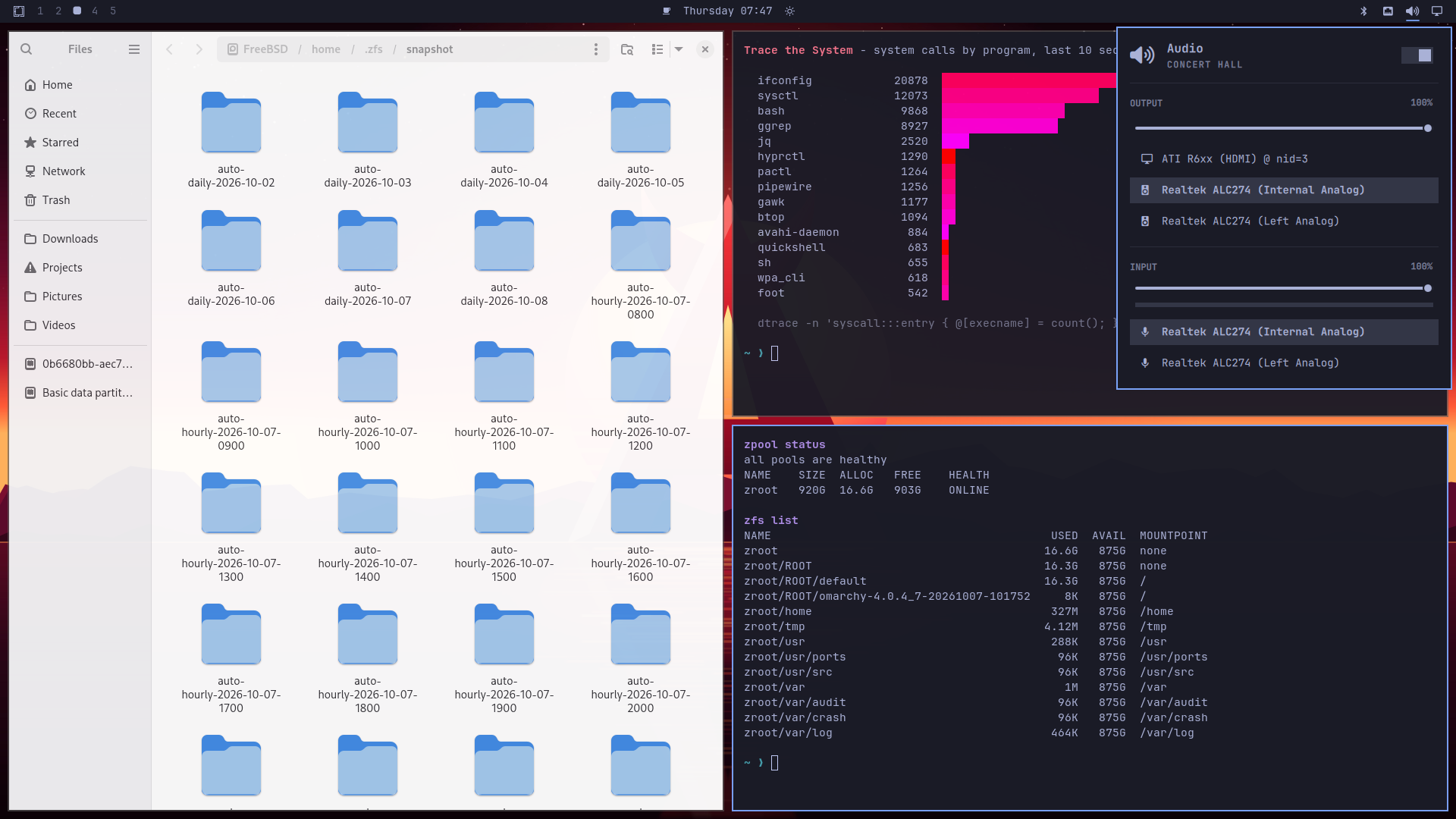
Omarchy's panels work on FreeBSD too. Wi-Fi runs through FreeBSD's wpa_supplicant, sound through PipeWire, and Bluetooth keyboards and mice through FreeBSD's own Bluetooth stack:
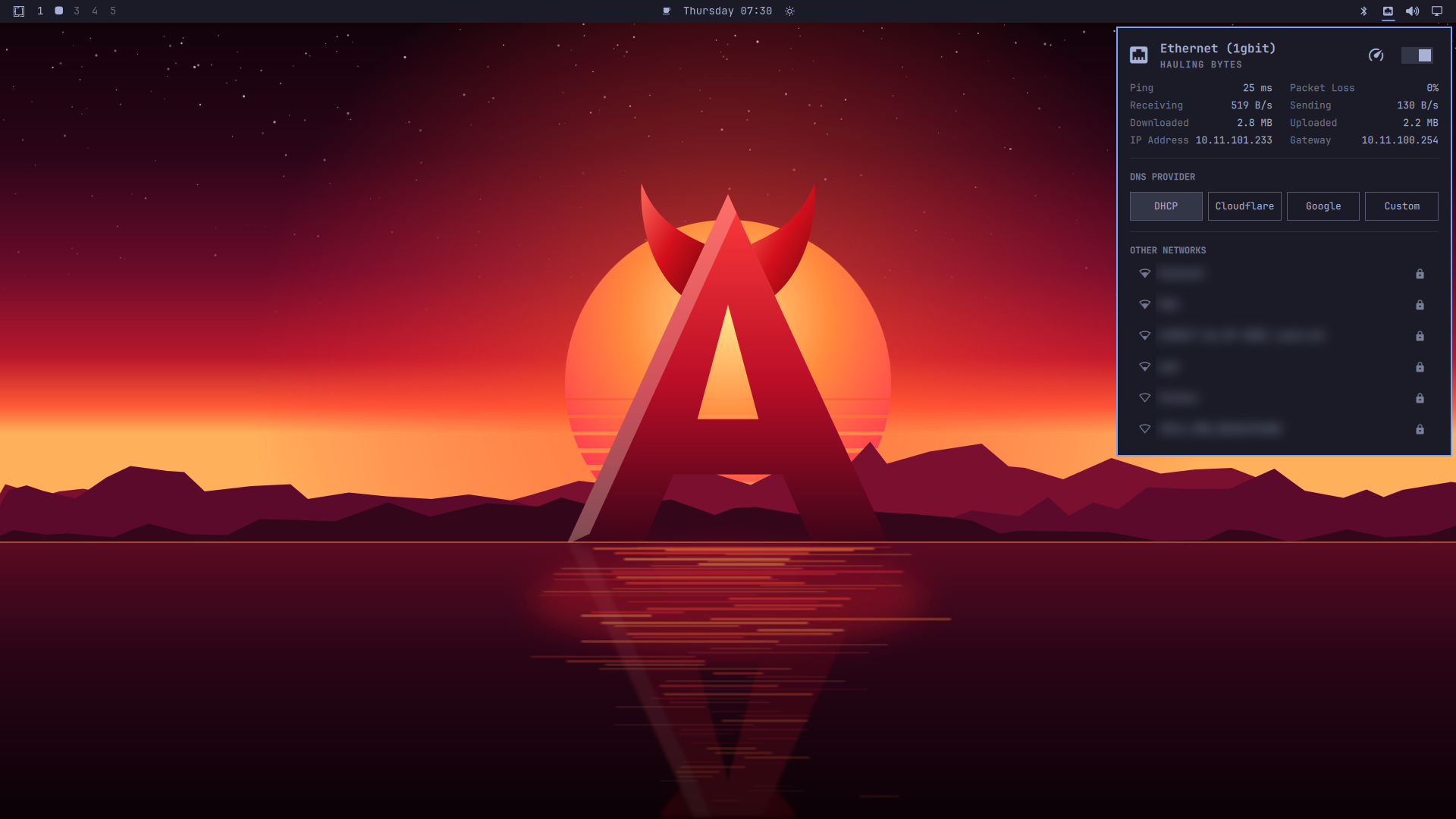
Install software from FreeBSD's package collection through OctoPkg (Install > Packages) or pkg. Chromium is installed by default. Linux-only applications and automatic agent downloads are withheld until their exact versions pass native Linuxulator qualification; see the application policy.
Do I need Literate AI?
No. Literate AI (litai) is a separate project, a release-engineering tool the maintainers use to check Daemonarchy's design contracts and to record evidence about what was built and tested. It is not on the image, not in the package feeds, and nothing you do as a user (installing, updating, running the desktop, using pkg) calls it. Developers can build, test and release Daemonarchy without it too, with less checking; HACKING.md says what it does, where to install it and what is rough about it today.
What the image contains
- A live FreeBSD system (from the snapshot) that logs root in on the first console and starts the installer.
- The installer:
configurator asks the questions, install installs, dashboard shows its progress, launch ties them together.
- The snapshot's
base.txz, kernel.txz and lib32.txz, which become the installed system. The 32-bit compatibility libraries also satisfy native package dependencies such as LLVM/Mesa.
- A package repository with what pkg.FreeBSD.org does not publish: the Omarchy ports from the release's ports fork (daemonarchy-ports
e84b4c4c for 1.5.0), and the GPU and Wi-Fi kernel modules (drm-612-kmod, gpu-firmware-*-kmod, wifi-firmware-*-kmod) built for the snapshot kernel.
Other desktop dependencies are downloaded during installation. Compatible official packages come from pkg.FreeBSD.org; the release's versioned feed also supplies ordinary dependencies rebuilt for its newer ports/base selection. Network access is required. Keeping those downloads off the ISO keeps each release asset below GitHub's 2 GiB limit; a complete offline desktop payload would exceed that budget.
Updates
The upgrade model, stated plainly: what pkg upgrade does and does not do, and when an ISO is still needed. Developers who want to publish their own installer and feeds: Forking Daemonarchy.
Application packages update with pkg upgrade (which Omarchy's update runs). This does not update the FreeBSD base/kernel or make kernel modules compatible with another snapshot. FreeBSD's packages come from pkg.FreeBSD.org. Daemonarchy's own packages (the Omarchy ports and the patched Quickshell) come from a signed repository published as the assets of the packages-16-amd64 release. The installer adds its key as /usr/local/etc/pkg/keys/daemonarchy.pub, so fixes reach you without a new ISO. The image's own packages stay on the disk as a fallback repository, Daemonarchy-ISO, since the GPU and Wi-Fi modules built for its kernel are only there.
A system installed from an image dated 2026-10-02 or earlier has only the on-disk repository. To move it to the online one, run as root:
mkdir -p /usr/local/etc/pkg/keys
fetch -o /usr/local/etc/pkg/keys/daemonarchy.pub https://raw.githubusercontent.com/jordanhubbard/daemonarchy/main/overlay/usr/local/share/daemonarchy-installer/daemonarchy.pub
cat >/usr/local/etc/pkg/repos/Daemonarchy.conf <<'EOF'
Daemonarchy: {
  url: "https://github.com/jordanhubbard/daemonarchy/releases/download/packages-16-amd64",
  signature_type: "pubkey",
  pubkey: "/usr/local/etc/pkg/keys/daemonarchy.pub",
  priority: 10,
  enabled: yes
}
Daemonarchy-ISO: {
  url: "file:///var/db/daemonarchy/repo",
  signature_type: "none",
  priority: 5,
  enabled: yes
}
EOF
pkg upgrade
1.5.0 release
1.5.0 is the current stable release. Its notes and the plan
say what was done and what was not. 1.5.0 was re-scoped on 2026-11-03 to evidenced work; the
framework-executed build-speed goals (BUILD-001, COMP-001, PERF-001, PERF-002, DEV-001 and the native halves
of ADOPT-002, SRC-001 and RELEASE-001) moved to 1.5.1. What changed since 1.4.1:
- NVIDIA RTX Spark laptop (aarch64): an official target; support is deferred to 1.6. The 1.5.1 image still hangs after starting the fourth CPU, as 1.5.0 did. The first physical arm64 machine the project tests. Tested, not yet working; deferred from 1.5.0 and to be debugged later: the image boots its kernel there but does not reach a desktop. The stock arm64 kernel stops starting CPUs after
Starting CPU 4 (400); with kern.smp.disabled=1 it reaches init; with the draft bounded-wait fix it boots further and then panics in the kernel. Support stays in the tree and the work continues after 1.5.0 (application note).
- Windows programs and Steam (x86-64). Apps menu entries
Steam and Windows Programs, virtual apps that
set up Wine, Wine Mono and DXVK on first launch and run any Windows program you supply
(Windows programs and Steam; the Mono and DXVK recipe was contributed by Sam
Sheridan). Checked headless on a build VM only; no Windows game or Steam window has run on real hardware.
- A graphical package manager,
daemonarchy-pkg (GUI-001, partly): a GTK 4 window over the installer's
planner, packaged (ports-mgmt/daemonarchy-pkg) and listed for the application feed (origins.sh); it ships in the 1.5.0 application feed. The menu still opens OctoPkg and it has no real-desktop
evidence yet (status).
- Sandboxed Lua installer extensions (EXT-002, SDK API 1.5) and a first fish-tank extension
(sandboxed extensions); built and tested on a build host, not yet on a
real image.
- aarch64: a VirtIO GPU path reaches the SDDM greeter and the session in software in a QEMU guest. Still
QEMU only and a community-validation image (aarch64).
- Faster login on the MSI Raider 18 HX:
x11-toolkits/aquamarine (daemonarchy-ports #44, PORTREVISION 2)
force-probes display connectors only on a hotplug event and otherwise uses the kernel's cached status
(NVIDIA's nvidia-drm connectors are still probed as before). The stall it removes was i915's DisplayPort
detect on an unplugged port, which Aquamarine probed twice. Measured on that one machine: login to the
desktop shell (quickshell) 2.95 s to 1.32 s warm, about 1.6 s faster, from a first version of the patch; the
shipped version was run once. Untested: hotplug on Intel- and NVIDIA-wired ports, session resume, lid and VT
switch. It is an application package, so pkg upgrade delivers it.
- MacBookPro16,1 Wi-Fi stall after association: the driver fix is merged in daemonarchy-ports. Evidence is
fault injection on the MacBook; the real firmware-side loss was not reproduced and a physical retest is
pending. It is a kernel-bound package, so it needs a rebuilt module and re-signed boot bundle.
- Build and release-cycle speed (BUILD-001) is not delivered in 1.5.0 and no speed-up is claimed: the
framework-dependent items have not run natively under Literate AI and moved to 1.5.1.
- One signing session per release (SIGN-001, option A): the signed inputs were frozen, then signed in the
operator's key windows (mastering).
Earlier releases
1.4.1 was the stable release from October 31, 2026 until 1.5.0. Its base was source 303b364 with ports at
dd277aff; its notes cover a parallel package fetch from signed Daemonarchy feeds, an
install trace, an installer built on a visual SDK with four arcade games as extensions, cudalab as a virtual
app, remote debugger leases and a watchdog, and an arm64 image for community validation.
1.4.0 was the stable release from October 29, 2026 until 1.4.1. Its base was
source 06e5befc with ports at b7857842.
1.3.1 was the stable release from October 25, 2026 until 1.4.0. Its base was
source d63d77f4 with ports at b7857842.
Moving an older installation to the 1.5.0 application feed requires a
coordinated base, kernel and driver upgrade; changing the package URL alone is
insufficient. Physical GPU, firmware, radio and retained-OS qualification
remains explicitly recorded rather than inferred from VM tests.
Hacking on it
If you want to change the installer, fix a port, build FreeBSD from source "the Daemonarchy way", build your own image or test one, start with HACKING.md. It begins with a side-by-side of what you would type on a plain FreeBSD machine (make buildworld installworld in /usr/src, make all install in /usr/ports/<category>/<port>) and what you type for Daemonarchy, then covers the machines and tools you need, the repositories to check out, the build and test loops, and releasing. On a running Daemonarchy desktop, System > FreeBSD > Hack on Daemonarchy fetches the sources for you.
Source
Daemonarchy is built from these repositories:
Roadmap
1.5.0 is available with documented qualification gaps; 1.5.1 is planned. See the roadmap for remaining
graphics, Bluetooth, enterprise Wi-Fi, installation and boot support, upstream
ports work, and the checks required before release. The
partition preview guide covers installing into
an existing OS/data partition or creating a new one in free space.
The installer
The installer's screens, its unattended mode, the optional /usr/ports and /usr/src checkouts and the NVIDIA CUDA offer are described in the installer reference. The step-by-step first install is in the getting-started guide; the log, retained evidence and rescue menu are in the rescue console guide.
Release Engineers
Historical limits of 1.0.1
- Whole-disk installs only; no dual boot.
- UEFI machines only, with Secure Boot turned off: the FreeBSD loader is not signed, and the installed disk has no BIOS boot code.
- The install needs a network connection (wired, or Wi-Fi with WPA-PSK or no password; no enterprise Wi-Fi). The desktop has FreeBSD Wi-Fi and Bluetooth panels; Bluetooth supports input devices only.
- NVIDIA GPUs get no driver.
- Virtual machines install and boot, but Hyprland needs a DRM driver, which FreeBSD VMs lack.
Names and marks
Daemonarchy is a union of two projects and claims to be neither. Omarchy is the desktop and FreeBSD is the operating system underneath; both are credited by name wherever the system describes what it is (the About screen reads "Omarchy on FreeBSD "). Daemonarchy's own identity — the wordmark, the horned "A", the wallpaper, and the login theme's logo — is original artwork that lives in the x11-wm/daemonarchy port, apart from Omarchy's files, which are installed as Omarchy ships them. No FreeBSD or Arch Linux logo is used.
Daemonarchy is not affiliated with or endorsed by Omarchy, the FreeBSD Project, or The FreeBSD Foundation. FreeBSD is a registered trademark of The FreeBSD Foundation. Omarchy is used under the MIT license.
License
Daemonarchy is licensed as described in LICENSE; licenses/README.md lists which components are under which license.

 Daemonarchy — это загрузочный установочный образ FreeBSD, который приносит на FreeBSD рабочий стол Omarchy (авторская настройка Hyprland от DHH), а также подписанный репозиторий пакетов для него.