Introduction
Jujutsu is a powerful version control system
for software projects. You use it to get a copy of your code, track changes
to the code, and finally publish those changes for others to see and use.
It is designed from the ground up to be easy to use—whether you're new or
experienced, working on brand new projects alone, or large scale software
projects with large histories and teams.
Jujutsu is unlike most other systems, because internally it abstracts the user
interface and version control algorithms from the storage systems used to
serve your content. This allows it to serve as a VCS with many possible physical
backends, that may have their own data or networking models—like Mercurial or
Breezy, or hybrid systems like Google's cloud-based design, Piper/CitC.
Today, we use Git repositories as a storage layer to serve and track content,
making it compatible with many of your favorite Git-based tools, right now!
However, note that only commits and files are stored in Git; bookmarks
(branches) and other higher-level metadata are stored in custom storage outside
of Git. All core developers use Jujutsu to develop Jujutsu, right here on
GitHub. But it should hopefully work with your favorite Git forges, too.
We combine many distinct design choices and concepts from other version control
systems into a single tool. Some of those sources of inspiration include:
Git: We make an effort to be fast—with a snappy UX, efficient
algorithms, correct data structures, and good-old-fashioned attention to
detail. The default storage backend uses Git repositories for "physical
storage", for wide interoperability and ease of onboarding.
Mercurial & Sapling: There are many Mercurial-inspired features, such as
the revset language to select commits. There is no explicit index
or staging area. Branches are "anonymous" like Mercurial, so you don't need
to make up a name for each small change. Primitives for rewriting history are
powerful and simple. Formatting output is done with a robust template language
that can be configured by the user.
Darcs: Jujutsu keeps track of conflicts as first-class
objects in its model; they are first-class in the same way commits
are, while alternatives like Git simply think of conflicts as textual diffs.
While not as rigorous as systems like Darcs (which is based on a formalized
theory of patches, as opposed to snapshots), the effect is that many forms of
conflict resolution can be performed and propagated automatically.
And it adds several innovative, useful features of its own:
Working-copy-as-a-commit: Changes to files are recorded automatically
as normal commits, and amended on every subsequent change. This "snapshot"
design simplifies the user-facing data model (commits are the only visible
object), simplifies internal algorithms, and completely subsumes features like
Git's stashes or the index/staging-area.
Operation log & undo: Jujutsu records every operation that is performed on the
repository, from commits, to pulls, to pushes. This makes debugging problems like
"what just happened?" or "how did I end up here?" easier, especially when
you're helping your coworker answer those questions about their repository!
And because everything is recorded, you can undo that mistake you just made
with ease. Version control has finally entered the 1960s!
Automatic rebase and conflict resolution: When you modify a commit, every
descendent is automatically rebased on top of the freshly-modified one. This
makes "patch-based" workflows a breeze. If you resolve a conflict in a commit,
the resolution of that conflict is also propagated through descendants as
well. In effect, this is a completely transparent version of git rebase --update-refs combined with git rerere, supported by design.
[!WARNING]
The following features are available for use, but experimental; they may have
bugs, backwards incompatible storage changes, and user-interface changes!
Safe, concurrent replication: Have you ever wanted to store your version
controlled repositories inside a Dropbox folder? Or continuously backup
repositories to S3? No? Well, now you can!
The fundamental problem with using filesystems like Dropbox and backup tools
like rsync on your typical Git/Mercurial repositories is that they rely
on local filesystem operations being atomic, serialized, and non-concurrent
with respect to other reads and writes—which is not true when operating on
distributed file systems, or when operations like concurrent file copies (for
backup) happen while lock files are being held.
Jujutsu is instead designed to be safe under concurrent scenarios;
simply using rsync or Dropbox and then using that resulting repository
should never result in a repository in a corrupt state. The worst that
should happen is that it will expose conflicts between the local and remote
state, leaving you to resolve them.
The command-line tool is called jj for now because it's easy to type and easy
to replace (rare in English). The project is called "Jujutsu" because it matches
"jj".
Jujutsu is relatively young, with lots of work to still be done. If you have any
questions, or want to talk about future plans, please join us on Discord
 ,
start a GitHub Discussion, or
send an IRC message to
,
start a GitHub Discussion, or
send an IRC message to #jujutsu on Libera
Chat. The developers monitor all of
these channels[^bridge].
[^bridge]: To be more precise, the #jujutsu Libera IRC channel is bridged to
one of the channels on jj's Discord. Some of the developers stay on Discord and
use the bridge to follow IRC.
News and Updates 📣
- December 2024: The
jj Repository has moved to the jj-vcs GitHub
organization.
- November 2024: Version 0.24 is released which adds
jj file annotate,
which is equivalent to git blame or hg annotate.
- September 2024: Martin gave a presentation about Jujutsu at
Git Merge 2024.
- Feb 2024: Version 0.14 is released, which deprecates "jj checkout" and "jj merge",
as well as
jj init --git, which is now just called jj git init.
- Oct 2023: Version 0.10.0 is released! Now includes a bundled merge and
diff editor for all platforms, "immutable revsets" to avoid accidentally
edit-ing the wrong revisions, and lots of polish.
- Jan 2023: Martin gave a presentation about Google's plans for Jujutsu at
Git Merge 2022!
See the slides or the recording.
The wiki also contains a more extensive list of media references.
Getting started
[!IMPORTANT]
Jujutsu is an experimental version control system. While Git compatibility
is stable, and most developers use it daily for all their needs, there may
still be work-in-progress features, suboptimal UX, and workflow gaps that make
it unusable for your particular use.
Follow the installation
instructions to
obtain and configure jj.
The best way to get started is probably to go through the
tutorial. Also see the Git
comparison, which
includes a table of jj vs. git commands.
As you become more familiar with Jujutsu, the following resources may be helpful:
- The FAQ.
- The Glossary.
- The
jj help command (e.g. jj help rebase).
- The
jj help -k <keyword> command (e.g. jj help -k config). Use jj help --help
to see what keywords are available.
If you are using a prerelease version of jj, you would want to consult
the docs for the prerelease (main branch)
version. You can also get there
from the docs for the latest release by using the website's version switcher. The version switcher is visible in
the header of the website when you scroll to the top of any page.
Features
Compatible with Git
Jujutsu is designed so that the underlying data and storage model is abstract.
Today, only the Git backend is production-ready. The Git backend uses the
gitoxide Rust library.
The Git backend is fully featured and maintained, and allows you to use Jujutsu
with any Git remote. The commits you create will look like regular Git commits.
You can fetch branches from a regular Git remote and push branches to the
remote. You can always switch back to Git.
Here is how you can explore a GitHub repository with jj.
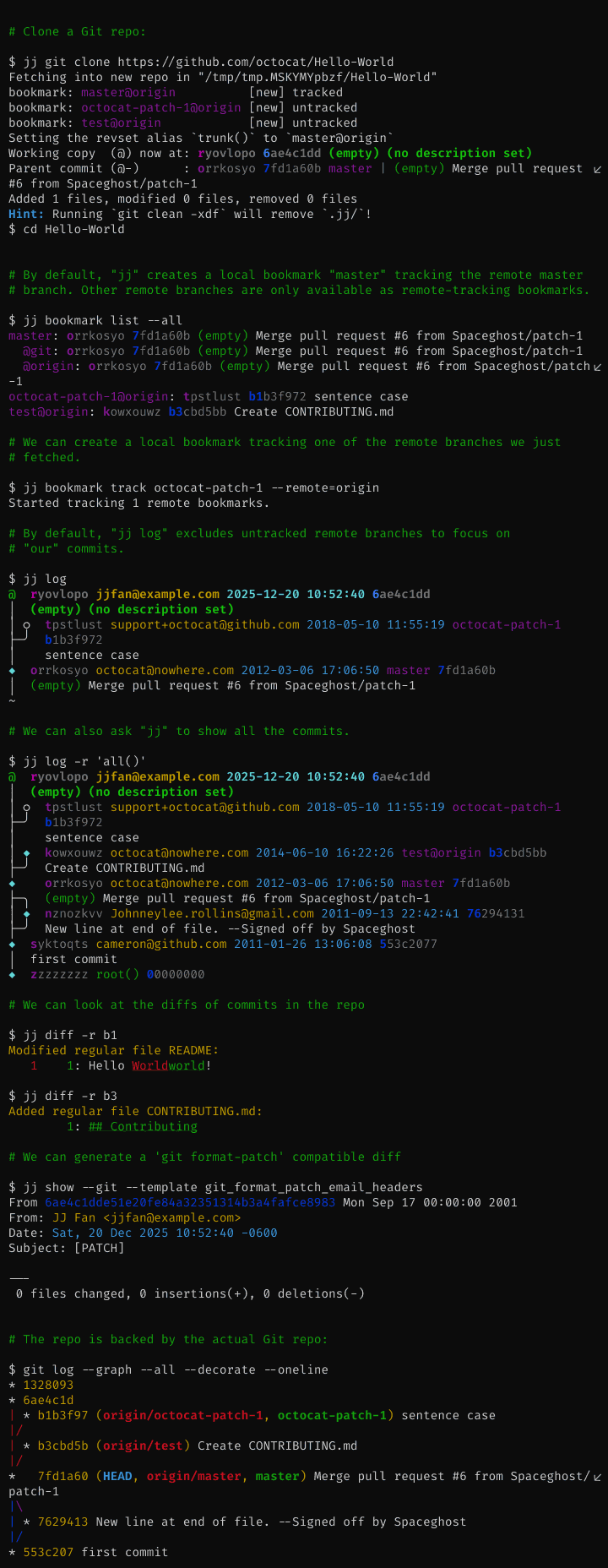
You can even have a colocated local
workspace
where you can use both jj and git commands interchangeably.
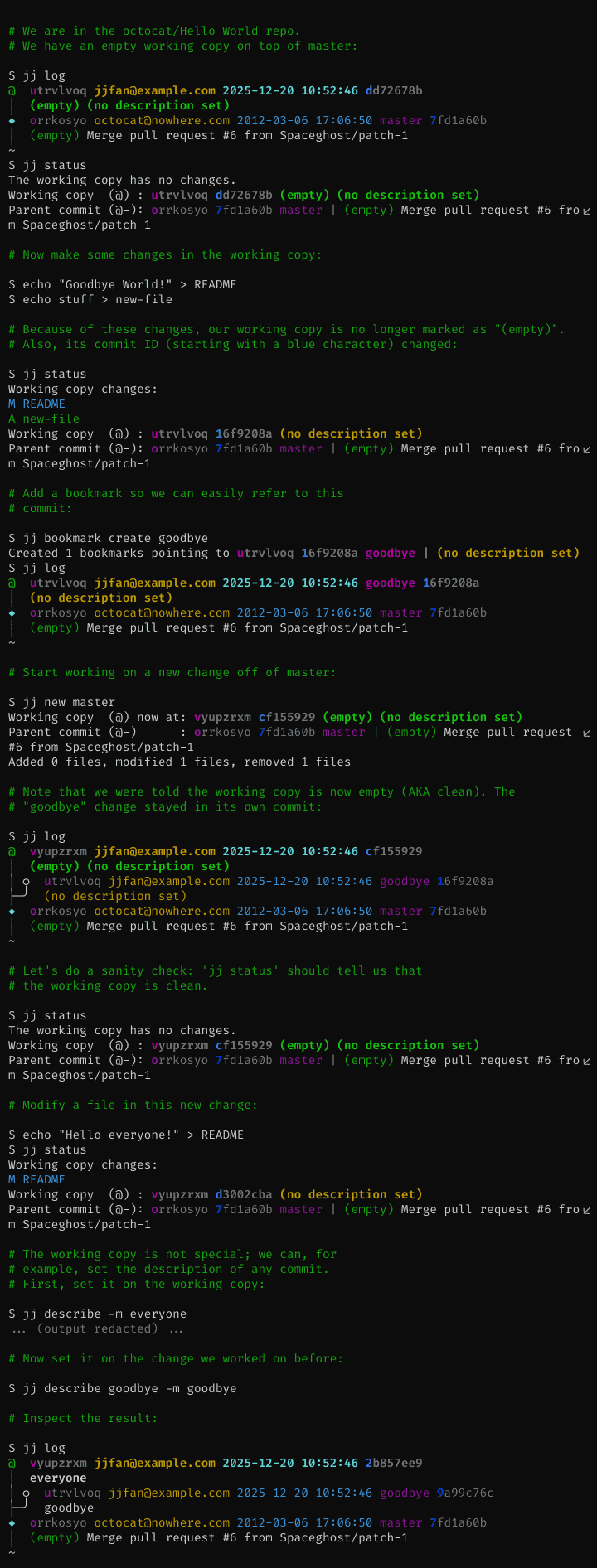
The working copy is automatically committed
Jujutsu uses a real commit to represent the working copy. Checking out a commit
results in a new working-copy commit on top of the target commit. Almost all
commands automatically amend the working-copy commit.
The working-copy being a commit means that commands never fail because the
working copy is dirty (no "error: Your local changes to the following
files..."), and there is no need for git stash. Also, because the working copy
is a commit, commands work the same way on the working-copy commit as on any
other commit, so you can set the commit message before you're done with the
changes.
The repo is the source of truth
With Jujutsu, the working copy plays a smaller role than with Git. Commands
snapshot the working copy before they start, then they update the repo, and then
the working copy is updated (if the working-copy commit was modified). Almost
all commands (even checkout!) operate on the commits in the repo, leaving the
common functionality of snapshotting and updating of the working copy to
centralized code. For example, jj restore (similar to git restore) can
restore from any commit and into any commit, and jj describe can set the
commit message of any commit (defaults to the working-copy commit).
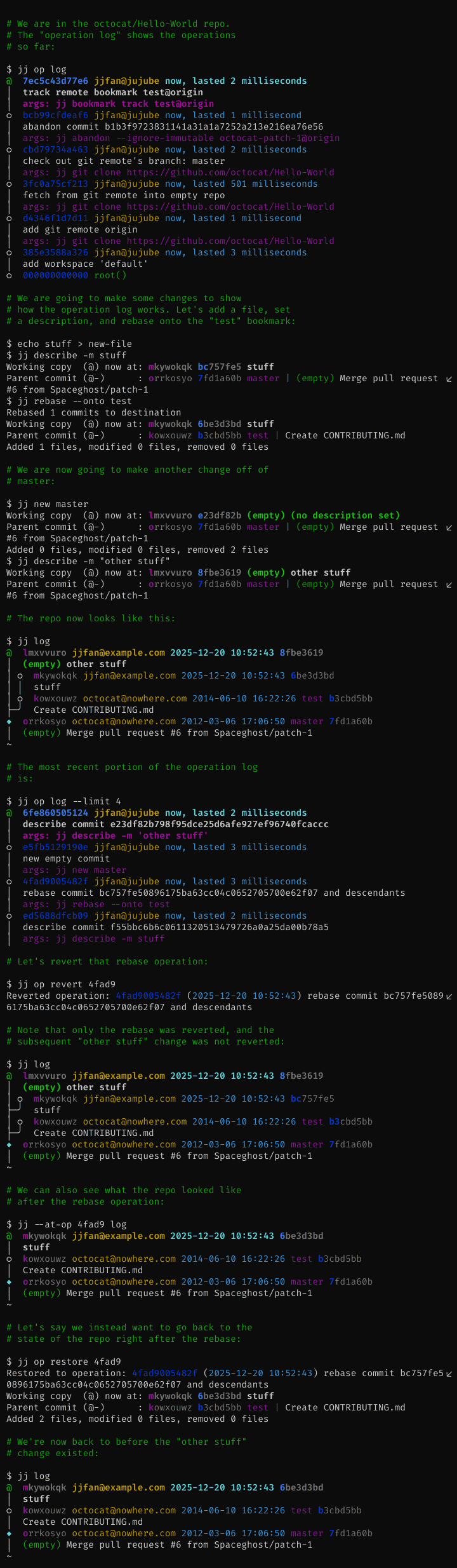
Entire repo is under version control
All operations you perform in the repo are recorded, along with a snapshot of
the repo state after the operation. This means that you can easily restore to
an earlier repo state, simply undo your operations one-by-one or even revert a
particular operation which does not have to be the most recent one.
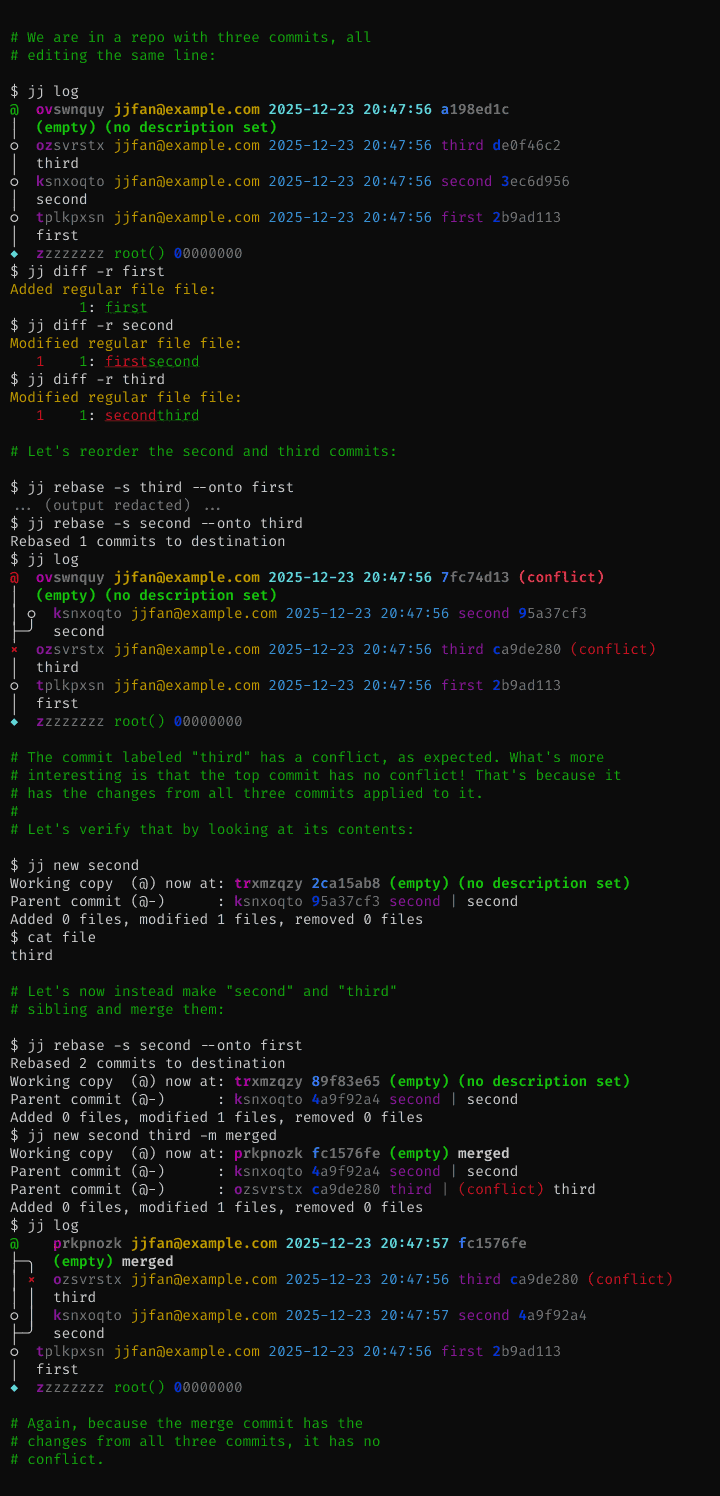
Conflicts can be recorded in commits
If an operation results in
conflicts,
information about those conflicts will be recorded in the commit(s). The
operation will succeed. You can then resolve the conflicts later. One
consequence of this design is that there's no need to continue interrupted
operations. Instead, you get a single workflow for resolving conflicts,
regardless of which command caused them. This design also lets Jujutsu rebase
merge commits correctly (unlike both Git and Mercurial).
Basic conflict resolution:
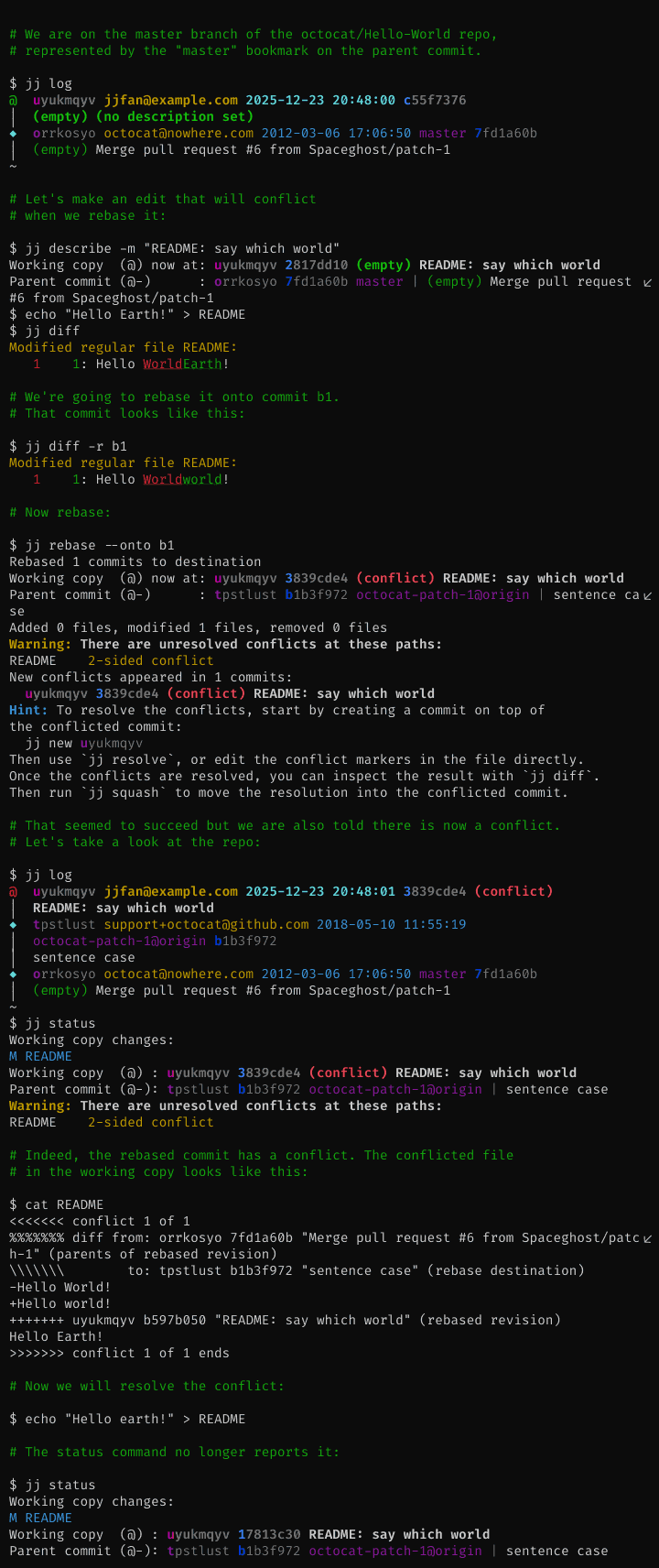
Juggling conflicts:
Automatic rebase
Whenever you modify a commit, any descendants of the old commit will be rebased
onto the new commit. Thanks to the conflict design described above, that can be
done even if there are conflicts. Bookmarks pointing to rebased commits will be
updated. So will the working copy if it points to a rebased commit.
Comprehensive support for rewriting history
Besides the usual rebase command, there's jj describe for editing the
description (commit message) of an arbitrary commit. There's also jj diffedit,
which lets you edit the changes in a commit without checking it out. To split
a commit into two, use jj split. You can even move part of the changes in a
commit to any other commit using jj squash -i --from X --into Y.
Status
The tool is fairly feature-complete, but some important features like support
for Git submodules are not yet completed. There
are also several performance bugs. It's likely that workflows and setups
different from what the core developers use are not well supported, e.g. there
is no native support for email-based workflows.
Today, all core developers use jj to work on jj. I (Martin von Zweigbergk)
have almost exclusively used jj to develop the project itself since early
January 2021. I haven't had to re-clone from source (I don't think I've even had
to restore from backup).
There will be changes to workflows and backward-incompatible changes to the
on-disk formats before version 1.0.0. For any format changes, we'll try to
implement transparent upgrades (as we've done with recent changes), or provide
upgrade commands or scripts if requested.
There are several tools trying to solve similar problems as Jujutsu. See
related work for details.
Contributing
We welcome outside contributions, and there's plenty of things to do, so
don't be shy. Please ask if you want a pointer on something you can help with,
and hopefully we can all figure something out.
We do have a few policies and
suggestions
for contributors. The broad TL;DR:
- Bug reports are very welcome!
- Every commit that lands in the
main branch is code reviewed.
- Please behave yourself, and obey the Community Guidelines.
- There is a mandatory CLA you must agree to. Importantly, it does not
transfer copyright ownership to Google or anyone else; it simply gives us the
right to safely redistribute and use your changes.
Mandatory Google Disclaimer
I (Martin von Zweigbergk, [email protected]) started Jujutsu as a hobby
project in late 2019, and it has evolved into my full-time project at Google,
with several other Googlers (now) assisting development in various capacities.
That said, while Google is one of the main contributors, this is not a
supported Google product, i.e. support is provided by the community.
License
Jujutsu is available as Open Source Software, under the Apache 2.0 license. See
LICENSE for details about copyright and redistribution.
The jj logo was contributed by J. Jennings and is licensed under a Creative
Commons License, see docs/images/LICENSE.






 Jujutsu(jj)是一个兼容 Git 的版本控制系统,力求既简单又强大。它使用 Git 作为存储后端,因此可以与你现有的 Git 远程仓库和工具配合使用。