


mise README

The project's README from github.com/jdx/mise. As one markdown file: README.md.

mise
mise-en-place

Crates.io GitHub GitHub Workflow Status Discord

Dev tools, env vars, and tasks in one CLI

Getting Started • Documentation • Dev Tools • Environments • Tasks

Sponsored by

Entire     Omacom Foundation

View all sponsors


What is mise?

mise manages your development tools, environment variables, and project tasks. Declare them in mise.toml, commit the file, and use the same setup in your shell, your editor, and CI.

Use the parts you need. Start with one tool or task and add more to the same config.

Quickstart

1. Install mise

On macOS or Linux:

curl https://mise.run | sh
~/.local/bin/mise --version

On Windows, install with winget install jdx.mise. See the installation guide for package managers and other installation methods.

The examples below use mise. If it isn't on your PATH yet, use ~/.local/bin/mise instead on macOS or Linux.

2. Try a tool

mise exec node@24 -- node --version

This installs Node.js if needed and runs it for this command, without changing your project configuration. No shell activation is required.

For an existing project that already has a reviewed mise.toml, run mise install from its directory and mise tasks ls to discover its tasks.

3. Give a project its own environment

In a project directory, create mise.toml:

[tools]
node = "24"

[env]
NODE_ENV = "development"

[tasks.hello]
description = "Print the project's Node.js version and environment"
run = '''node -e "console.log(process.version, process.env.NODE_ENV)"'''

Run the task:

mise run hello

mise installs the configured tool if needed, loads NODE_ENV, and runs the task. The output includes the Node.js version and development. Commit mise.toml so teammates and CI can run the same command.

To add tools later, run mise use [email protected] from the project directory. Use mise use --global to set personal defaults. Version requests such as "24" select a release in that series; use exact pins or a lockfile when you need everyone to use the same resolved version.

4. Activate your shell (optional)

Activation makes project tools and environment variables available directly when you enter a directory. For an installation from mise.run, add one of these lines to the corresponding shell config:

# ~/.bashrc
eval "$(~/.local/bin/mise activate bash)"
# ~/.zshrc
eval "$(~/.local/bin/mise activate zsh)"
# ~/.config/fish/config.fish
~/.local/bin/mise activate fish | source

Restart your shell, then run node --version inside the project. For PowerShell and other installation methods, follow the shell setup guide.

Check your project setup

mise config ls
mise ls --current
mise exec -- node --version

These show which configuration files are loaded, which versions are selected, and whether the tool runs in the project environment. If mise exec works but node --version does not, check shell activation with mise doctor.

Where to go next

I want to… Read
Set up mise for the first time Getting started
Add mise to an existing project Walkthrough
Understand configuration and overrides Configuration
Use mise in an editor or CI IDE integration · Continuous integration
Find a command or solve a problem CLI reference · Troubleshooting
Contribute to mise Contributing · Writing docs

Demo

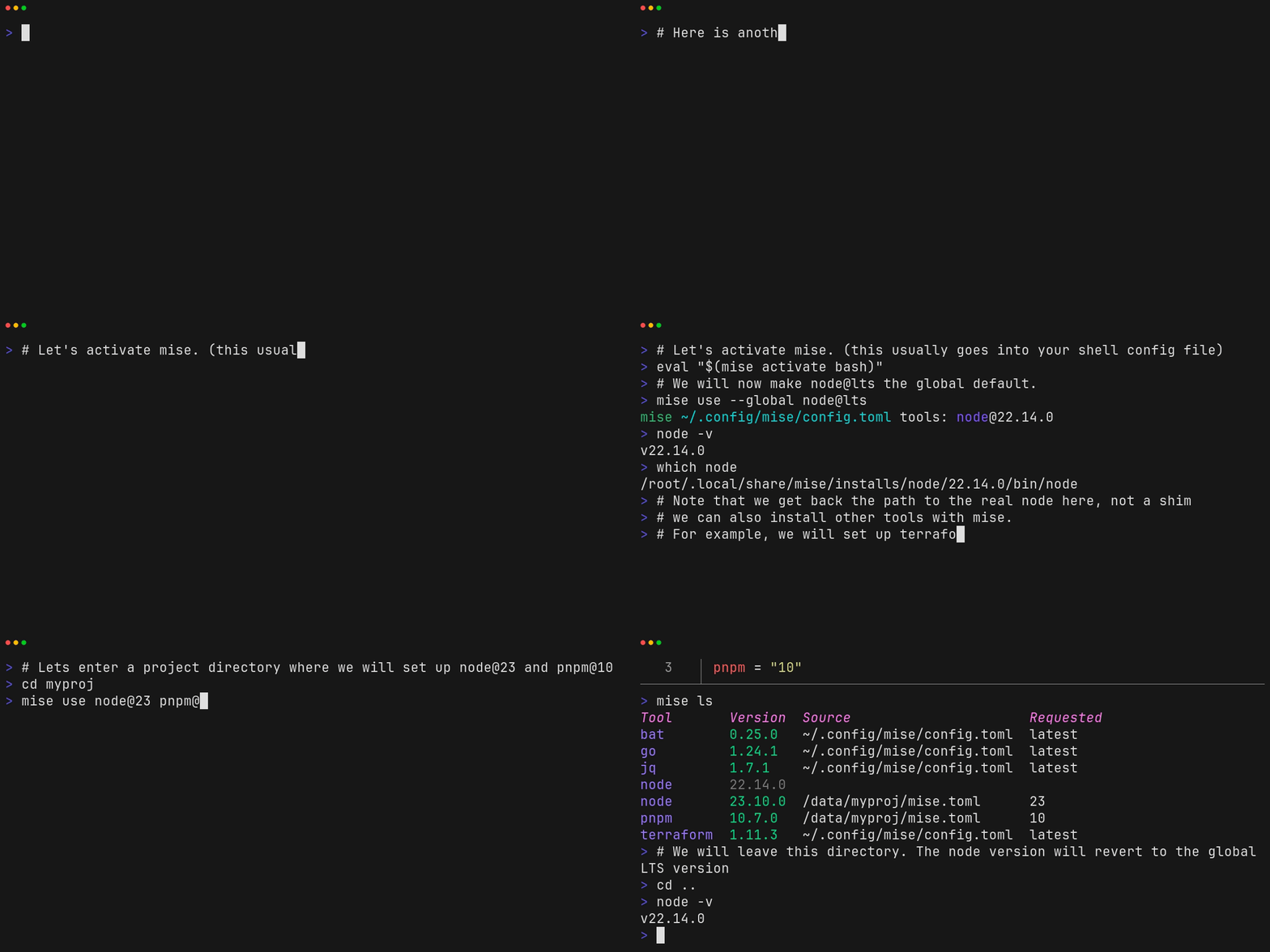
Watch mise install tools and switch Node.js versions as you change directories.

Demo of mise managing tools

A text transcript is also available.

GitHub Issues & Discussions

Use GitHub Discussions for support and feature requests. GitHub Issues are not used for new reports.

Special Thanks

Namespace
Thanks to Namespace for providing CI services for mise.

Contributors

Contributors

mise (jdx/mise)

Searching Database…

35.1K ·GitHub
这是什么?mise 是一个命令行工具,用来管理开发工具、环境变量和项目任务。所有内容都声明在一个 mise.toml 文件里并提交到仓库,这样你的终端、编辑器和 CI 共用同一套配置。
那它是加到我代码里的库,还是装在我电脑上的软件?它是一个独立的命令行工具,装在你自己的电脑上——macOS、Linux 或 Windows 都行。项目里只需要带一个 mise.toml 文件,由 mise 去读取。
我怎么把它跑起来?在 macOS 或 Linux 上用 mise.run 脚本安装,在 Windows 上用 'winget install jdx.mise'。在一个带 mise.toml 的项目里,运行 'mise install' 装好所需的工具,再运行 'mise tasks ls' 查看有哪些任务。
我需要修改终端的配置文件它才能工作吗?不需要——所有操作都可以直接通过 mise 完成,不用动你的 shell。你也可以选择在 shell 配置里加一行激活语句,这样进入项目目录时工具和环境变量会自动生效。
如果我要的是 Node 22,我的同事拿到的会是完全相同的版本吗?不一定:像 '24' 这种宽泛的写法只会选中该系列里的某个版本,不同机器解析出的版本可能不一样。如果大家需要完全一致的结果,就要锁定精确版本,或者提交一个 lockfile。
它能安装哪些开发工具?Node.js、Python、Go 以及几百种其他工具,每个项目还可以用不同的版本。在项目里用 'mise use [email protected]' 添加工具,或者用 'mise use --global' 设置自己的全局默认版本。
除了切换工具版本,它还能做什么?它可以设置项目环境变量、加载 .env 文件,在所需的工具和环境下运行构建和测试任务,还能用同一个 mise.toml 把整台机器配置好——包括系统软件包、dotfiles 和各种服务。
它怎么保证我的同事和 CI 跟我保持一致?你把 mise.toml 提交到仓库,所有人——包括 CI——都会运行同样的命令,得到相同的工具和环境。一个 mise.toml 经过审核的项目,只需 'mise install' 就可以开始干活了。
某个工具没有用上我项目里指定的版本,我怎么排查原因?运行 'mise doctor':它会显示加载了哪些配置文件、选中了哪些版本,以及 shell 激活是否正常。如果 'mise exec' 能正常运行某个工具,但 'node --version' 的结果不对,doctor 会指出是激活的问题。
What are similar projects?gvm, just, nvm, volta, nub, task, tpm, asdf
Creator
jdx
Size
146.6 MB
Stars
35.1K
Age
3y
Commits · 90 Days