
What is this?
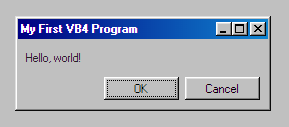
 98.css is a CSS design system that makes semantic HTML look like a Windows 98 interface, letting you build faithful retro-UI recreations.
98.css is a CSS design system that makes semantic HTML look like a Windows 98 interface, letting you build faithful retro-UI recreations.Is it a UI framework or just a stylesheet?It's just a CSS file with no JavaScript, so it works with any frontend framework you choose.
It's just a CSS file with no JavaScript, so it works with any frontend framework you choose.How do I add it to my project?Import it directly from unpkg, or grab it from the releases page or npm.
Import it directly from unpkg, or grab it from the releases page or npm.Do I need any build tools or JS to use it?No, it's pure CSS applied to semantic HTML; you only need Node/npm if you want to develop or rebuild the library itself.
No, it's pure CSS applied to semantic HTML; you only need Node/npm if you want to develop or rebuild the library itself.Does it work with React or vanilla JS out of the box?Yes, the README links working examples for both React and vanilla JavaScript usage.
Yes, the README links working examples for both React and vanilla JavaScript usage.Are there similar design systems for other old OS looks?Yes, the author also maintains XP.css and 7.css for Windows XP and Windows 7 style recreations.
Yes, the author also maintains XP.css and 7.css for Windows XP and Windows 7 style recreations.Where can I see the full list of components?There's a dedicated documentation site listing specific instructions for each of the library's components.
There's a dedicated documentation site listing specific instructions for each of the library's components.Why Guy Fieri as a topic tag?It's a lighthearted, silly branding touch the author added; the project itself is explicitly described as a fun, playful side project meant to be approachable for new open-source contributors.
It's a lighthearted, silly branding touch the author added; the project itself is explicitly described as a fun, playful side project meant to be approachable for new open-source contributors.What are similar projects?mdb-ui-kit, pure, weui, bootstrap-table, daisyui, milligram, NES.css, yeti
mdb-ui-kit, pure, weui, bootstrap-table, daisyui, milligram, NES.css, yetiWhich topics is it in?retro, css-framework, frontend-framework, design-system, ui-components, css, html, ui, npm, frontend, nodejs, library
retro, css-framework, frontend-framework, design-system, ui-components, css, html, ui, npm, frontend, nodejs, library