
Hydra Download Manager (HDM)
Fast, resilient, multi-source download manager and accelerator for Windows, macOS, and Linux.
https://hydra.javad.dev





Contents
Overview
Hydra Download Manager (HDM) is an open-source, high-performance network file retriever and download accelerator designed for speed, resilience, and adaptability. It dynamically partitions downloads across multiple connections and independent mirror sources, continuously rebalancing work to maximize throughput without stalling on slow peers. It ships as both a wget/curl-compatible CLI and a cross-platform desktop download manager with browser integration.
Key Features
Engine
- Adaptive Concurrency — splits files across connections and mirrors, rebalancing live
- Range Stealing — reassigns work from slow peers to fast ones automatically
- Stall Detection — statistical estimators catch degraded connections early
- Broad Protocol Support — HTTP(S), FTP, CONNECT tunneling, SOCKS4/4a/5
- Integrity Checks — checksum manifests plus Reed–Solomon bitrot protection
- Flat Memory Use — direct positioned writes keep RAM usage constant
|
CLI
hydra or hya — the same CLI under a short second name, on every platformwget / curl Compatible — drop-in flag and dialect support- Interactive TUI — manage, pause, resume, and monitor queued downloads
- Smart File Sorting — content-based type detection and auto-sort
- Remote Checksum Lookup — verify server-advertised digests before or after download
|
Desktop GUI
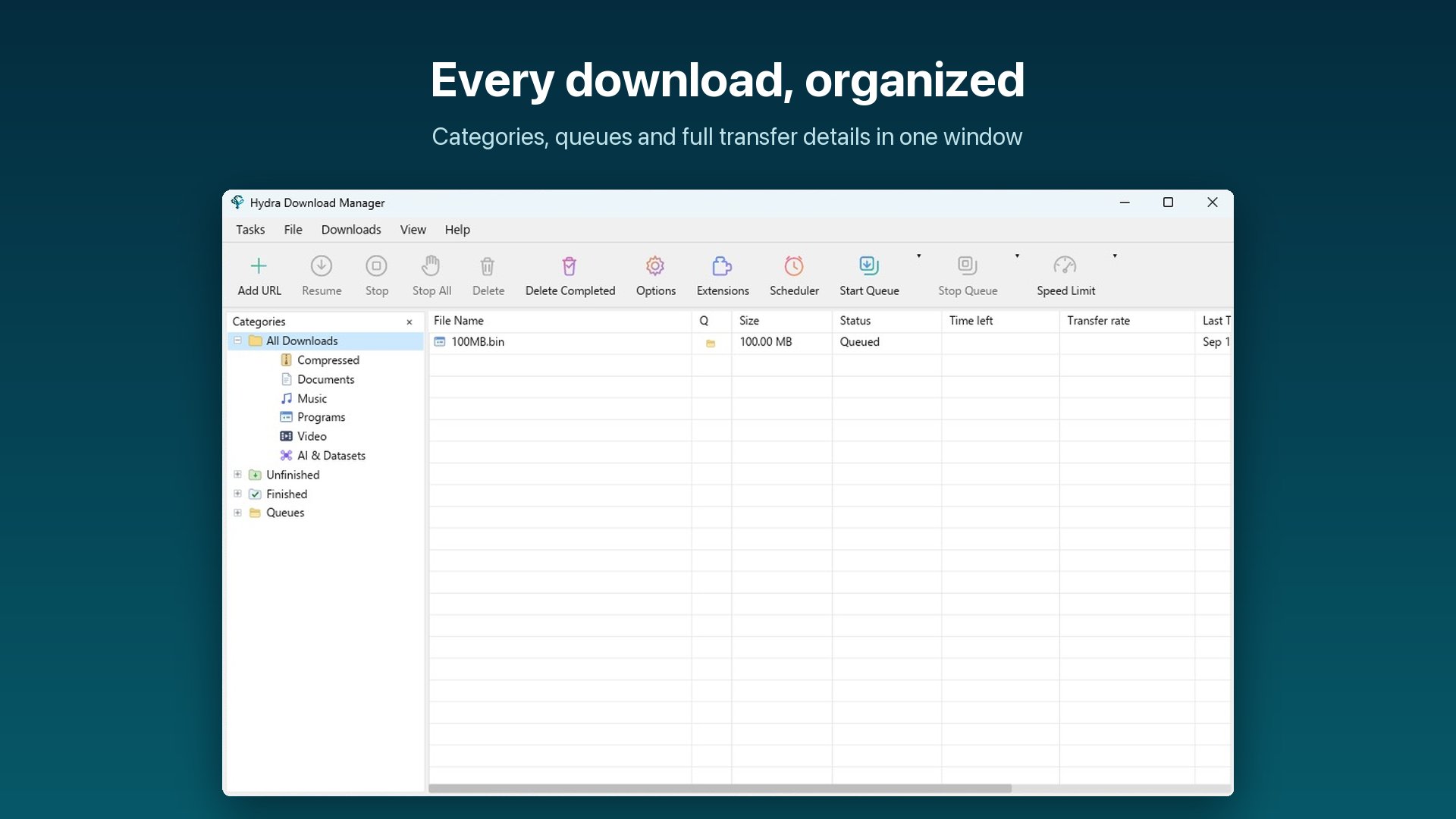
- Cross-Platform App — Windows, macOS, and Linux with categories and progress detail
- Browser Integration — Chrome, Edge, Firefox, and Safari extensions hand off downloads
- Queue & Scheduler — scheduled start/stop times with retry tracking
- Desktop Niceties — tray icon, sounds, launch-on-startup, localized UI
- Portable Profile —
hydra-gui --config ./here keeps settings, downloads list and logs in that directory
|
Installation
Homebrew (macOS / Linux)
CLI:
brew install ja7ad/tap/hydra
macOS Desktop App (GUI):
brew install --cask ja7ad/tap/hydra
Linux Packages (Ubuntu PPA / Fedora COPR / Arch Linux AUR)
Ubuntu / Debian-based (Launchpad PPA):
sudo add-apt-repository ppa:sonycore/hydra
sudo apt update
sudo apt install hydra
PPA Repository: launchpad.net/~sonycore/+archive/ubuntu/hydra
Fedora / RHEL-based (Fedora COPR):
sudo dnf copr enable sonycore/hydra
sudo dnf install hydra
COPR Repository: copr.fedorainfracloud.org/coprs/sonycore/hydra
Arch Linux (AUR):
Build from source:
paru -S hydra-download-manager
# or: yay -S hydra-download-manager
Precompiled binary:
paru -S hydra-download-manager-bin
# or: yay -S hydra-download-manager-bin
AUR Packages: hydra-download-manager | hydra-download-manager-bin
AppImage (portable, self-updating)
One file, no installation, no root. Download it from the
latest release, make it
executable, and run it:
chmod +x Hydra-*-x86_64.AppImage
./Hydra-*-x86_64.AppImage
aarch64 images are published alongside the x86_64 ones. Every release is
built on the oldest supported Ubuntu and verified to run on 22.04 through the
current release, so one image covers the whole line and the distributions
downstream of it.
The image carries the GUI, the hydra CLI, the hydra-host native-messaging
bridge and the update finisher. On its first start it writes a menu entry, a
copy of the browser extensions and the native-messaging manifests into
~/.local/share/hydra — all of them pointing at the image file, so moving or
renaming it is repaired on the next launch. Nothing is written outside your
home directory and nothing needs root.
| Command |
What it does |
./Hydra-*.AppImage |
run the GUI |
./Hydra-*.AppImage --hydra-exec hydra … |
run the CLI inside the image |
./Hydra-*.AppImage --hydra-install |
write the menu entry and browser manifests now |
./Hydra-*.AppImage --hydra-uninstall |
remove them again (downloads and settings are kept) |
./Hydra-*.AppImage --hydra-extensions |
print the directory to load the unpacked extensions from |
Set HYDRA_APPIMAGE_NO_INTEGRATION=1 for a run that writes nothing outside
your download directory. For a fully self-contained copy — settings included —
create a directory named after the image with a .home suffix next to it
(Hydra-0.3.14-x86_64.AppImage.home); the AppImage runtime then uses it as
$HOME, which is what makes the image portable across machines on a USB stick.
Updates. This is the one Linux build Hydra can update itself: the deb and
the rpm install into /usr, which only their package manager may rewrite, so
the in-app updater offers you the new package instead of touching those files.
An AppImage is a single file you own wherever you put it, so Update Now
replaces that file and relaunches — including when it sits somewhere only root
can write, where it asks for your password first. The image also advertises
zsync update information, so AppImageUpdate and appimaged can update it
too.
Because it does not bundle GTK, the graphics stack or ALSA — those come from
your desktop, where they are already correct — a portal-capable desktop is
still what the file dialogs need. Nothing else is required.
Quick Install (prebuilt binaries)
macOS / Linux — installs the GUI bundle (GUI + CLI + browser extensions) by default:
curl -fsSL https://raw.githubusercontent.com/ja7ad/hydra/main/install.sh | bash
CLI only:
curl -fsSL https://raw.githubusercontent.com/ja7ad/hydra/main/install.sh | bash -s -- --cli
Windows (PowerShell) — installs the GUI bundle by default:
irm https://raw.githubusercontent.com/ja7ad/hydra/main/install.ps1 | iex
CLI only:
& ([scriptblock]::Create((irm https://raw.githubusercontent.com/ja7ad/hydra/main/install.ps1))) -Cli
The scripts detect your OS and architecture (amd64/arm64), fetch the matching archive from the latest GitHub release, and install it — on Linux and macOS to /usr/local (falling back to ~/.local; override with --prefix DIR), on Windows to %LOCALAPPDATA%\Programs\Hydra. The CLI lands under both hydra and the short hya; an existing hya on the same prefix is never overwritten. GUI installs also register the browser native-messaging host. Pin a release with --version vX.Y.Z / -Version vX.Y.Z, or download the archives yourself from the releases page.
A GUI install is a real desktop app, not a loose binary:
- Windows — a start-menu shortcut (
-Desktop adds a desktop one) and an Apps & features entry, so Hydra is listed and uninstallable from Settings like any other app.
- macOS —
Hydra Download Manager.app is installed into /Applications (override with --app-dir DIR, e.g. ~/Applications), with its icon and name in Launchpad, Spotlight, the Dock and the app switcher. hydra, hya, hydra-gui and hydra-host in <prefix>/bin are symlinks into the app, so the CLI stays on PATH and one update refreshes both.
- Linux — the logo lands in the hicolor icon theme and a
hydra.desktop entry in your applications directory (plus the prefix's, for a system-wide install), so the app shows up in the launcher, the dock and the switcher with its own icon.
Either way the GUI can update itself in place afterwards (Options → General → Check for updates), including an install that lives in a root-owned directory — it asks for authorisation before replacing those files.
Beta channel — --beta (-Beta on Windows) installs the newest -rc pre-release when it is ahead of the latest stable release; otherwise it installs the stable release:
curl -fsSL https://raw.githubusercontent.com/ja7ad/hydra/main/install.sh | bash -s -- --beta
& ([scriptblock]::Create((irm https://raw.githubusercontent.com/ja7ad/hydra/main/install.ps1))) -Beta
The GUI's in-app updater follows the same rule: enable Options → General → Download Beta channel and update checks will also offer release candidates while one is ahead of stable.
macOS notes: since the app isn't notarized yet, Gatekeeper may block it — see the macOS Permissions Guide for granting the required permissions. If you installed via the .dmg and macOS refuses to open the app ("damaged" or "unidentified developer"), clear the quarantine attribute:
xattr -cr /Applications/Hydra\ Download\ Manager.app
From Source
Ensure you have Rust (1.80+) installed:
git clone https://github.com/ja7ad/hydra.git
cd hydra
cargo build --release
The compiled binary will be located at target/release/hydra. To build the GUI and native-messaging host as well, run make build.
Browser Extension
Hydra integrates directly with web browsers to automatically capture downloads, provide right-click context menu options, and intercept media streams.
Official Store Listings (Recommended)
Install the extension directly from the official store for your browser:
Tip: In the desktop GUI, you can also view status and open extension store listings directly from Options → Extensions or the Extensions toolbar button.
Development & Manual Installation
Extension source code and resources are maintained under the extensions/ directory:
Every installer also ships pre-built extension packages with the app in both packed (.zip / .xpi) and unpacked shapes:
| Install |
Extensions directory |
| Windows (setup.exe) |
%LOCALAPPDATA%\Programs\Hydra\extensions |
| macOS (.app / DMG) |
Hydra Download Manager.app/Contents/Resources/extensions |
| macOS (.pkg) |
/Library/Application Support/Hydra/extensions |
| Linux (.deb / .rpm) |
/usr/share/hydra-download-manager/extensions |
| Linux (AppImage) |
~/.local/share/hydra/extensions |
Archive / install.sh |
<prefix>/share/hydra/extensions |
Sideloading Unpacked / Development Builds
- Chrome, Edge, Opera, Brave, Vivaldi, Arc, Chromium — open
chrome://extensions
(edge://extensions, opera://extensions, …), turn on Developer mode, choose
Load unpacked, and pick the extensions/chrome/ (or bundled chrome/) directory. The manifest key pins the id to
jpnonmbbkjdpeebdhkjoliklfhkdcomj across all Chromium browsers, matching the native-messaging
host allow-list. The packed .zip is the Web Store upload format, and the signed .crx is for enterprise policy
deployment (ExtensionSettings / ExtensionInstallForcelist against an update manifest you
host).
- Firefox — open
about:debugging#/runtime/this-firefox → Load Temporary Add-on… and pick
extensions/firefox/manifest.json or the packed .xpi. Developer Edition, Nightly, and ESR can install it
permanently after setting xpinstall.signatures.required to false in about:config.
Building Extensions from Source
To build and assemble extensions from a repository checkout:
make extensions                                   # -> target/extensions
make extensions ARGS="--crx-key path/to/key.pem"  # also sign a .crx
A .crx is packed whenever a signing key is available (--crx-key, $HYDRA_CRX_KEY, or
target/hydra-chrome-crx.pem); --crx generates one if there is none. Sign with the key behind
the pinned manifest key — any other key changes the extension id, and the script says so.
ARGS=--sign additionally fetches an addons.mozilla.org-signed .xpi (needs web-ext and AMO
API keys).
Uninstall
Quick Uninstall (prebuilt installs)
macOS / Linux:
curl -fsSL https://raw.githubusercontent.com/ja7ad/hydra/main/uninstall.sh | bash
To also delete config, state, and logs:
curl -fsSL https://raw.githubusercontent.com/ja7ad/hydra/main/uninstall.sh | bash -s -- --purge
Windows (PowerShell):
irm https://raw.githubusercontent.com/ja7ad/hydra/main/uninstall.ps1 | iex
To also delete config and state:
& ([scriptblock]::Create((irm https://raw.githubusercontent.com/ja7ad/hydra/main/uninstall.ps1))) -Purge
Homebrew:
# Uninstall CLI
brew uninstall hydra

# Uninstall macOS Desktop App (and zap settings)
brew uninstall --cask --zap hydra
The scripts remove binaries, extensions, manifests, desktop shortcuts, and startup entries. On macOS, they also remove the bundled app and package receipts. Config and state are kept by default (~/.config/hydra on Linux/macOS, %APPDATA%\hydra on Windows); use --purge / -Purge to delete them.
Usage
Basic Download
# Retrieve a file with automatic concurrency discovery
hydra https://example.com/archive.tar.gz

# Specify output destination
hydra https://example.com/archive.tar.gz -o output.tar.gz
hya works everywhere hydra does. Every install channel — the install
scripts, Homebrew, the .deb/.rpm/AUR packages, the macOS .pkg and the
Windows installer — puts the CLI on your PATH under both names. It is
three letters to type, and it is also the name to reach for on a machine
that already has THC-Hydra,
the login auditor, which is hydra too. Shell completions are installed for
both; hydra install-completions --bin-name hya adds them by hand.
Multi-Connection & Mirror Sources
# Explicit connection count (e.g., 8 connections)
hydra -x 8 https://example.com/largefile.iso

# Fetch across multiple mirror origins serving identical files
hydra https://mirror1.example.org/file.iso https://mirror2.example.org/file.iso
A Metalink document supplies the three things a bare URL cannot: every mirror
that holds the object, its exact size, and what it must hash to. HYDRA
reads both dialects — Metalink 3.0 (.metalink, what mirrormanager and most
distribution redirectors emit) and Metalink 4 / RFC 5854 (.meta4) — and needs
no flag to do it:
# A document on disk, whatever it is called: the content is read.
hydra ./Fedora-Workstation.metalink

# A redirector that serves one. Detected from its Content-Type on the probe
# that was going to happen anyway.
hydra "https://mirrors.fedoraproject.org/metalink?repo=fedora-40&arch=x86_64"

# Or name it outright, when a URL reveals nothing about itself.
hydra --metalink https://example.org/big.iso.meta4
What that buys, over the same object fetched from one URL:
- Mirrors that can actually be assembled together. Splicing ranges across
hosts is normally gated on every source agreeing about a strong validator —
and independent mirror operators cannot share an
ETag, so that gate keeps
exactly one source out of a nineteen-mirror list. A document states the size
and a content digest from outside the mirrors, so agreement is established
against the document instead. Stronger, and satisfiable.
- A reserve bench. Politeness authorises a handful of connections; the rest
of the list is held back. When a mirror dies or goes silent mid-transfer, its
connections are re-pointed at a reserve in place — the socket count stays
what politeness allowed, and no range is stranded.
- Localised repair. Where the document publishes
<pieces>, each chunk is
verified as the file lands and a bad one costs a single chunk refetched from a
different mirror, not a whole re-download.
Read one without fetching anything, including what HYDRA would do with it:
hydra metalink ./Fedora-Workstation.metalink
hydra metalink --json h

 Hydra (HDM) — быстрый отказоустойчивый менеджер загрузок и ускоритель, который разбивает файлы на несколько соединений и зеркальных источников, с CLI, совместимым с wget/curl, и кроссплатформенным десктопным GUI.