438 ·GitHub
Что это?
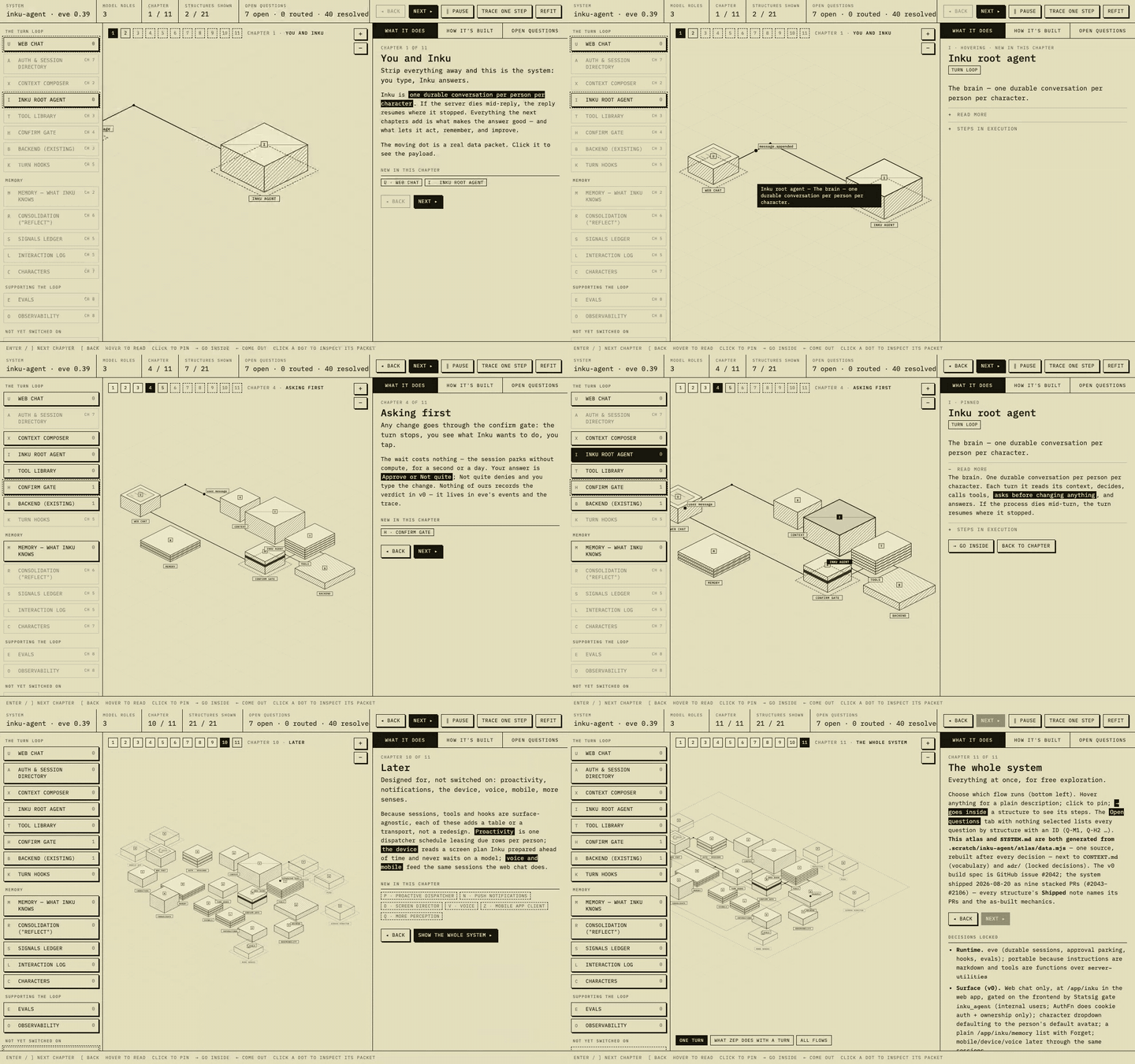
 Skill для агентов, который превращает обсуждение архитектуры в исследуемый изометрический атлас: один файл данных создаёт и интерактивную HTML-карту, и сгенерированный текстовый двойник SYSTEM.md.
Skill для агентов, который превращает обсуждение архитектуры в исследуемый изометрический атлас: один файл данных создаёт и интерактивную HTML-карту, и сгенерированный текстовый двойник SYSTEM.md.Это отдельное приложение или то, что использует мой кодинг-агент?Это agent skill в стиле Claude (SKILL.md плюс скрипт сборки и HTML-шаблон), который ваш агент вызывает во время беседы, а не отдельное приложение, которое вы запускаете сами.
Это agent skill в стиле Claude (SKILL.md плюс скрипт сборки и HTML-шаблон), который ваш агент вызывает во время беседы, а не отдельное приложение, которое вы запускаете сами.Как его установить и вызвать?Установите через skills CLI в Claude Code, Cursor, Copilot, Codex, Gemini, Cline или Amp либо вручную скопируйте skills/system-atlas/ в каталог skills вашего агента (например, ~/.claude/skills/system-atlas/). Вызывается простым запросом в чате, например «сделай мне атлас этого пайплайна».
Установите через skills CLI в Claude Code, Cursor, Copilot, Codex, Gemini, Cline или Amp либо вручную скопируйте skills/system-atlas/ в каталог skills вашего агента (например, ~/.claude/skills/system-atlas/). Вызывается простым запросом в чате, например «сделай мне атлас этого пайплайна».Нужна ли система сборки или runtime-зависимости, чтобы смотреть атлас?Нет. Отрисованная карта — это единственный самодостаточный HTML-файл без этапа сборки и runtime-зависимостей; data.mjs обрабатывается build.mjs (запускается инструментами в стиле Node) для его создания, а раздаётся он так же просто, как npx serve или python3 -m http.server.
Нет. Отрисованная карта — это единственный самодостаточный HTML-файл без этапа сборки и runtime-зависимостей; data.mjs обрабатывается build.mjs (запускается инструментами в стиле Node) для его создания, а раздаётся он так же просто, как npx serve или python3 -m http.server.Что будет, если дизайн изменится после построения атласа?Атлас остаётся точным, только если вы пересобираете и заново публикуете его после каждого изменения; устаревший непересобранный атлас прямо называется хуже, чем отсутствие атласа вообще.
Атлас остаётся точным, только если вы пересобираете и заново публикуете его после каждого изменения; устаревший непересобранный атлас прямо называется хуже, чем отсутствие атласа вообще.Кто решает, куда коммитить сгенерированный атлас и SYSTEM.md?Это зависит от собственной политики репозитория по документации (docs/ или /atlas/ для репозиториев, коммитящих дизайн-документы, git-игнорируемая черновая папка для репозиториев, хранящих только ADR и глоссарий), и skill явно спрашивает, прежде чем что-либо коммитить.
Это зависит от собственной политики репозитория по документации (docs/ или /atlas/ для репозиториев, коммитящих дизайн-документы, git-игнорируемая черновая папка для репозиториев, хранящих только ADR и глоссарий), и skill явно спрашивает, прежде чем что-либо коммитить.Как он не даёт диаграмме и документации разойтись?И интерактивная карта, и SYSTEM.md генерируются build.mjs из одного-единственного файла data.mjs, поэтому существует ровно одно место, где дизайн может быть ошибочным, и одно изменение обновляет оба представления.
И интерактивная карта, и SYSTEM.md генерируются build.mjs из одного-единственного файла data.mjs, поэтому существует ровно одно место, где дизайн может быть ошибочным, и одно изменение обновляет оба представления.Что такое главы с прогрессивным раскрытием?Вместо показа всей системы сразу каждая глава раскрывает не более трёх новых структур и один небольшой поток данных, затрагивая только уже виденное, а финальная глава показывает всё с выбором потока.
Вместо показа всей системы сразу каждая глава раскрывает не более трёх новых структур и один небольшой поток данных, затрагивая только уже виденное, а финальная глава показывает всё с выбором потока.Как отслеживаются открытые вопросы дизайна?Каждый открытый вопрос получает стабильный Q-ID и состояние (открыт, решён с ответом и датой или передан на именованный следующий шаг), чтобы раунды обратной связи не теряли, о чём спрашивалось.
Каждый открытый вопрос получает стабильный Q-ID и состояние (открыт, решён с ответом и датой или передан на именованный следующий шаг), чтобы раунды обратной связи не теряли, о чём спрашивалось.Можно изучить потоки данных, показанные на карте?Да, движущиеся точки на карте представляют реальные запросы; клик по точке открывает панель с её маршрутом и репрезентативной полезной нагрузкой JSON.
Да, движущиеся точки на карте представляют реальные запросы; клик по точке открывает панель с её маршрутом и репрезентативной полезной нагрузкой JSON.What are similar projects?architecture-diagram-generator, live-panel-skill, answer-me-with-html, axton-obsidian-visual-skills, drawio-skill, dashi-ppt-skill, archify, draw-architecture
architecture-diagram-generator, live-panel-skill, answer-me-with-html, axton-obsidian-visual-skills, drawio-skill, dashi-ppt-skill, archify, draw-architectureWhich topics is it in?diagramming, diagram, system-design, architecture, agent-skill, visualization, skill, documentation, html, claude, markdown, ai-agent
diagramming, diagram, system-design, architecture, agent-skill, visualization, skill, documentation, html, claude, markdown, ai-agent