438 ·GitHub
What is this?
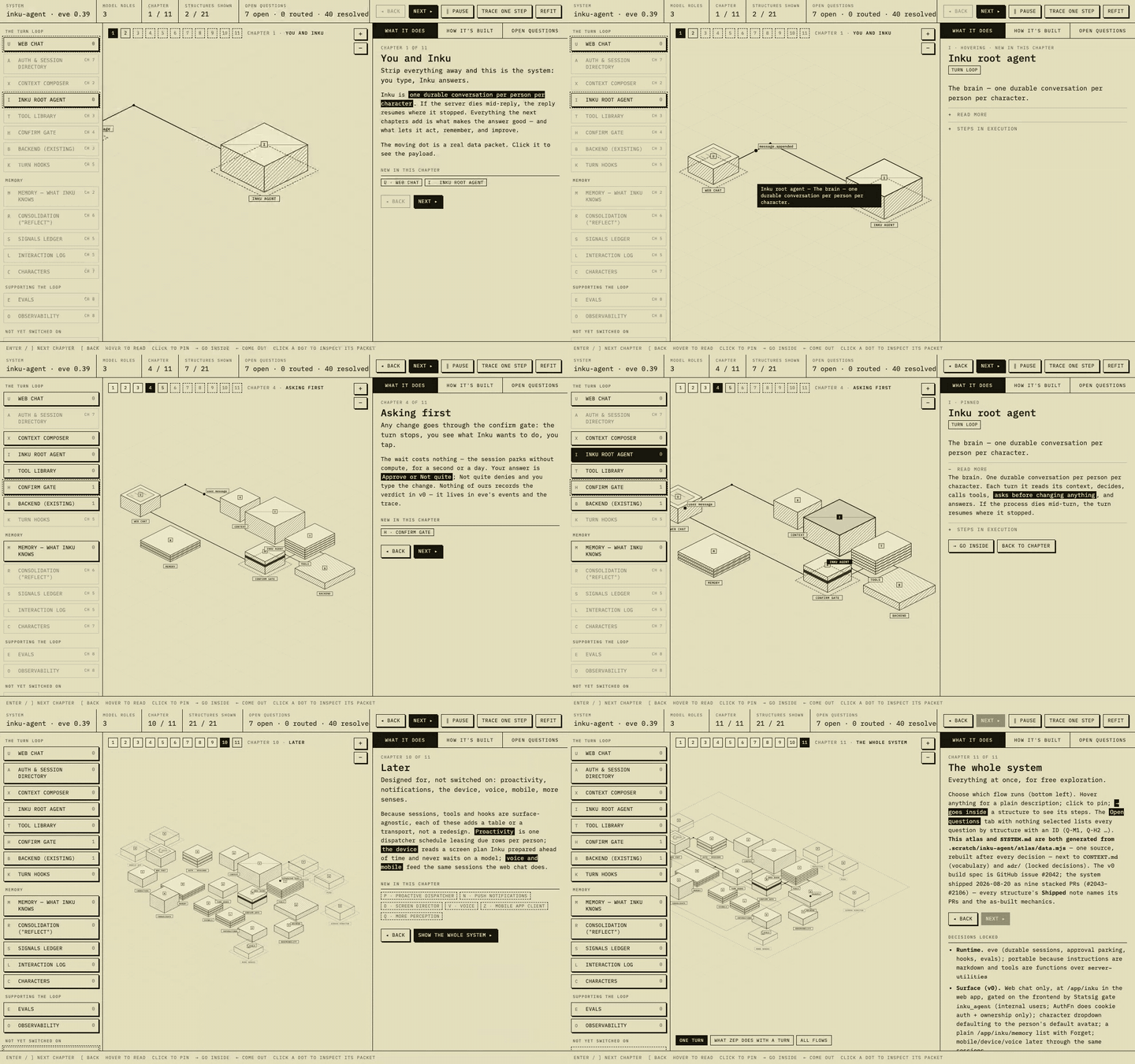
 An agent skill that turns an architecture discussion into an explorable isometric atlas: one data file produces both an interactive HTML map and a generated SYSTEM.md text twin.
An agent skill that turns an architecture discussion into an explorable isometric atlas: one data file produces both an interactive HTML map and a generated SYSTEM.md text twin.Is this a standalone app or something my coding agent uses?It is a Claude-style agent skill (SKILL.md plus a build script and HTML template) that your agent invokes during a conversation, not a standalone application you run yourself.
It is a Claude-style agent skill (SKILL.md plus a build script and HTML template) that your agent invokes during a conversation, not a standalone application you run yourself.How do I install and trigger it?Install with the skills CLI into Claude Code, Cursor, Copilot, Codex, Gemini, Cline or Amp, or manually copy skills/system-atlas/ into your agent's skills directory (e.g. ~/.claude/skills/system-atlas/). You trigger it by just asking in chat, e.g. 'make me an atlas of this pipeline.'
Install with the skills CLI into Claude Code, Cursor, Copilot, Codex, Gemini, Cline or Amp, or manually copy skills/system-atlas/ into your agent's skills directory (e.g. ~/.claude/skills/system-atlas/). You trigger it by just asking in chat, e.g. 'make me an atlas of this pipeline.'Do I need a build system or any runtime dependencies to view the atlas?No. The rendered map is a single self-contained HTML file with no build step and no runtime dependencies; data.mjs is processed by build.mjs (run with Node-style tooling) to produce it, and serving it is as simple as npx serve or python3 -m http.server.
No. The rendered map is a single self-contained HTML file with no build step and no runtime dependencies; data.mjs is processed by build.mjs (run with Node-style tooling) to produce it, and serving it is as simple as npx serve or python3 -m http.server.What happens if the design changes after the atlas is built?The atlas only stays accurate if you rebuild and republish after every change; a stale, unrebuilt atlas is explicitly called out as worse than having no atlas at all.
The atlas only stays accurate if you rebuild and republish after every change; a stale, unrebuilt atlas is explicitly called out as worse than having no atlas at all.Who decides where the generated atlas and SYSTEM.md get committed?That depends on the repo's own docs policy (docs/ or /atlas/ for repos that commit design docs, a git-ignored scratch dir for repos that only keep ADRs and a glossary), and the skill explicitly asks before committing anything.
That depends on the repo's own docs policy (docs/ or /atlas/ for repos that commit design docs, a git-ignored scratch dir for repos that only keep ADRs and a glossary), and the skill explicitly asks before committing anything.How does it keep the diagram and the documentation from drifting apart?Both the interactive map and SYSTEM.md are generated from the same single data.mjs file by build.mjs, so there is exactly one place the design can be wrong and one edit updates both views.
Both the interactive map and SYSTEM.md are generated from the same single data.mjs file by build.mjs, so there is exactly one place the design can be wrong and one edit updates both views.What is progressive-disclosure chapters?Instead of showing the whole system at once, each chapter reveals at most three new structures and a small data flow touching only what you've already seen, with a final chapter showing everything with a flow picker.
Instead of showing the whole system at once, each chapter reveals at most three new structures and a small data flow touching only what you've already seen, with a final chapter showing everything with a flow picker.How are open design questions tracked?Every open question gets a stable Q-ID and a state (open, resolved with answer and date, or routed to a named next step), so feedback rounds don't lose track of what was asked.
Every open question gets a stable Q-ID and a state (open, resolved with answer and date, or routed to a named next step), so feedback rounds don't lose track of what was asked.Can I inspect the data flows shown on the map?Yes, the moving dots on the map represent real requests; clicking one opens a panel showing its route and a representative JSON payload.
Yes, the moving dots on the map represent real requests; clicking one opens a panel showing its route and a representative JSON payload.What are similar projects?architecture-diagram-generator, live-panel-skill, answer-me-with-html, axton-obsidian-visual-skills, drawio-skill, dashi-ppt-skill, archify, draw-architecture
architecture-diagram-generator, live-panel-skill, answer-me-with-html, axton-obsidian-visual-skills, drawio-skill, dashi-ppt-skill, archify, draw-architectureWhich topics is it in?diagramming, diagram, system-design, architecture, agent-skill, visualization, skill, documentation, html, claude, markdown, ai-agent
diagramming, diagram, system-design, architecture, agent-skill, visualization, skill, documentation, html, claude, markdown, ai-agent