








5.3K ·GitHub
Что это такое?
 AstronRPA — это десктопное приложение с открытым исходным кодом для роботизированной автоматизации процессов (RPA) корпоративного уровня, с визуальным конструктором, который позволяет создавать сценарии без кода и с минимумом кода для автоматизации работы настольных программ и веб-страниц, с нативной интеграцией в платформу Astron Agent от iFlytek.
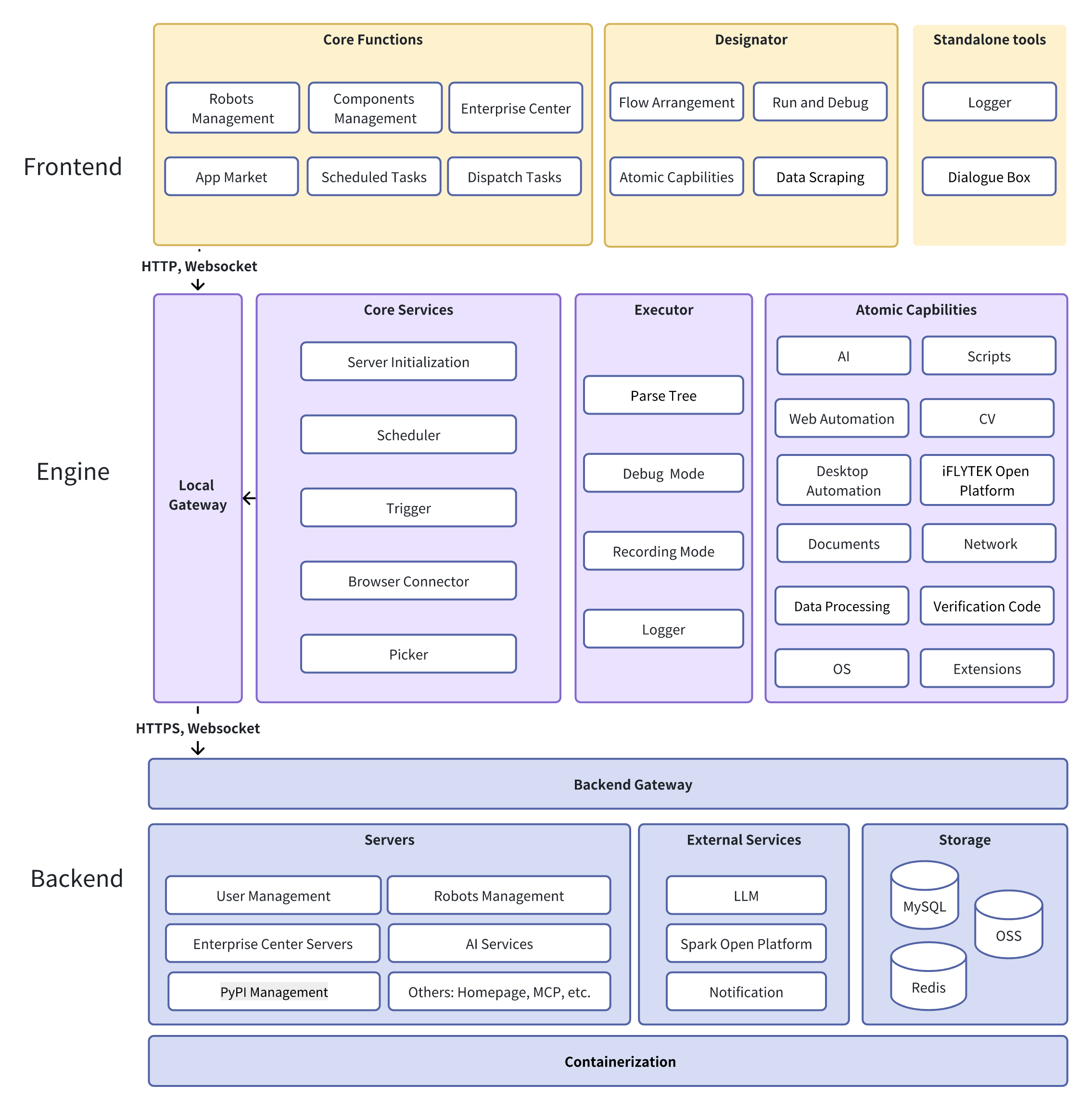
AstronRPA — это десктопное приложение с открытым исходным кодом для роботизированной автоматизации процессов (RPA) корпоративного уровня, с визуальным конструктором, который позволяет создавать сценарии без кода и с минимумом кода для автоматизации работы настольных программ и веб-страниц, с нативной интеграцией в платформу Astron Agent от iFlytek.Это только десктопное приложение или есть и серверная часть?Есть и то и другое: десктопный клиент для Windows на Vue 3, TypeScript и Electron для создания и запуска сценариев, а также бэкенд на Java Spring Boot и микросервисах Python FastAPI (развёртывается через Docker), который отвечает за оркестрацию и возможности ИИ и агентов.
Есть и то и другое: десктопный клиент для Windows на Vue 3, TypeScript и Electron для создания и запуска сценариев, а также бэкенд на Java Spring Boot и микросервисах Python FastAPI (развёртывается через Docker), который отвечает за оркестрацию и возможности ИИ и агентов.Как всё запустить?Сначала разверните серверную часть через Docker для быстрой настройки, затем установите клиент: либо скачайте последний готовый пакет релиза, либо запустите скрипт сборки в одно действие из исходного кода.
Сначала разверните серверную часть через Docker для быстрой настройки, затем установите клиент: либо скачайте последний готовый пакет релиза, либо запустите скрипт сборки в одно действие из исходного кода.Клиент работает и на macOS, и на Linux?Нет, клиент официально поддерживает только Windows 10/11 и требует не менее 8 ГиБ оперативной памяти; о поддержке других настольных платформ не сказано.
Нет, клиент официально поддерживает только Windows 10/11 и требует не менее 8 ГиБ оперативной памяти; о поддержке других настольных платформ не сказано.Это для отдельных пользователей или для команд в компаниях?И то и другое: приложение подходит и для частных пользователей, и для компаний, с корпоративными возможностями вроде центра передового опыта, командного маркетплейса, мониторинга терминалов, режимов расписания и общего доступа к командам роботов для совместной работы между командами.
И то и другое: приложение подходит и для частных пользователей, и для компаний, с корпоративными возможностями вроде центра передового опыта, командного маркетплейса, мониторинга терминалов, режимов расписания и общего доступа к командам роботов для совместной работы между командами.Что такое Astron Agent и как он связан с AstronRPA?Astron Agent — это собственная платформа ИИ-агентов от iFlytek. AstronRPA интегрируется с ней в обе стороны: узлы RPA-сценариев можно вызывать из потоков Agent, а сценарии Agent можно использовать внутри AstronRPA, сочетая автоматизацию с принятием решений на основе ИИ.
Astron Agent — это собственная платформа ИИ-агентов от iFlytek. AstronRPA интегрируется с ней в обе стороны: узлы RPA-сценариев можно вызывать из потоков Agent, а сценарии Agent можно использовать внутри AstronRPA, сочетая автоматизацию с принятием решений на основе ИИ.Можно ли запускать сценарии как-то иначе, а не кнопкой «Запустить»?Да, сценарии поддерживают прямой запуск, запланированные задачи, режимы расписания, вызовы API и сервисы MCP в качестве каналов запуска, что упрощает встраивание RPA во внешние системы.
Да, сценарии поддерживают прямой запуск, запланированные задачи, режимы расписания, вызовы API и сервисы MCP в качестве каналов запуска, что упрощает встраивание RPA во внешние системы.Зачем использовать это, а не обычный скрипт автоматизации?AstronRPA включает более 300 готовых атомарных действий, визуальный конструктор с минимумом кода и инструменты корпоративной совместной работы и безопасности, поэтому неразработчики могут собирать сценарии для работы между приложениями (десктопными и веб) без написания всего кода с нуля.
AstronRPA включает более 300 готовых атомарных действий, визуальный конструктор с минимумом кода и инструменты корпоративной совместной работы и безопасности, поэтому неразработчики могут собирать сценарии для работы между приложениями (десктопными и веб) без написания всего кода с нуля.What are similar projects?astron-agent, skyvern, kestra, evenfire, JeecgBoot, holaOS, airbyte, maxun
astron-agent, skyvern, kestra, evenfire, JeecgBoot, holaOS, airbyte, maxunWhich topics is it in?on-premise, data-privacy, rpa, gui-automation, spring-boot, low-code, no-code, fastapi, email, microservices, enterprise, workflow-automation
on-premise, data-privacy, rpa, gui-automation, spring-boot, low-code, no-code, fastapi, email, microservices, enterprise, workflow-automation