Codex Trajectory


Read this in 简体中文.
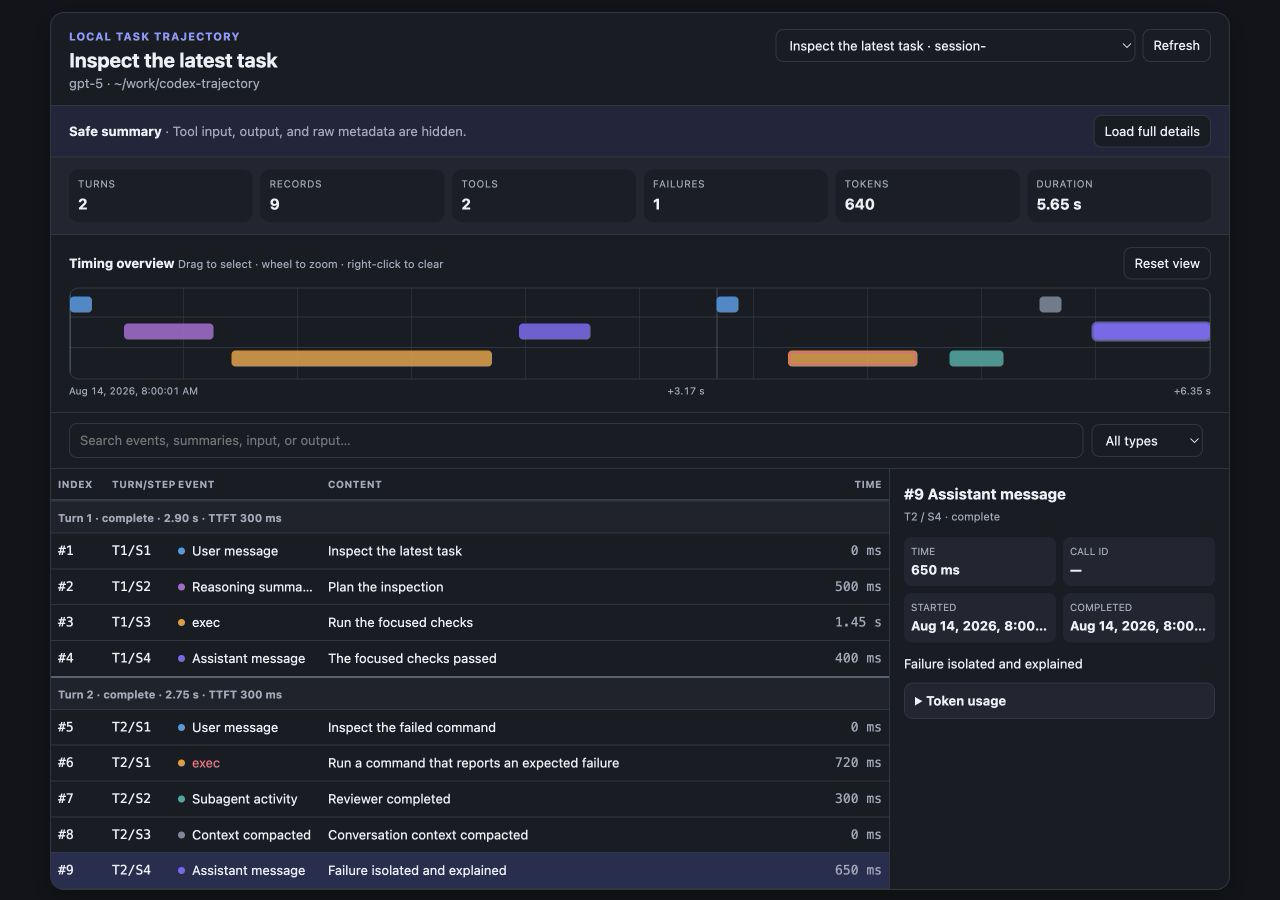
Codex Trajectory is a privacy-aware Codex plugin whose MCP tools turn local task logs into an event ledger and interactive timeline. It shows turns, approximate model steps, reasoning summaries, assistant messages, tool timing, subagents, compaction, token usage, and failures without changing the original logs. Its optional live stop controls use an explicitly enabled loopback CDP path to pause an active Goal and interrupt the current turn directly; they never post a follow-up message, enter the steering queue, delete worktrees, or modify task files.
The viewer is built for Codex desktop surfaces and desktop Chromium browsers.
Install
Prerequisites: Codex and uv on macOS, Linux, or Windows.
codex plugin marketplace add icesixgod/codex-trajectory
codex plugin add codex-trajectory@icesixgod
Open a new Codex task so the installed tools and skill are loaded. Then ask:
Show the safe trajectory summary for this Codex task.
Privacy model
Safe summary mode is the default. It returns event names, timing, status, token usage, and bounded summaries while hiding tool inputs, tool outputs, raw record metadata, absolute log paths, Git remotes, base instructions, and encrypted reasoning.
Full details are opt-in through detailLevel: "full" or the viewer's confirmation button. They expose bounded record details to the active Codex conversation, but still never return base instructions or encrypted reasoning. The Python runtime has no telemetry and, unless the optional CDP direct-stop integration is enabled, makes no application network requests; that integration connects only to the user-selected loopback debugging port. On macOS and Windows, the token-bearing in-app Browser shortcut is additionally gated by an operating-system check that binds each CDP connection to the authenticated Codex desktop process; unsupported platforms keep that shortcut unavailable. The uv launcher may provision a compatible Python and, on Python 3.10–3.13, the pinned zstandard runtime dependency according to the user's own uv configuration. See PRIVACY.md.
| Tool |
Purpose |
list_codex_sessions |
List recent task metadata without transcript bodies. |
get_codex_trajectory |
Return structured trajectory data for analysis. |
show_codex_trajectory |
Return the trajectory with an interactive MCP Apps viewer. |
get_codex_trajectory and show_codex_trajectory accept sessionId, maxRecords (50–1000), the exclusive beforeRecord cursor, includeArchived, and detailLevel (summary or full). Omit sessionId for the latest task and omit beforeRecord for its newest tail; pass pagination.nextBeforeRecord to retrieve the immediately preceding page.
Historical list_codex_sessions queries use a bounded local metadata index to filter candidates before full overviews are built. The trajectory viewer also requests its recent-session selector only after the selected trajectory has rendered, so opening one task does not eagerly parse every recent task. See the interface reference for index contents and invalidation rules.
The output uses schemaVersion: 2; the original schemaVersion: 1 contract remains byte-for-byte frozen for existing validators. Legacy and current dual-UUID filenames, plain .jsonl and compressed .jsonl.zst rollouts, and paginated history_base lineages are supported. Compressed lineage offsets are interpreted in the decompressed logical JSONL stream. Paginated identities, byte boundaries, and contiguous ordinals are validated before inherited history is joined; copied parent context before a subagent's subagent_history_start_ordinal is excluded from the child trajectory. Codex logs do not expose DeepSeek Harness step boundaries directly, so a new approximate step begins when model output resumes after one or more tool results. Unknown control events are ignored; malformed complete JSONL or UTF-8 lines are reported in warnings, while an unfinished JSON or UTF-8 tail is tolerated during active writes. See the interface reference.
The viewer's Token details panel separates input, cache reads, uncached input, output, and reasoning output. It also shows cache-hit rate and per-turn totals in a collapsed section. Large totals, including tens or hundreds of billions of tokens, are displayed in full with responsive numeric sizing. Cache and reasoning counters are subsets of input and output respectively, not additional tokens.
The viewer also shows the whole task's estimated cost, each turn's estimated cost, and the estimate for every record carrying a Token-usage sample. Estimates use a bundled snapshot of standard OpenAI API text-token prices, updated August 24, 2026: uncached input, cache reads, and output are priced separately, while reasoning tokens remain part of output. The snapshot includes GPT-5.6 Sol's current promotional standard rate, advertised through at least November 21, 2026. Unknown or unpublished model prices are marked unavailable instead of guessed, and mixed-model totals disclose partial coverage. These values are API-equivalent estimates—not a Codex subscription bill—and exclude tool-call charges plus long-context, service-tier, and regional pricing adjustments.
The Live window repeats all three pricing levels: its frozen summary shows task and current-turn cost, sticky turn dividers show each visible turn's Token total and cost, and every Token-usage event card shows its own estimated cost. Native video picture-in-picture displays the task, current-turn, and latest-record cost estimates.
Long task titles wrap within the header. The session selector, Live window, and Refresh controls move onto additional rows when needed so they remain accessible in narrow desktop panels.
The event ledger expands only the latest loaded turn by default. When an earlier page exists, Load earlier records prepends the next 500-record page, deduplicates it by stable record index, and preserves the current ledger viewport; repeat it to load the complete task. Every turn header shows its model plus separate uncached-input, cache-read, and output totals, and the entire summary strip—including all three token totals—toggles that turn. An expanded turn owns its column header, which stays pinned only while that turn's records are in view, so collapsed turns never separate a global header from the records it describes. Since the turn is already identified by that header, record rows show only their approximate Step instead of repeating Turn/step. Event and Content use compact proportional columns so all three token columns remain visible without horizontal scrolling; hovering either truncated field reveals its complete value, and focusing a record exposes both values together. Earlier turns and the Token details per-turn table are rendered lazily when opened, reducing DOM work for large tasks. Search, type filters, timeline selection, and direct record selection reveal matching collapsed turns automatically.
Click Live window to keep the current task visible without launching a standalone app. Inside Codex, the component uses the host's supported fullscreen presentation to fill its side panel; a frozen header shows the whole task's cumulative Token breakdown and current turn/step/record cursor, while the remaining height is a separately scrollable safe-summary event stream. When Codex records account rate-limit windows, the header's upper-right quota badge shows the remaining percentage for each window—normally 5-hour and weekly—with reset times in its tooltip; the badge stays hidden when that data is unavailable. A one-click Stop control and the optional auto-stop guard both require the experimental loopback CDP integration. The standard Apps surface uses the private request_codex_task_stop helper to pause an active Goal through thread/goal/set and then call turn/interrupt. It does not post a follow-up message, invoke the model, wait for a confirmation dialog, or enter the steering queue. The guard is off by default with a 10% threshold and stops at most once while the same displayed quota cycle remains at or below that threshold. A stale projected turn is rebound once, and transient automatic failures retry with bounded backoff. When the turn finishes, Stopped changes to Idle, and a later running turn rearms manual Stop. The automatic latch deliberately survives later turns—including /goal continuations—until all displayed windows recover above the threshold, a quota window resets, or the user changes the guard configuration. The controls are disabled with an explicit setup message while direct CDP is unavailable, or if the viewer switches to a task other than the one that opened it.
Each event shows its status, duration, and record-level Token delta as a three-row Total/Input/Output breakdown: Input separates uncached input from cache reads, while Output separates visible output from reasoning. Point-only records without a measured elapsed interval show — instead of the misleading 0 ms; genuinely measured zero-duration records remain 0 ms. The newest record stays at the bottom with automatic follow-latest behavior. A compact transparent 32-frame mining mascot stays fully inside that newest card's upper-left corner and plays one cycle only when the latest record identity changes; unchanged polls leave it idle, and reduced-motion preferences disable the animation. The component never requests the unsupported host pip mode. In a regular Chromium page without the Codex display bridge, it prefers browser-native video picture-in-picture and renders the same quota summary in the upper right; if that API is unavailable or rejected at runtime, it falls back to the same full-height live panel inside the current page. Stop controls are not shown in the non-interactive video surface; an interactive in-page fallback enables them when either supported stop bridge is present. Full tool input, output, and raw metadata stay out of every live surface. The window checks for changes serially every second, pauses while hidden or after exit, and backs off after errors. Its mounted side-panel shell is updated in place, so unchanged polls do not recreate or move the status row. The app-only refresh helper compares an opaque lineage revision first; unchanged tasks are not reparsed, while changed tasks return only a 50-record safe-summary tail. Standard entry still requires an explicit click.
Optional direct stop
The inline viewer has an off-by-default Unattended direct stop setting. When enabled, its app-private helper accepts only bounded task/turn identifiers, a manual/auto source, threshold, and locale—never arbitrary prompt text—and performs a fixed Goal-pause plus turn/interrupt sequence with at most one stale-turn rebind. Stopping never changes the composer, posts a task message, invokes the model, or creates a steering turn. If an active Goal cannot be paused, the turn is not interrupted and the UI reports a bounded error.
On macOS and Windows, View trajectory is restored only after operating-system peer authentication succeeds for the exact token-bearing CDP connection. macOS resolves the connected TCP owner and requires the signed com.openai.codex application from OpenAI's signing team; Windows resolves the connection owner through the system TCP table, selects the outer authenticated OpenAI.Codex desktop ancestor, and requires the same package family throughout the accepted process ancestry. The watcher rejects PID reuse, checks every new connection before its WebSocket handshake can carry a viewer token, and exits when that host identity disappears. Authentication failure is fail-closed: the local viewer URL/token never leaves the watcher and no token-bearing injection is used, while the separately bounded direct-stop path remains available after explicit opt-in. Platforms without this peer binding keep the Browser shortcut unavailable. MCP startup serves protocol requests immediately while restoring an already enabled watcher and prewarming bounded safe-summary caches in the background; the plugin intentionally bundles no lifecycle command hook. Its portable launcher executes uv directly on Unix and uses a reviewed GUI-subsystem shim on Windows to prefer uvw.exe, falling back to uv.exe under CREATE_NO_WINDOW; the optional watcher runs under the base pythonw.exe with the active uv environment's import path, avoiding the venv redirector that otherwise reopens python.exe. This prevents Session selection from creating a Terminal tab without making the packaged MCP command Windows-only. This recovery does not enable CDP for the user. Updated authenticated runtimes start and bind the replacement viewer before stopping a verified older watcher, then acquire the shared watcher lock; the cross-process control lock and settings revision check ensure stale recovery cannot overwrite a later disable or port change. The first authenticated injection installs the shortcut before deferring auxiliary-renderer cleanup to the next cycle. Public heartbeat status exposes bounded startup durations, while errors—including complete peer-authentication failure—are reduced to a fixed category rather than exposing exception text, local paths, absolute timestamps, or bearer-token URLs. Settings, heartbeat, handoff markers, and watcher locks remain bounded single-link regular files under CODEX_HOME/codex-trajectory; task logs, drafts, and attachments remain untouched.
CDP must already be enabled when the app starts. Completely quit ChatGPT/Codex first. On macOS, relaunch it from Terminal with:
open -a ChatGPT --args --remote-debugging-address=127.0.0.1 --remote-debugging-port=9222
For the Microsoft Store build on Windows, use PowerShell (the installed package name or executable subpath may differ in future builds):
$codex = Get-AppxPackage -Name OpenAI.Codex
$exe = Join-Path $codex.InstallLocation 'app\ChatGPT.exe'
Start-Process -FilePath $exe -ArgumentList '--remote-debugging-address=127.0.0.1','--remote-debugging-port=9222'
The viewer shows this command when the selected port is unavailable. A debugging port can control the application page, so keep it bound to loopback, do not expose it through a tunnel or non-loopback address, and turn the setting off when it is not needed. Treat the selected local endpoint as trusted: the direct-stop transport is experimental and is not a documented Codex extension API.
Session logs are parsed incrementally. Only the requested record page and a bounded turn/warning/call state are retained in memory, while aggregate statistics still describe the complete parsed task. A logical rollout is capped at 512 MiB and 1,000,000 physical lines; each complete line is capped at 16 MiB. Discovery separately caps entries, directories, depth, files, and lineage length. JSON objects must be unambiguous and interoperable: duplicate keys, non-finite numbers, excessively large integers, and non-object records are rejected or reported. Repeated cumulative Token snapshots are deduplicated, reset counters are accumulated, and late samples remain attached to the model turn that produced them. Unchanged session overviews are cached using every lineage file's metadata, and the derived search index is invalidated by the same complete-lineage signature. Discovery and reads are descriptor-checked, restricted to regular single-link files under configured roots, and reject path-like selectors, symbolic links, hardlinks, and root escapes. Full-view refreshes start from the bounded 500-record tail instead of requesting the 1,000-record maximum, while earlier pages are loaded only on request.
Development
uv sync --group dev
uv run ruff format --check .
uv run ruff check .
uv run mypy
uv run mypy --no-incremental --platform win32
uv run pytest --cov --cov-report=term-missing
Python 3.14 uses its standard-library Zstandard decoder. Python 3.10–3.13 install the pinned zstandard==0.25.0 dependency so compressed Codex rollouts behave consistently; project and development dependencies are locked in uv.lock. See CONTRIBUTING.md.
Attribution
Portions of the event-ledger, timeline, selection, and inspector implementation are adapted from @deepseek-ai/dsh-client-ui-trajectory, copyright (c) 2026 DeepSeek, under the MIT License. The complete upstream license is included in LICENSES/DeepSeek-Harness.txt, with additional details in NOTICE.
Codex Trajectory is an independent project and is not affiliated with or endorsed by DeepSeek. Codex uses a different persisted event vocabulary, and this repository bundles no DeepSeek Harness package, Cordis runtime, React runtime, TanStack Virtual package, or diff package.
Friendly Links
Linux.do

 Codex Trajectory 是一个注重隐私的 Codex 插件,其 MCP 工具能把本地 Codex 任务日志转换成事件台账和交互式时间线,展示对话轮次、推理摘要、工具耗时、子代理、token 用量和失败情况,且不会改动原始日志。