








Что это такое?
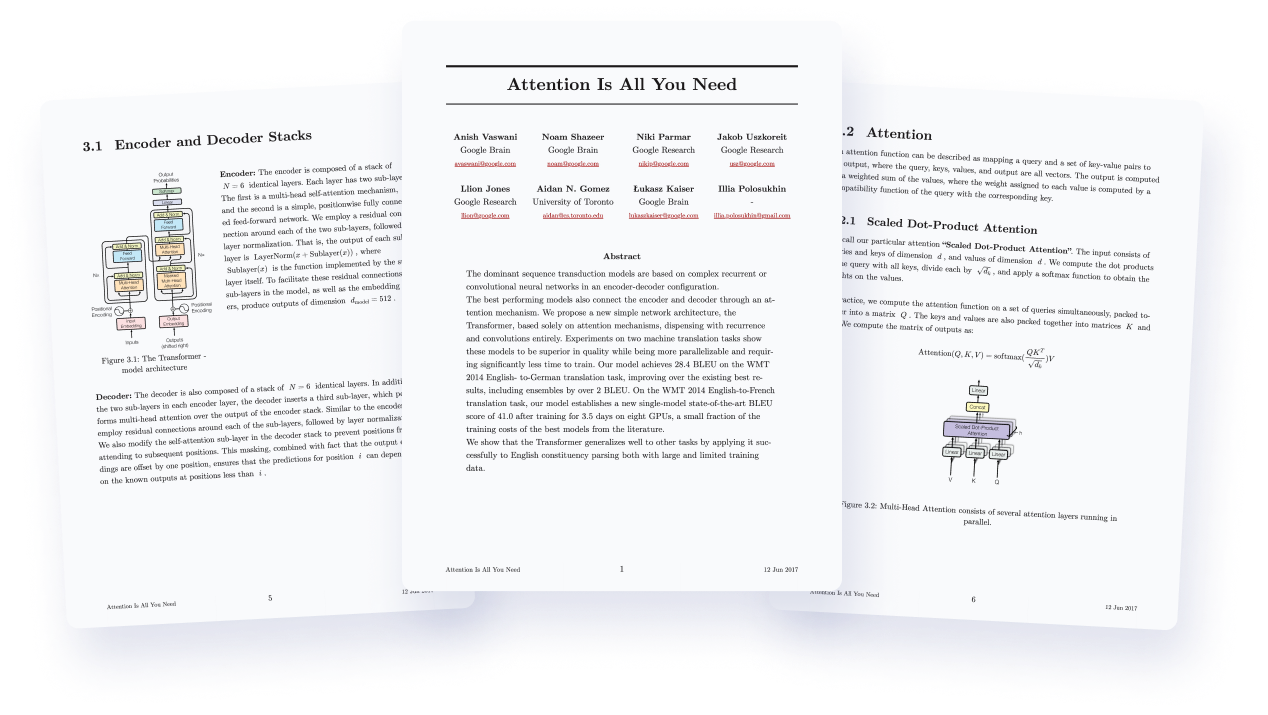
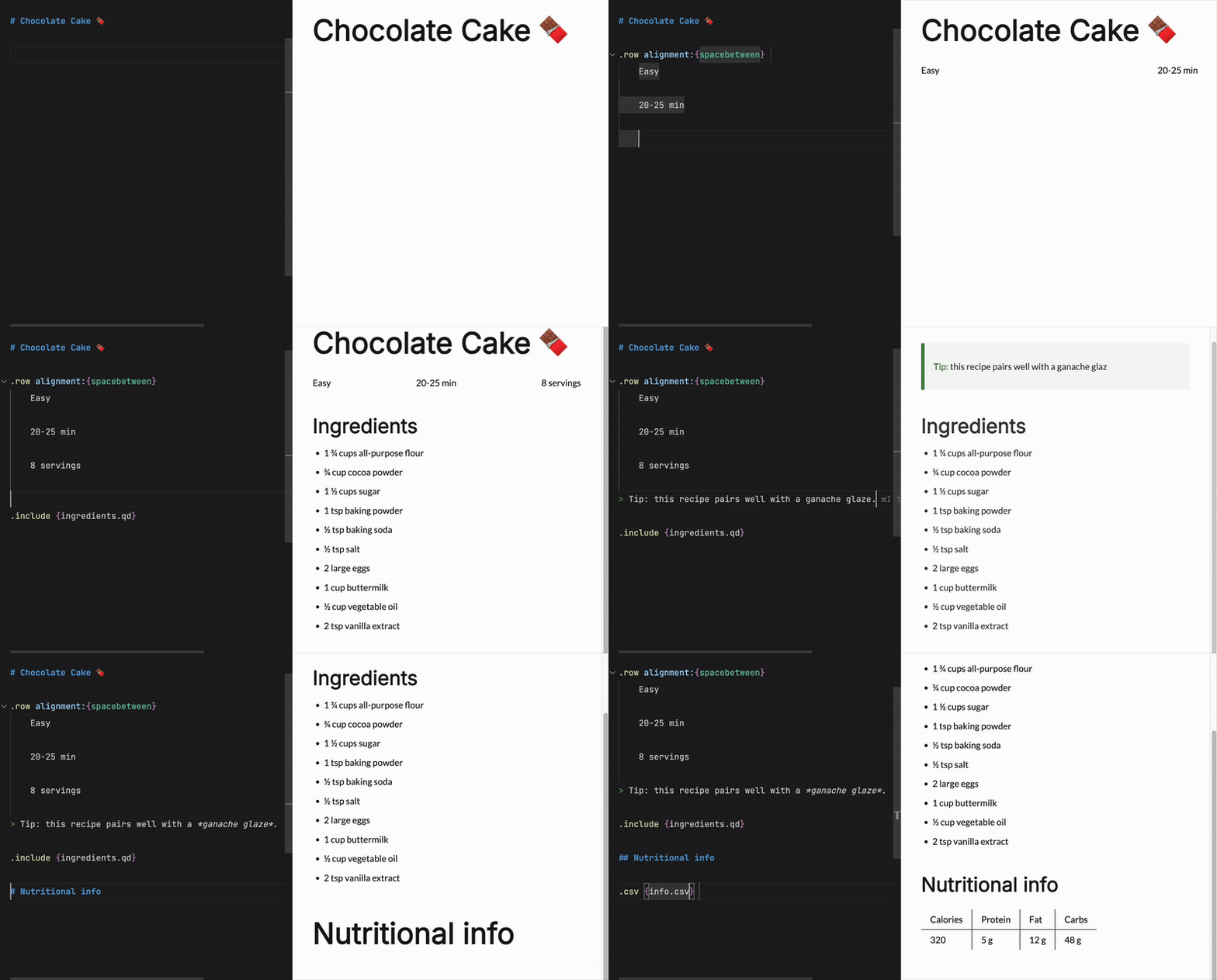
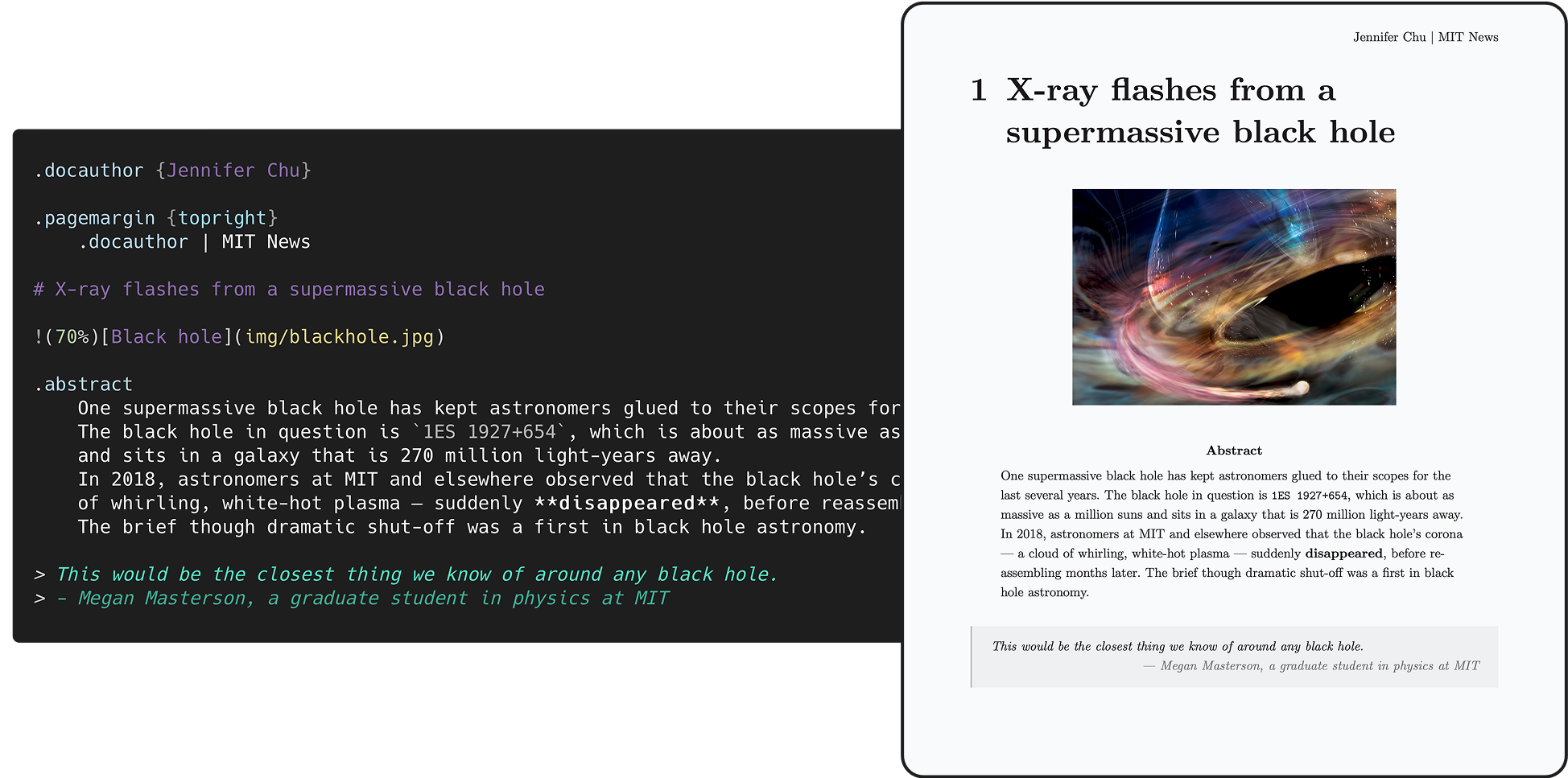
 Quarkdown — это система вёрстки на основе Markdown: вы пишете один исходник в Markdown, а на выходе получаете готовую к печати книгу, научную статью, базу знаний, сайт или интерактивную презентацию.
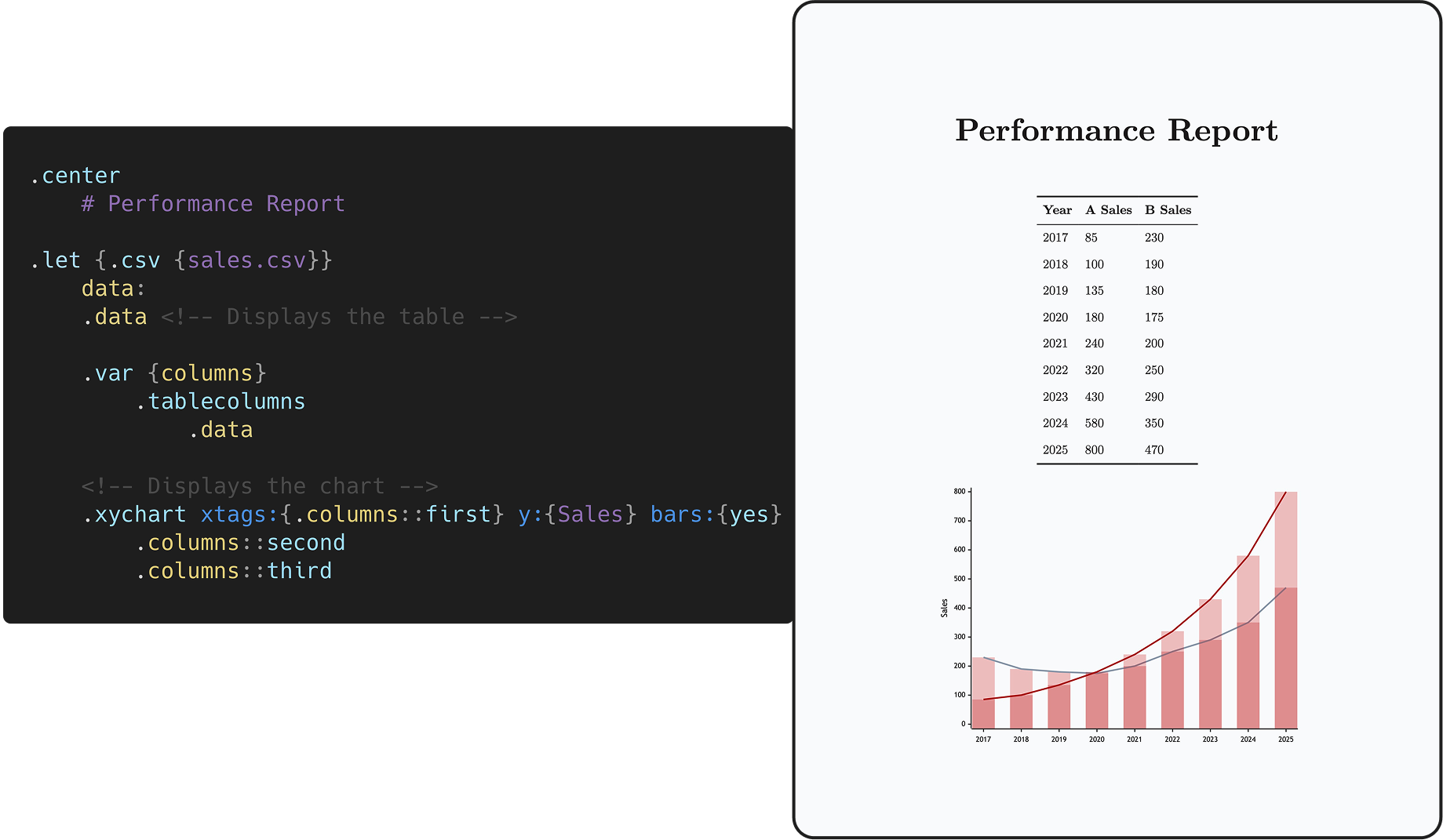
Quarkdown — это система вёрстки на основе Markdown: вы пишете один исходник в Markdown, а на выходе получаете готовую к печати книгу, научную статью, базу знаний, сайт или интерактивную презентацию.Так это обычный Markdown или придётся учить новый синтаксис?Это Markdown: Quarkdown Flavor отталкивается от CommonMark и GFM и расширяет их вызовами функций, переменными, условиями и циклами, превращая Markdown в язык с полнотой по Тьюрингу.
Это Markdown: Quarkdown Flavor отталкивается от CommonMark и GFM и расширяет их вызовами функций, переменными, условиями и циклами, превращая Markdown в язык с полнотой по Тьюрингу.Как его установить и скомпилировать первый документ?Установите через скрипт или Homebrew на Linux/macOS, через скрипт или Scoop на Windows, либо через GitHub Action setup-quarkdown. Затем 'quarkdown create' создаёт проект с помощью мастера, а 'quarkdown c file.qd' компилирует его.
Установите через скрипт или Homebrew на Linux/macOS, через скрипт или Scoop на Windows, либо через GitHub Action setup-quarkdown. Затем 'quarkdown create' создаёт проект с помощью мастера, а 'quarkdown c file.qd' компилирует его.Нужно ли что-то дополнительно на компьютере для экспорта в PDF?Только браузер на движке Chromium, например chrome-headless-shell. Скрипт установки для Linux/macOS настраивает браузер автоматически; при ручной установке его нужно поставить самому.
Только браузер на движке Chromium, например chrome-headless-shell. Скрипт установки для Linux/macOS настраивает браузер автоматически; при ручной установке его нужно поставить самому.Он работает на Windows, как на Mac и Linux?Да — это кроссплатформенный CLI с отдельными способами установки для Linux и macOS (скрипт, Homebrew) и для Windows (скрипт, Scoop), плюс интеграция с GitHub Actions для сборок в CI.
Да — это кроссплатформенный CLI с отдельными способами установки для Linux и macOS (скрипт, Homebrew) и для Windows (скрипт, Scoop), плюс интеграция с GitHub Actions для сборок в CI.Документы Quarkdown могут содержать код — может ли скачанный .qd-файл залезть в мою систему?Не как угодно: система разрешений ограничивает, что документы могут делать с системными ресурсами, и включена по умолчанию.
Не как угодно: система разрешений ограничивает, что документы могут делать с системными ресурсами, и включена по умолчанию.Он правда бесплатный или есть подвох с лицензией?Он бесплатный и открытый: по умолчанию GPLv3, а модули CLI и Language Server с их бинарниками — AGPLv3. Никаких платных тарифов нигде нет.
Он бесплатный и открытый: по умолчанию GPLv3, а модули CLI и Language Server с их бинарниками — AGPLv3. Никаких платных тарифов нигде нет.Во что именно может скомпилироваться один документ?В HTML в четырёх режимах — обычный непрерывный поток в стиле Notion/Obsidian, постраничный (через paged.js) для статей и книг, слайды через reveal.js и docs для вики — выбирается через .doctype {plain|paged|slides|docs}. Всё, что экспортируется в HTML, также экспортируется в PDF, а ещё есть экспорт в GFM Markdown или обычный текст.
В HTML в четырёх режимах — обычный непрерывный поток в стиле Notion/Obsidian, постраничный (через paged.js) для статей и книг, слайды через reveal.js и docs для вики — выбирается через .doctype {plain|paged|slides|docs}. Всё, что экспортируется в HTML, также экспортируется в PDF, а ещё есть экспорт в GFM Markdown или обычный текст.Есть ли живой предпросмотр, пока я пишу?Да: компилируйте с -p (автоматическая перезагрузка) и -w (перекомпиляция при изменении файла) вместе для живого предпросмотра, и это быстро — официальная вики из 100+ подокументов компилируется примерно за 2 секунды. Интерактивный REPL доступен через 'quarkdown repl'.
Да: компилируйте с -p (автоматическая перезагрузка) и -w (перекомпиляция при изменении файла) вместе для живого предпросмотра, и это быстро — официальная вики из 100+ подокументов компилируется примерно за 2 секунды. Интерактивный REPL доступен через 'quarkdown repl'.Чем он сравним с LaTeX и Typst?По сравнительной таблице из README, Quarkdown — единственный инструмент в этой группе, сочетающий лаконичный синтаксис в духе Markdown с полноценным скриптингом и экспортом во все форматы: HTML, PDF, Markdown и обычный текст — включая презентации и docs/wiki, которых в LaTeX нет. Порог вхождения у него между AsciiDoc и Typst.
По сравнительной таблице из README, Quarkdown — единственный инструмент в этой группе, сочетающий лаконичный синтаксис в духе Markdown с полноценным скриптингом и экспортом во все форматы: HTML, PDF, Markdown и обычный текст — включая презентации и docs/wiki, которых в LaTeX нет. Порог вхождения у него между AsciiDoc и Typst.Есть ли инструменты для редакторов и ИИ-агентов для кодинга?Да — есть расширение для VS Code, неофициальный плагин для IntelliJ IDEA и встроенный skill, который заставляет кодинг-агентов писать идиоматичный Quarkdown; README даже даёт ссылку на его оценку.
Да — есть расширение для VS Code, неофициальный плагин для IntelliJ IDEA и встроенный skill, который заставляет кодинг-агентов писать идиоматичный Quarkdown; README даже даёт ссылку на его оценку.What are similar projects?openwiki, pandoc, typst, craftinginterpreters, gollum, mkdocs, mdBook, gzh-design-skill
openwiki, pandoc, typst, craftinginterpreters, gollum, mkdocs, mdBook, gzh-design-skillWhich topics is it in?presentations, markup, scripting-language, typesetting, pdf-generation, academic-writing, documentation-tool, jetbrains, slides, wiki, books, static-site-generator
presentations, markup, scripting-language, typesetting, pdf-generation, academic-writing, documentation-tool, jetbrains, slides, wiki, books, static-site-generator