
Homebridge





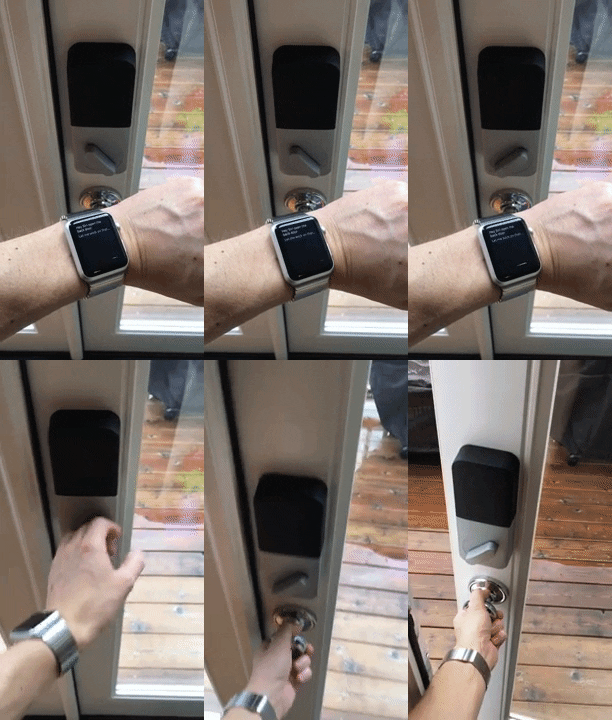
Homebridge is a lightweight Node.js server you can run on your home network to emulate the HomeKit Accessory Protocol (HAP). It supports plugins, which are community-contributed modules that provide a basic bridge from HomeKit to various 3rd-party APIs provided by manufacturers of "smart home" devices. From v2, plugins can also expose accessories over Matter for use with Apple Home, Google Home, Amazon Alexa, SmartThings and other Matter-capable controllers.
Homebridge is a free, non-commercial, community-driven open-source project. It is not affiliated with Apple, Google, Amazon, or the Connectivity Standards Alliance, and no part of it is offered as a paid or certified product.
Since Siri supports devices added through HomeKit, this means that with Homebridge you can ask Siri to control devices that don't have any support for HomeKit at all. For instance, using just some of the available plugins, you can say:
- Siri, unlock the back door. [pictured to the right]
- Siri, open the garage door.
- Siri, turn on the coffee maker.
- Siri, turn on the living room lights.
- Siri, good morning!
You can explore all available plugins at the NPM website by searching for the keyword homebridge-plugin.
The official Homebridge Discord server and Reddit community are where users can discuss Homebridge and ask for help.


HomeKit communities can also be found on both Discord and Reddit.
Installation
Raspberry Pi
Official Homebridge Raspberry Pi Image
Install Homebridge on Raspbian

Linux
Debian or Ubuntu Linux |
Red Hat, CentOS or Fedora Linux | Arch / Manjaro Linux|Install Homebridge on Arch Linux

macOS
Install Homebridge on macOS
Windows 10 / 11
Install Homebridge on Windows 10 / 11 Using Hyper V

Docker
Install Homebridge on Docker
Synology | Unraid | QNAP | TrueNAS Scale
Synology DSM
Install Homebridge on Synology DSM 7
Other Platforms
Adding Homebridge to iOS
- Open the Home
 app on your device.
- Tap the Home tab, then tap
 .
.
- Tap Add Accessory, then scan the QR code shown in the Homebridge UI or your Homebridge logs.
If the bridge does not have any accessories yet, you may receive a message saying Additional Set-up Required, this is ok, as you add plugins they will show up in the Home app without the need to pair again (except for Cameras and TVs).
Cameras and most TV devices are exposed as separate accessories and each needs to be paired separately. See this wiki article for instructions.
Interacting with your Devices
Once your device has been added to HomeKit, you should be able to tell Siri to control your devices. However, realize that Siri is a cloud service, and iOS may need some time to synchronize your device information with iCloud.
One final thing to remember is that Siri will almost always prefer its default phrase handling over HomeKit devices. For instance, if you name your Sonos device "Radio" and try saying "Siri, turn on the Radio" then Siri will probably start playing an iTunes Radio station on your phone. Even if you name it "Sonos" and say "Siri, turn on the Sonos", Siri will probably just launch the Sonos app instead. This is why, for instance, the suggested name for the Sonos accessory is "Speakers".
Matter Support
Homebridge v2 introduces optional support for the Matter smart home standard, allowing plugins to expose their devices to any Matter-capable controller — Apple Home, Google Home, Amazon Alexa, Samsung SmartThings and others — alongside (or instead of) HomeKit.
[!IMPORTANT]
Homebridge's Matter support is not certified by the Connectivity Standards Alliance (CSA) and Homebridge is not a "Matter product" in any commercial sense. It is a community, non-profit implementation that re-uses the open-source matter.js library to speak the protocol. Matter-certified controllers may treat uncertified bridges as "uncertified accessories" and display a warning during pairing — this is expected.
How it works
- The Matter stack runs in-process inside Homebridge using the open-source matter.js library (the
@matter/main npm package) as its protocol engine.
- Matter is opt-in per bridge. Add a
matter block to bridge (the main bridge) and/or to a plugin's _bridge (a child bridge) in your config, and Homebridge will start a separate Matter server on its own port and advertise it on your LAN. Bridges without a matter block keep working exactly as before.
- Each Matter-enabled bridge appears as its own pairing — you scan a Matter QR code in the controller of your choice (Apple Home, Google Home, etc.). Multiple controllers can commission the same bridge ("multi-admin"), so it can sit alongside HomeKit rather than replacing it.
- Plugins decide whether to publish accessories to Matter by calling the
api.matter API — analogous to the existing api.hap API. Plugins that don't opt in are unaffected.
- Currently supported device types include lights (on/off, dimmable, colour-temperature, full-colour), switches and outlets, a wide range of sensors (motion, contact, temperature, humidity, light, leak, smoke/CO, air quality), door locks, thermostats, fans, window coverings, robotic vacuum cleaners, water valves and generic switches. See the developer docs for the full list.
Limitations
- Matter pairing requires the controller and Homebridge to be on the same IP subnet with mDNS/IPv6 working — the same network constraints as HomeKit.
- A Matter-enabled bridge cannot be moved between controllers without re-commissioning.
- Because the implementation is uncertified, some controllers may surface warnings during pairing or restrict access to features that require certification.
For setup instructions and the latest list of supported device types, see the developer docs at https://github.com/homebridge-plugins/homebridge-matter/wiki.
Plugin Development
The https://developers.homebridge.io website contains the Homebridge API reference, available service and characteristic types, and plugin examples.
The Homebridge Plugin Template project provides a base you can use to create your own platform plugin.
There are many existing plugins you can study; you might start with the Homebridge Example Plugins or a plugin that already implements the device type you need.
When writing your plugin, you'll want Homebridge to load it from your development directory instead of publishing it to npm each time. Run this command inside your plugin project folder so your global installation of Homebridge can discover it:
npm link
You can undo this using the npm unlink command.
Then start Homebridge in debug mode:
homebridge -D
This will start up Homebridge and load your in-development plugin. Note that you can also direct Homebridge to load your configuration from somewhere besides the default ~/.homebridge, for example:
homebridge -D -U ~/.homebridge-dev
This is very useful when you are already using your development machine to host a "real" Homebridge instance (with all your accessories) that you don't want to disturb.
Common Issues
Home App Says Accessory Already Added
To fix this, Reset Homebridge.
My iOS App Can't Find Homebridge
Try the following:
- Swap between the
Bonjour HAP and Ciao mDNS Advertiser options. See the wiki for more details.
- iOS DNS cache has gone stale or gotten misconfigured. To fix this, turn airplane mode on and back off to flush the DNS cache.
Limitations
- One bridge can only expose 150 accessories due to a HomeKit limit. You can however run your plugins as a Child Bridge or run Multiple Homebridge Instances to get around this limitation.
- Once an accessory has been added to the Home app, changing its name via Homebridge won't be automatically reflected in iOS. You must change it via the Home app as well.
Why Homebridge?
Technically, the device manufacturers should be the ones implementing the HomeKit API. And I'm sure they will - eventually. When they do, this project will be obsolete, and I hope that happens soon. In the meantime, Homebridge is a fun way to get a taste of the future, for those who just can't bear to wait until "real" HomeKit devices are on the market.
Homebridge is maintained on a volunteer basis by a community of contributors. There is no company behind it, nothing is sold, and no part of the project is certified or endorsed by Apple, Google, Amazon, the Connectivity Standards Alliance, or any device manufacturer. If a plugin or page asks you to pay for "Homebridge" itself, it isn't us.
Credit
- Homebridge was originally created by Nick Farina.
- The original HomeKit API work was done by Khaos Tian in his HAP-NodeJS project.
- Matter support is built on top of matter.js, the open-source TypeScript implementation of Matter — without it, Homebridge's Matter bridge would not exist. Thanks to the matter.js maintainers and contributors.

 Homebridge 是一个轻量级的 Node.js 服务器,运行在你的家庭网络里,它可以模拟 HomeKit 配件协议,让不支持 HomeKit 的智能家居设备也能通过 Apple 家庭 App 和 Siri 来控制。