252 ·GitHub
What is this?
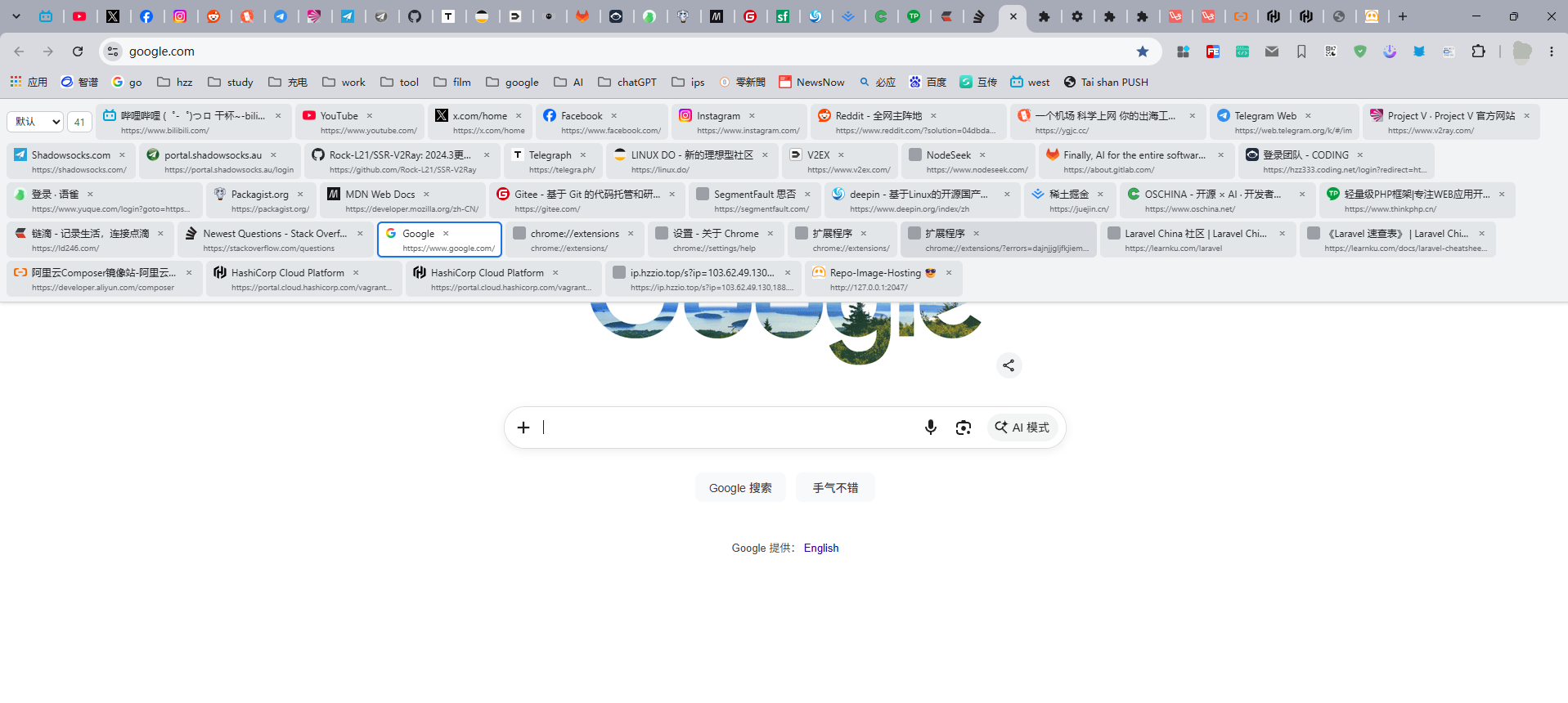
 A Chrome extension (Manifest V3) that displays all tabs in the current window as a multi-row tiled grid, shown as a floating overlay you trigger with a button or shortcut, without modifying any page styles.
A Chrome extension (Manifest V3) that displays all tabs in the current window as a multi-row tiled grid, shown as a floating overlay you trigger with a button or shortcut, without modifying any page styles.Why does it float over the page instead of replacing Chrome's own tab bar?Chrome extensions cannot modify the browser's native tab bar since it belongs to the browser UI layer, not the page. So instead it injects a draggable floating button that reveals a tab bar overlay on top of the page when clicked.
Chrome extensions cannot modify the browser's native tab bar since it belongs to the browser UI layer, not the page. So instead it injects a draggable floating button that reveals a tab bar overlay on top of the page when clicked.Does the floating tab bar work on every page?No - it cannot appear on chrome:// pages or the Chrome Web Store because extensions can't inject content scripts there, and after reloading the extension, already-open tabs need a manual refresh to pick up the new script.
No - it cannot appear on chrome:// pages or the Chrome Web Store because extensions can't inject content scripts there, and after reloading the extension, already-open tabs need a manual refresh to pick up the new script.How can I sort the tabs in the bar?Three modes are available: default (matches Chrome's own tab order), by name (Chinese pinyin order), and by domain (groups subdomains of the same site together); the choice is remembered automatically.
Three modes are available: default (matches Chrome's own tab order), by name (Chinese pinyin order), and by domain (groups subdomains of the same site together); the choice is remembered automatically.Can I navigate tabs with the keyboard?Yes - once the bar is expanded, arrow keys move focus between tabs, Enter switches to the highlighted tab, Delete closes it, and Esc collapses the bar.
Yes - once the bar is expanded, arrow keys move focus between tabs, Enter switches to the highlighted tab, Delete closes it, and Esc collapses the bar.What's the default shortcut and can I change it?The default shortcut is Alt+Z, and you can record any custom key combination from the extension's popup panel.
The default shortcut is Alt+Z, and you can record any custom key combination from the extension's popup panel.Will mixed-content warnings show up for http favicons on https pages?No - favicons are fetched by the background script and converted to data URLs before display, so http-only icons never trigger a 'Mixed Content' warning on https pages.
No - favicons are fetched by the background script and converted to data URLs before display, so http-only icons never trigger a 'Mixed Content' warning on https pages.What are similar projects?refined-github, ext-saladict, Youtube-Pro-Plus, integrity_baozi-, desktop_gifs, BrowserKitten, github-chinese, maxurl
refined-github, ext-saladict, Youtube-Pro-Plus, integrity_baozi-, desktop_gifs, BrowserKitten, github-chinese, maxurlWhich topics is it in?webextension, productivity-tools, keyboard, extension, chrome-extension, browser-extension, google, customization, browser, utility, productivity, chinese
webextension, productivity-tools, keyboard, extension, chrome-extension, browser-extension, google, customization, browser, utility, productivity, chinese