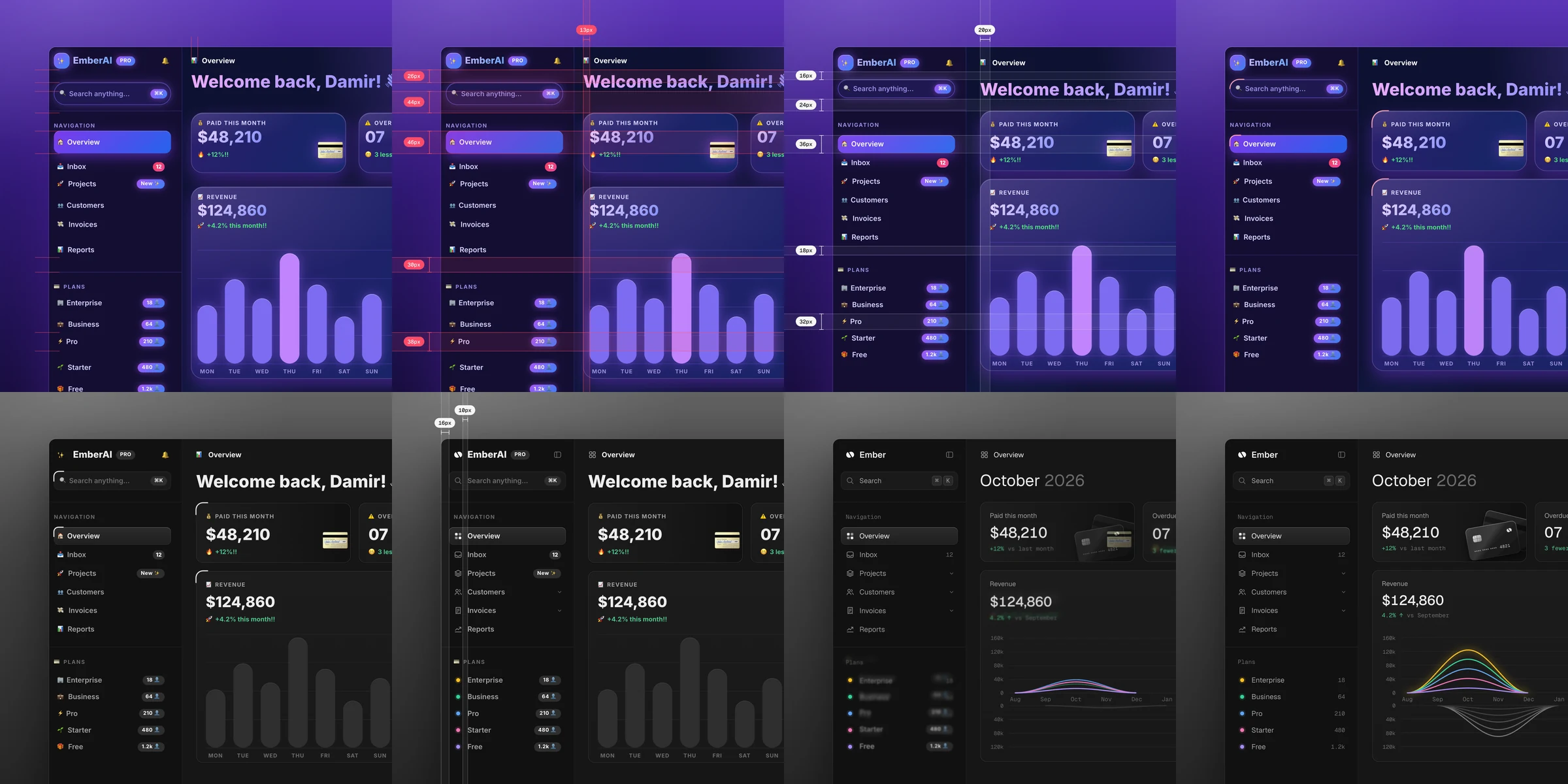
这是什么?
 unslop 是一个用于 Claude Code 的 skill,它能识别出看起来像 AI 生成的界面劣质痕迹(紫色渐变、光晕、用作标签的表情符号、大喊大叫式的文案),并分步骤把页面重新设计成更有意图、更讲究设计感的界面。
这是独立应用,还是需要我装进 Claude 里的东西?它是一个 Claude Code 的 skill,本质上是一组放进 skills 目录里的指令文件,不是独立应用,也不是代码库。Claude 会自动识别它,你也可以用 /unslop 命令手动触发。
它是一个 Claude Code 的 skill,本质上是一组放进 skills 目录里的指令文件,不是独立应用,也不是代码库。Claude 会自动识别它,你也可以用 /unslop 命令手动触发。我该怎么安装和使用?如果要全局使用,就把 skill 文件夹复制到 Claude Code 的 skills 文件夹中;如果只在某个项目里用,就复制到项目内的 .claude/skills/ 目录。然后输入 /unslop 加上你的需求,或者直接描述问题,Claude 会自己调用这个 skill。
如果要全局使用,就把 skill 文件夹复制到 Claude Code 的 skills 文件夹中;如果只在某个项目里用,就复制到项目内的 .claude/skills/ 目录。然后输入 /unslop 加上你的需求,或者直接描述问题,Claude 会自己调用这个 skill。除了 Claude Code,我还需要别的东西才能用吗?核心的重设计流程只需要 Claude Code 本身。可选的主图生成功能需要把 fal、Replicate、OpenAI images 或 Higgsfield 等图像服务作为 MCP 服务器接入;可选的故事视频功能则需要安装 Playwright 和 ffmpeg。
核心的重设计流程只需要 Claude Code 本身。可选的主图生成功能需要把 fal、Replicate、OpenAI images 或 Higgsfield 等图像服务作为 MCP 服务器接入;可选的故事视频功能则需要安装 Playwright 和 ffmpeg。它是不是一定会重新设计页面?如果界面本来就不错,它会直接放过吗?如果页面本身已经不错,它会直接说明,并只建议一些小的优化,而不会整体重做。在动手修改前,它还会先审查并提出设计方向;在进行任何付费的图片生成前,都会先征得你的确认。
如果页面本身已经不错,它会直接说明,并只建议一些小的优化,而不会整体重做。在动手修改前,它还会先审查并提出设计方向;在进行任何付费的图片生成前,都会先征得你的确认。它能用于任何前端技术栈吗?能。它可以适配你的页面所用的技术,包括 Next.js、React、Vue、Svelte、Tailwind 或纯 HTML 和 CSS,适用于仪表盘、应用和落地页。即使你只有一个线上网站的链接,它也能处理。
能。它可以适配你的页面所用的技术,包括 Next.js、React、Vue、Svelte、Tailwind 或纯 HTML 和 CSS,适用于仪表盘、应用和落地页。即使你只有一个线上网站的链接,它也能处理。授权条款是什么?本项目采用 CC BY 4.0 协议发布:可以免费使用、修改和分享,包括用于商业用途,但需要注明作者 Damir Sokolovsky(@heydamir)并链接回项目仓库。
本项目采用 CC BY 4.0 协议发布:可以免费使用、修改和分享,包括用于商业用途,但需要注明作者 Damir Sokolovsky(@heydamir)并链接回项目仓库。这个 skill 会修复哪些“AI 味”的劣质设计?比如紫色渐变、泛泛的光晕、用作标签的表情符号、大喊大叫式的营销文案,以及间距不均等。这些都是典型的默认 AI 生成界面的特征。
比如紫色渐变、泛泛的光晕、用作标签的表情符号、大喊大叫式的营销文案,以及间距不均等。这些都是典型的默认 AI 生成界面的特征。逐项重设计会覆盖哪些方面?在完成审查并确定设计方向后,它会按照间距、颜色、图标、文案、字体、布局、细节、视觉效果和动效的顺序逐项处理,就像设计师做红线评审一样。
在完成审查并确定设计方向后,它会按照间距、颜色、图标、文案、字体、布局、细节、视觉效果和动效的顺序逐项处理,就像设计师做红线评审一样。它能把修改前后的对比做成视频给我看吗?可以,它能制作一段正方形的、时长不到 10 秒的视频,展示界面自我“去 AI 味”的过程,可以直接发布。不过这需要安装 Playwright 和 ffmpeg。
可以,它能制作一段正方形的、时长不到 10 秒的视频,展示界面自我“去 AI 味”的过程,可以直接发布。不过这需要安装 Playwright 和 ffmpeg。如果我更希望由真人来做重设计呢?作者提供付费服务:他本人会在 3 天内,用你自己的技术栈重新设计一个关键页面,详情见 heydamir.design/unslop。
作者提供付费服务:他本人会在 3 天内,用你自己的技术栈重新设计一个关键页面,详情见 heydamir.design/unslop。有哪些类似的项目?evondevKit, taste-skill, EpicInfographics, oil-ui, tweakcn, refactoring-ui-skill, openpencil, ui-ux-pro-max-skill
evondevKit, taste-skill, EpicInfographics, oil-ui, tweakcn, refactoring-ui-skill, openpencil, ui-ux-pro-max-skill它属于哪些主题?vibecoding, design-tools, ui-design, svelte, playwright, tailwindcss, ffmpeg, claude-skills, image-generation, design, vue, css
vibecoding, design-tools, ui-design, svelte, playwright, tailwindcss, ffmpeg, claude-skills, image-generation, design, vue, css