TS-Pattern
The exhaustive Pattern Matching library for TypeScript
with smart type inference.



import { match, P } from 'ts-pattern';

type Data =
  | { type: 'text'; content: string }
  | { type: 'img'; src: string };

type Result =
  | { type: 'ok'; data: Data }
  | { type: 'error'; error: Error };

const result: Result = ...;

const html = match(result)
  .with({ type: 'error' }, () => <p>Oups! An error occured</p>)
  .with({ type: 'ok', data: { type: 'text' } }, (res) => <p>{res.data.content}</p>)
  .with({ type: 'ok', data: { type: 'img', src: P.select() } }, (src) => <img src={src} />)
  .exhaustive();
About
Write better and safer conditions. Pattern matching lets you express complex conditions in a single, compact expression. Your code becomes shorter and more readable. Exhaustiveness checking ensures you haven’t forgotten any possible case.
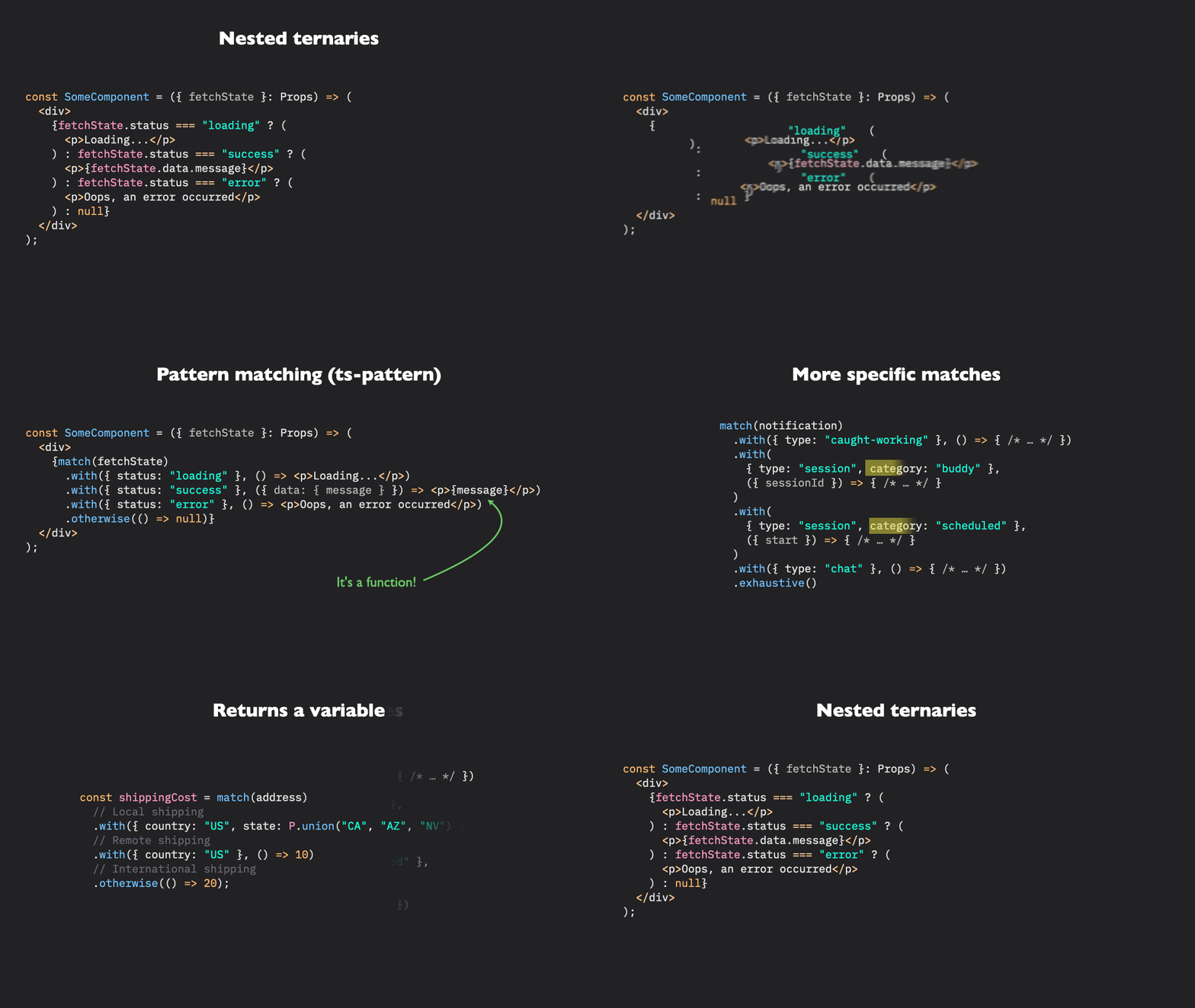
Animation by @nicoespeon
Features
- Pattern-match on any data structure: nested Objects, Arrays, Tuples, Sets, Maps and all primitive types.
- Typesafe, with helpful type inference.
- Exhaustiveness checking support, enforcing that you are matching every possible case with
.exhaustive().
- Use patterns to validate the shape of your data with
isMatching.
- Expressive API, with catch-all and type specific wildcards:
P._, P.string, P.number, etc.
- Supports predicates, unions, intersections and exclusion patterns for non-trivial cases.
- Supports properties selection, via the
P.select(name?) function.
- Tiny bundle footprint (only ~2kB).
What is Pattern Matching?
Pattern Matching is a code-branching technique coming from functional programming languages that's more powerful and often less verbose than imperative alternatives (if/else/switch statements), especially for complex conditions.
Pattern Matching is implemented in Python, Rust, Swift, Elixir, Haskell and many other languages. There is a tc39 proposal to add Pattern Matching to EcmaScript, but it is still in stage 1 and isn't likely to land before several years. Luckily, pattern matching can be implemented in userland. ts-pattern Provides a typesafe pattern matching implementation that you can start using today.
Read the introduction blog post: Bringing Pattern Matching to TypeScript 🎨 Introducing TS-Pattern
Installation
Via npm
npm install ts-pattern
You can also use your favorite package manager:
pnpm add ts-pattern
# OR
yarn add ts-pattern
# OR
bun add ts-pattern
# OR
npx jsr add @gabriel/ts-pattern
Want to become a TypeScript Expert?
Check out 👉 Type-Level TypeScript, an online course teaching you how to unleash the full potential of TypeScript's Turing-complete type system. You already know how to code, and types are simply another programming language to master. This course bridges the gap, helping you apply your existing programming knowledge to TypeScript's type system, so you never again struggle with type errors or feel unable to type complex generic code correctly!
Documentation
Sandbox examples
Getting Started
As an example, let's create a state reducer for a frontend application that fetches some data.
Example: a state reducer with ts-pattern
Our application can be in four different states: idle, loading,
success and error. Depending on which state we are in, some events
can occur. Here are all the possible types of event our application
can respond to: fetch, success, error and cancel.
I use the word event but you can replace it with action if you are used
to Redux's terminology.
type State =
  | { status: 'idle' }
  | { status: 'loading'; startTime: number }
  | { status: 'success'; data: string }
  | { status: 'error'; error: Error };

type Event =
  | { type: 'fetch' }
  | { type: 'success'; data: string }
  | { type: 'error'; error: Error }
  | { type: 'cancel' };
Even though our application can handle 4 events, only a subset of these
events make sense for each given state. For instance we can only cancel
a request if we are currently in the loading state.
To avoid unwanted state changes that could lead to bugs, we want our state reducer function to branch on both the state and the event, and return a new state.
This is a case where match really shines. Instead of writing nested switch statements, we can use pattern matching to simultaneously check the state and the event object:
import { match, P } from 'ts-pattern';

const reducer = (state: State, event: Event) =>
  match([state, event])
    .returnType<State>()
    .with(
      [{ status: 'loading' }, { type: 'success' }],
      ([_, event]) => ({ status: 'success', data: event.data })
    )
    .with(
      [{ status: 'loading' }, { type: 'error', error: P.select() }],
      (error) => ({ status: 'error', error })
    )
    .with(
      [{ status: P.not('loading') }, { type: 'fetch' }],
      () => ({ status: 'loading', startTime: Date.now() })
    )
    .with(
      [
        {
          status: 'loading',
          startTime: P.when((t) => t + 2000 < Date.now()),
        },
        { type: 'cancel' },
      ],
      () => ({ status: 'idle' })
    )
    .with(P._, () => state)
    .exhaustive();
There's a lot going on, so let's go through this code bit by bit:
match(value)
match takes a value and returns a builder on which you can add your pattern matching cases.
match([state, event])
It's also possible to specify the input and output type explicitly with match<Input, Output>(...), but this is usually unnecessary, as TS-Pattern is able to infer them.
.returnType<OutputType>()
.returnType is an optional method that you can call if you want to force all following code-branches to return a value of a specific type. It takes a single type parameter, provided between <AngleBrackets>.
.returnType<State>()
Here, we use this method to make sure all branches return a valid State object.
.with(pattern, handler)
Then we add a first with clause:
  .with(
    [{ status: 'loading' }, { type: 'success' }],
    ([state, event]) => ({
      // `state` is inferred as { status: 'loading' }
      // `event` is inferred as { type: 'success', data: string }
      status: 'success',
      data: event.data,
    })
  )
The first argument is the pattern: the shape of value you expect for this branch.
The second argument is the handler function: the code branch that will be called if the input value matches the pattern.
The handler function takes the input value as first parameter with its type narrowed down to what the pattern matches.
P.select(name?)
In the second with clause, we use the P.select function:
  .with(
    [
      { status: 'loading' },
      { type: 'error', error: P.select() }
    ],
    (error) => ({ status: 'error', error })
  )
P.select() lets you extract a piece of your input value and inject it into your handler. It is pretty useful when pattern matching on deep data structures because it avoids the hassle of destructuring your input in your handler.
Since we didn't pass any name to P.select(), It will inject the event.error property as first argument to the handler function. Note that you can still access the full input value with its type narrowed by your pattern as second argument of the handler function:
  .with(
    [
      { status: 'loading' },
      { type: 'error', error: P.select() }
    ],
    (error, stateAndEvent) => {
      // error: Error
      // stateAndEvent: [{ status: 'loading' }, { type: 'error', error: Error }]
    }
  )
In a pattern, we can only have a single anonymous selection. If you need to select more properties on your input data structure, you will need to give them names:
.with(
    [
      { status: 'success', data: P.select('prevData') },
      { type: 'error', error: P.select('err') }
    ],
    ({ prevData, err }) => {
      // Do something with (prevData: string) and (err: Error).
    }
  )
Each named selection will be injected inside a selections object, passed as first argument to the handler function. Names can be any strings.
P.not(pattern)
If you need to match on everything but a specific value, you can use a P.not(<pattern>) pattern. it's a function taking a pattern and returning its opposite:
  .with(
    [{ status: P.not('loading') }, { type: 'fetch' }],
    () => ({ status: 'loading' })
  )
P.when() and guard functions
Sometimes, we need to make sure our input value respects a condition that can't be expressed by a pattern. For example, imagine you need to check that a number is positive. In these cases, we can use guard functions: functions taking a value and returning a boolean.
With TS-Pattern, there are two ways to use a guard function:
- use
P.when(<guard function>) inside one of your patterns
- pass it as second parameter to
.with(...)
using P.when(predicate)
  .with(
    [
      {
        status: 'loading',
        startTime: P.when((t) => t + 2000 < Date.now()),
      },
      { type: 'cancel' },
    ],
    () => ({ status: 'idle' })
  )
Passing a guard function to .with(...)
.with optionally accepts a guard function as second parameter, between
the pattern and the handler callback:
  .with(
    [{ status: 'loading' }, { type: 'cancel' }],
    ([state, event]) => state.startTime + 2000 < Date.now(),
    () => ({ status: 'idle' })
  )
This pattern will only match if the guard function returns true.
the P._ wildcard
P._ will match any value. You can use it either at the top level, or within another pattern.
  .with(P._, () => state)

  // You could also use it inside another pattern:
  .with([P._, P._], () => state)

  // at any level:
  .with([P._, { type: P._ }], () => state)
.exhaustive(), .otherwise() and .run()
.exhaustive();
.exhaustive() executes the pattern matching expression, and returns the result. It also enables exhaustiveness checking, making sure we don't forget any possible case in our input value. This extra type safety is very nice because forgetting a case is an easy mistake to make, especially in an evolving code-base.
Note that exhaustive pattern matching is optional. It comes with the trade-off of having slightly longer compilation times because the type checker has more work to do.
Alternatively, you can use .otherwise(), which takes an handler function returning a default value. .otherwise(handler) is equivalent to .with(P._, handler).exhaustive().
.otherwise(() => state);
Matching several patterns
As you may know, switch statements allow handling several cases with
the same code block:
switch (type) {
  case 'text':
  case 'span':
  case 'p':
    return 'text';

  case 'btn':
  case 'button':
    return 'button';
}
Similarly, ts-pattern lets you pass several patterns to .with() and if
one of these patterns matches your input, the handler function will be called:
const sanitize = (name: string) =>
  match(name)
    .with('text', 'span', 'p', () => 'text')
    .with('btn', 'button', () => 'button')
    .otherwise(() => name);

sanitize('span'); // 'text'
sanitize('p'); // 'text'
sanitize('button'); // 'button'
As you might expect, this also works with more complex patterns than strings and exhaustiveness checking works as well.
API Reference
match
match(value);
Create a Match object on which you can later call .with, .when, .otherwise and .run.
Signature
function match<TInput, TOutput>(input: TInput): Match<TInput, TOutput>;
Arguments
input
- Required
- the input value your patterns will be tested against.
.with
match(...)
  .with(pattern, [...patterns], handler)
Signature
function with(
  pattern: Pattern<TInput>,
  handler: (selections: Selections<TInput>, value: TInput) => TOutput
): Match<TInput, TOutput>;

// Overload for multiple patterns
function with(
  pattern1: Pattern<TInput>,
  ...patterns: Pattern<TInput>[],
  // no selection object is provided when using multiple patterns
  handler: (value: TInput) => TOutput
): Match<TInput, TOutput>;

// Overload for guard functions
function with(
  pattern: Pattern<TInput>,
  when: (value: TInput) => unknown,
  handler: (
    selection: Selection<TInput>,
    value: TInput
  ) => TOutput
): Match<TInput, TOutput>;
Arguments
pattern: Pattern<TInput>
- Required
- The pattern your input must match for the handler to be called.
- See all valid patterns below
- If you provide several patterns before providing the
handler, the with clause will match if one of the patterns matches.
when: (value: TInput) => unknown
- Optional
- Additional condition the input must satisfy for the handler to be called.
- The input will match if your guard function returns a truthy value.
TInput might be narrowed to a more precise type using the pattern.
handler: (selections: Selections<TInput>, value: TInput) => TOutput
- Required
- Function called when the match conditions are satisfied.
- All handlers on a single
match case must return values of the same type, TOutput.
selections is an object of properties selected from the input with the select function.TInput might be narrowed to a more precise type using the pattern.
.when
match(...)
  .when(predicate, handler)
Signature
function when(
  predicate: (value: TInput) => unknown,
  handler: (value: TInput) => TOutput
): Match<TInput, TOutput>;
Arguments
predicate: (value: TInput) => unknown
- Required
- Condition the input must satisfy for the handler to be called.
handler: (value: TInput) => TOutput
- Required
- Function called when the predicate condition is satisfied.
- All handlers on a single
match case must return values of the same type, TOutput.
.returnType
match(...)
  .returnType<string>()
  .with(..., () => "has to be a string")
  .with(..., () => "Oops".length)
  //               ~~~~~~~~~~~~~ ❌ `number` isn't a string!
The .returnType<SomeType>() method allows you to control the return type of all of your branches of code. It accepts a single type parameter that will be used as the return type of your match expression. All code branches must return values assignable to this type.
Signature
function returnType<TOutputOverride>(): Match<TInput, TOutputOverride>;
Type arguments
TOutputOverride
- The type that your
match expression will return. All branches must return values assignable to it.
.exhaustive
match(...)
  .with(...)
  .exhaustive()
Runs the pattern-matching expression and returns its result. It also enables exhaustiveness checking, making sure that we have handled all possible cases at compile time.
By default, .exhaustive() will throw an error if the input value wasn't handled by any .with(...) clause. This should only happen if your types are incorrect.
It is possible to pass your own handler function as a parameter to decide what should happen if an unexpected value has been received. You can for example throw your own custom error:
match(...)
  .with(...)
  .exhaustive((unexpected: unknown) => {
    throw MyCustomError(unexpected);
  })
Or log an error and return a default value:
match<string, number>(...)
  .with(P.string, (str) => str.length)
  .exhaustive((notAString: unknown) => {
    console.log(`received an unexpected value: ${notAString}`);
    return 0;
  })
Signature
function exhaustive(): TOutput;
function exhaustive(handler: (unexpectedValue: unknown) => TOutput): TOutput;
Example
type Permission = 'editor' | 'viewer';
type Plan = 'basic' | 'pro';

const fn = (org: Plan, user: Permission) =>
  match([org, user])
    .with(['basic', 'viewer'], () => {})
    .with(['basic', 'editor'], () => {})
    .with(['pro', 'viewer'], () => {})
    // Fails with `NonExhaustiveError<['pro', 'editor']>`
    // because the `['pro',

 TS-Pattern 是一个用于 TypeScript 的穷尽式模式匹配库,它能把复杂的条件判断写成一个紧凑的表达式,不必使用嵌套的 if/else 或 switch 语句,同时由类型检查器自动为你收窄类型。