Что это?
 Официальное Android-приложение-спутник конференции разработчиков Google I/O: доклады, кодлабы, карта площадки и личное расписание для участников. Код был открыт под открытой лицензией, а в 2023 году репозиторий перевели в архив.
Официальное Android-приложение-спутник конференции разработчиков Google I/O: доклады, кодлабы, карта площадки и личное расписание для участников. Код был открыт под открытой лицензией, а в 2023 году репозиторий перевели в архив.Это приложение, которым реально пользовались участники, или просто пример кода?И то, и другое. Оно помогало посетителям I/O на протяжении десяти лет, а Google держал код в открытом доступе как практический пример разработки под Android. Написано целиком на Kotlin, все скрипты сборки — на Kotlin DSL.
И то, и другое. Оно помогало посетителям I/O на протяжении десяти лет, а Google держал код в открытом доступе как практический пример разработки под Android. Написано целиком на Kotlin, все скрипты сборки — на Kotlin DSL.Как его запустить?Склонируйте репозиторий и откройте его в Android Studio через 'Import Project' либо соберите из командной строки командой gradlew build. Нужна Android Studio Arctic Fox или новее.
Склонируйте репозиторий и откройте его в Android Studio через 'Import Project' либо соберите из командной строки командой gradlew build. Нужна Android Studio Arctic Fox или новее.Нужны ли мне ключи Firebase API, чтобы собрать и запустить приложение?Чтобы просто попробовать — нет: вариант сборки staging подменяет модули, зависящие от Firebase, ещё на этапе компиляции, поэтому приложение собирается и запускается без API-ключей. Полноценное поведение, например бронирование мест, зависит от сервисов Firebase.
Чтобы просто попробовать — нет: вариант сборки staging подменяет модули, зависящие от Firebase, ещё на этапе компиляции, поэтому приложение собирается и запускается без API-ключей. Полноценное поведение, например бронирование мест, зависит от сервисов Firebase.Приложение до сих пор поддерживается, им можно пользоваться?Нет. Google перевёл репозиторий в архив в 2023 году, а само приложение не обновлялось с 2019-го — в нём до сих пор данные конференции того года. Вместо него Google предлагает разработчикам пример 'Now in Android'.
Нет. Google перевёл репозиторий в архив в 2023 году, а само приложение не обновлялось с 2019-го — в нём до сих пор данные конференции того года. Вместо него Google предлагает разработчикам пример 'Now in Android'.Что будет с моими избранными мероприятиями, если пропадёт интернет?Они никуда не денутся: данные пользователя — избранные и забронированные мероприятия — хранятся в Cloud Firestore с локальным кешем для работы офлайн, а данные конференции загружаются один раз и держатся в памяти.
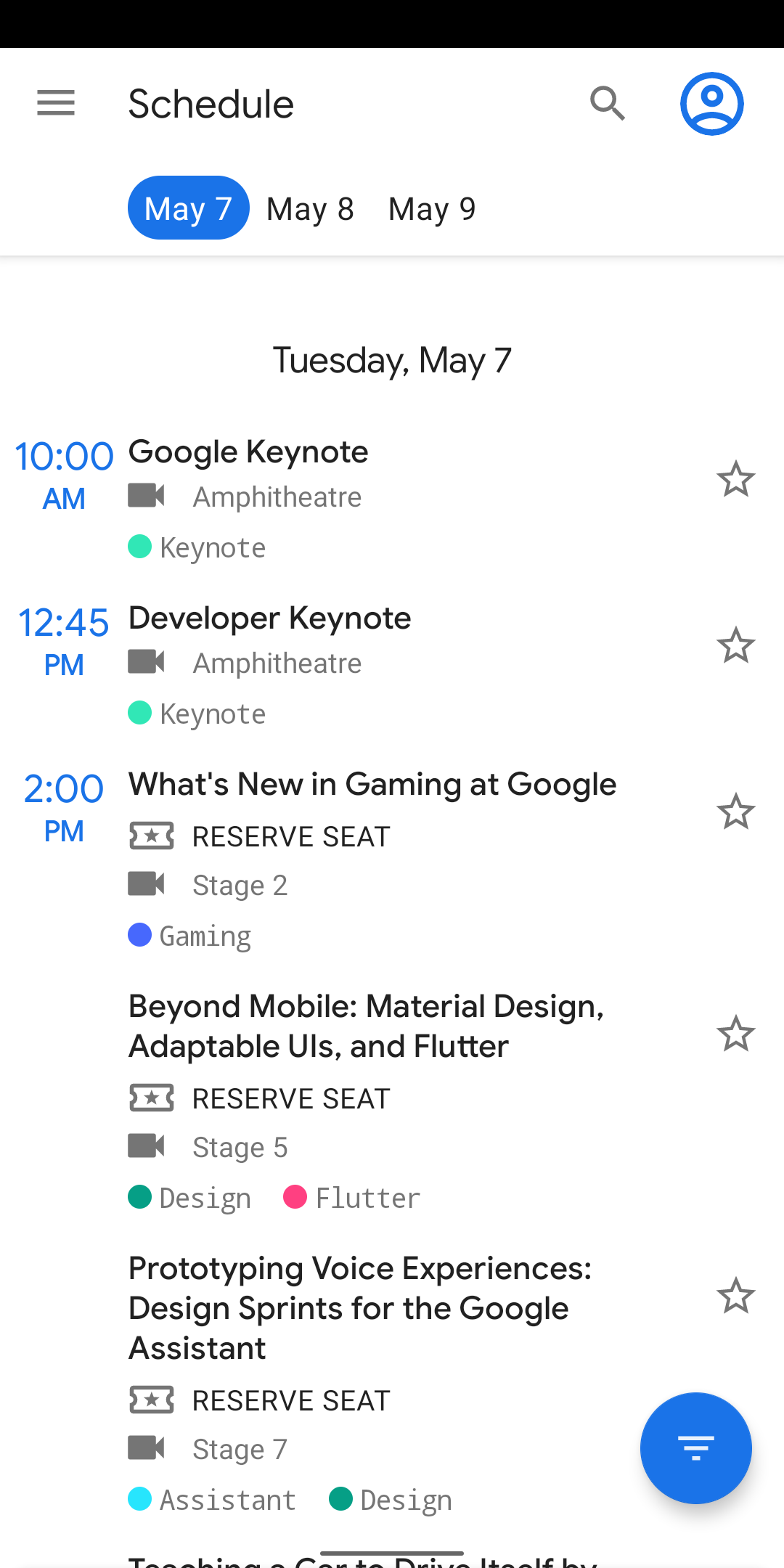
Они никуда не денутся: данные пользователя — избранные и забронированные мероприятия — хранятся в Cloud Firestore с локальным кешем для работы офлайн, а данные конференции загружаются один раз и держатся в памяти.Что участники реально могут делать в приложении?Оно показывает все события конференции — доклады, офисные часы, обзоры приложений, кодлабы, — с фильтрами по типу события и теме (Android, Firebase и т.д.). Можно отмечать мероприятия звёздочкой, бронировать места, чтобы гарантированно попасть, а во время конференции доступны карта площадки, информационные страницы и лента Home, актуальная по времени.
Оно показывает все события конференции — доклады, офисные часы, обзоры приложений, кодлабы, — с фильтрами по типу события и теме (Android, Firebase и т.д.). Можно отмечать мероприятия звёздочкой, бронировать места, чтобы гарантированно попасть, а во время конференции доступны карта площадки, информационные страницы и лента Home, актуальная по времени.Какие архитектурные паттерны здесь показаны?Приложение следует руководству Google по архитектуре приложений (Guide to App Architecture): логика живёт во ViewModels, данные наблюдаются через Kotlin Flows, слой репозиториев скрывает источники данных, а лёгкий доменный слой выполняет бизнес-логику вне потока интерфейса. Внедрение зависимостей делает Hilt, а поиск по докладам, спикерам и кодлабам построен на Room с FTS4 — с полнотекстовым поиском.
Приложение следует руководству Google по архитектуре приложений (Guide to App Architecture): логика живёт во ViewModels, данные наблюдаются через Kotlin Flows, слой репозиториев скрывает источники данных, а лёгкий доменный слой выполняет бизнес-логику вне потока интерфейса. Внедрение зависимостей делает Hilt, а поиск по докладам, спикерам и кодлабам построен на Room с FTS4 — с полнотекстовым поиском.Как тестируется код?UI-тесты написаны на Espresso, юнит-тесты — на JUnit4 с Mockito там, где это нужно, а Jetpack Benchmark замеряет критичные пути запуска, например разбор стартовых данных, и выводит результаты в консоль Android Studio.
UI-тесты написаны на Espresso, юнит-тесты — на JUnit4 с Mockito там, где это нужно, а Jetpack Benchmark замеряет критичные пути запуска, например разбор стартовых данных, и выводит результаты в консоль Android Studio.Почему Google перестал его обновлять?Google I/O 2020 отменили, а в 2021 конференция прошла только онлайн, поэтому приложению-спутнику нечего было обслуживать, и после выпуска 2019 года оно не обновлялось. Команда продолжала модернизировать код — Kotlin Flows, DataStore, поддержка больших экранов — прежде чем перевести его в архив в пользу 'Now in Android'.
Google I/O 2020 отменили, а в 2021 конференция прошла только онлайн, поэтому приложению-спутнику нечего было обслуживать, и после выпуска 2019 года оно не обновлялось. Команда продолжала модернизировать код — Kotlin Flows, DataStore, поддержка больших экранов — прежде чем перевести его в архив в пользу 'Now in Android'.What are similar projects?compose-samples, nowinandroid, plaid, architecture-samples, MVPArms, LastWave-Native, sunflower, coil
compose-samples, nowinandroid, plaid, architecture-samples, MVPArms, LastWave-Native, sunflower, coilWhich topics is it in?kotlin-coroutines, coroutines, sample-app, androidx, gradle, jetpack-compose, android-development, architecture, android-app, google, kotlin, mobile-app
kotlin-coroutines, coroutines, sample-app, androidx, gradle, jetpack-compose, android-development, architecture, android-app, google, kotlin, mobile-app