ProductSpec


ProductSpec is the open standard for product intent. It acts as a Product Harness for AI-native software work: what to build, what not to build, how to prove completion, and when intent changes.
It gives teams and agents a portable way to define intent up front, attach evidence after work starts, and preserve what changed when reality disagreed.
Use it when consequential software work needs intent to survive handoff: from product to engineering, from humans to agents, and from implementation back to learning.
Product Spec -> Engineering Spec -> Code -> Evaluation -> Learning
what / why      how / plan / tasks   implementation   outcome
For agent-led work, ProductSpec gives coding agents a product contract:
Product Spec
  -> MCP tools
  -> coding agent
  -> implementation
  -> Agent Run receipt
  -> Related Artifacts
  -> Decision Trace
  -> revised Product Spec
Product Spec is the core artifact. Agent Run and Decision Trace are optional companion artifacts: use them when agents implement against a spec or when evidence changes the decision.
ProductSpec is neutral. It defines structure, section IDs, portable review annotations, calibration-example serialization, and portable decision traces. It does not define what makes a Product Spec good.
Design principle: structure the parts machines must execute or compare. Leave the parts humans must reason about readable.
ProductSpec acts as a Product Harness for agent-led work. The Product Spec tells Claude, Codex, Cursor, and other coding agents what to build, what not to build, how to prove completion, and when to stop and re-plan. For those agents, ProductSpec provides an intent harness: structured context, scope guardrails, acceptance criteria, evals, evidence targets, and revision checks. The repo includes skills/productspec/SKILL.md, a loadable agent skill that tells coding agents how to read Product Specs, cite Acceptance Criteria, respect scope, and propose a Decision Trace when implementation diverges from intent. skills/productspec-authoring/SKILL.md covers the other direction: writing a Product Spec, validating it, and converting an existing PRD into one. Both are installable with npx skills add gokulrajaram/ProductSpec.
Agent Run is the optional companion artifact for recording what happened when an agent used ProductSpec as its product contract: the pinned spec revision, checked criteria and evals, linked evidence, drift status, and completion claim.
Decision Trace is the optional companion standard for recording how consequential decisions, drift, revisions, and outcomes are handled over time.
Intent -> Implementation -> Drift -> Decision Trace -> Revised Intent
What Agents Can Do Today
With the parser, CLI, MCP server, and companion artifacts in this repo, agents can:
- validate Product Specs before planning or coding
- pin
spec_revision and content hash at the start of a work session
- read Product Summary, Scope, Acceptance Criteria, AI Evals, Success Metrics, and Related Artifacts as structured data
- resolve a folder of specs into buildable, blocked, and ordered work
- garden a repo to find missing evidence, stale revision pins, unscoped specs, and run gaps
- reconcile one Product Spec against one Agent Run before claiming completion
- ask what evidence is expected for each
AC-, EVAL-, and SM- item
- check whether the Product Spec changed before claiming completion
- draft an Agent Run receipt
- record drift or learning through Decision Trace
ProductSpec does not tell the agent how to code. It tells the agent what intent it is accountable to.
Repo Maintenance Commands
Once Product Specs live in a repo, use these commands to operate the Product Harness across many files:
# Scan repo health: specs, runs, traces, graph, evidence, stale revision pins
npm exec --package @productspec/parser -- productspec garden .

# Check whether one Agent Run satisfies one Product Spec revision
npm exec --package @productspec/parser -- productspec reconcile docs/product-specs/my-feature.product-spec.md --against docs/agent-runs/my-feature.agent-run.json

# Open a local read-only dashboard over the same garden report
npm exec --package @productspec/parser -- productspec serve . --port 4317
See docs/repo-maintenance.md for the full semantics.
Intent And Evidence
ProductSpec defines what should be built and why.
Evidence shows what happened after work started: pull requests, tests, eval runs, dashboards, analytics snapshots, releases, and support signals.
Use Related Artifacts to attach evidence to durable ProductSpec IDs:
AC-<number>: implementation evidenceEVAL-<number>: model behavior evidenceSM-<number>: post-launch outcome evidence
Updating evidence links does not automatically require a spec_revision bump. Bump spec_revision when evidence changes the meaning of the product intent: scope, acceptance criteria, user experience, success metrics, or the underlying bet. Use Decision Trace when evidence changes the product decision.
ProductSpec does not collect traces or run evals. It gives evidence a stable intent target.
Living Specs
Product Specs are living documents. They should change when evidence, scope, design, acceptance criteria, or success metrics change.
spec_revision gives each meaningful revision a portable handle:
spec_format_version: "0.1" # ProductSpec standard version
spec_revision: 1           # initial product intent
spec_revision: 2           # scope changed after design review
spec_revision: 3           # acceptance criteria updated before implementation
Git keeps the detailed history. spec_revision lets people and tools cite the intent revision they are using: a Jira ticket, an engineering spec, an AI agent loop, a pull request, or a Decision Trace.
See examples/revisions/ for a Product Spec that evolves from revision 1 to revision 2.
Quick Start
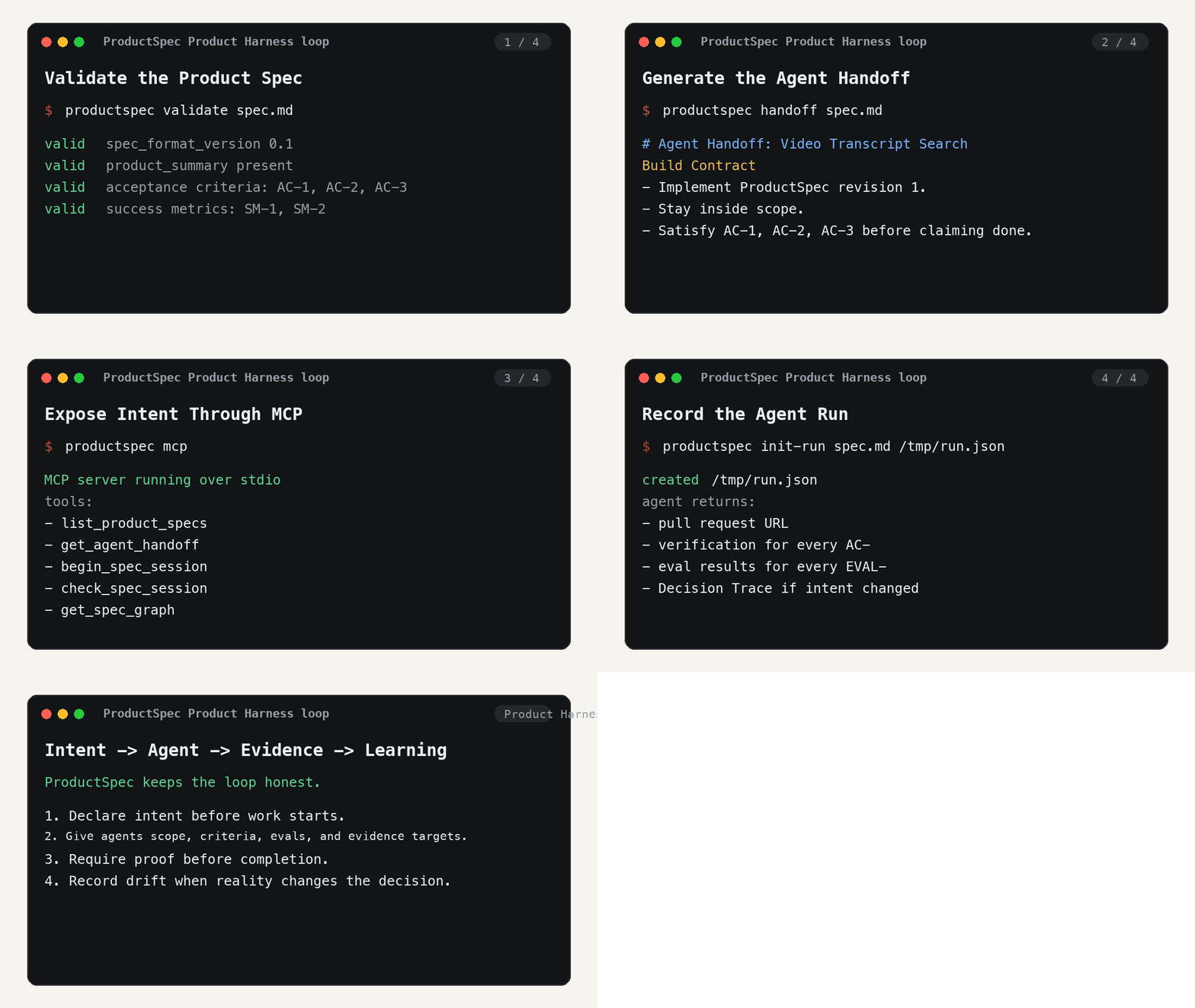
If you want to use ProductSpec as a Product Harness for coding agents, start here:
- Get started with agents: install the skills, convert a PRD, validate in CI, implement from a Product Spec, and record drift.
- Use the MCP server: expose Product Specs to coding agents as structured tools.
- Install MCP in Claude or Cursor: generate a copy-pasteable MCP client config.
- Use with Claude Code, Cursor, or Codex: tool-specific agent walkthroughs.
- 5-minute Product Harness demo: see Product Spec, MCP, Agent Run, and Decision Trace working together.
- Product Harness: the outer-loop frame around coding agents and engineering specs.
- Agent Handoff: generate an implementation brief from a Product Spec without making handoff a canonical spec section.
- 60-second demo script: record the ProductSpec loop closing in a short GIF or Loom.
- Real-world example gallery: copy patterns from product, AI, platform, and agent-led specs.
- CI badge demo: validate Product Specs in GitHub Actions and show a factual status badge.
- Awesome ProductSpec: curated docs, examples, workflows, and adjacent tools.
- Status badge spec: factual badge shapes for valid specs, run receipts, evidence, and revisions.
- Evidence loop: connect Product Specs to implementation, evals, metrics, and Decision Trace.
- Repo maintenance: garden a repo, reconcile Agent Runs, and serve a local ProductSpec dashboard.
- Agent Run: record one Claude, Codex, Cursor, or other agent execution against a pinned Product Spec.
- Try the Product Harness demo:
npm exec --package @productspec/parser -- productspec validate examples/harness-demo/checkout-notifications.product-spec.md
- Generate an Agent Handoff:
npm exec --package @productspec/parser -- productspec handoff examples/product-harness/video-transcript.product-spec.md
- Start the MCP server:
npx --yes -p @productspec/parser@latest productspec mcp
Generate a Claude or Cursor MCP config:
npx --yes -p @productspec/parser@latest productspec mcp-config claude
- Ask Claude, Codex, Cursor, or another MCP-aware agent to implement against the Product Spec:
Use ProductSpec MCP before coding.
Validate examples/harness-demo/checkout-notifications.product-spec.md, call begin_spec_session, load Product Summary, Scope, Acceptance Criteria, AI Evals, Success Metrics, Related Artifacts, and Agent Handoff.
Stay inside scope.in, avoid scope.out and scope.cut, verify every AC- and EVAL- item, call check_spec_session before claiming done, and draft an Agent Run receipt.
- Draft the run receipt:
npm exec --package @productspec/parser -- productspec init-run examples/harness-demo/checkout-notifications.product-spec.md /tmp/checkout-notifications.agent-run.json
- Validate the checked-in example receipt and trace:
npm exec --package @productspec/parser -- productspec validate-run examples/harness-demo/checkout-notifications.agent-run.json
npm exec --package @productspec/parser -- productspec validate-trace examples/harness-demo/checkout-notifications.decision-trace.json
Try This With Your Coding Agent
- Pick a real feature you would otherwise describe in a PRD, ticket, or chat thread.
- Write a Product Spec for it, or start from
examples/product-harness/video-transcript.product-spec.md.
- Validate it:
npm exec --package @productspec/parser -- productspec validate path/to/your.product-spec.md
- Generate the Agent Handoff:
npm exec --package @productspec/parser -- productspec handoff path/to/your.product-spec.md
- Paste the handoff into Claude, Codex, Cursor, or another coding agent.
- Require evidence for every
AC-<number> and EVAL-<number> before the agent claims completion.
- If implementation pressure changes product intent, update the Product Spec or record a Decision Trace.
Create a starter Product Spec:
npm exec --package @productspec/parser -- productspec init my-feature.product-spec.md
Prefer an editor?
You can also draft and validate Product Specs in the free browser editor at ProductSpec.io. The open standard does not require the hosted editor.
Resolve a folder of specs into a build graph:
npm exec --package @productspec/parser -- productspec graph conformance/graph
The graph answers the fleet question too: which specs are safe to hand to different agents at the same time. It reports contention (the surfaces more than one live spec touches, read from applies_to) and waves (sets of specs that share no surface and whose dependencies are already met), so two agents never land in the same files and find out at merge.
Read and inspect a spec from the shell:
npm exec --package @productspec/parser -- productspec list specs
npm exec --package @productspec/parser -- productspec get path/to/your.product-spec.md acceptance --json
npm exec --package @productspec/parser -- productspec check-claim path/to/your.product-spec.md
The CLI reaches every operation the MCP does: validate, list, show, read a section (scope, acceptance, evals, metrics, related, evidence), graph, generate a handoff, check a completion claim, and pin or check a session for drift. Every read command supports --json, so anyone who finds MCP overkill can do the same work from a plain terminal. See the CLI reference for all commands and flags. The CLI and the MCP call the same functions, so their output cannot drift.
Garden the whole repo for missing evidence, stale revision pins, run gaps, Decision Trace gaps, and graph health:
npm exec --package @productspec/parser -- productspec garden .
Reconcile one implementation run against one Product Spec revision:
npm exec --package @productspec/parser -- productspec reconcile docs/product-specs/my-feature.product-spec.md --against docs/agent-runs/my-feature.agent-run.json
Serve the same repo-health view locally:
npm exec --package @productspec/parser -- productspec serve . --port 4317
See docs/repo-maintenance.md for the command semantics.
Status Badges
ProductSpec badges should report facts, not subjective quality scores.
ProductSpec: valid
ProductSpec: rev 3
Agent Run: recorded
Evidence: 4 linked artifacts
ProductSpec graph: buildable
See docs/status-badge.md for the recommended badge vocabulary.
Use the GitHub Action in a repository:
name: ProductSpec

on:
  pull_request:

jobs:
  validate-product-specs:
    runs-on: ubuntu-latest
    steps:
      - uses: actions/checkout@v4
      - uses: gokulrajaram/ProductSpec@main
        with:
          files: "docs/product-specs/**/*.product-spec.md"
          decision_traces: "docs/decision-traces/**/*.decision-trace.json"
          agent_runs: "docs/agent-runs/**/*.agent-run.json"
How To Contribute Without Coding
Product leaders and builders can shape ProductSpec without touching parser code:
- open a
General spec discussion issue with an example from your product process
- propose a section vocabulary change when the default sections do not fit consequential work
- contribute an anonymized Product Spec example
- contribute a Decision Trace example showing how intent changed during implementation
- report confusing validator errors or adoption friction
See CONTRIBUTING.md for exact issue and pull request steps.
Example
Full Product Spec files include frontmatter such as title, optional spec_revision, author, and timestamps. This shortened example shows the section body.
## Problem

Support leads at B2B SaaS companies lose their morning planning window because urgent, account-risk tickets are buried among routine product questions.

## Hypothesis

If incoming tickets are automatically labeled by urgency, customer tier, and likely owner, support leads will respond to account-risk issues faster because the queue starts each day pre-sorted by consequence.

## Product Summary

An AI support triage workflow labels incoming tickets by urgency, customer tier, likely owner, and confidence so support leads can start from an ordered queue.

## Scope

```productspec-scope
in:
  - Include ticket ingestion in this version.
  - Include urgency labels in this version.
  - Include customer-tier lookup in this version.
  - Include owner recommendation in this version.
  - Include confidence score in this version.
  - Include reviewer override in this version.
  - Include audit log in this version.
out:
  - Do not build auto-replies in this version.
  - Do not build direct ticket reassignment in this version.
  - Do not build customer-visible status changes in this version.
cut:
  - Cut custom routing rules from the first version if implementation time is tight.
```

## Acceptance Criteria

```productspec-acceptance-criteria
- id: AC-1
  criterion: New tickets receive urgency, customer tier, suggested owner, confidence score, and model version within 60 seconds.
- id: AC-2
  criterion: Reviewers can override any label before it changes downstream workflow state.
```

```productspec-ai-evals
- id: EVAL-1
  type: llm_judge
  cases:
    - input: "Representative input for this eval."
      expected: "Expected behavior for this eval."
  evaluator: llm
  pass_threshold: 0.92
  checks:
    - urgency classification identifies account-risk tickets
```

## Success Metrics

```productspec-success-metrics
- id: SM-1
  metric: median_time_to_first_human_response
  target: "< 15 minutes"
  target_status: committed
  window: business hours
```
See examples/ai-support-triage.product-spec.md for the complete version.
Naming
ProductSpec is the open standard, project, repository, and ecosystem for software intent.Product Spec is the artifact a person writes.
When To Use ProductSpec
ProductSpec is not for every act of building. It is for consequential software work where intent needs to survive handoff.
For an individual builder, a Product Spec is useful when the work is complex, risky, long-lived, or being handed to an AI agent loop. For quick experiments, one-off scripts, or throwaway prototypes, it may be faster to brainstorm, build, and iterate directly.
For a team or organization, ProductSpec is most useful when coordination cost appears: multiple people, multiple agents, design and engineering handoffs, customer-facing launches, AI features with evals, or decisions that will need to be revisited later.
Where This Sits
ProductSpec operates at the software intent layer: the what and why that come before engineering specs are written. This is where a team commits to the problem, hypothesis, product summary, scope, user experience, acceptance criteria, and success metrics.
OpenSpec and Spec Kit operate at the engineering spec layer. OpenSpec's flow is propose -> apply -> archive. Spec Kit's flow is constitution -> specify -> clarify -> plan -> tasks -> analyze -> implement. Those artifacts live in the repo and are consumed by AI agents to build code.
Product Spec (ProductSpec) -> Engineering Spec (OpenSpec / Spec Kit) -> Code (agents)
what / why                       how / plan / tasks                         implementation
strategic intent                 technical decomposition                    running system
Both layers are SDD. Both use the spec as a control system. They serve different roles with different artifacts.
Where ProductSpec Fits
ProductSpec does not replace Git, Jira, Linear, Figma, analytics tools, OpenSpec, Spec Kit, or AI coding agents.
It sits upstream of them.
ProductSpec -> Engineering Spec -> Tasks -> Code -> Evaluation -> Learning
- Git stores implementation history. A Product Spec can live beside code in Git, but code commits should not be the first durable record of why the work exists.
- Jira and Linear store work history. A Product Spec can become epics, tickets, or tasks, but it should remain the durable statement of intent behind those tasks.
- Figma stores design artifacts. A Product Spec can link to prototypes, mockups, or screenshots through
user_experience, but it does not replace the design source of truth.
- Analytics tools store outcome data.
- OpenSpec and Spec Kit turn intent into engineering plans.
- AI coding agents execute implementation tasks.
- ProductSpec stores the software intent behind the work: the problem, hypothesis, product summary, scope, acceptance criteria, and success metrics that downstream tools should preserve.
Ecosystem
ProductSpec is meant to be implemented by many tools.
Current repo artifacts:
@productspec/parser: TypeScript parser, validator, and CLI.skills/productspec and skills/productspec-authoring: loadable agent skills for implementing from a Product Spec and for writing one.- JSON Schema for parsed Product Spec documents.
- Valid and invalid conformance fixtures.
starter-kit/: copyable repo setup with Product Specs, Agent Runs, Decision Traces, agent instructions, PR template, and CI.- GitHub issue and pull request templates.
- Examples for AI features, consumer UX, enterprise workflows, internal APIs, and revision history.
Durable IDs are generated for the top-level items that tools execute or compare: AC-1 for Acceptance Criteria, SM-1 for Success Metrics, and EVAL-1 for AI evals. Scope bullets, eval cases, optional eval checks, and prose/custom sections remain un-IDed. Tools that need to cite eval children should use positional references like EVAL-1.case[2].
Success Metrics may be committed when the target is known, or provisional when the team knows the metric but needs post-launch baseline work before committing the threshold. Provisional targets must name a target_owner.
Natural integration points:
- Git and GitHub for versioned Product Specs, pull requests, and review.
- Jira and Linear for work tracking that links back to Product Spec revisions.
- Figma and prototypes through
user_experience.
- OpenSpec and Spec Kit for downstream engineering specs.
- AI coding agents that build until Acceptance Criteria pass.
- Analytics and experiment tools that measure Success Metrics after launch.
Traceability uses two shapes:
- Frontmatter for stable document-level relationships such as
linked_github_repo and applies_to.
## Related Artifacts with a structured productspec-related-artifacts block for item-level links from AC-<number>, SM-<number>, or EVAL-<number> to issues, pull requests, eval runs, dashboards, designs, releases, or engineering specs.
Early ecosystem contributions are welcome: examples, importer/exporter experiments, editor integrations, CI validation actions, review tools, and mappings into engineering-spec systems.
Want a small first contribution? Start with pinned issue #43: add a real Product Harness example.
What Is Included
- SPEC.md: the canonical v0.1 standard.
- CHANGELOG.md: release history for the standard and tooling.
- CONTRIBUTING.md: how to propose examples, validator changes, and section vocabulary changes.
- docs/philosophy.md: the core beliefs behind ProductSpec.
- docs/launch-post.md: a draft launch post for sharing the project.
- docs/why-productspec.md: why the intent layer needs its own artifact.
- docs/faq.md: answers to common ProductSpec adoption questions.
- docs/get-started-with-agents.md: the shortest path from existing docs to agent-authored and agent-implemented Product Specs.
- docs/use-in-your-repo.md: copy-paste setup for using ProductSpec in an existing repository.
- docs/product-harness.md: how ProductSpec acts as the Product Harness above coding agents and engineering specs.
- docs/agent-usage.md: how to use ProductSpec as an intent harness for coding agents.
- docs/agent-handoff.md: how to generate an implementation brief from a Product Spec without duplicating canonical intent.
- docs/agent-run.md: how to record one agent execution against a pinned Product Spec.
- docs/graph.md: resolving a folder of Product Specs into buildable, blocked, and ordered work, plus the contention and waves a fleet of agents needs to run in parallel safely.
- docs/repo-maintenance.md: repo-level garden, reconciliation, and local dashboard commands for ProductSpec libraries.
- docs/adoption.md: how teams can adopt ProductSpec across Git, Jira, Linear, Figma, CI, engineering specs, and agents.
- docs/productspec-to-tickets.md: how to project a Product Spec into Jira or Linear tickets without forking intent.
- docs/adoption-levels.md: a step-by-step maturity ladder for adopting ProductSpec.
- docs/before-after.md: a loose PRD transformed into ProductSpec.
- docs/productspec-vs.md: how ProductSpec differs from PRDs, Jira, Git, Figma, engineering design docs, OpenSpec, Spec Kit, and ADRs.
- docs/repo-starter-kit.md: copy-paste conventions for using ProductSpec in an existing repo.
- starter-kit/: a copyable repo starter kit with ProductSpec, Agent Run, Decision Trace, AGENTS/CLAUDE instructions, and CI.
- docs/handoff-example.md: how ProductSpec interacts with Jira, Figma, Git, OpenSpec, Spec Kit, and coding agents.
- docs/end-to-end-handoff.md: a concrete walkthrough from Product Spec to issue, design, engineering spec, agent loop, pull request, and launch learning.
- docs/vision.md: the public vision for ProductSpec as the intent layer.
- docs/validator.md: validator error and warning codes.
- docs/validate-your-first-product-spec.md: the fastest local validation path.
- docs/field-guide.md: field-level guidance for writing each section.
- docs/versioning.md: compatibility rules before v1.0.
- docs/decision-trace.md: the optional companion standard for decisions, drift, and revisions.
- schema/product-spec.schema.json: JSON Schema for parsed Product Spec documents.
- schema/decision-trace.schema.json: JSON Schema for Decision Trace documents.
- schema/agent-run.schema.json: JSON Schema for Agent Run documents.
- schema/review-annotation.schema.json: JSON Schema for portable review annotations.
- skills/productspec/SKILL.md: loadable agent guidance for implementing from Product Specs.
- skills/productspec-authoring/SKILL.md: loadable agent guidance for writing, validating, and converting Product Specs.
- conformance/: valid and invalid fixtures for implementers.
- examples/README.md: guide to choosing the right example.
- examples/: minimal and expanded examples.
- examples/decision-traces/: companion Decision Trace examples.
- examples/product-harness/: Product Spec, generated Agent Handoff, Agent Run, and Decision Trace in one loop.
- examples/agent-ready-repo/: ProductSpec as a Product Harness in a small repo layout.
- parsers/ts: TypeScript reference parser, validator, and CLI.
Examples include AI features, consumer UX, enterprise workflows, internal APIs, and agent handoffs:
Canonical Sections
Mandatory sections, in order:
problemhypothesisproduct_summaryscopeacceptance_criteriasuccess_metrics
Optional sections:
user_experience, customer_truth, solution_alternatives, solution, strategic_positioning, adoption, pricing, risks, ai, open_questions, rollout, related_artifacts
user_experience describes the externally observable experience of the work when there is one: for example, a prototype URL, mockup, design link, public deploy, Loom walkthrough, API documentation page, CLI demo, dashboard, or internal tool screen.
Custom sections use custom-<kebab-name>.
Status
Version 0.1 is intentionally small. It is stable enough for tooling experiments, but still pre-1.0 while implementers learn what needs to change. See docs/versioning.md for compatibility expectations.
ProductSpec distinguishes the standard version from the document revision:
spec_format_version tells tools which ProductSpec format the file uses.spec_revision is an optional positive integer for this particular product decision. It starts at 1 and increments when intent materially changes.
The current v0.x standard includes conformance fixtures, a structured validator, examples, a CLI, optional spec_revision frontmatter, traceability fields, an MCP server, a loadable agent skill, a copyable repo starter kit, generated Agent Handoffs, Decision Trace validation, Agent Run drafting and validation, repo gardening, reconciliation, and a local read-only dashboard:
npm exec --package @productspec/parser -- productspec validate examples/minimal.product-spec.md
To validate a Decision Trace:
npm exec --package @productspec/parser -- productspec validate-trace examples/decision-traces/transcript-search.decision-trace.json
To validate an Agent Run:
npm exec --package @productspec/parser -- productspec validate-run examples/agent-ready-repo/docs/agent-runs/transcript-search.agent-run.json
To draft an Agent Run from a Product Spec:
npm exec --package @productspec/parser -- productspec init-run examples/minimal.product-spec.md examples/minimal.agent-run.json
To generate an Agent Handoff from a Product Spec:
npm exec --package @productspec/parser -- productspec handoff examples/product-harness/video-transcript.product-spec.md
To create a starter Product Spec:
npm exec --package @productspec/parser -- productspec init my-feature.product-spec.md
For local development from this repository:
npm install
npm run build
node dist/cli.js validate examples/minimal.product-spec.md
Or use the shortcut:
npm run validate -- examples/minimal.product-spec.md
To run the local productspec CLI without a global install:
npm run cli -- validate examples/minimal.product-spec.md
To link the CLI during development:
npm run link:cli
After linking, productspec validate examples/minimal.product-spec.md works if your npm
global binary directory is on PATH.
See docs/validate-your-first-product-spec.md for the first-run path and current validator checks.
See docs/adoption.md for a practical team setup across Git, Jira, Linear, Figma, CI, engineering specs, and AI coding agents.

 ProductSpec 是一个开放标准,用来描述产品意图——可以理解为面向 AI 原生软件开发的一套“产品缰绳”(Product Harness),它把要做什么、不做什么、怎样才算完成、以及现实和计划不一致时该怎么办都固定下来。