Monaspace
The Monaspace type system is a monospaced type superfamily with some modern tricks up its sleeve. It consists of five variable axis typefaces. Each one has a distinct voice, but they are all metrics-compatible with one another, allowing you to mix and match them for a more expressive typographical palette.
Letters on a grid is how we see our code. Why not make those letters better?
✨ An exploration from GitHub Next. ✨ See the full story of Monaspace at monaspace.githubnext.com.
🔤 Download the latest release 🔤

Overview
Monaspace is five interchangable type families, each of which is packaged into three distinct formats. You can install all of them side-by-side; their family names are distinct by family and format. For example:
Monaspace _____: the static family.Monaspace _____ Var or VF: the variable familyMonaspace _____ NF: static families patched with NerdFontsMonaspace _____ Frozen: the "frozen" TTF family. These fonts enable all of the typographical features ("stylistic sets") in Monaspace by default. They are intended to be used in environments where you might not be able to configure stylistic sets or character variants, like XCode or IntelliJ IDEs. See more about how the frozen fonts work below.
The variable fonts have one file per family (Neon, Argon, etc.). Modern and convenient!
The static fonts have one file per cut, per family. The variable axes have named stops for each axis, like light or bold for weight, italic for italics, and semiwide or wide for width. The combinatorial explosion of all these properties means the complete installation of static fonts involves hundreds of font files. But for situations that don't yet support variable fonts, the static builds give you a wide variety of stops throughout the range of each axis.
Texture Healing
Monaspace pioneered the technique of "texture healing" for monospaced fonts:
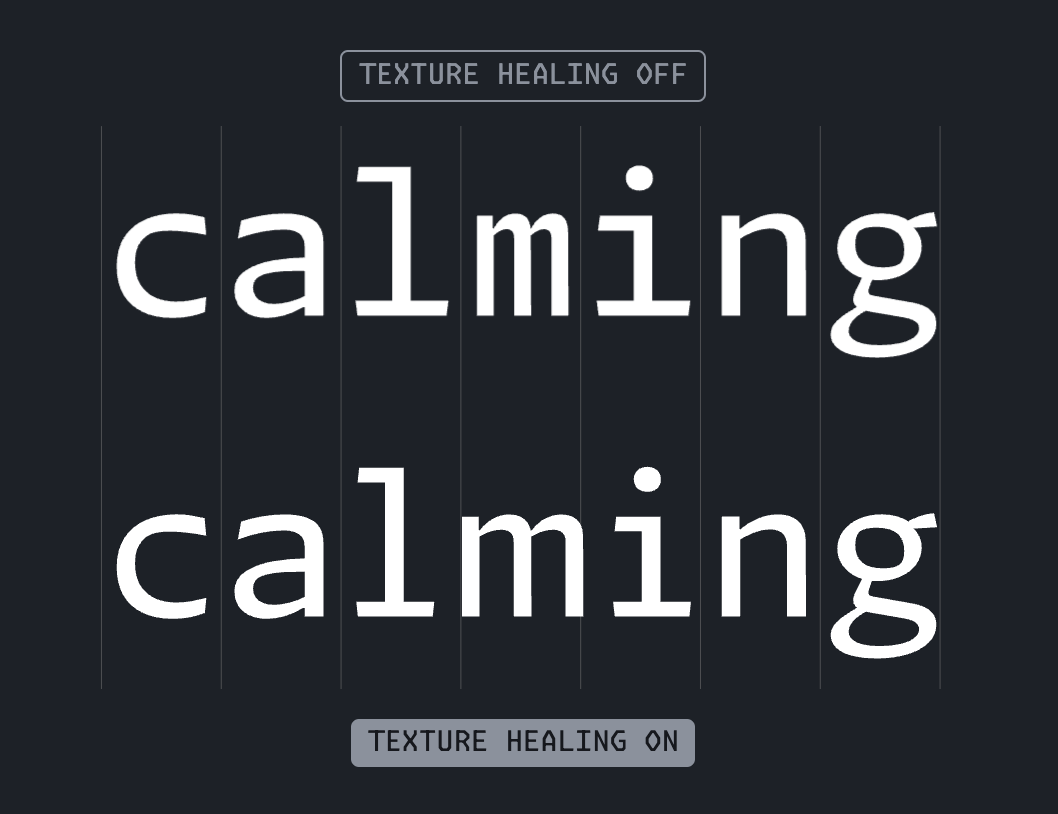
Texture healing is enabled when the calt font feature setting is turned on in your editor. The location for this setting varies across applications, and not all applications support it. See the Editors section below for specific guidance.
You can read more about how it works on the Monaspace website, and learn how it is implemented in the documentation.
Nerd Fonts
As of Monaspace 1.2, the static font builds (both desktop and web) offer versions patched with Nerd Fonts!
Monaspace gives a lot of consideration to horizontal and vertical metrics of a font, and Nerd Fonts are thousands of icons which don't necessarily respect those considerations. Monaspace makes a best-effort attempt to optically align the size and placement of the icons so that they feel compatible with the other Monaspace glyphs.
There is such a broad variety of environments and terminals and often solving for one breaks another! Some Nerd Fonts glyphs may not render correctly in every environment.
[!NOTE]
Monaspace uses the Nerd Fonts implementation from Cascadia Code as our starting point. Each icon was resized to fit the max advance width of the given Monaspace font, and centered vertically between the baseline and cap height of Monaspace's vertical metrics.
Coding Ligatures
[!WARNING]
Ligature handling has changed significantly in Monaspace point releases.
If you're upgrading, check the release notes to learn what changes you might need to make to your editor configuration:
The liga font feature enables customized spacing of repeating characters, like /// or ||. It is designed to avoid activating inside longer sequences like ////.
There are ten groups of coding ligatures, separated into stylistic sets. You may be able to enable or disable individual sets selectively:
ss01: ligatures related to the equals glyph like != and ===.ss02: ligatures for greater/less or equal (<=, >=).ss03: ligatures related to arrows like -> and ~>.ss04: ligatures related to markup, like </ and />.ss05: ligatures related to the F# programming language, like |>.ss06: ligatures related to repeated uses of #, +, _, = and &.ss07: ligatures related to colons like :: or =:=.ss08: ligatures related to combinations of periods with other glyphs like ..= or .-.ss09: ligatures related to combinations of the greater/less than and equals signs, like <=>,>>, and =<<.ss10: other tags, like #[ and #(
👉 You can see an interactive display of all the ligatures on the Monaspace website
Character Variants
Specific characters have variants that you can optionally enable using the cvNN opentype feature:
cv01: 0 alternates
- 1: plain
- 2: slash
- 3: reverse slash
- 4: cut-out slash
cv02: 1 alternate (no serif)
cv10-cv29: letter variants
cv10: l i alternates (Neon, Argon, Xenon, Radon)cv11: j f r t alternates (Neon, Argon)cv12: Bulgarian-specific Cyrillic alternatescv13: Serbianc-specific Cyrillic alternates
cv30-cv59: symbol variants
cv30: * vertically aligned closer to the top of the space, similar to how the asterisk was in Monaspace 1.0cv31: * 6-pointed asteriskcv32: ≥ ≤ angled lower line
cv60-cv79: optional ligatures
cv60: forces the <= pair to render in a fashion that matches => instead of swapping for ≤.cv61: enables the optional closed square ligature for []. This can be distracting when authoring arrays in many editors, because they automatically insert the closing bracket, which immediately produces the closed square ligature upon typing the open bracket.cv62: @_ ligature
cv80-cv99: reserved for future use
Special Characters Galore
In addition to the ligatures, character variants, and Nerd Fonts, Monaspace includes a wealth of special characters.

Desktop Installation
Upgrading
Font caching on operating systems is an inscrutable mess dating back thirty years, and not something we can fix in Monaspace. Generally speaking, you should:
- First delete the old fonts…
- Then install the new fonts…
- Then restart applications that use the fonts…
- … and maybe restart your entire computer.
Restarting is usually the only way to be 100% sure that the underlying machinery in the operating system picks up the new fonts.
MacOS
You can manually drag the fonts from the fonts/otf, fonts/variable, and fonts/frozen directories into Font Book.
There is also a script that automates the deletion of all Monaspace fonts from ~/Library/Fonts and then copies over the latest versions. Invoke it from the root of the repo like:
$ bash util/install_macos.sh
You can also use Homebrew as an alternative, though it may not always have the latest version of Monaspace.
brew install --cask font-monaspace
Windows
You can manually drag the fonts from the fonts/otf, fonts/variable, and fonts/frozen directories into C:\Windows\Fonts. Alternatively, right-click the fonts you want and click Install.
Linux
You can manually drag the fonts from the fonts/otf, fonts/variable, and fonts/frozen directories into ~/.local/share/fonts.
After doing so, it's probably wise to rebuild your font cache like so:
fc-cache -f
Webfonts
All files with a .woff or .woff2 suffix are intended for use on the web. You do not install them with your operating system but add them to your web development project.
As with the desktop fonts, they are available in variable, static, and nerdfont versions.
The webfonts do not come in a "frozen" format; you can easily control Opentype features on the web using the font-feature-settings CSS property.
Editors
Visual Studio Code
[!WARNING]
Ligature handling has changed significantly in Monaspace point releases.
If you're upgrading, check the release notes to learn what changes you might need to make to your editor configuration:
Set the font family:
"editor.fontFamily": "'Monaspace Neon', monospace",
Set an alternate family for inline suggestions:
"editor.inlineSuggest.fontFamily": "'Monaspace Krypton', monospace",
[!NOTE]
Variable fonts are not yet well-supported in VS Code, and it is not yet possible to mix multiple fonts. Stay tuned, we're talking with the VS Code team about it!
You must use the editor.fontLigatures setting to enable the various features (texture healing, ligatures, and character variants). The setting is a comma-separated list of font features to be enabled.
[!NOTE]
This setting is unavailable from the graphical settings editor; you must create it manually.
calt: enables texture healingliga: enables dynamic spacing for certain repeating character patterns like ///ss01, ss02, etc: enables the specific stylistic setcv30, cv60, etc: enables the specific character variants
Putting it all together, a setting string which enables everything but the character variants would look like this:
"editor.fontLigatures": "'calt', 'liga', 'ss01', 'ss02', 'ss03', 'ss04', 'ss05', 'ss06', 'ss07', 'ss08', 'ss09'"
Specific character variants are also enabled using the font-feature-settings syntax. To enable slashed zeroes (with cv01) and six-pointed asterisks (with cv31), you might use the following settings:
"editor.fontLigatures": "'calt', 'liga', 'ss01', 'cv01' 2, 'cv31' 1"
Note that some character variants have several possible values. For any variants that are either on or off, setting them to 1 should enable them, and omitting the variant (or setting them to 0) will disable them.
Contribution
There's no formal contribution guide yet! If you're interested in contributing to the typefaces, you should read the Texture Healing guide, as it explains how to produce the necessary alternate glyphs.
License
SIL OFL. See LICENSE.
Support
Please file issues in this repo. Monaspace is not a supported product; do not contact GitHub support with questions, as they do not support GitHub Next explorations.
Contributors
Monaspace was made to improve all code for all developers. GitHub Next set out on this journey in 2022, and we were fortunate to find a type foundry that shares our passion for improving software in Lettermatic. The result is a marriage of form and function that opens the door to new developer experiences, and that would not have been possible without the domain expertise and skill of the Lettermatic team and the time they invested in working with GitHub Next on figuring out how typography ought to work for code.
Lettermatic

- Latin Type Designers: Riley Cran, Danelle Cheney, Heather Cran
- Lead Symbols & Punctuation: Heather Cran
- Lead Language Support: Heather Cran
- Language Support Expansions: Danelle Cheney, Jane Solomon
- Cyrillic Type Design: Heather Cran, Danelle Cheney, Jane Solomon, Lauren Dickens, Riley Cran
- Cyrillic Consultancy: Ilya Ruderman
- Greek Consultancy: Elina Koutsogiannopoulou
- Vietnamese Consultancy: Donny Trương
GitHub Next

Special Thanks To
- Anna Thomas
- Marg Chronister
Interesting Statistics:
- Typefaces families:
5
- Variable axes per family:
3
- Languages supported:
>220
- Unique glyphs:
>6,000
- Total glyphs:
~750,000
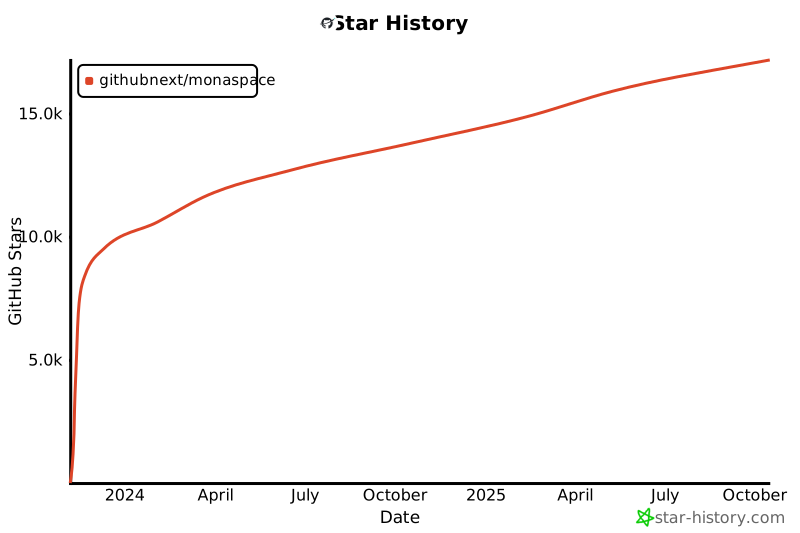
Star History

 Monaspace 是一套包含五款等宽代码字体的超级字体系列,由 GitHub Next 携手字体工作室 Lettermatic 设计打造。这五款字体风格各不相同,但字面尺寸完全一致,因此可以在同一个编辑器里混用。