Что это такое?
 Monaspace — это супергарнитура из пяти монопространственных шрифтов для кода, исследовательский проект GitHub Next, созданный вместе со шрифтовой студией Lettermatic. У пяти гарнитур разный характер, но одинаковые метрики, поэтому их можно смешивать внутри одного редактора.
Monaspace — это супергарнитура из пяти монопространственных шрифтов для кода, исследовательский проект GitHub Next, созданный вместе со шрифтовой студией Lettermatic. У пяти гарнитур разный характер, но одинаковые метрики, поэтому их можно смешивать внутри одного редактора.Это один шрифт или несколько — и почему это называется супергарнитурой?Это пять взаимозаменяемых семейств: у каждого свой характер, но все они совместимы по метрикам, поэтому их можно свободно комбинировать в одном редакторе. Каждое семейство поставляется в статической, вариативной (VF) и Nerd Fonts (NF) сборках под отдельными именами семейств и устанавливается рядом друг с другом.
Это пять взаимозаменяемых семейств: у каждого свой характер, но все они совместимы по метрикам, поэтому их можно свободно комбинировать в одном редакторе. Каждое семейство поставляется в статической, вариативной (VF) и Nerd Fonts (NF) сборках под отдельными именами семейств и устанавливается рядом друг с другом.Как установить шрифты на свой компьютер?Скачайте последний релиз и перетащите шрифты из fonts/otf, fonts/variable или fonts/frozen в Font Book (macOS), папку шрифтов Windows или ~/.local/share/fonts (Linux, затем перестройте кэш командой fc-cache). На macOS в репозитории есть ещё и скрипт обновления, а в качестве альтернативы работает Homebrew, хотя там может быть не самая свежая версия.
Скачайте последний релиз и перетащите шрифты из fonts/otf, fonts/variable или fonts/frozen в Font Book (macOS), папку шрифтов Windows или ~/.local/share/fonts (Linux, затем перестройте кэш командой fc-cache). На macOS в репозитории есть ещё и скрипт обновления, а в качестве альтернативы работает Homebrew, хотя там может быть не самая свежая версия.Если выйдет новая версия, можно просто установить её поверх старой?Лучше не стоит — кэширование шрифтов в операционной системе непредсказуемо, поэтому в README советуют сначала удалить старые шрифты, установить новые, а затем перезапустить приложения и, возможно, весь компьютер. Обработка лигатур также менялась между промежуточными версиями, так что настройки редактора, возможно, придётся обновить.
Лучше не стоит — кэширование шрифтов в операционной системе непредсказуемо, поэтому в README советуют сначала удалить старые шрифты, установить новые, а затем перезапустить приложения и, возможно, весь компьютер. Обработка лигатур также менялась между промежуточными версиями, так что настройки редактора, возможно, придётся обновить.Это для шрифтовых дизайнеров или для всех, кто пишет код?Для всех, кто пишет код — в README сказано, что Monaspace создавалась, чтобы сделать любой код лучше для всех разработчиков. Это исследовательский проект GitHub Next, а не поддерживаемый продукт, поэтому вопросы стоит задавать в issues репозитория, а не в поддержку GitHub.
Для всех, кто пишет код — в README сказано, что Monaspace создавалась, чтобы сделать любой код лучше для всех разработчиков. Это исследовательский проект GitHub Next, а не поддерживаемый продукт, поэтому вопросы стоит задавать в issues репозитория, а не в поддержку GitHub.Только для компьютера, или можно использовать и в вебе?И то, и другое — кроме установки на macOS, Windows и Linux, в релиз входят веб-шрифты .woff и .woff2 в вариативной, статической и Nerd Fonts версиях, которые добавляются в веб-проект. В вебе функции шрифта управляются через CSS-свойство font-feature-settings, поэтому замороженной веб-сборки нет.
И то, и другое — кроме установки на macOS, Windows и Linux, в релиз входят веб-шрифты .woff и .woff2 в вариативной, статической и Nerd Fonts версиях, которые добавляются в веб-проект. В вебе функции шрифта управляются через CSS-свойство font-feature-settings, поэтому замороженной веб-сборки нет.Monaspace платная?Нет — она бесплатная. Шрифты выпущены под лицензией SIL Open Font License, так что их можно свободно устанавливать, использовать и распространять.
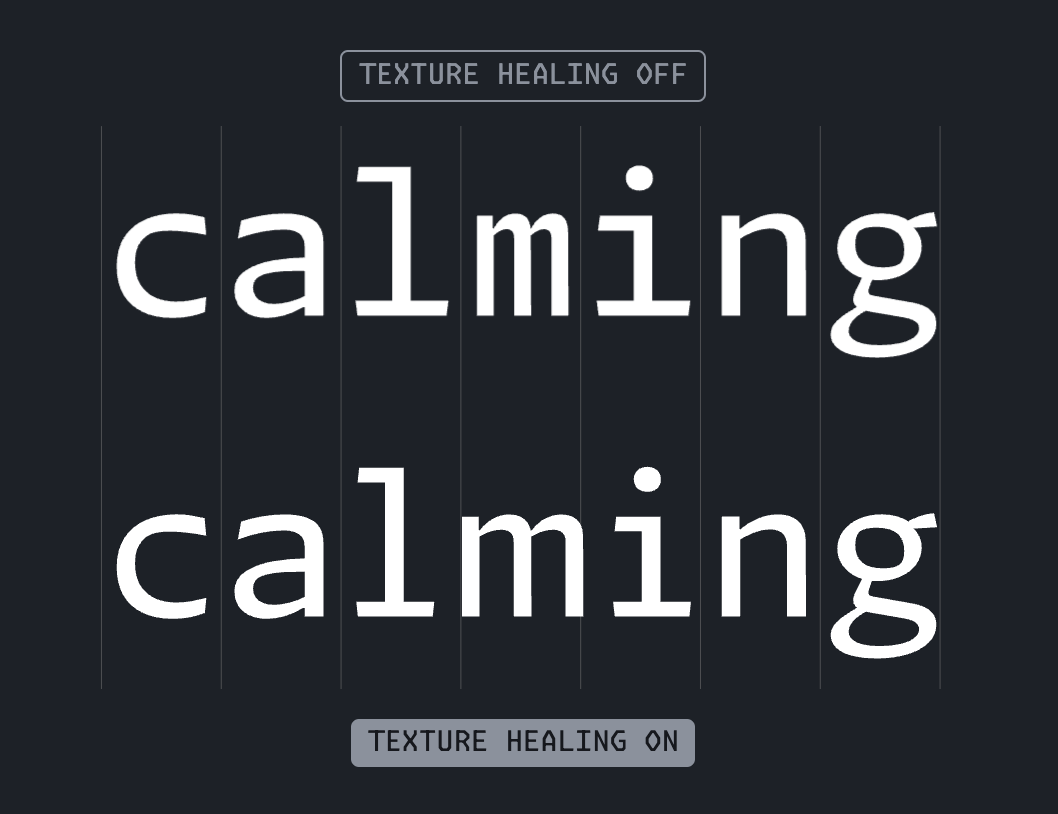
Нет — она бесплатная. Шрифты выпущены под лицензией SIL Open Font License, так что их можно свободно устанавливать, использовать и распространять.Что такое texture healing — фишка, которой известна Monaspace?Это техника управления отступами в монопространственных шрифтах, pioneered которой стала именно Monaspace. Она включается, когда ваш редактор активирует фичу шрифта calt; поддерживают её не все приложения, а подробности лучше искать на сайте Monaspace и в документации, как и указано в README.
Это техника управления отступами в монопространственных шрифтах, pioneered которой стала именно Monaspace. Она включается, когда ваш редактор активирует фичу шрифта calt; поддерживают её не все приложения, а подробности лучше искать на сайте Monaspace и в документации, как и указано в README.Какие лигатуры и варианты символов входят в комплект?Десять групп лигатур идут как стилистические наборы — ss01 для комбинаций со знаками равенства, ss03 для стрелок, ss05 для пайпов F#, ss07 для двоеточий — плюс варианты символов вроде перечёркнутых нулей (cv01) и необязательной квадратной лигатуры [] (cv61). Фича liga также разрежает повторяющиеся символы вроде ///, но остаётся выключенной внутри более длинных последовательностей.
Десять групп лигатур идут как стилистические наборы — ss01 для комбинаций со знаками равенства, ss03 для стрелок, ss05 для пайпов F#, ss07 для двоеточий — плюс варианты символов вроде перечёркнутых нулей (cv01) и необязательной квадратной лигатуры [] (cv61). Фича liga также разрежает повторяющиеся символы вроде ///, но остаётся выключенной внутри более длинных последовательностей.Есть ли версия со значками Nerd Fonts для терминала?Да — начиная с v1.2 статические настольные и веб-сборки поставляются с патчем Nerd Fonts: это тысячи значков, которые сами по себе не соблюдают метрики Monaspace. Каждый значок масштабируется до максимальной ширины символа шрифта и по возможности центрируется, так что в некоторых окружениях отдельные глифы могут отображаться странно.
Да — начиная с v1.2 статические настольные и веб-сборки поставляются с патчем Nerd Fonts: это тысячи значков, которые сами по себе не соблюдают метрики Monaspace. Каждый значок масштабируется до максимальной ширины символа шрифта и по возможности центрируется, так что в некоторых окружениях отдельные глифы могут отображаться странно.Зачем нужны сборки Frozen?Это TTF-файлы, в которых все типографские фичи Monaspace (стилистические наборы) включены по умолчанию. Они предназначены для сред, где нельзя самому настраивать фичи шрифта — в README прямо упоминаются XCode и IntelliJ IDE.
Это TTF-файлы, в которых все типографские фичи Monaspace (стилистические наборы) включены по умолчанию. Они предназначены для сред, где нельзя самому настраивать фичи шрифта — в README прямо упоминаются XCode и IntelliJ IDE.What are similar projects?JetBrainsMono, maple-font, fonts, Hack, Iosevka, source-code-pro, Monocraft, source-han-sans
JetBrainsMono, maple-font, fonts, Hack, Iosevka, source-code-pro, Monocraft, source-han-sansWhich topics is it in?ofl, opentype, programming-font, variable-fonts, monospace, fonts, font, typography, vscode, homebrew, multilingual, shell
ofl, opentype, programming-font, variable-fonts, monospace, fonts, font, typography, vscode, homebrew, multilingual, shell