What is this?
 Monaspace is a superfamily of five monospaced fonts for code, an exploration from GitHub Next designed with the type foundry Lettermatic. The five typefaces have distinct voices but identical metrics, so they can be mixed within a single editor.
Monaspace is a superfamily of five monospaced fonts for code, an exploration from GitHub Next designed with the type foundry Lettermatic. The five typefaces have distinct voices but identical metrics, so they can be mixed within a single editor.Is it one font or several — and why call it a superfamily?It's five interchangeable families, each with its own voice but all metrics-compatible, so you can mix and match them in one editor. Each family ships in static, variable (VF), and Nerd Fonts (NF) builds under distinct family names, installed side by side.
It's five interchangeable families, each with its own voice but all metrics-compatible, so you can mix and match them in one editor. Each family ships in static, variable (VF), and Nerd Fonts (NF) builds under distinct family names, installed side by side.How do I get the fonts onto my machine?Download the latest release and drag the fonts from fonts/otf, fonts/variable, or fonts/frozen into Font Book (macOS), the Windows Fonts folder, or ~/.local/share/fonts (Linux, then rebuild the cache with fc-cache). On macOS there's also an update script in the repo, and Homebrew works as an alternative, though it may not have the latest version.
Download the latest release and drag the fonts from fonts/otf, fonts/variable, or fonts/frozen into Font Book (macOS), the Windows Fonts folder, or ~/.local/share/fonts (Linux, then rebuild the cache with fc-cache). On macOS there's also an update script in the repo, and Homebrew works as an alternative, though it may not have the latest version.If a new version comes out, can I just install over the old one?Better not — OS font caching is unpredictable, so the README advises deleting the old fonts first, installing the new ones, then restarting apps and possibly the whole machine. Ligature handling also changed between point releases, so editor config may need updating.
Better not — OS font caching is unpredictable, so the README advises deleting the old fonts first, installing the new ones, then restarting apps and possibly the whole machine. Ligature handling also changed between point releases, so editor config may need updating.Is this for type designers, or for anyone who writes code?For anyone who writes code — the README says Monaspace was made to improve all code for all developers. It's a GitHub Next exploration rather than a supported product, so questions go to the repo's issues, not GitHub support.
For anyone who writes code — the README says Monaspace was made to improve all code for all developers. It's a GitHub Next exploration rather than a supported product, so questions go to the repo's issues, not GitHub support.Is it desktop-only, or can I use it on the web too?Both — besides macOS, Windows, and Linux installs, the release includes .woff and .woff2 webfonts in variable, static, and Nerd Fonts versions that you add to a web project. On the web you control features with the font-feature-settings CSS property, so there's no frozen web build.
Both — besides macOS, Windows, and Linux installs, the release includes .woff and .woff2 webfonts in variable, static, and Nerd Fonts versions that you add to a web project. On the web you control features with the font-feature-settings CSS property, so there's no frozen web build.Does Monaspace cost anything?No — it's free. The fonts are released under the SIL Open Font License, so you can install, use, and share them freely.
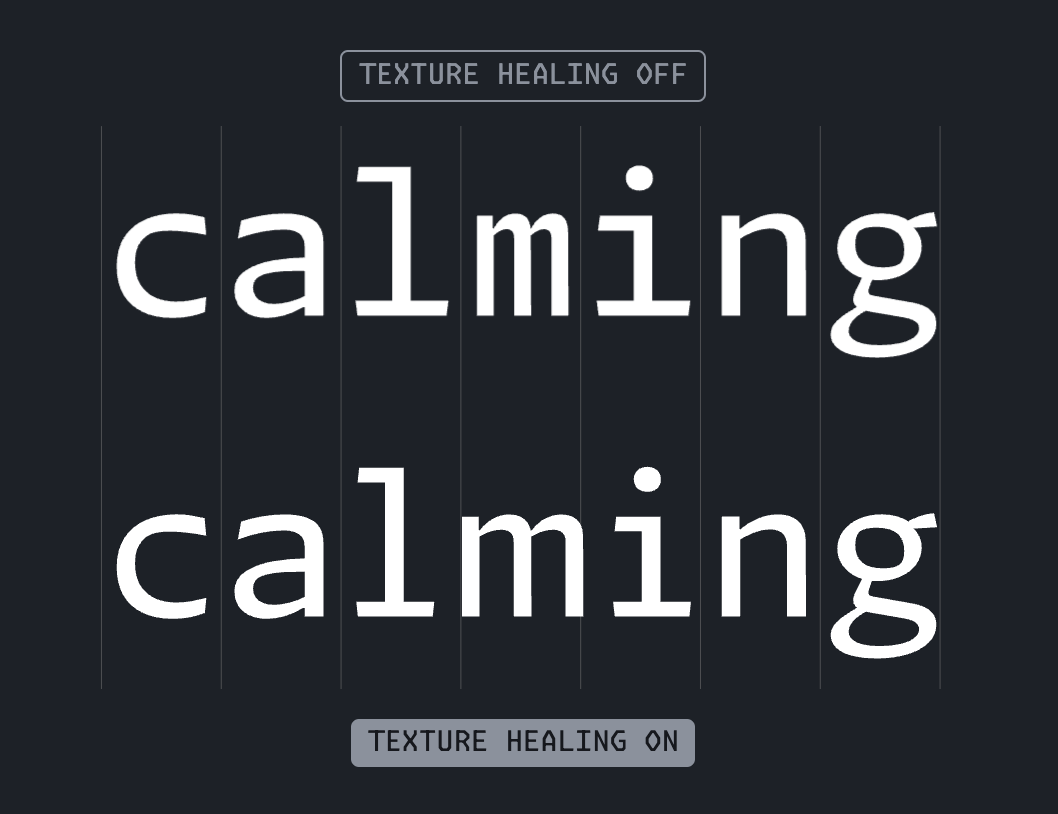
No — it's free. The fonts are released under the SIL Open Font License, so you can install, use, and share them freely.What is texture healing, the feature Monaspace is known for?It's a spacing technique for monospaced fonts that Monaspace pioneered. It's enabled when your editor turns on the calt font feature; not all applications support it, and the README points to the Monaspace website and docs for the full story.
It's a spacing technique for monospaced fonts that Monaspace pioneered. It's enabled when your editor turns on the calt font feature; not all applications support it, and the README points to the Monaspace website and docs for the full story.Which ligatures and character variants are included?Ten ligature groups ship as stylistic sets — ss01 for equals-sign combos, ss03 for arrows, ss05 for F# pipes, ss07 for colons — plus character variants like slashed zeroes (cv01) and an optional closed-square [] ligature (cv61). The liga feature also spaces repeated characters like /// while staying off inside longer runs.
Ten ligature groups ship as stylistic sets — ss01 for equals-sign combos, ss03 for arrows, ss05 for F# pipes, ss07 for colons — plus character variants like slashed zeroes (cv01) and an optional closed-square [] ligature (cv61). The liga feature also spaces repeated characters like /// while staying off inside longer runs.Is there a version with Nerd Fonts icons for my terminal?Yes — since v1.2 the static desktop and web builds come patched with Nerd Fonts: thousands of icons that don't naturally respect Monaspace's metrics. Each icon is resized to the font's max advance width and centered as a best effort, so some glyphs may still render oddly in certain environments.
Yes — since v1.2 the static desktop and web builds come patched with Nerd Fonts: thousands of icons that don't naturally respect Monaspace's metrics. Each icon is resized to the font's max advance width and centered as a best effort, so some glyphs may still render oddly in certain environments.What are the Frozen builds for?They're TTFs with all of Monaspace's typographical features (stylistic sets) enabled by default, meant for environments where you can't configure font features yourself — the README specifically calls out XCode and IntelliJ IDEs.
They're TTFs with all of Monaspace's typographical features (stylistic sets) enabled by default, meant for environments where you can't configure font features yourself — the README specifically calls out XCode and IntelliJ IDEs.What are similar projects?JetBrainsMono, maple-font, fonts, Hack, Iosevka, source-code-pro, Monocraft, source-han-sans
JetBrainsMono, maple-font, fonts, Hack, Iosevka, source-code-pro, Monocraft, source-han-sansWhich topics is it in?ofl, opentype, programming-font, variable-fonts, monospace, fonts, font, typography, vscode, homebrew, multilingual, shell
ofl, opentype, programming-font, variable-fonts, monospace, fonts, font, typography, vscode, homebrew, multilingual, shell