ggwave


Tiny data-over-sound library.
Click on the images below to hear what it sounds like:
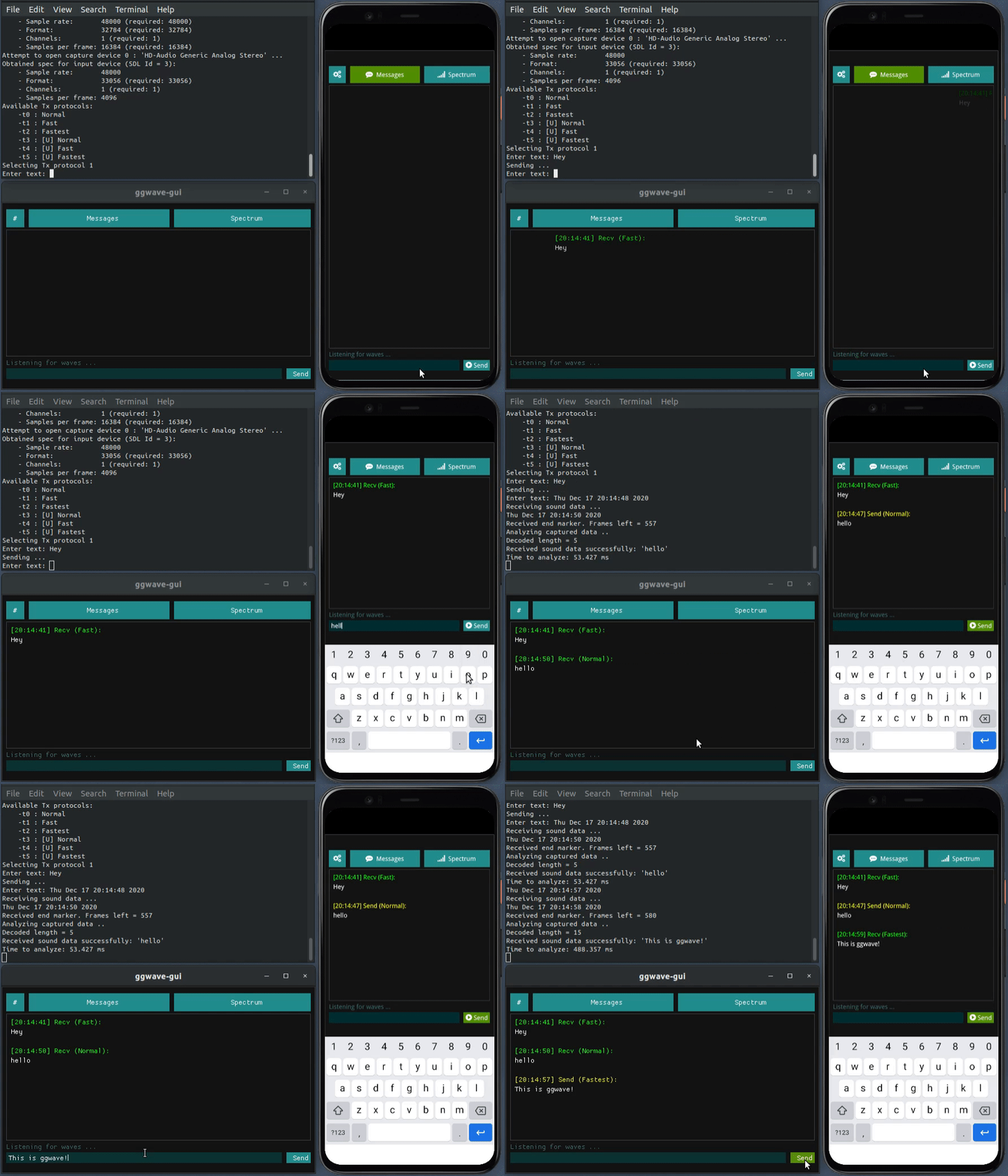


https://user-images.githubusercontent.com/1991296/166411509-5e1b9bcb-3655-40b1-9dc3-9bec72889dcf.mp4
https://user-images.githubusercontent.com/1991296/168469004-aeb9b9fe-cf81-4db7-b602-62e4ae659341.mp4

Details
This library allows you to communicate small amounts of data between air-gapped devices using sound. It implements a simple FSK-based transmission protocol that can be easily integrated in various projects. The bandwidth rate is between 8-16 bytes/sec depending on the protocol parameters. Error correction codes (ECC) are used to improve demodulation robustness.
This library is used only to generate and analyze the RAW waveforms that are played and captured from your audio devices (speakers, microphones, etc.). You are free to use any audio backend (e.g. PulseAudio, ALSA, etc.) as long as you provide callbacks for queuing and dequeuing audio samples.
Here is a list of possible applications of ggwave with a few examples:
- Serverless, one-to-many broadcast
- Internet of Things
- Audio QR codes
- [Twitter] - Broadcast your clipboard to nearby devices
- Device pairing / Contact exchange
- PairSonic - Exchange contact information and public keys with nearby devices
- Authorization
Try it out
You can easily test the library using the free waver application which is available on the following platforms:


Browser demos
# audible example
curl -sS 'https://ggwave-to-file.ggerganov.com/?m=Hello%20world!' --output hello.wav

# ultrasound example
curl -sS 'https://ggwave-to-file.ggerganov.com/?m=Hello%20world!&p=4' --output hello.wav
Technical details
Below is a short summary of the modulation and demodulation algorithm used in ggwave for encoding and decoding data into sound.
Modulation (Tx)
The current approach uses a multi-frequency Frequency-Shift Keying (FSK) modulation scheme. The data to be transmitted is first split into 4-bit chunks. At each moment of time, 3 bytes are transmitted using 6 tones - one tone for each 4-bit chunk. The 6 tones are emitted in a 4.5kHz range divided in 96 equally-spaced frequencies:
| Freq, [Hz] |
Value, [bits] |
Freq, [Hz] |
Value, [bits] |
... |
Freq, [Hz] |
Value, [bits] |
F0 + 00*dF |
Chunk 0: 0000 |
F0 + 16*dF |
Chunk 1: 0000 |
... |
F0 + 80*dF |
Chunk 5: 0000 |
F0 + 01*dF |
Chunk 0: 0001 |
F0 + 17*dF |
Chunk 1: 0001 |
... |
F0 + 81*dF |
Chunk 5: 0001 |
F0 + 02*dF |
Chunk 0: 0010 |
F0 + 18*dF |
Chunk 1: 0010 |
... |
F0 + 82*dF |
Chunk 5: 0010 |
| ... |
... |
... |
... |
... |
... |
... |
F0 + 14*dF |
Chunk 0: 1110 |
F0 + 30*dF |
Chunk 1: 1110 |
... |
F0 + 94*dF |
Chunk 5: 1110 |
F0 + 15*dF |
Chunk 0: 1111 |
F0 + 31*dF |
Chunk 1: 1111 |
... |
F0 + 95*dF |
Chunk 5: 1111 |
For all protocols: dF = 46.875 Hz. For non-ultrasonic protocols: F0 = 1875.000 Hz. For ultrasonic protocols: F0 = 15000.000 Hz.
The original data is encoded using Reed-Solomon error codes. The number of ECC bytes is determined based on the length of the original data. The encoded data is the one being transmitted.
Demodulation (Rx)
Beginning and ending of the transmission are marked with special sound markers (#13). The receiver listens for these markers and records the in-between sound data. The recorded data is then Fourier transformed to obtain a frequency spectrum. The detected frequencies are decoded back to binary data in the same way they were encoded.
Reed-Solomon decoding is finally performed to obtain the original data.
Examples
The examples folder contains several sample applications of the library:
| Example |
Description |
Audio |
| ggtag |
Sound-programmable e-paper badge |
PDM mic |
| ggwave-rx |
Very basic receive-only program |
SDL |
| ggwave-cli |
Command line tool for sending/receiving data through sound |
SDL |
| ggwave-wasm |
WebAssembly module for web applications |
SDL |
| ggwave-to-file |
Output a generated waveform to an uncompressed WAV file |
- |
| ggwave-from-file |
Decode a waveform from an uncompressed WAV file |
- |
| waver |
GUI application for sending/receiving data through sound |
SDL |
| ggwave-py |
Python examples |
PortAudio |
| ggwave-js |
Javascript example |
Web Audio API |
| spectrogram |
Spectrogram tool |
SDL |
| ggweb-spike |
Android example using a WebView to wrap ggwave into a simple app |
WebAudio |
| buttons |
Record and send commands via Talking buttons |
Web Audio API |
| r2t2 |
Transmit data through the PC speaker |
PC speaker |
| ggwave-objc |
Minimal Objective-C iOS app using ggwave |
AudioToolbox |
| ggwave-java |
Minimal Java Android app using ggwave |
android.media |
| ggwave-kmm |
Kotlin Multiplatform Project using ggwave |
android.media, javax.sound.sampled |
| ggwave-fm |
Transmit ggwave messages with HackRF |
Radio |
| esp32-rx |
Transmit and receive messages using ESP32 |
- |
| rp2040-rx |
Transmit and receive messages using Raspberry Pi Pico (RP2040) |
- |
| arduino-rx |
Transmit and receive messages using Arduino RP2040 |
- |
| arduino-tx |
Transmit messages using Arduino Uno |
- |
| arduino-rx-web |
Receive messages from Arduino Uno |
Web Audio API |
Other projects using ggwave or one of its prototypes:
- wave-gui - a GUI for exploring different modulation protocols
- wave-share - WebRTC file sharing with sound signaling
Building
Dependencies for SDL-based examples
[Ubuntu]
$ sudo apt install libsdl2-dev

[Mac OS with brew]
$ brew install sdl2

[MSYS2]
$ pacman -S git cmake make mingw-w64-x86_64-dlfcn mingw-w64-x86_64-gcc mingw-w64-x86_64-SDL2
Linux, Mac, Windows (MSYS2)
# build
git clone https://github.com/ggerganov/ggwave --recursive
cd ggwave && mkdir build && cd build
cmake ..
make

# running
./bin/ggwave-cli
Local Debian packages
Build reproducible libggwave-dev and python3-ggwave Debian packages:
# Fetch source
git clone https://github.com/ggerganov/ggwave --recursive
cd ggwave

# Configure
cmake . -DGGWAVE_BUILD_EXAMPLES=OFF -DCMAKE_BUILD_TYPE=Release

# Build
make deb

# Install
sudo dpkg -i dist/*.deb
Emscripten
git clone https://github.com/ggerganov/ggwave --recursive
cd ggwave
mkdir build && cd build
emcmake cmake ..
make
Python
pip install ggwave
More info: https://pypi.org/project/ggwave/
Node.js
npm install ggwave
More info: https://www.npmjs.com/package/ggwave
iOS
Available as a Swift Package: https://github.com/ggerganov/ggwave-spm
Installing the Waver application
Linux
sudo snap install waver
sudo snap connect waver:audio-record :audio-record
Mac OS
brew install ggerganov/ggerganov/waver
References

 ggwave 是一个小巧的 C++ 库,它使用多频 FSK 调制把数据编码成声音来发送和接收。这样两台设备就能通过扬声器和麦克风交换少量数据,而不需要网络。