



genoffice README

The project's README from github.com/genspark-ai/genoffice. As one markdown file: README.md.

GenOffice — the open-source AI Office suite: Docs, Sheets, Slides, PDF, Markdown and HTML with a built-in AI panel

GenOffice

The world's first full-featured open-source AI Office suite.
Word, Excel, PowerPoint and PDF files, edited by you and your AI, saved back in the real formats.

License: Apache-2.0 Latest release Downloads GitHub stars

English · Español · Português (Brasil) · Deutsch · Français · 简体中文 · 繁體中文 · 한국어 · 日本語 · العربية · Русский · Italiano · Nederlands · Polski · Čeština · Bahasa Indonesia · Bahasa Melayu · ไทย · हिन्दी · עברית

Download · Website · Community · Privacy

GenOffice is a free, open-source alternative to Microsoft Office for macOS, Windows and Linux. It opens and saves native .docx, .xlsx and .pptx files, edits PDF, Markdown and HTML, and puts an AI agent next to every document — not a chat box bolted on the side, but an editor that reads the file, makes the change, and shows you exactly what it touched.

Get it: macOS (Apple Silicon and Intel) · Windows (x64 and Arm) · Linux (deb, rpm, AppImage) — details and requirements in Download.

Demo

Six apps, one AI panel. Every screenshot is the real app on macOS, with the AI driven from the prompt you can read in the panel.

1 · Docs — open and edit .docx with an AI you can review

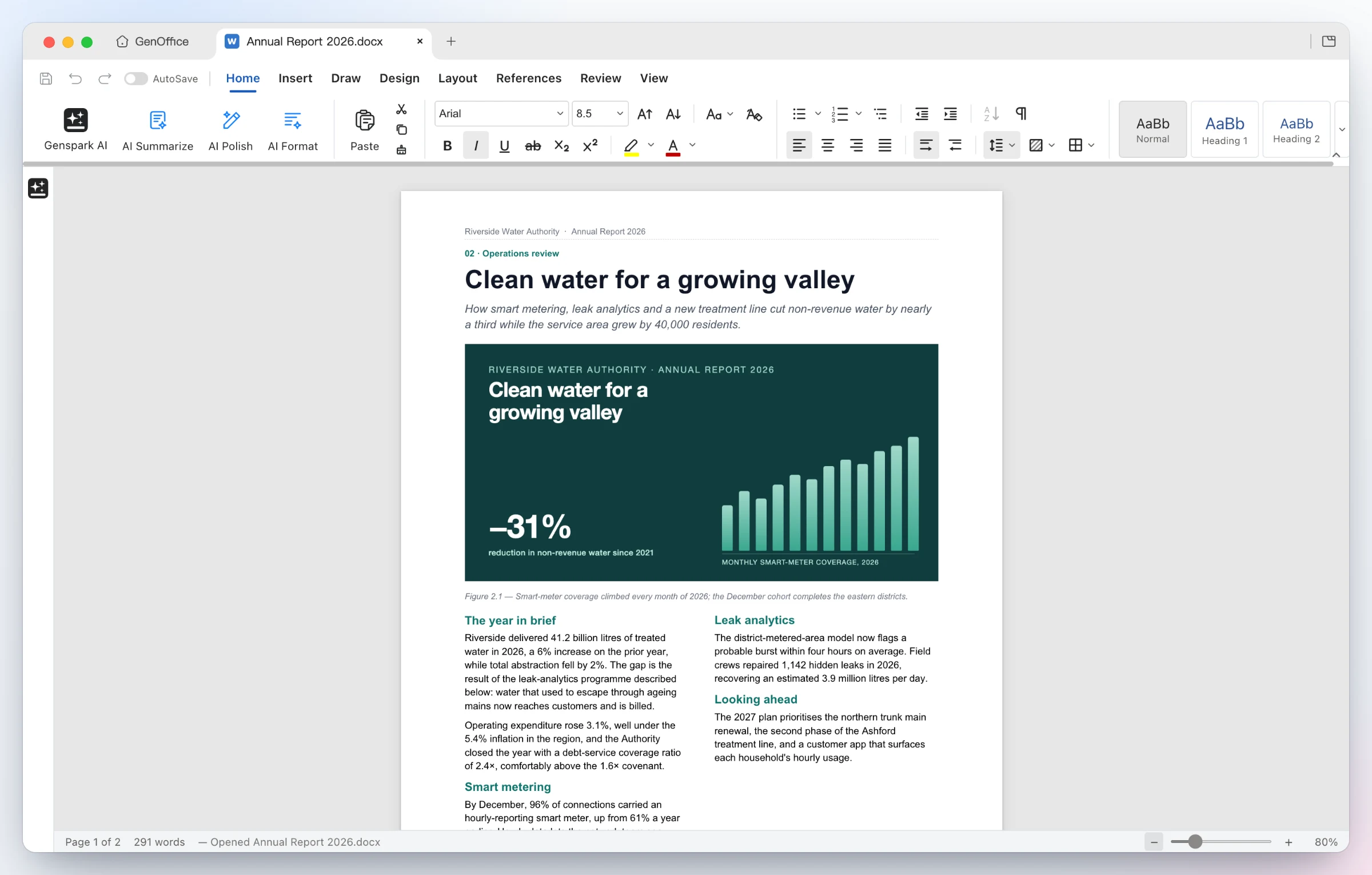
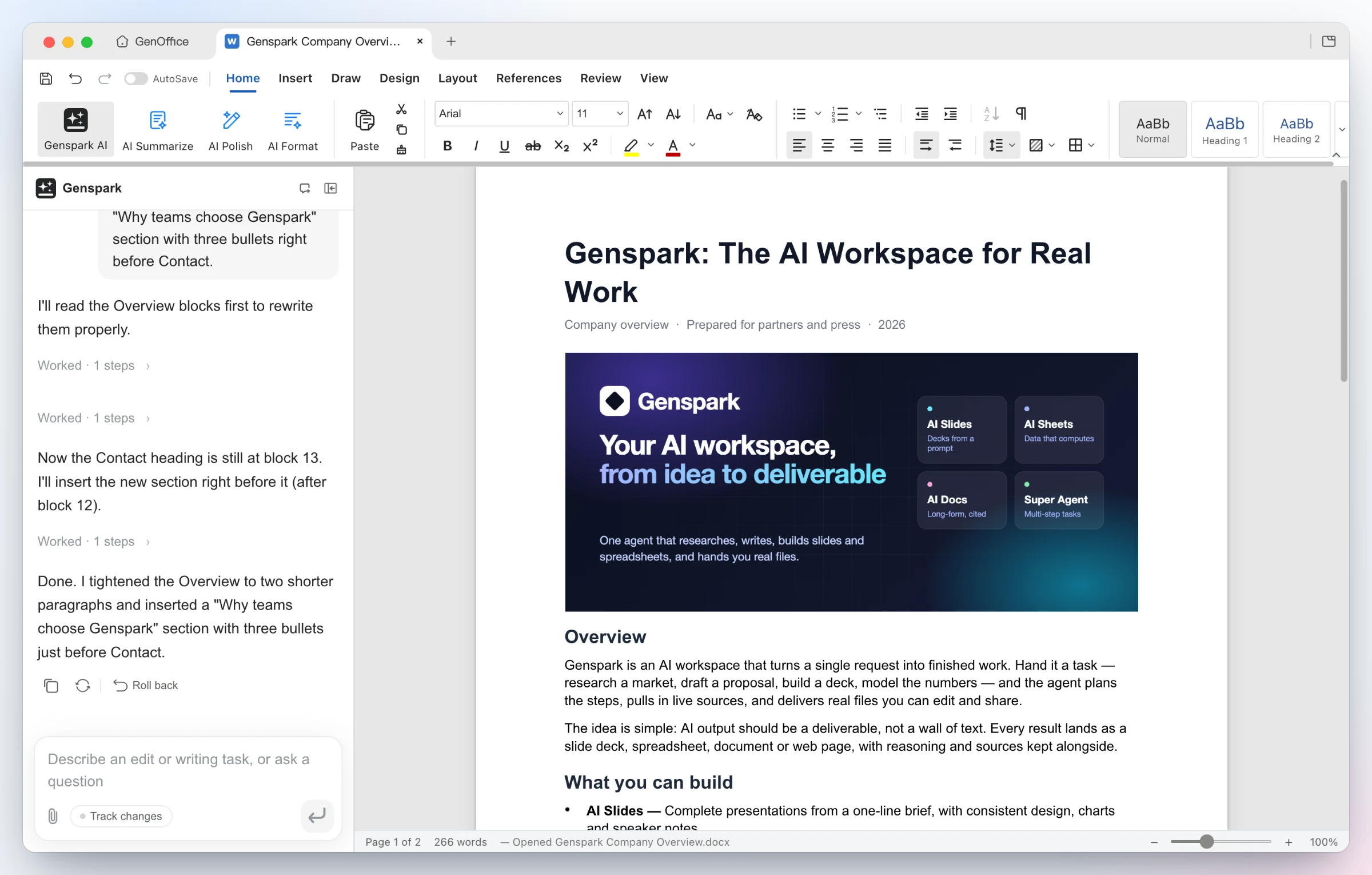
GenOffice Docs rendering a two-column annual-report page with a full-width cover image, shaded KPI table, header and footer, at 80% zoom with the AI panel collapsed GenOffice Docs: a company overview with a banner image; the AI tightened the Overview and inserted a new bulleted section, and the panel offers a one-click roll back
Opens the file as Word lays it out — two-column sections, full-bleed images, shaded tables, headers and footers, pagination on Word's line metrics. Styles, comments, tracked changes, equations and ink round-trip untouched. Ask for the edit — the AI reads the blocks it needs, rewrites the Overview and inserts a new bulleted section. Every AI turn is a snapshot you can roll back; with Track changes on, edits arrive as Word-style revisions.

2 · Sheets — .xlsx with live formulas and charts, not pasted numbers

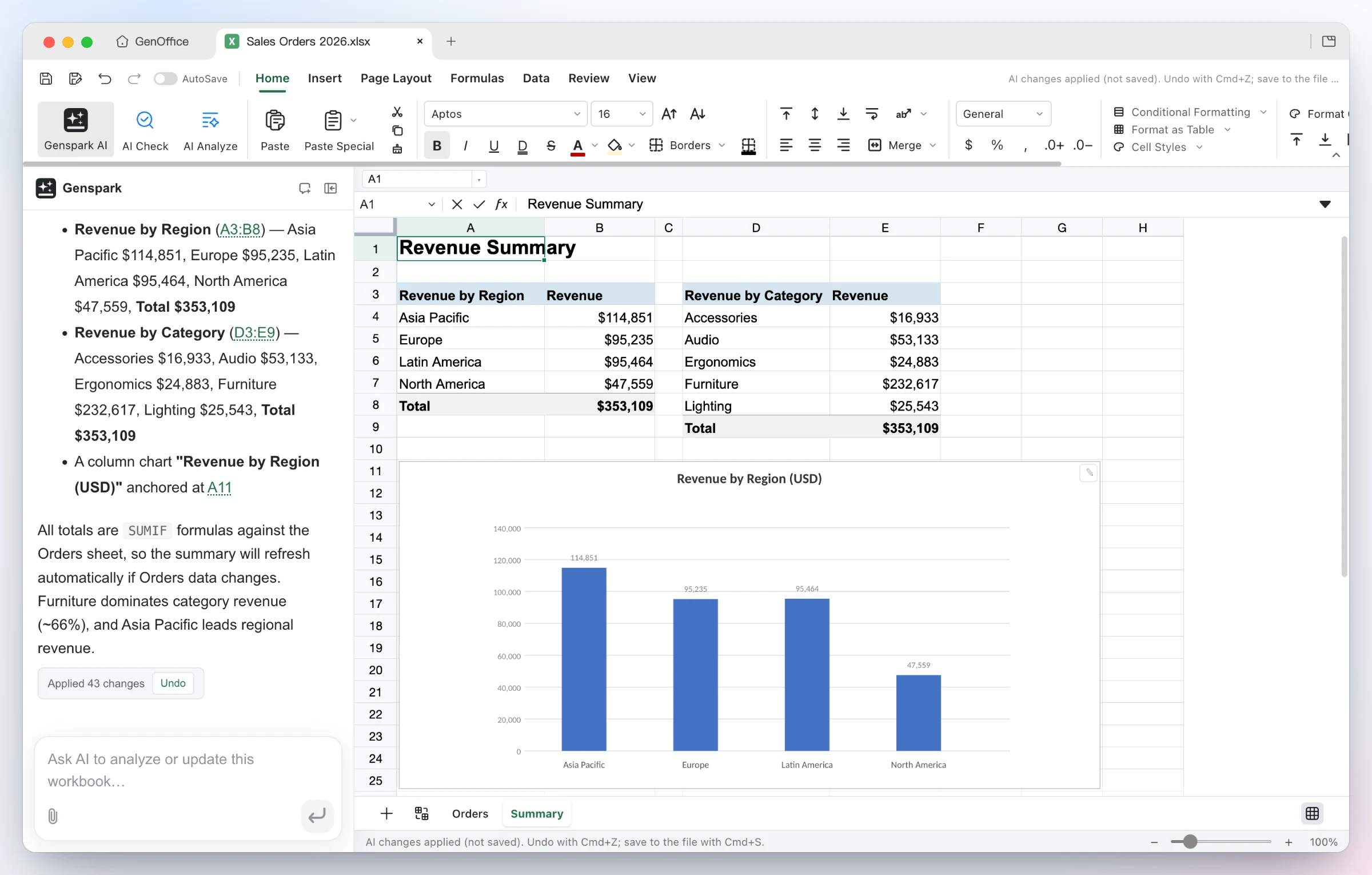
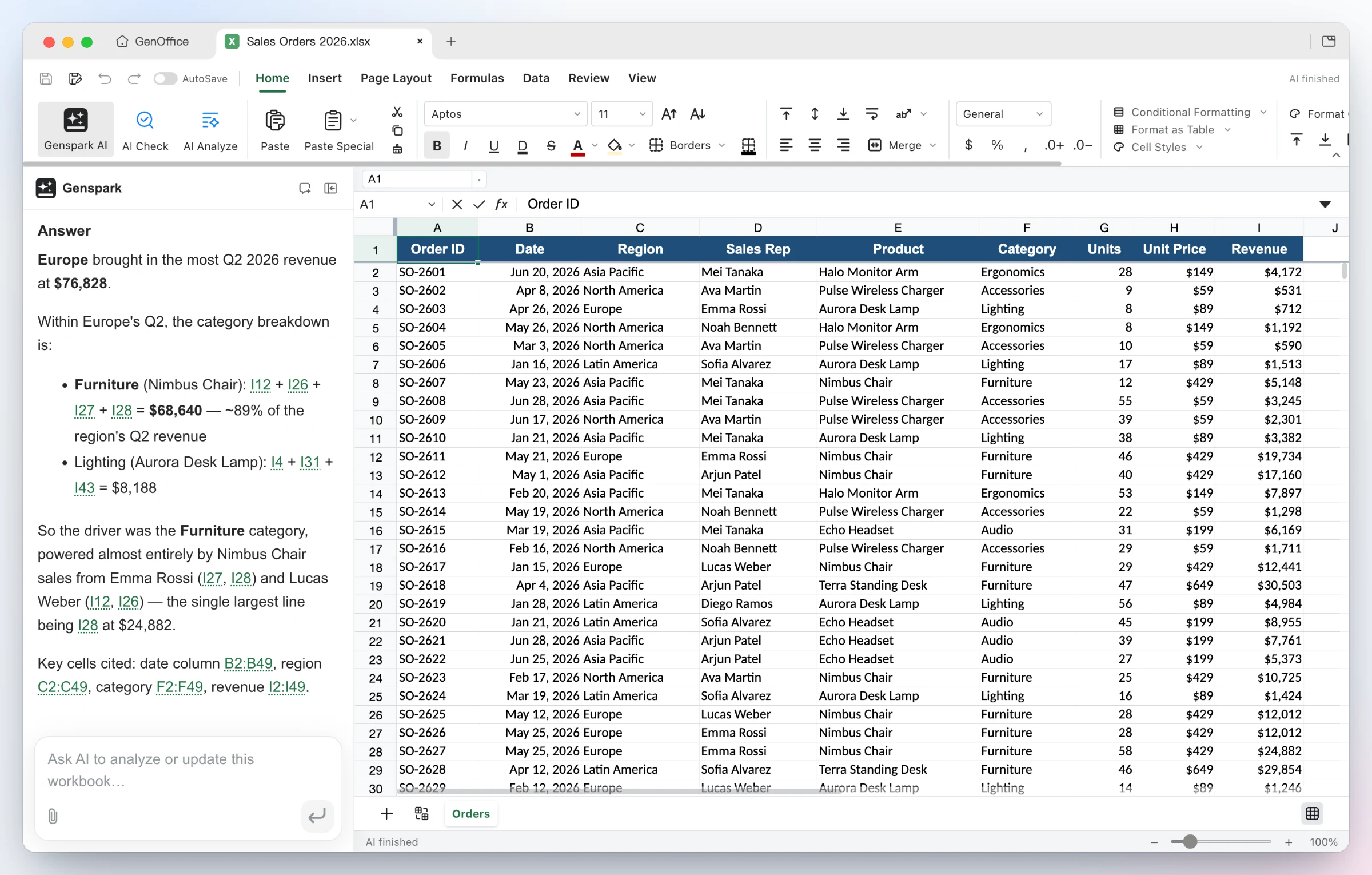
GenOffice Sheets: the AI added a Summary sheet with revenue by region and category using SUMIF formulas, plus a column chart, and reports 43 applied changes with an Undo button GenOffice Sheets: asked which region led Q2 revenue, the AI answers Europe with the category breakdown and cites the cells it used as links, next to the Orders sheet
Build it — from one sentence the agent adds a Summary sheet with real SUMIFs by region and category, inserts a column chart, and applies the 43 changes as a single undoable batch. Ask it — questions about the workbook come back with the reasoning and the exact cells used as clickable citations. Under the hood: an in-house Rust .xlsx engine, pivot tables, slicers, conditional formatting and formula tracing.


3 · Slides — from a prompt to a .pptx deck

Time-lapse of GenOffice Slides generating the Aurora Home investor deck: the AI plans the storyline in the panel, slides appear on the canvas one after another, and the finished deck ends on the closing ask
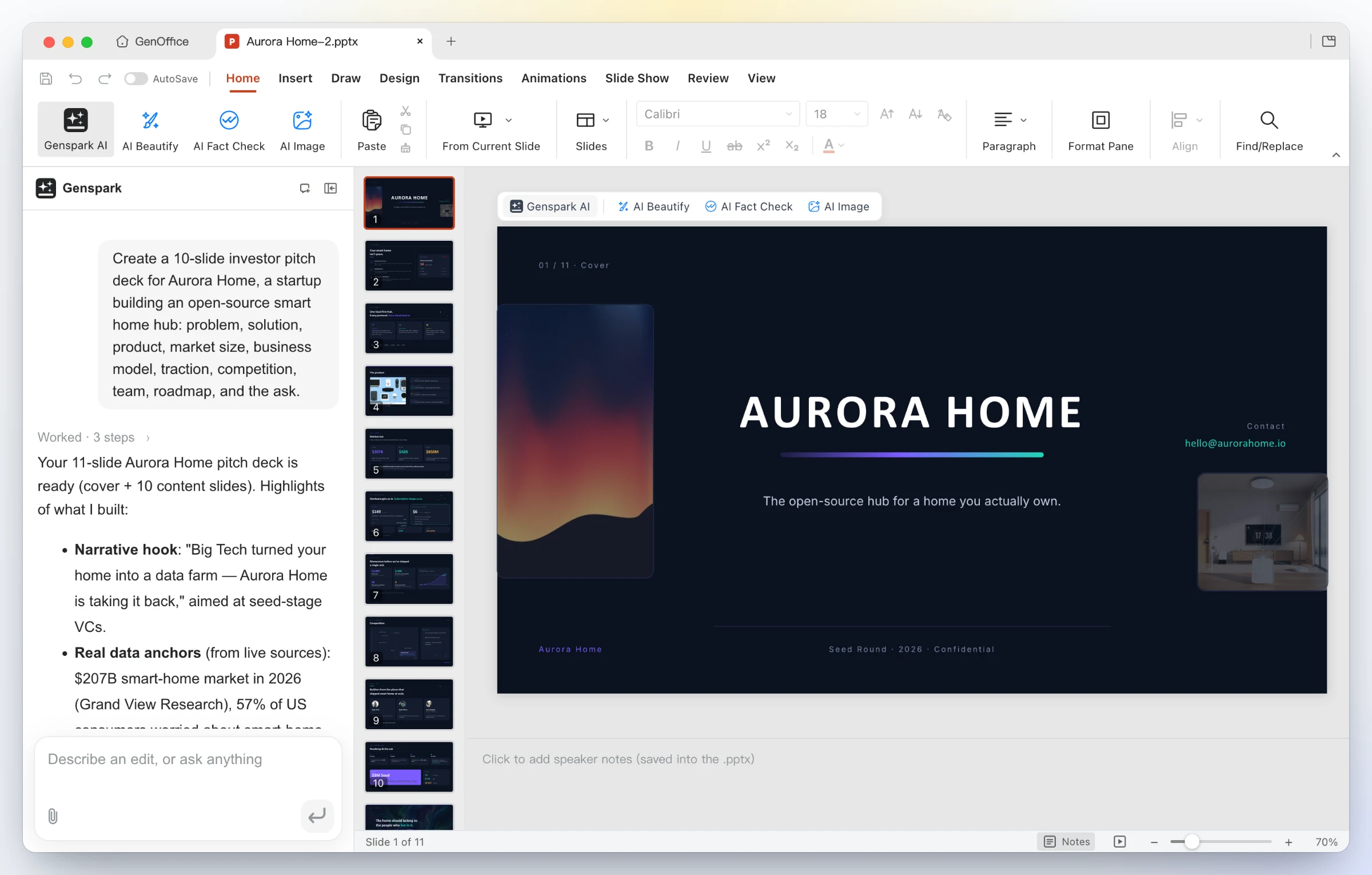
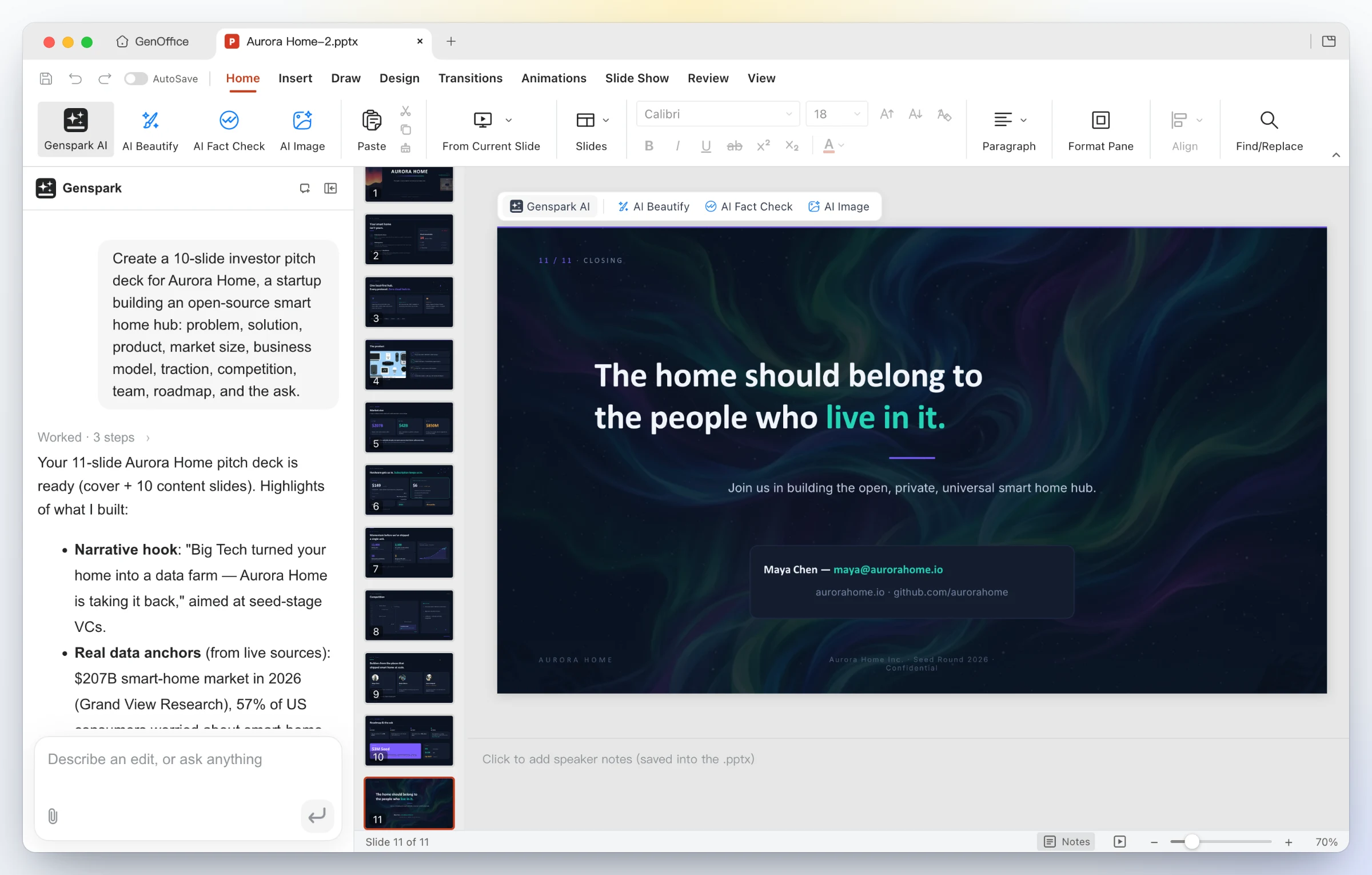
GenOffice Slides: the cover slide of an AI-generated Aurora Home investor deck on the canvas, with the original one-line prompt and the AI's summary of what it built in the panel GenOffice Slides: the designed closing slide of the same 11-slide deck, with the thumbnail strip on the left and the AI panel summarizing the storyline
One line in — "Create a 10-slide investor pitch deck for Aurora Home…". GenOffice plans the storyline, researches the numbers, and drafts every slide onto the canvas as a real .pptx. A finished deck out — eleven designed slides with consistent typography, imagery and a closing call to action; keep editing with masters, layouts, smart guides and non-destructive cropping, or ask the panel to restyle, rewrite and reorder.

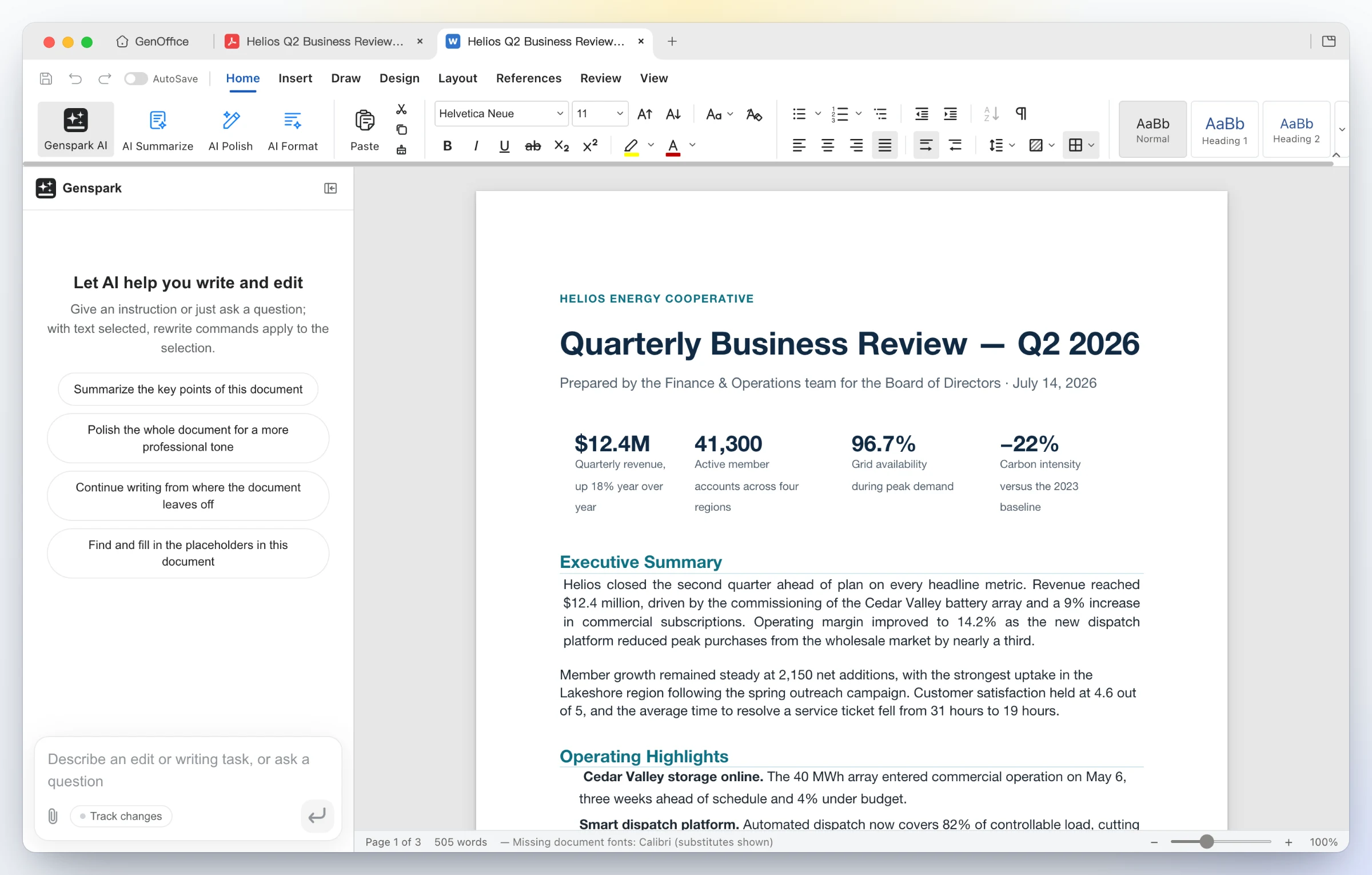
4 · PDF — edit PDF text in place, convert PDF to Word on-device

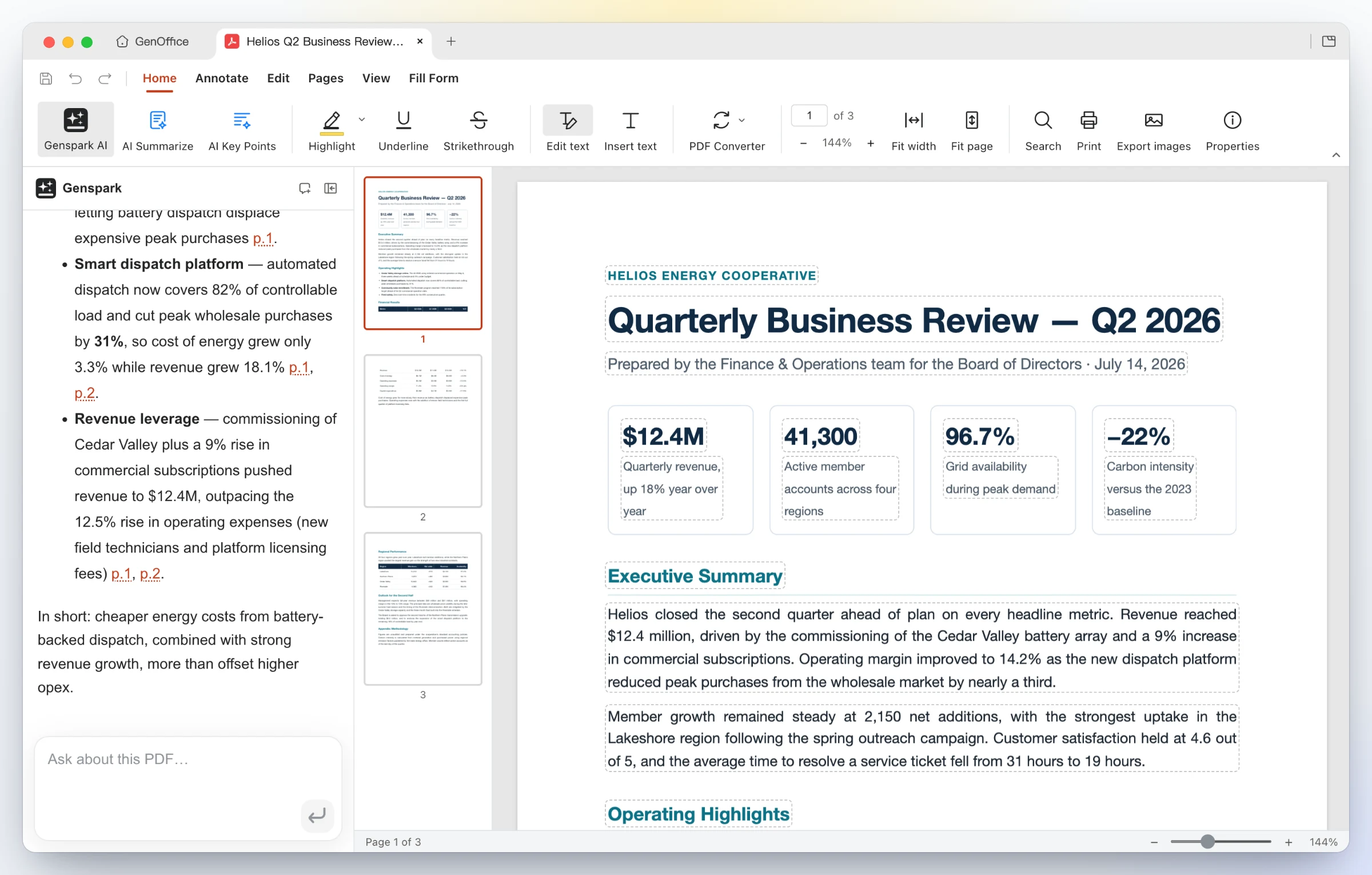
GenOffice PDF: Edit text mode outlines every text block on the page for in-place editing while the AI panel answers a question about the report with page citations GenOffice Docs showing a Word document converted locally from the Helios quarterly review PDF, opened in a second tab beside the original PDF
Edit inside the page — Edit text mode outlines every text block for in-place retyping; the content stream is rewritten through PDFium with the original fonts, not a cover-up annotation. Ask the AI about a long report and get answers with page citations. Convert on-device — PDF Converter → PDF to Word produces an editable .docx that opens in Docs next to the source, headings, stat rows and paragraphs intact. Excel and PowerPoint targets work the same way; scanned pages go through the system OCR.

5 · HTML — an AI page and UI builder, design brief first


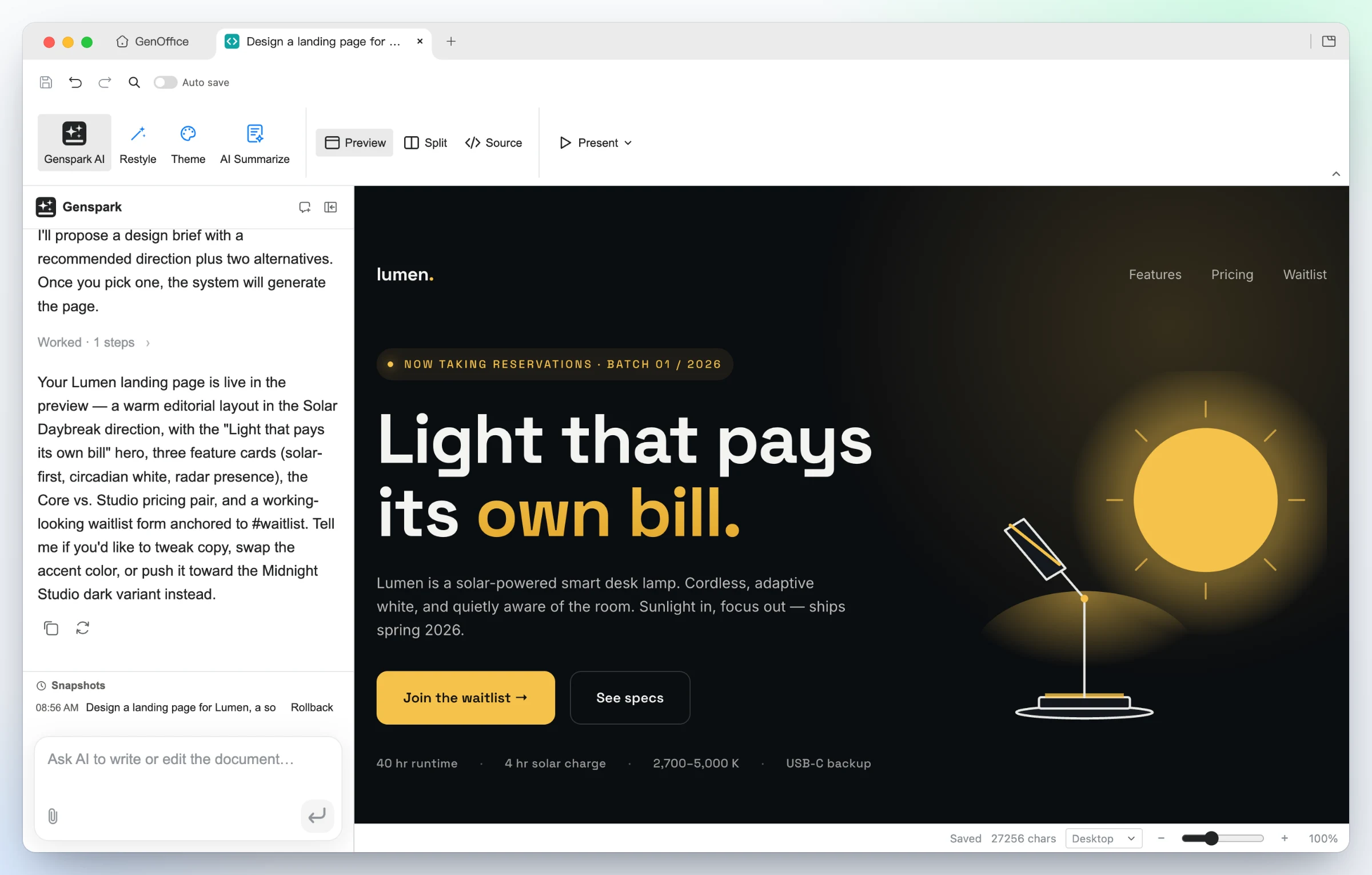
Say what the page is for and who it is for. The AI proposes a design brief first — hook, palette, typography and style directions — then builds a single self-contained .html file against those tokens.

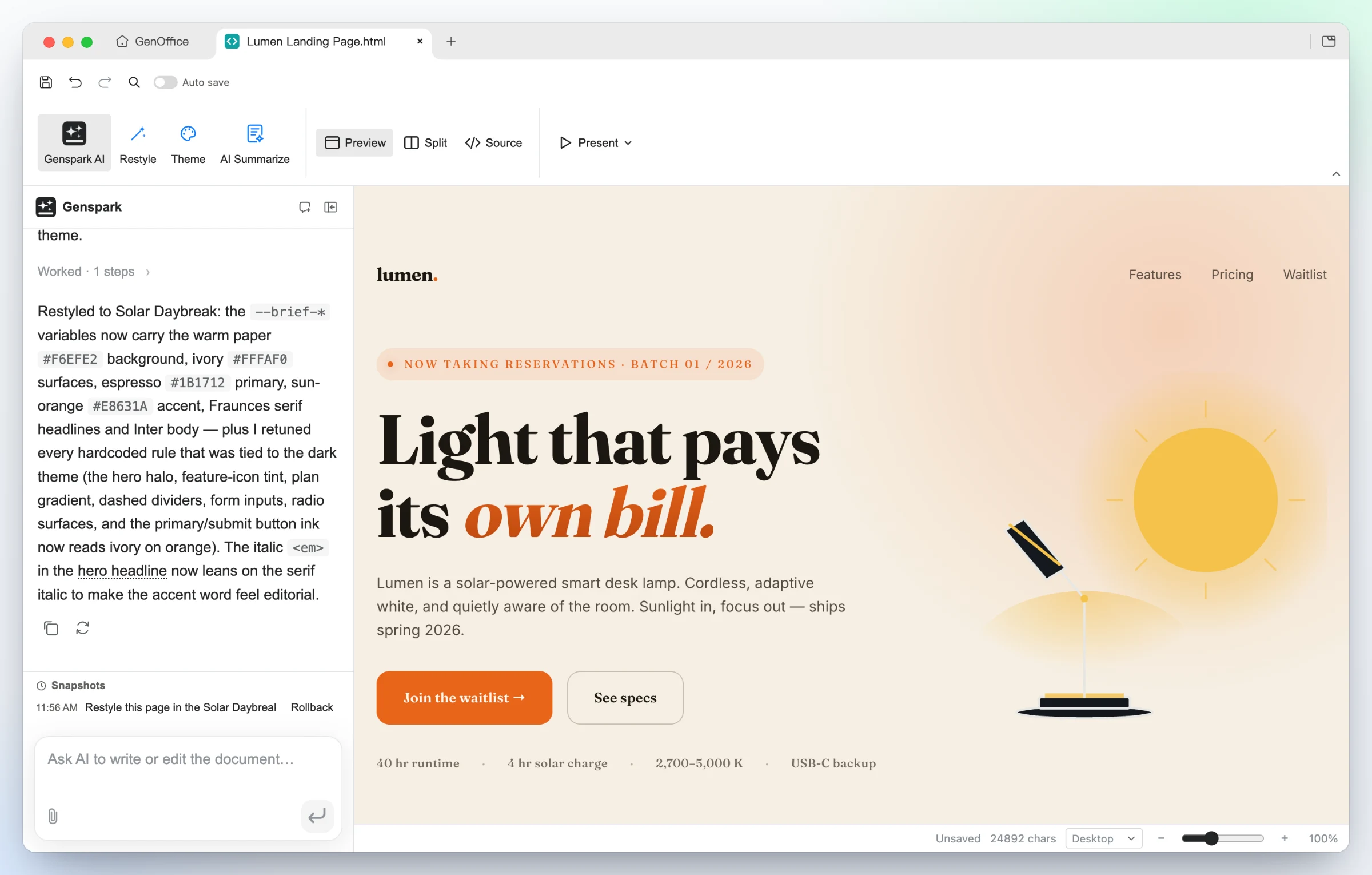
Time-lapse of GenOffice HTML restyling the Lumen landing page: one Restyle request in the panel turns the dark Midnight Studio page into the warm Solar Daybreak version while every section and all copy stay in place
GenOffice HTML: a generated landing page for a solar desk lamp in the dark Midnight Studio direction, shown in the live preview with the AI panel summarizing the page it just built The same Lumen landing page restyled by the AI into the warm Solar Daybreak direction: paper background, serif headlines and an orange accent, with every section and all copy kept
Generated from one prompt — a bold hero, feature cards, pricing and a waitlist form for Lumen, built in the Midnight Studio direction. Click any element to restyle it, double-click to edit text, or switch to the CodeMirror source view. Same design, new direction — one Restyle request swaps the brief's tokens and the page follows: warm paper, editorial serif, sun-orange accent, nothing rewritten. Present fullscreen, or export as PDF or a native editable Word document.
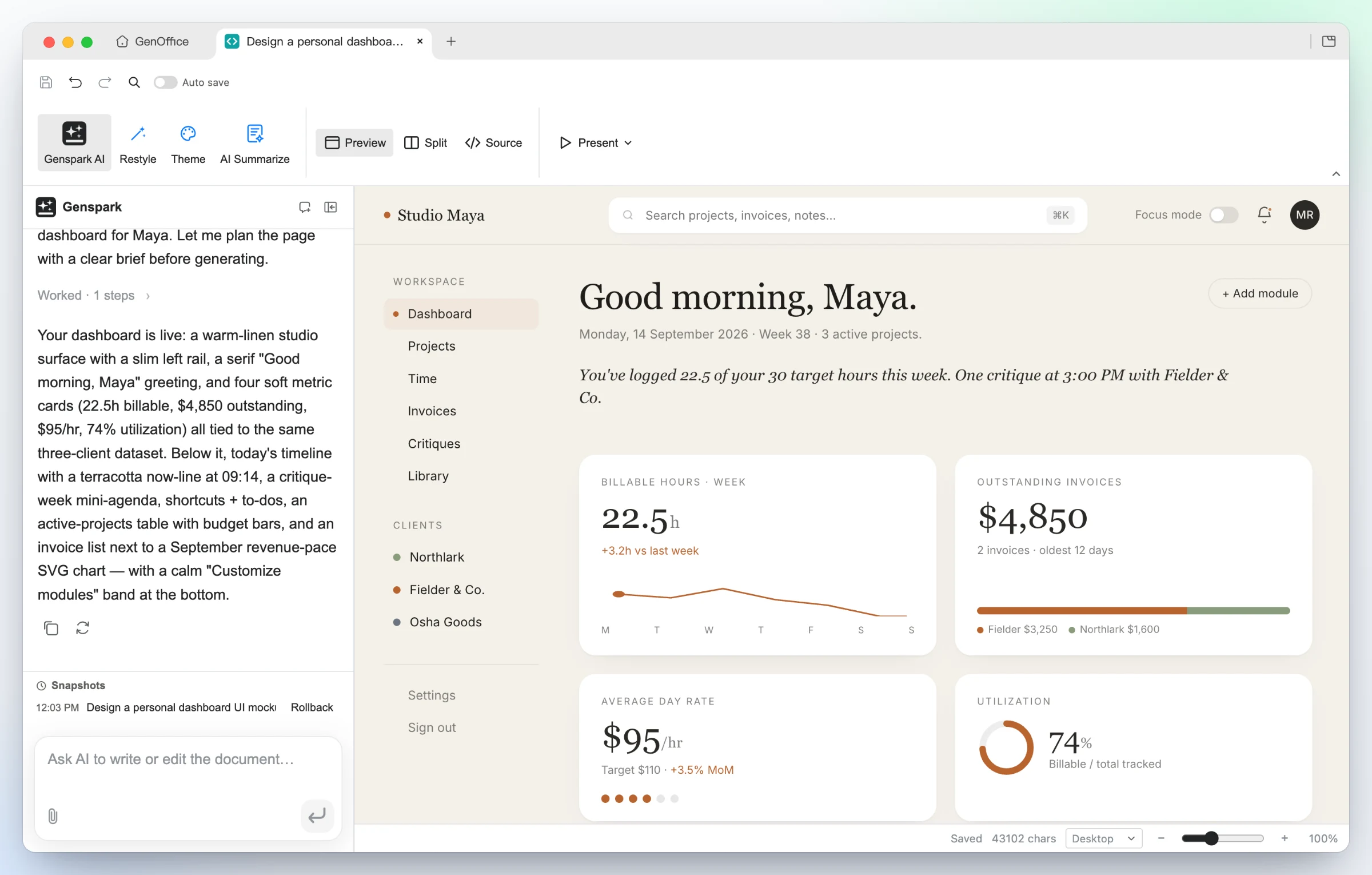
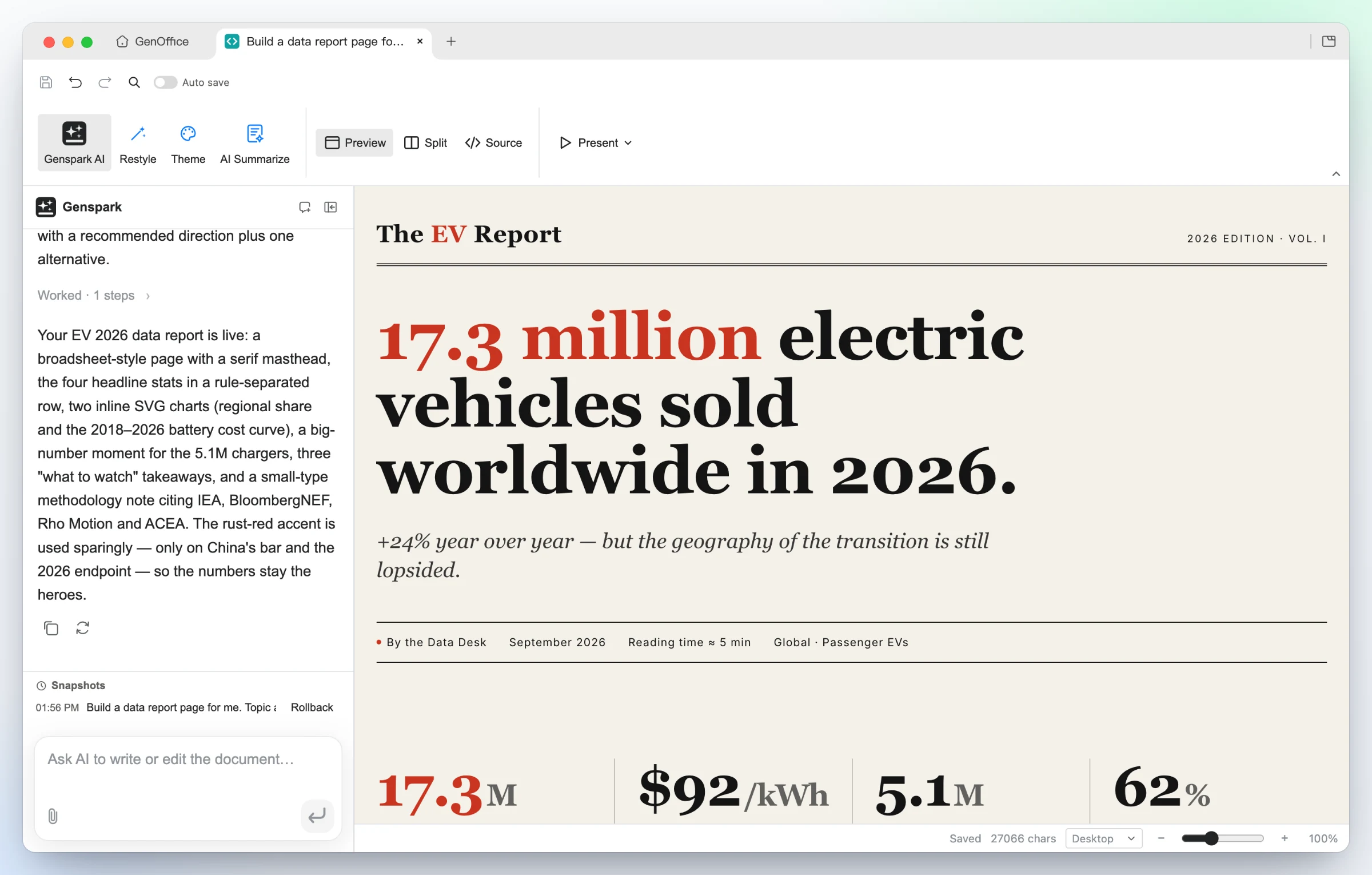
GenOffice HTML: a generated personal dashboard UI for a freelance designer in a warm linen style, with a left rail, serif greeting and four metric cards GenOffice HTML: a generated EV-market data report in a broadsheet style, with a serif masthead, a 17.3 million headline figure and a stat row
UI mockups — the "personal dashboard" starter turns a persona into a working layout: left rail, greeting, billable-hours sparkline, invoice and utilization cards, all real HTML you can hand to a developer. Data stories — the "data report" starter builds an editorial broadsheet: serif masthead, one headline number, a rule-separated stat row, inline SVG charts and a methodology note.

6 · Markdown — a block editor over plain .md, with Ask AI

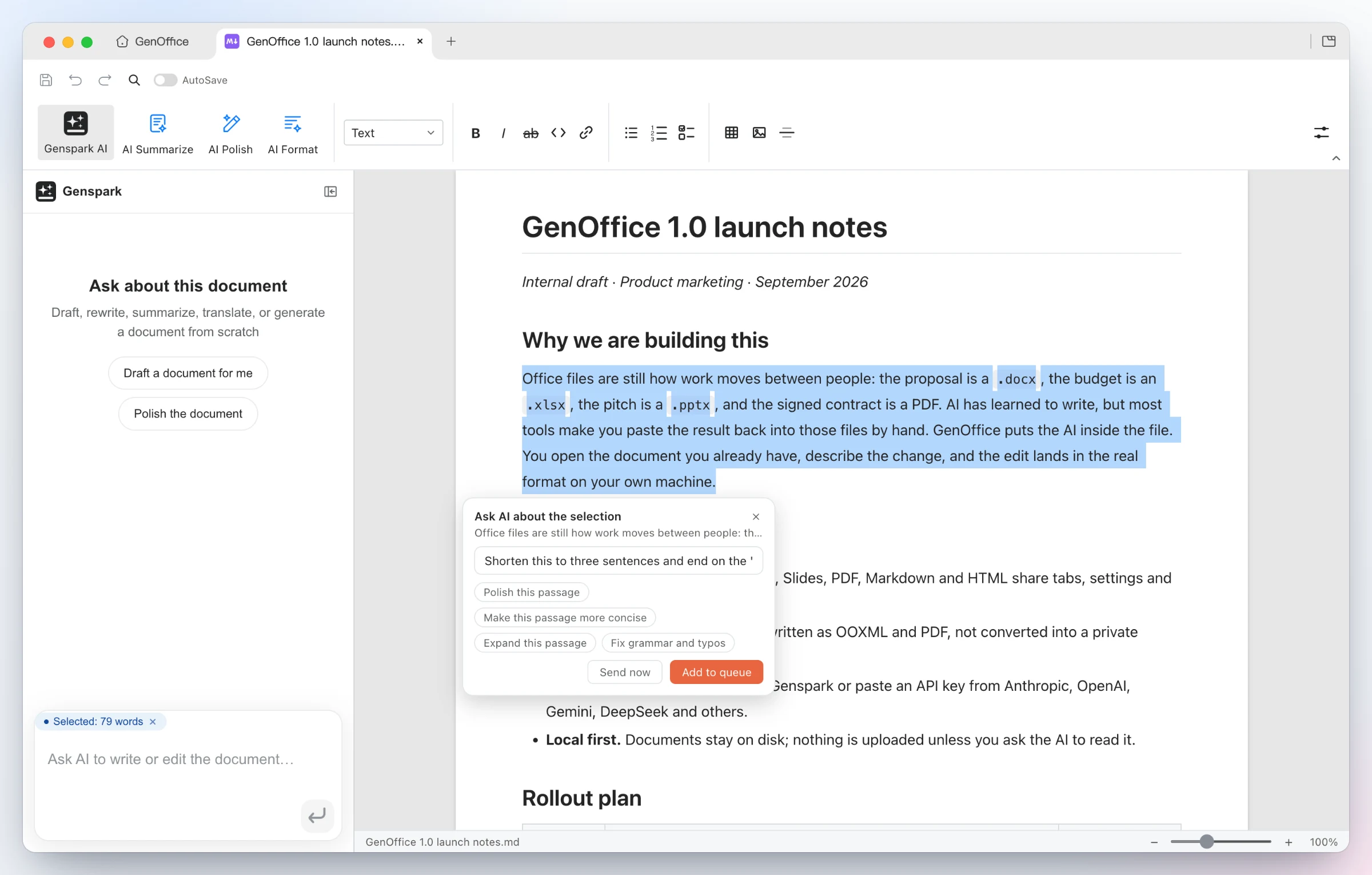
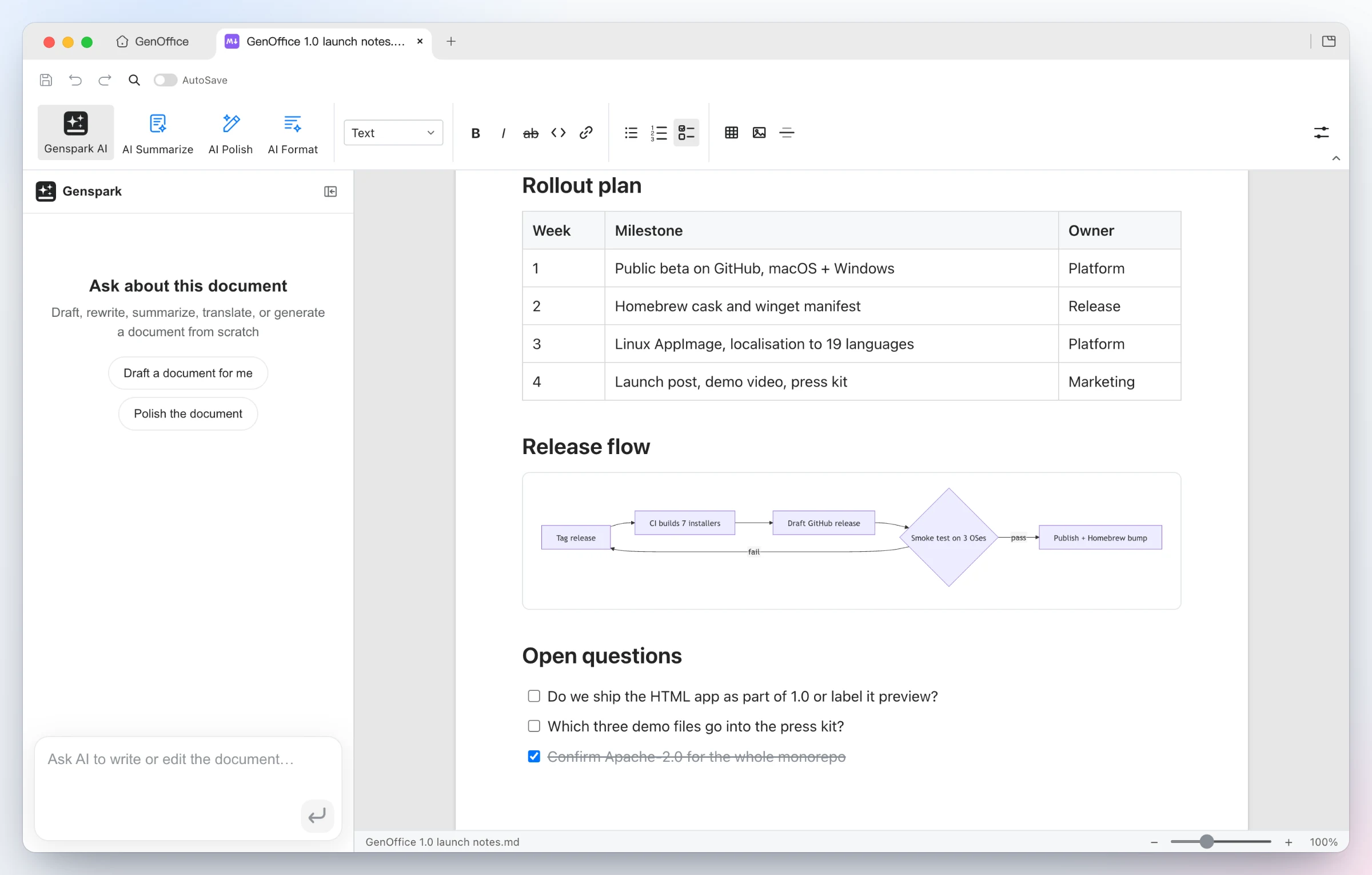
GenOffice Markdown: a selected paragraph shows an Ask AI popover with a typed instruction and suggestion chips such as Polish, Make more concise, Expand and Fix grammar, plus Send now and Add to queue buttons GenOffice Markdown rendering a launch-notes document with a table, a Mermaid flowchart and a task list, with the AI panel's starter prompts on the left
Ask AI about a selection — select any passage and an Ask AI chip appears: type an instruction or pick a suggestion, send it now, or queue several anchored edits and run them in one pass. The same entry exists in every app. Rendered, saved as plain Markdown — headings, lists, tables, images, code blocks and Mermaid diagrams in a Tiptap block editor, written back as plain .md, with a fully local Markdown → Word export.

Why GenOffice

AI backends

Sign in with Genspark and there is nothing to configure: model calls route through the Genspark proxy (Claude, GPT and Gemini families) and the agents get web and image search, image generation, and image/audio/video analysis.

Or bring your own key. Settings → AI lists Claude, OpenAI, Gemini, DeepSeek, Kimi, GLM, Qwen, Doubao, MiniMax, Grok, Mistral, OpenRouter and OpenCode Zen/Go, plus a custom slot for any OpenAI-compatible endpoint (base URL + key), including local model servers. Search and media have their own per-capability providers under AI Media & Search: Serper or Tavily for web search, and OpenAI, Gemini, Doubao/Seedream, GLM, Grok, Qwen, MiniMax or any OpenAI-compatible images endpoint for image generation and image/video analysis.

The whole suite ships light, dark and system themes. Themes only change what is on screen: exports, prints and saved files always keep the document's own colors.

Download

Platform Requirements Download
macOS — Apple Silicon (arm64) macOS 11+ Latest .dmg (arm64)
macOS — Intel (x64) macOS 11+ Latest .dmg (x64)
Windows (x64, most PCs) Windows 10+, Intel/AMD Latest -x64.exe installer
Windows on Arm (ARM64) Windows 11 on Arm (Snapdragon X and similar) Latest -arm64.exe installer
Linux — Debian / Ubuntu x86_64, glibc 2.34+ (Ubuntu 22.04 or newer) Latest .deb
Linux — Fedora / RHEL / openSUSE x86_64, glibc 2.34+ (Fedora 35+, RHEL 9+, Leap 15.6+) Latest .rpm
Linux — other distributions x86_64, glibc 2.34+, FUSE 2 Latest .AppImage

All builds come from main; the macOS and Windows installers are signed. Older versions are on the Releases page.

Installing on Linux

The deb installs with apt — it pulls in the dependencies and adds GenOffice to the applications menu:

sudo apt install ./genoffice_<version>_amd64.deb

On Fedora / RHEL-family / openSUSE, install the rpm instead:

sudo dnf install ./genoffice-<version>.x86_64.rpm     # Fedora / RHEL family
sudo zypper install ./genoffice-<version>.x86_64.rpm  # openSUSE

The AppImage runs in place: install the FUSE 2 runtime (sudo apt install libfuse2; on Ubuntu 24.04 the package is libfuse2t64), make the file executable, then run it:

chmod +x GenOffice-<version>.AppImage
./GenOffice-<version>.AppImage

How it works

Seven Electron apps — Docs, Sheets, Slides, PDF, Markdown, HTML and the tabbed shell — share one engine layer of pure TypeScript packages plus a Rust sidecar for .xlsx. The original file is always the source of truth: edits are applied as narrow patches, and everything the editor did not touch survives the round trip untouched.

open docx ─► archive original by hash (never touched)
          ─► parse word/document.xml into a block tree, each block anchored to its original XML
          ─► Tiptap editor (manual + AI editing, dirty tracking)
save      ─► dirty blocks → OOXML fragments (referencing existing styles only)
          ─► splice into the original document.xml; untouched blocks keep their bytes
          ─► repack the zip; every other entry is copied byte-for-byte

The package-by-package tour (docx/pptx engines, pdf2docx, html2docx, the agent core and providers) lives in CONTRIBUTING.md.

Development

npm install
npm run fixtures     # generate test .docx fixtures
npm test             # engine + app unit tests (docs/sheets/slides need no display)
npm run typecheck    # tsc --noEmit across every workspace
npm run dev          # all six editors + shell against Vite dev servers
npm run dev:docs     # a single app (same pattern works per workspace)
npm run dist:mac     # package macOS dmg (regenerates third-party notices)
npm run dist:win     # package Windows nsis installer
npm run dist:linux   # package Linux AppImage + deb + rpm

The sheets app additionally needs a Rust toolchain for its xlsx sidecar (cargo on PATH); npm run build -w @genoffice/sheets compiles it automatically. See CONTRIBUTING.md for the checks every change must pass and how pull requests land.

Community

GenOffice is in active development and your feedback shapes it.

FAQ

Is GenOffice free?

Yes. GenOffice is free and open-source under the Apache-2.0 license — no trial, no paid tier for the apps themselves.

Can GenOffice open Microsoft Word, Excel and PowerPoint files?

Yes. GenOffice opens and saves native .docx, .xlsx and .pptx files. Saving is byte-preserving: parts of the file you didn't touch are written back byte-for-byte, so documents keep working in Microsoft Office.

Does GenOffice work offline?

Document editing is fully local — files never leave your machine to be opened, edited, saved

genoffice (genspark-ai/genoffice)

Searching Database…

Что это такое?GenOffice — бесплатный офисный пакет с открытым исходным кодом и ИИ для редактирования настоящих файлов .docx, .xlsx, .pptx, PDF, Markdown и HTML, со встроенным ИИ-агентом, который читает документ и редактирует его за вас, на macOS, Windows и Linux.
Это настольное приложение или что-то, чем я пользуюсь в браузере?Это нативное настольное приложение на базе Electron: семь приложений (Docs, Sheets, Slides, PDF, Markdown, HTML и оболочка с вкладками), которые используют общий слой движка на TypeScript и вспомогательный процесс на Rust для движка .xlsx.
Нужен ли мне собственный ключ API для ИИ?Нет, это необязательно: войдите через Genspark, чтобы вообще не работать с ключами (запросы идут через их прокси), или используйте свой ключ для Claude, OpenAI, Gemini, DeepSeek, Kimi, GLM, Qwen, Doubao, MiniMax, Grok, Mistral, OpenRouter или любой эндпоинт, совместимый с OpenAI, включая локальные серверы моделей.
Переписывает ли ИИ весь мой документ, когда его редактирует?Нет — правки сохраняют байты: переписывается только то, что вы изменили, а всё остальное (стили, комментарии, отслеживаемые изменения, уравнения) сохраняется побайтово, поэтому файл продолжает работать в Word, Excel и PowerPoint.
Могу ли я пользоваться им без доступа в интернет?Редактирование документов, сохранение и конвертация форматов полностью локальные и работают без подключения; сетевой доступ нужен только функциям ИИ-помощника, чтобы обращаться к выбранному вами провайдеру моделей.
Покидают ли данные моего документа компьютер?Нет — открытие, редактирование, сохранение и конвертация файлов выполняются локально, на вашем диске; с компьютера уходит только сам запрос к ИИ, который отправляется выбранному вами провайдеру.
Можно ли управлять GenOffice из Claude Code, Codex или Cursor?Да, в комплекте есть CLI `genoffice` и навык для агента, поэтому агенты для программирования, такие как Claude Code, Codex и Cursor, могут создавать и редактировать настоящие файлы .docx/.xlsx/.pptx локально.
Может ли он превратить PDF в редактируемый файл Word или Excel?Да, конвертер PDF создаёт редактируемый .docx, .xlsx или .pptx прямо на устройстве, а отсканированные страницы распознаются системным OCR.
Чем приложение Sheets отличается от простого просмотрщика таблиц?Оно работает на собственном движке .xlsx на Rust с живыми формулами вроде SUMIF, сводными таблицами, срезами, условным форматированием, диаграммами и трассировкой формул — а не на просто вставленных числах.
GenOffice действительно бесплатный?Да, он бесплатный и с открытым исходным кодом по лицензии Apache-2.0, без пробного периода и без платного тарифа для самих приложений.
Size
67 MB
Stars
9.9K
Age
2mo
Commits · 90 Days