

Fuxi README

项目的 README,来自 github.com/fuxicodex/Fuxi。合并为一个 markdown 文件:README.md。

FuXi

English | 简体中文

GitHub stars Release Last commit License

FuXi is a fast, self-contained terminal AI coding agent. It reads code, edits files, runs commands, and drives tools from a rich TUI, with cost-aware routing across LLM providers and automatic failover. Built in Go, it ships as one static binary with no runtime dependencies.

Terminal-first · Provider-agnostic · Bring your own key · MCP client · Self-updating

Homepage: https://www.fuxicode.com

FuXi's roughly 2 million lines of code were written entirely by FuXi itself.

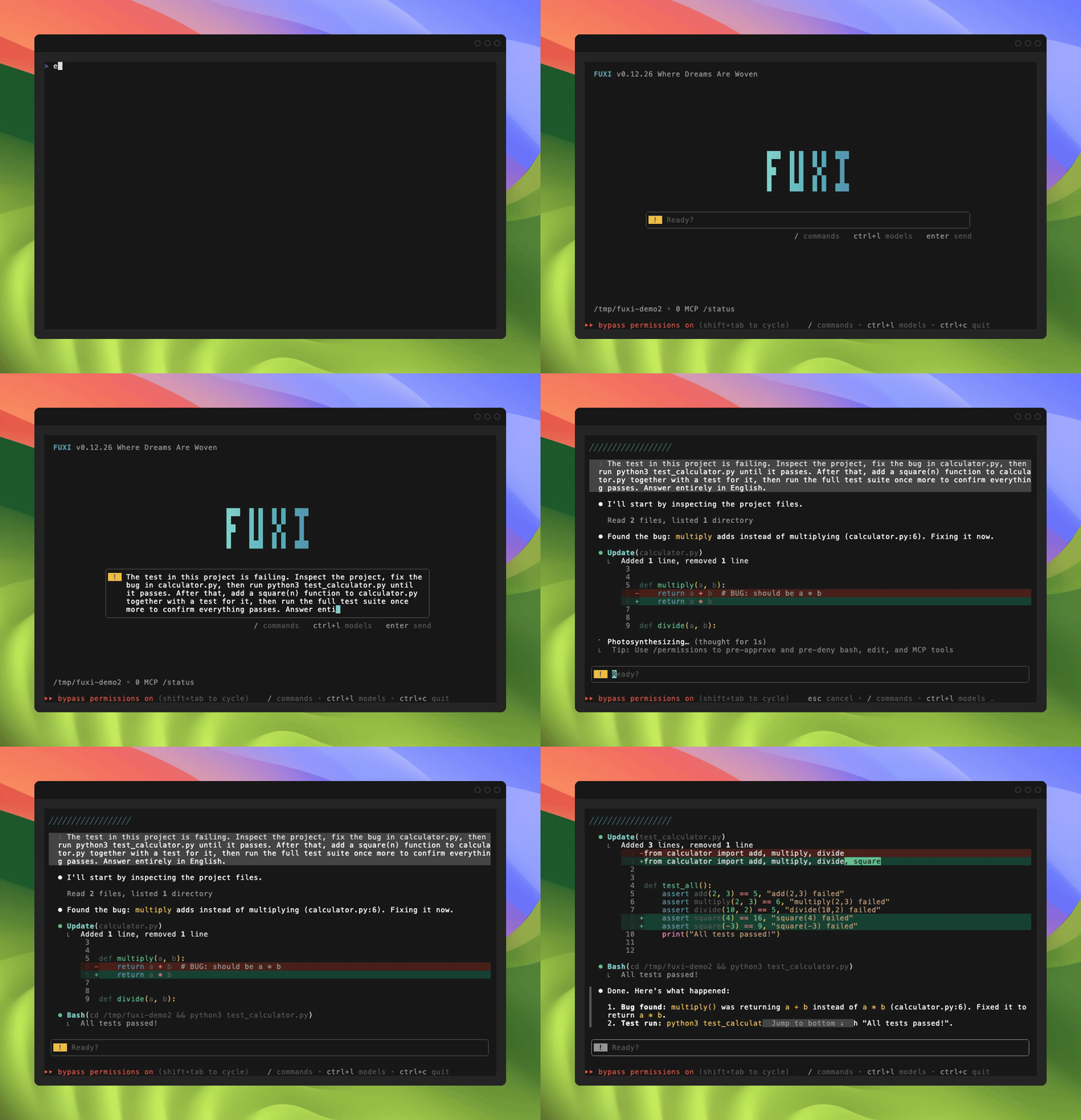
FuXi in action

Install

macOS / Linux

curl -fsSL https://downloads.fuxicode.com/bootstrap.sh | bash

Windows (PowerShell)

irm https://downloads.fuxicode.com/bootstrap.ps1 | iex

Windows (CMD)

curl -fsSL https://downloads.fuxicode.com/install.cmd -o "%TEMP%\fuxi-install.cmd" && "%TEMP%\fuxi-install.cmd"

Then verify and launch:

fuxi --version
fuxi doctor    # environment sanity checks
fuxi           # start a session

Install and upgrade are the same command. Full options, uninstall steps, and troubleshooting: setup docs.

Get started

A FuXi account is required. Run fuxi, then:

  1. Register and sign in — fuxi login (or fuxi setup-token for headless/CI). Registration processes only minimal account data.
  2. Connect a model (optional) — sign-in gives access to FuXi-managed models; to use your own provider instead, set an API key via environment variable or ~/.fuxi/config.yaml (fuxi init generates a template). Or run fuxi wizard.

Then type a prompt and press Enter, for example:

Fix the failing tests in this repository.

Useful commands: /model switch models · /help browse all commands · /config open settings · /privacy-settings privacy controls · /exit quit.

Full walkthrough: usage guide.

Permissions

Sensitive tool calls ask for approval unless you change the permission mode at launch.

--dangerously-skip-permissions starts in bypassPermissions, so tool calls run without a prompt. Extreme commands such as rm -rf / are still blocked. Use it only in a container or VM; on Linux and macOS, root and sudo are rejected.

--allow-dangerously-skip-permissions keeps the normal mode and adds bypassPermissions to the Shift+Tab cycle.

--permission-mode bypassPermissions behaves like --dangerously-skip-permissions. The same flag also accepts default and plan.

Data, privacy, and retention

FuXi runs on your machine and keeps your work local.

Full details: Privacy Policy · Security Whitepaper · Terms of Service.

Documentation

Guide What it covers
Usage guide First session, permissions, sessions & memory, tools & MCP, CLI reference, troubleshooting
Architecture Execution base, persistence, routing, multi-window coordination, extensibility
Keyboard shortcuts Terminal-UI key reference
Environment variables Full environment-variable reference
FAQ Common questions
Benchmark report Reproducible evaluation methodology and results
Security & privacy Privacy Policy, Security Whitepaper, Terms of Service, Usage Policy, compliance and governance
Changelog Release history
Support Where to get help

Usage policy

You must use FuXi in accordance with the laws applicable to you. FuXi is aimed at developers and professional users and is not directed at children under 14; users aged 14–17 require a parent or guardian.

Disallowed uses and full requirements: Usage Policy. If you are unsure whether a use is lawful, take advice before proceeding.

Contributing

The product source is proprietary; this repository hosts the documentation, installers, and issue tracker, which are open to contributions. See CONTRIBUTING.md.

License

Proprietary. Copyright © 2026 FUXI. All rights reserved.

Fuxi (fuxicodex/Fuxi)

正在搜索数据库…

3.2K ·GitHub
这是什么?一个用 Go 编写的快速终端 AI 编程代理。它可以读取你的代码、编辑文件、运行命令,并在 TUI 界面中调用工具;同时会结合成本考虑,把请求分发到不同的大语言模型服务商。
它是聊天机器人,还是会直接操作我文件的代理?是代理。它会读取和编辑你的代码,运行 shell 命令并调用工具;但除非你更改权限模式,否则涉及敏感操作的工具调用都会先征求你的同意。
我怎样才能让它运行起来?按照 README 中对应你操作系统的安装命令进行安装,然后输入 'fuxi' 启动。安装和升级使用同一条命令。使用 'fuxi login' 登录;如果是无界面或 CI 环境,则使用 'fuxi setup-token'。
我需要先安装 Python 或 Node 吗?不需要。它以一个静态二进制文件的形式发布,没有运行时依赖。
它能不经询问就直接运行命令吗?只有在使用 --dangerously-skip-permissions 启动时才可以,此时工具调用不会弹出提示。README specifies 仅建议在容器或虚拟机中使用该选项。像 rm -rf / 这样的极端命令仍会被阻止,并且在 Linux 和 macOS 上会拒绝 root 或 sudo 权限。
它支持哪些操作系统?支持 macOS、Linux 和 Windows,并为每个系统提供了对应的安装命令。在 Windows 上,README 同时列出了 PowerShell 和 CMD 两种方式。
我的代码和对话会怎样处理?默认情况下,FuXi 不会收集或保存它们。如果使用你自己的密钥,内容会直接发送给你的服务商;如果使用托管模型,内容仅用于处理该请求。只有在启用 sendconversations 时内容才会到达 FuXi,而该选项默认关闭。凭据保存在 ~/.fuxi/ 中。
它是开源的吗?不是。该产品是专有软件。公开仓库只托管文档、安装程序和问题追踪器,其中问题追踪器接受贡献。
FuXi 本身是用 AI 编程代理开发的吗?README 称,约 200 万行代码完全由 FuXi 自己编写。
我能使用自己的模型服务商,而不是 FuXi 提供的吗?可以。通过环境变量或在 ~/.fuxi/config.yaml 中设置 API 密钥即可。'fuxi init' 会生成配置模板,'fuxi wizard' 会引导你完成设置。
我应该先学习哪些斜杠命令?/model 用于切换模型,/help 列出所有命令,/config 打开设置,/privacy-settings 设置隐私控制,/exit 退出。
我能否在 CI 中运行它而无需交互式登录?可以。在无界面和 CI 环境中使用 'fuxi setup-token',而不是交互式登录。
有哪些类似的项目?Baize, claurst, oh-my-pi, crush, SwarmLab, PiG, Codewhale, plandex
作者
fuxicodex
大小
7.8 MB
星标
3.2K
时长
3个月
提交 · 90 天