



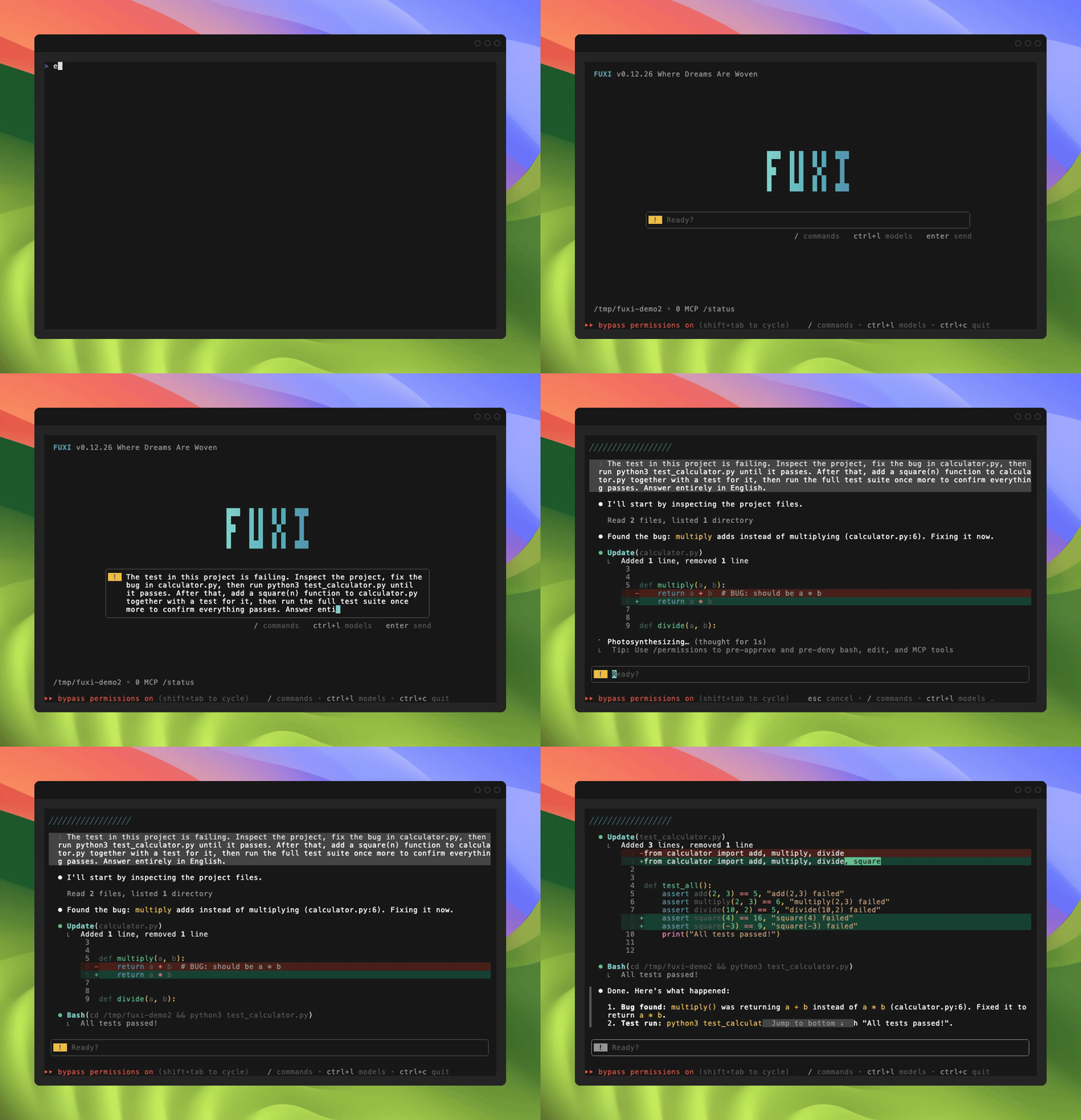
Что это такое?
 Быстрый терминальный ИИ-агент для написания кода, написанный на Go. Он читает ваш код, редактирует файлы, запускает команды и вызывает инструменты из TUI, направляя запросы к разным LLM-провайдерам с учётом стоимости.
Это чат-бот или агент, который работает с моими файлами?Агент. Он читает и редактирует ваш код, запускает команды оболочки и управляет инструментами, но чувствительные вызовы инструментов запрашивают подтверждение, если вы не измените режим разрешений.
Агент. Он читает и редактирует ваш код, запускает команды оболочки и управляет инструментами, но чувствительные вызовы инструментов запрашивают подтверждение, если вы не измените режим разрешений.Как это запустить?Выполните команду установки для вашей ОС из README, затем введите 'fuxi', чтобы запустить программу. Установка и обновление выполняются одной и той же командой. Войдите через 'fuxi login' или используйте 'fuxi setup-token' для работы без интерфейса или в CI.
Выполните команду установки для вашей ОС из README, затем введите 'fuxi', чтобы запустить программу. Установка и обновление выполняются одной и той же командой. Войдите через 'fuxi login' или используйте 'fuxi setup-token' для работы без интерфейса или в CI.Нужно ли сначала установить Python или Node?Нет. Программа поставляется как один статический бинарный файл без внешних зависимостей времени выполнения.
Нет. Программа поставляется как один статический бинарный файл без внешних зависимостей времени выполнения.Может ли он выполнять команды без моего запроса?Только если вы запустите его с флагом --dangerously-skip-permissions, который выполняет вызовы инструментов без запросов. В README сказано использовать это только в контейнере или виртуальной машине. Опасные команды вроде rm -rf / по-прежнему блокируются, а запуск от root или sudo запрещён в Linux и macOS.
Только если вы запустите его с флагом --dangerously-skip-permissions, который выполняет вызовы инструментов без запросов. В README сказано использовать это только в контейнере или виртуальной машине. Опасные команды вроде rm -rf / по-прежнему блокируются, а запуск от root или sudo запрещён в Linux и macOS.Какие операционные системы поддерживаются?macOS, Linux и Windows; для каждой приведены команды установки. В Windows в README указаны и PowerShell, и CMD.
macOS, Linux и Windows; для каждой приведены команды установки. В Windows в README указаны и PowerShell, и CMD.Что происходит с моим кодом и разговорами?По умолчанию FuXi их не собирает и не хранит. При использовании вашего ключа они уходят напрямую к вашему провайдеру, а при управляемых моделях — только для обработки запроса. Содержимое попадает к FuXi, только если вы включите sendconversations, что по умолчанию выключено. Учётные данные хранятся в ~/.fuxi/.
По умолчанию FuXi их не собирает и не хранит. При использовании вашего ключа они уходят напрямую к вашему провайдеру, а при управляемых моделях — только для обработки запроса. Содержимое попадает к FuXi, только если вы включите sendconversations, что по умолчанию выключено. Учётные данные хранятся в ~/.fuxi/.Это проект с открытым исходным кодом?Нет. Продукт проприетарный. Публичный репозиторий содержит только документацию, установщики и трекер задач, куда можно предлагать вклад.
Нет. Продукт проприетарный. Публичный репозиторий содержит только документацию, установщики и трекер задач, куда можно предлагать вклад.Был ли сам FuXi создан с помощью ИИ-агента для написания кода?В README сказано, что примерно 2 миллиона строк кода были написаны полностью самим FuXi.
В README сказано, что примерно 2 миллиона строк кода были написаны полностью самим FuXi.Можно ли использовать своего провайдера моделей вместо провайдера FuXi?Да. Задайте API-ключ через переменную окружения или в ~/.fuxi/config.yaml. Команда 'fuxi init' создаёт шаблон, а 'fuxi wizard' проводит через настройку.
Да. Задайте API-ключ через переменную окружения или в ~/.fuxi/config.yaml. Команда 'fuxi init' создаёт шаблон, а 'fuxi wizard' проводит через настройку.Какие слеш-команды стоит изучить в первую очередь?/model переключает модели, /help показывает все команды, /config открывает настройки, /privacy-settings задаёт параметры приватности, а /exit завершает работу.
/model переключает модели, /help показывает все команды, /config открывает настройки, /privacy-settings задаёт параметры приватности, а /exit завершает работу.Можно ли запускать это в CI без интерактивного входа?Да. Используйте 'fuxi setup-token' для работы без интерфейса и в CI вместо интерактивного входа.
Да. Используйте 'fuxi setup-token' для работы без интерфейса и в CI вместо интерактивного входа.В каких он темах?developer-tool, autonomous-agent, terminal-app, coding-assistant, ai-coding, tui, openai-compatible, golang, coding-agent, ai-agent, go, productivity
developer-tool, autonomous-agent, terminal-app, coding-assistant, ai-coding, tui, openai-compatible, golang, coding-agent, ai-agent, go, productivity- Автор
- fuxicodex
- Размер
- 7.8 MB
- Звёзды
- 3.2K
- Обновлён
- КоммитSep 29Релизv0.1.8Sep 22
- Возраст
- 3 мес
- Коммиты · 90 дней