
















































first-contributions README

The project's README from github.com/firstcontributions/first-contributions. As one markdown file: README.md.

Open Source Love License: MIT Open Source Helpers

Read this in other languages.

Shqip Armenian Uzbek language Azərbaycan dili বাংলা Bulgarian Português (Brasil) Català 中文 (Simplified) Czech Deutsch Dansk المصرية Dezéiriya Español de España Française Gaeilge Galego Ελληνικά ქართული Magyar Bahasa Indonesia עִברִית ગુજરાતી / हिन्दी / मराठी / മലയാളം / ಕನ್ನಡ / తెలుగు / ଓଡିଆ / छत्तीसगढ़ी / ਪੰਜਾਬੀ/کٲشُر தமிழ் فارسی Italiano 日本語 සිංහල 한국어 Lietuvių kalba Limba Română Limba Română မြန်မာ Македонски Español de México Bahasa Melayu / بهاس ملايو‎ / Malay Dutch Norsk नेपाली Wikang Filipino English (Pirate) اردو Twi (Ghana) Polski Português (Portugal) Русский язык العربية Svenska Slovenčina Slovenščina ภาษาไทย Türkçe 中文(Traditional) Українська Tiếng Việt Swahili language Zulu (South Africa) Afrikaans (South Africa) Igbo (Nigeria) Bambara (Mali) Hausa (Nigeria) Yoruba (Nigeria) Latvia Suomeksi Беларуская мова Српски Srpski Қазақша Bosanski Hrvatski پښتو Somalia Ecuador Luganda (Uganda) Turkmen language Ewe (TOGO) አማርኛ Kurdî Malagasy ភាសាខ្មែរ Moroccan Darija Mongolian Tounsi Lingala

First Contributions

This project aims to simplify and guide the way beginners make their first contribution. If you are looking to make your first contribution, follow the steps below.

If you're not comfortable with command line, here are tutorials using GUI tools.

fork the repository

If you don't have git on your machine, install it.

Fork this repository

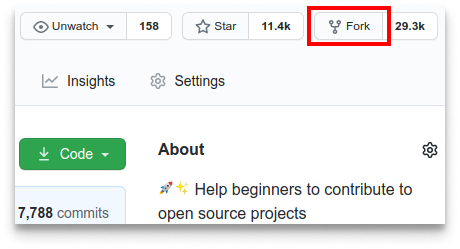
Fork this repository by clicking on the fork button on the top of this page. This will create a copy of this repository in your account.

Clone the repository

clone the repository

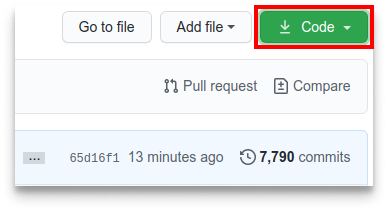
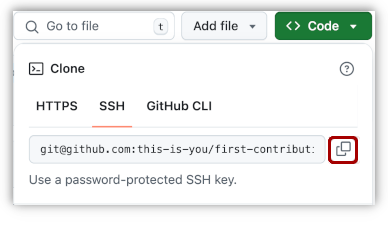
Now clone the forked repository to your machine. Go to your GitHub account, open the forked repository, click on the code button, then on SSH tab and then click the copy url to clipboard icon.

Open a terminal and run the following git command:

git clone "url you just copied"

where "url you just copied" (without the quotation marks) is the url to this repository (your fork of this project). See the previous steps to obtain the url.

copy URL to clipboard

For example:

git clone [email protected]:this-is-you/first-contributions.git

where this-is-you is your GitHub username. Here you're copying the contents of the first-contributions repository on GitHub to your computer.

Create a branch

Change to the repository directory on your computer (if you are not already there):

cd first-contributions

Now create a branch using the git switch command:

git switch -c your-new-branch-name

For example:

git switch -c add-alonzo-church
If you get any errors using git switch, click here:

If the error message "Git: switch is not a git command. See git –help" appears, it's likely because you're using an older version of git.

In this case, try to use git checkout instead:

git checkout -b your-new-branch-name

Make necessary changes and commit those changes

Now open Contributors.md file in a text editor, add your name to it. Don't add it at the beginning or end of the file. Put it anywhere in between. Now, save the file.

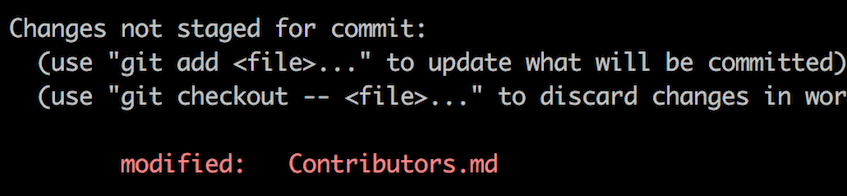
git status

If you go to the project directory and execute the command git status, you'll see there are changes.

Add those changes to the branch you just created using the git add command:

git add Contributors.md

Now commit those changes using the git commit command:

git commit -m "Add your-name to Contributors list"

replacing your-name with your name.

Push changes to GitHub

Push your changes using the command git push:

git push -u origin your-branch-name

replacing your-branch-name with the name of the branch you created earlier.

If you get any errors while pushing, click here:
  • Authentication Error

    remote: Support for password authentication was removed on August 13, 2021. Please use a personal access token instead.
    remote: Please see https://github.blog/2020-12-15-token-authentication-requirements-for-git-operations/ for more information.

first-contributions (firstcontributions/first-contributions)

Searching Database…

这是什么?这是一个适合新手的教程仓库,手把手带你完成第一次开源贡献。
这是工具还是只是教程?它纯粹是一个动手实践的教程或练习仓库:你复刻它、修改一个文件,然后提交拉取请求(pull request),练习真实的 GitHub 工作流程。它不是需要安装的软件。
开始之前,我需要先安装 Git 吗?需要,你的电脑上要装有 Git。如果还没装,README 里有安装指南的链接。对于不习惯命令行的人,README 还提供了图形界面 Git 工具的替代方案。
新手最常遇到的坑是什么?执行 git push 时可能会出现密码认证错误,因为 GitHub 在 2021 年 8 月取消了密码认证,所以你需要改用个人访问令牌(personal access token)。
具体要修改仓库里的什么内容?打开 Contributors.md,在文件中间任意位置添加你的名字(不要放在开头或结尾),然后只提交这一处修改(commit)。
有没有不用命令行的方法?有。README 中提供了使用图形界面 Git 工具完成贡献的教程链接,如果你不习惯终端,可以参考。
这个教程有英文以外的语言版本吗?有。README 提到它可以用其他语言阅读,翻译版本的链接列在页面顶部。
Size
51.4 MB
Stars
56.4K
Updated
CommitOct 18
Age
10y
Commits · 90 Days