


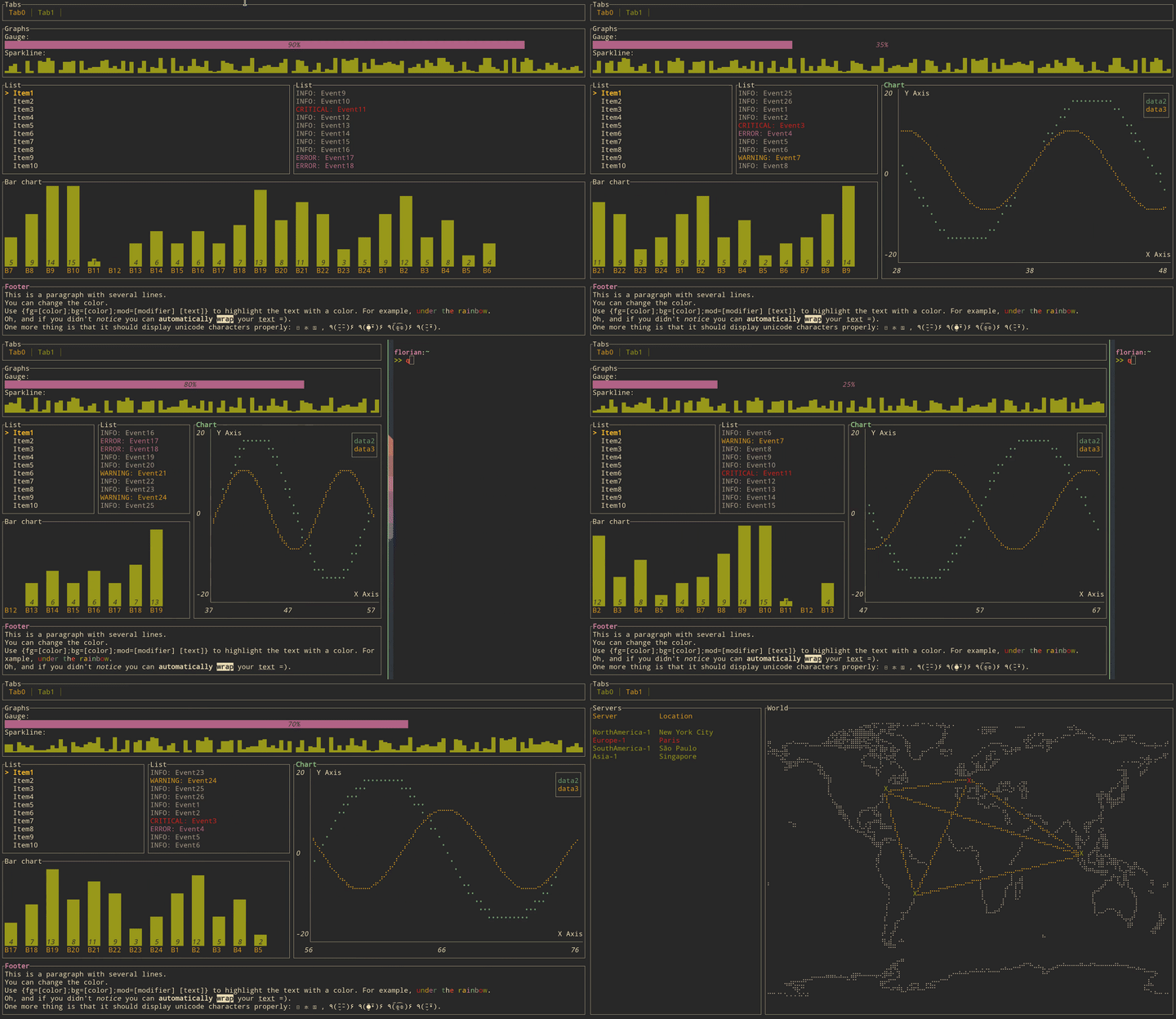
这是什么?
 tui-rs 是一个 Rust 库,用于构建丰富的终端用户界面和仪表盘,灵感来自 JavaScript 库 blessed-contrib 和 Go 库 termui。
tui-rs 是一个 Rust 库,用于构建丰富的终端用户界面和仪表盘,灵感来自 JavaScript 库 blessed-contrib 和 Go 库 termui。这是一个我能直接运行的应用,还是用来开发的库?是库,不是应用:你把它加入 Rust 项目,然后自己编写界面——每一帧都要重新构建所有需要显示在屏幕上的小组件,tui-rs 负责把它们绘制到终端里。
是库,不是应用:你把它加入 Rust 项目,然后自己编写界面——每一帧都要重新构建所有需要显示在屏幕上的小组件,tui-rs 负责把它们绘制到终端里。我怎么试用它?用 cargo 运行自带的示例,例如 'cargo run --example gauge'(按 q 退出)。要运行全部示例,先用 'cargo install cargo-make' 安装 cargo-make,然后执行 'cargo make run-examples'。
用 cargo 运行自带的示例,例如 'cargo run --example gauge'(按 q 退出)。要运行全部示例,先用 'cargo install cargo-make' 安装 cargo-make,然后执行 'cargo make run-examples'。我需要特定的 Rust 版本吗?只需要一个较新的 Rust 工具链:从 0.17.0 版本起,这个 crate 要求 rustc 1.56.1 或更高版本。
只需要一个较新的 Rust 工具链:从 0.17.0 版本起,这个 crate 要求 rustc 1.56.1 或更高版本。这个项目还在维护吗?不在了——这个 crate 自 2023 年 8 月起已停止维护。README 指向了一个仍在积极维护的分支,并推荐 Cursive 作为在 Rust 中构建 TUI 的替代方案。
不在了——这个 crate 自 2023 年 8 月起已停止维护。README 指向了一个仍在积极维护的分支,并推荐 Cursive 作为在 Rust 中构建 TUI 的替代方案。不管我用什么操作系统,它在我的终端里都能用吗?它通过可插拔的后端来渲染——默认是 crossterm,也可以换用 termion——所以它面向的是终端本身,而不针对特定操作系统。
它通过可插拔的后端来渲染——默认是 crossterm,也可以换用 termion——所以它面向的是终端本身,而不针对特定操作系统。内置了哪些小组件?有 Block、Gauge、Sparkline、Chart、BarChart、List、Table、Paragraph、Tabs,还有一个能绘制线条、点云和地图的 Canvas——每个都在仓库里有可运行的示例。
有 Block、Gauge、Sparkline、Chart、BarChart、List、Table、Paragraph、Tabs,还有一个能绘制线条、点云和地图的 Canvas——每个都在仓库里有可运行的示例。它怎么处理键盘输入?它不处理:tui-rs 不带任何输入处理和事件系统。你需要通过渲染所用的同一个后端自己实现,通常是 crossterm 或 termion。
它不处理:tui-rs 不带任何输入处理和事件系统。你需要通过渲染所用的同一个后端自己实现,通常是 crossterm 或 termion。它的渲染在底层是怎么工作的?采用即时渲染加中间缓冲区:每一帧都重新构建组成界面的所有小组件。这个 crate 尽量减少 ANSI 转义序列来降低重绘开销,实际剩下的开销更多来自终端模拟器而不是库本身。
采用即时渲染加中间缓冲区:每一帧都重新构建组成界面的所有小组件。这个 crate 尽量减少 ANSI 转义序列来降低重绘开销,实际剩下的开销更多来自终端模拟器而不是库本身。有哪些实际应用在用它?一大串终端工具都在用,包括 spotify-tui、bandwhich、bottom、zenith、gping、gitui、diskonaut、tickrs、termchat、xplr 和 tokio-console。
一大串终端工具都在用,包括 spotify-tui、bandwhich、bottom、zenith、gping、gitui、diskonaut、tickrs、termchat、xplr 和 tokio-console。