
Pop is an extensible animation engine for iOS, tvOS, and OS X. In addition to basic static animations, it supports spring and decay dynamic animations, making it useful for building realistic, physics-based interactions. The API allows quick integration with existing Objective-C or Swift codebases and enables the animation of any property on any object. It's a mature and well-tested framework that drives all the animations and transitions in Paper.

Installation
Pop is available on CocoaPods. Just add the following to your project Podfile:
pod 'pop', '~> 1.0'
Bugs are first fixed in master and then made available via a designated release. If you tend to live on the bleeding edge, you can use Pop from master with the following Podfile entry:
pod 'pop', :git => 'https://github.com/facebook/pop.git'
Framework (manual)
By adding the project to your project and adding pop.embedded framework to the Embedded Binaries section on the General tab of your app's target, you can set up pop in seconds! This also enables @import pop syntax with header modules.
Note: because of some awkward limitations with Xcode, embedded binaries must share the same name as the module and must have .framework as an extension. This means that you'll see three pop.frameworks when adding embedded binaries (one for OS X, one for tvOS, and one for iOS). You'll need to be sure to add the right one; they appear identically in the list but note the list is populated in order of targets. You can verify the correct one was chosen by checking the path next to the framework listed, in the format <configuration>-<platform> (e.g. Debug-iphoneos).
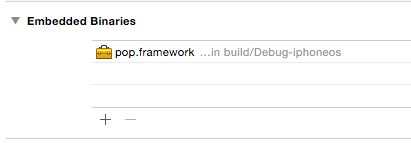
Note 2: this method does not currently play nicely with workspaces. Since targets can only depend on and embed products from other targets in the same project, it only works when pop.xcodeproj is added as a subproject to the current target's project. Otherwise, you'll need to manually set the build ordering in the scheme and copy in the product.
Static Library (manual)
Alternatively, you can add the project to your workspace and adopt the provided configuration files or manually copy the files under the pop subdirectory into your project. If installing manually, ensure the C++ standard library is also linked by including -lc++ to your project linker flags.
Usage
Pop adopts the Core Animation explicit animation programming model. Use by including the following import:
Objective-C
#import <pop/POP.h>
or if you're using the embedded framework:
@import pop;
Swift
import pop
Start, Stop & Update
To start an animation, add it to the object you wish to animate:
Objective-C
POPSpringAnimation *anim = [POPSpringAnimation animation];
...
[layer pop_addAnimation:anim forKey:@"myKey"];
Swift
let anim = POPSpringAnimation()
...
layer.pop_add(anim, forKey: "myKey")
To stop an animation, remove it from the object referencing the key specified on start:
Objective-C
[layer pop_removeAnimationForKey:@"myKey"];
Swift
layer.pop_removeAnimation(forKey: "myKey")
The key can also be used to query for the existence of an animation. Updating the toValue of a running animation can provide the most seamless way to change course:
Objective-C
anim = [layer pop_animationForKey:@"myKey"];
if (anim) {
  /* update to value to new destination */
  anim.toValue = @(42.0);
} else {
  /* create and start a new animation */
  ....
}
Swift
if let anim = layer.pop_animation(forKey: "myKey") as? POPSpringAnimation {
    /* update to value to new destination */
    anim.toValue = 42.0
} else {
    /* create and start a new animation */
    ....
}
While a layer was used in the above examples, the Pop interface is implemented as a category addition on NSObject. Any NSObject or subclass can be animated.
Types
There are four concrete animation types: spring, decay, basic and custom.
Spring animations can be used to give objects a delightful bounce. In this example, we use a spring animation to animate a layer's bounds from its current value to (0, 0, 400, 400):
Objective-C
POPSpringAnimation *anim = [POPSpringAnimation animationWithPropertyNamed:kPOPLayerBounds];
anim.toValue = [NSValue valueWithCGRect:CGRectMake(0, 0, 400, 400)];
[layer pop_addAnimation:anim forKey:@"size"];
Swift
if let anim = POPSpringAnimation(propertyNamed: kPOPLayerBounds) {
    anim.toValue = NSValue(cgRect: CGRect(x: 0, y: 0, width: 400, height: 400))
    layer.pop_add(anim, forKey: "size")
}
Decay animations can be used to gradually slow an object to a halt. In this example, we decay a layer's positionX from it's current value and velocity 1000pts per second:
Objective-C
POPDecayAnimation *anim = [POPDecayAnimation animationWithPropertyNamed:kPOPLayerPositionX];
anim.velocity = @(1000.);
[layer pop_addAnimation:anim forKey:@"slide"];
Swift
if let anim = POPDecayAnimation(propertyNamed: kPOPLayerPositionX) {
    anim.velocity = 1000.0
    layer.pop_add(anim, forKey: "slide")
}
Basic animations can be used to interpolate values over a specified time period. To use an ease-in ease-out animation to animate a view's alpha from 0.0 to 1.0 over the default duration:
Objective-C
POPBasicAnimation *anim = [POPBasicAnimation animationWithPropertyNamed:kPOPViewAlpha];
anim.timingFunction = [CAMediaTimingFunction functionWithName:kCAMediaTimingFunctionEaseInEaseOut];
anim.fromValue = @(0.0);
anim.toValue = @(1.0);
[view pop_addAnimation:anim forKey:@"fade"];
Swift
if let anim = POPBasicAnimation(propertyNamed: kPOPViewAlpha) {
    anim.timingFunction = CAMediaTimingFunction(name: kCAMediaTimingFunctionEaseInEaseOut)
    anim.fromValue = 0.0
    anim.toValue = 1.0
    view.pop_add(anim, forKey: "fade")
}
POPCustomAnimation makes creating custom animations and transitions easier by handling CADisplayLink and associated time-step management. See header for more details.
Properties
The property animated is specified by the POPAnimatableProperty class. In this example we create a spring animation and explicitly set the animatable property corresponding to -[CALayer bounds]:
Objective-C
POPSpringAnimation *anim = [POPSpringAnimation animation];
anim.property = [POPAnimatableProperty propertyWithName:kPOPLayerBounds];
Swift
let anim = POPSpringAnimation()
if let property = POPAnimatableProperty.property(withName: kPOPLayerBounds) as? POPAnimatableProperty {
    anim.property = property
}
The framework provides many common layer and view animatable properties out of box. You can animate a custom property by creating a new instance of the class. In this example, we declare a custom volume property:
Objective-C
prop = [POPAnimatableProperty propertyWithName:@"com.foo.radio.volume" initializer:^(POPMutableAnimatableProperty *prop) {
  // read value
  prop.readBlock = ^(id obj, CGFloat values[]) {
    values[0] = [obj volume];
  };
  // write value
  prop.writeBlock = ^(id obj, const CGFloat values[]) {
    [obj setVolume:values[0]];
  };
  // dynamics threshold
  prop.threshold = 0.01;
}];

anim.property = prop;
Swift
if let prop = POPAnimatableProperty.property(withName: "com.foo.radio.volume", initializer: { prop in
    guard let prop = prop else {
        return
    }
    // read value
    prop.readBlock = { obj, values in
        guard let obj = obj as? Volumeable, let values = values else {
            return
        }

        values[0] = obj.volume
    }
    // write value
    prop.writeBlock = { obj, values in
        guard var obj = obj as? Volumeable, let values = values else {
            return
        }

        obj.volume = values[0]
    }
    // dynamics threshold
    prop.threshold = 0.01
}) as? POPAnimatableProperty {
    anim.property = prop
}
For a complete listing of provided animatable properties, as well more information on declaring custom properties see POPAnimatableProperty.h.
Debugging
Here are a few tips when debugging. Pop obeys the Simulator's Toggle Slow Animations setting. Try enabling it to slow down animations and more easily observe interactions.
Consider naming your animations. This will allow you to more easily identify them when referencing them, either via logging or in the debugger:
Objective-C
anim.name = @"springOpen";
Swift
anim.name = "springOpen"
Each animation comes with an associated tracer. The tracer allows you to record all animation-related events, in a fast and efficient manner, allowing you to query and analyze them after animation completion. The below example starts the tracer and configures it to log all events on animation completion:
Objective-C
POPAnimationTracer *tracer = anim.tracer;
tracer.shouldLogAndResetOnCompletion = YES;
[tracer start];
Swift
if let tracer = anim.tracer {
    tracer.shouldLogAndResetOnCompletion = true
    tracer.start()
}
See POPAnimationTracer.h for more details.
Testing
Pop has extensive unit test coverage. To install test dependencies, navigate to the root pop directory and type:
pod install
Assuming CocoaPods is installed, this will include the necessary OCMock dependency to the unit test targets.
SceneKit
Due to SceneKit requiring iOS 8 and OS X 10.9, POP's SceneKit extensions aren't provided out of box. Unfortunately, weakly linked frameworks cannot be used due to issues mentioned in the Xcode 6.1 Release Notes.
To remedy this, you can easily opt-in to use SceneKit! Simply add this to the Preprocessor Macros section of your Xcode Project:
POP_USE_SCENEKIT=1
Resources
A collection of links to external resources that may prove valuable:
Contributing
See the CONTRIBUTING file for how to help out.
License
Pop is released under a BSD License. See LICENSE file for details.

 Pop 是一个可扩展的动画引擎,适用于 iOS、tvOS 和 OS X。它在 Core Animation 之上增加了弹簧、衰减、基础以及自定义的基于物理的动画,让你可以为任何对象的任何属性添加动画。