
Draft.js


Status
THIS PROJECT IS CURRENTLY IN MAINTENANCE MODE. It will not receive any feature updates, only critical security bug patches. On 31st December 2022 the repo will be fully archived.
For users looking for an open source alternative, Meta have been working on migrating to a new framework, called Lexical. It's still experimental, and we're working on adding migration guides, but, we believe, it provides a more performant and accessible alternative.
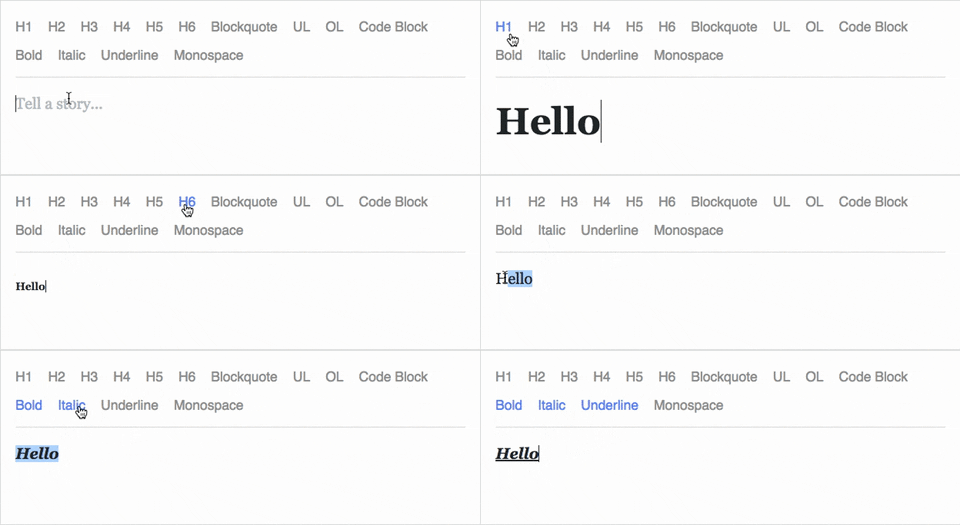
Draft.js is a JavaScript rich text editor framework, built for React and
backed by an immutable model.
- Extensible and Customizable: We provide the building blocks to enable
the creation of a broad variety of rich text composition experiences, from
basic text styles to embedded media.
- Declarative Rich Text: Draft.js fits seamlessly into
React applications,
abstracting away the details of rendering, selection, and input behavior with a
familiar declarative API.
- Immutable Editor State: The Draft.js model is built
with immutable-js, offering
an API with functional state updates and aggressively leveraging data persistence
for scalable memory usage.
Learn how to use Draft.js in your own project.
Draft.js is used in production on Facebook, including status and
comment inputs, Notes, and
messenger.com.
API Notice
Before getting started, please be aware that we recently changed the API of
Entity storage in Draft.
Previously, the old API was set to be removed in v0.11.0. Since, the plans have changed— v0.11.0 still supports the old API and v0.12.0 will remove it. Refer to the docs for more information and information on how to migrate.
Getting Started
npm install --save draft-js react react-dom

or

yarn add draft-js react react-dom
Draft.js depends on React and React DOM which must also be installed.
Using Draft.js
import React from 'react';
import ReactDOM from 'react-dom';
import {Editor, EditorState} from 'draft-js';

function MyEditor() {


  constructor(props) {
    super(props);
    this.state = {editorState: EditorState.createEmpty()};
    this.onChange = (editorState) => this.setState({editorState});
    this.setEditor = (editor) => {
      this.editor = editor;
    };
    this.focusEditor = () => {
      if (this.editor) {
        this.editor.focus();
      }
    };
  }

  componentDidMount() {
    this.focusEditor();
  }

  render() {
    return (
      <div style={styles.editor} onClick={this.focusEditor}>
        <Editor
          ref={this.setEditor}
          editorState={this.state.editorState}
          onChange={this.onChange}
        />
      </div>
    );
  }
}

const styles = {
  editor: {
    border: '1px solid gray',
    minHeight: '6em'
  }
};

ReactDOM.render(
  <MyEditor />,
  document.getElementById('container')
);
Since the release of React 16.8, you can use Hooks as a way to work with EditorState without using a class.
import React from "react";
import { Editor, EditorState } from "draft-js";
import "draft-js/dist/Draft.css";

export default function MyEditor() {
  const [editorState, setEditorState] = React.useState(() =>
    EditorState.createEmpty()
  );

  const editor = React.useRef(null);
  function focusEditor() {
    editor.current.focus();
  }

  return (
    <div
      style={{ border: "1px solid black", minHeight: "6em", cursor: "text" }}
      onClick={focusEditor}
    >
      <Editor
        ref={editor}
        editorState={editorState}
        onChange={setEditorState}
        placeholder="Write something!"
      />
    </div>
  );
}
Note that the editor itself is only as tall as its contents. In order to give users a visual cue, we recommend setting a border and a minimum height via the .DraftEditor-root CSS selector, or using a wrapper div like in the above example.
Because Draft.js supports unicode, you must have the following meta tag in the <head> </head> block of your HTML file:
<meta charset="utf-8" />
Further examples of how Draft.js can be used are provided in the /examples directory of this repo.
Building Draft.js
Draft.js is built with Yarn v1. Using other package managers mgiht work, but is not officially supported.
To clone and build, run:
git clone https://github.com/facebook/draft-js.git
cd draft-js
yarn install
yarn run build
Examples
To run the examples in the /examples directory, first build Draft.js locally as described above. Then, open the example HTML files in your browser.
Browser Support

IE / Edge |

Firefox |

Chrome |

Safari |

iOS Safari |
Chrome for Android |
| IE11, Edge [1, 2] |
last 2 versions |
last 2 versions |
last 2 versions |
not fully supported [3] |
not fully supported [3] |
[1] May need a shim or a polyfill for some syntax used in Draft.js (docs).
[2] IME inputs have known issues in these browsers, especially Korean (docs).
[3] There are known issues with mobile browsers, especially on Android (docs).
Resources and Ecosystem
Check out this curated list of articles and open-sourced projects/utilities: Awesome Draft-JS.
Discussion and Support
Join our Slack team!
Contribute
We welcome pull requests. Learn how to
contribute.
License
Draft.js is MIT licensed.
Examples provided in this repository and in the documentation are separately
licensed.

 它是一个专为 React 打造的 JavaScript 富文本编辑器框架,底层采用不可变数据模型——用来在网页应用里实现富文本编辑功能。