


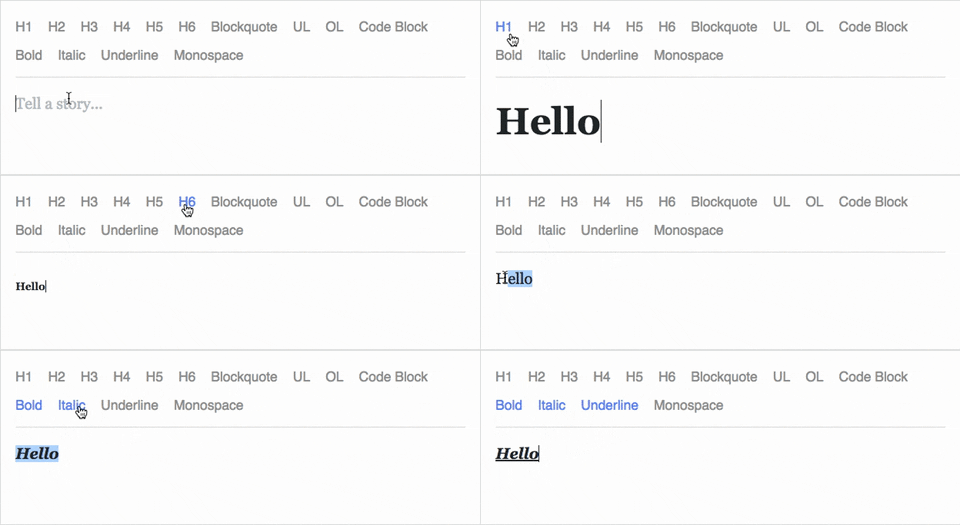


What is this?
 It is a JavaScript rich text editor framework built for React and backed by an immutable model — a way to build rich text editing into web apps.
It is a JavaScript rich text editor framework built for React and backed by an immutable model — a way to build rich text editing into web apps.So it's not a ready-made editor I can just drop into my app?Correct — it is a framework, not a finished component. You compose its building blocks into your own editing experiences, from basic text styles to embedded media.
Correct — it is a framework, not a finished component. You compose its building blocks into your own editing experiences, from basic text styles to embedded media.How do I add it to my React project?Install it alongside React: npm install draft-js react react-dom — Draft.js needs both React and React DOM. Since React 16.8 you can manage EditorState with Hooks instead of a class component.
Install it alongside React: npm install draft-js react react-dom — Draft.js needs both React and React DOM. Since React 16.8 you can manage EditorState with Hooks instead of a class component.Is it still maintained? Should I pick it for a new project?No — it is in maintenance mode, receiving only critical security patches, and the repo was fully archived on 31 December 2022. For new work Meta points to its successor framework, Lexical.
No — it is in maintenance mode, receiving only critical security patches, and the repo was fully archived on 31 December 2022. For new work Meta points to its successor framework, Lexical.Which browsers does it support?IE11 and Edge (a polyfill may be needed, and IME input has known issues, especially Korean) plus the last 2 versions of Firefox, Chrome and Safari. Mobile is not fully supported, especially on Android.
IE11 and Edge (a polyfill may be needed, and IME input has known issues, especially Korean) plus the last 2 versions of Firefox, Chrome and Safari. Mobile is not fully supported, especially on Android.Where is Draft.js used in production?At Facebook: status and comment inputs, Notes, and messenger.com were all built on it.
At Facebook: status and comment inputs, Notes, and messenger.com were all built on it.Why is the editor state immutable?The model is built with immutable-js, so state updates are functional and data persistence is aggressive — that keeps memory usage scalable even for long documents and undo histories.
The model is built with immutable-js, so state updates are functional and data persistence is aggressive — that keeps memory usage scalable even for long documents and undo histories.What is Lexical, the framework Meta suggests instead?Meta's newer text editor framework for the web. When Draft.js was archived it was still experimental, but Meta considered it more performant and accessible and was working on migration guides.
Meta's newer text editor framework for the web. When Draft.js was archived it was still experimental, but Meta considered it more performant and accessible and was working on migration guides.The editor looks squashed — how should I style it?It is only as tall as its contents, so give the .DraftEditor-root selector a border and a min-height, or wrap it in a div. Your HTML also needs a unicode meta tag because Draft.js supports unicode.
It is only as tall as its contents, so give the .DraftEditor-root selector a border and a min-height, or wrap it in a div. Your HTML also needs a unicode meta tag because Draft.js supports unicode.What are similar projects?pell, ckeditor5, medium-editor, slate, trix, BlockNote, codemirror5, tui.editor
pell, ckeditor5, medium-editor, slate, trix, BlockNote, codemirror5, tui.editorWhich topics is it in?contenteditable, facebook, javascript-framework, rich-text-editor, text-editor, reactjs, editor, javascript-library, ui-components, customization, deprecated, browser
contenteditable, facebook, javascript-framework, rich-text-editor, text-editor, reactjs, editor, javascript-library, ui-components, customization, deprecated, browser