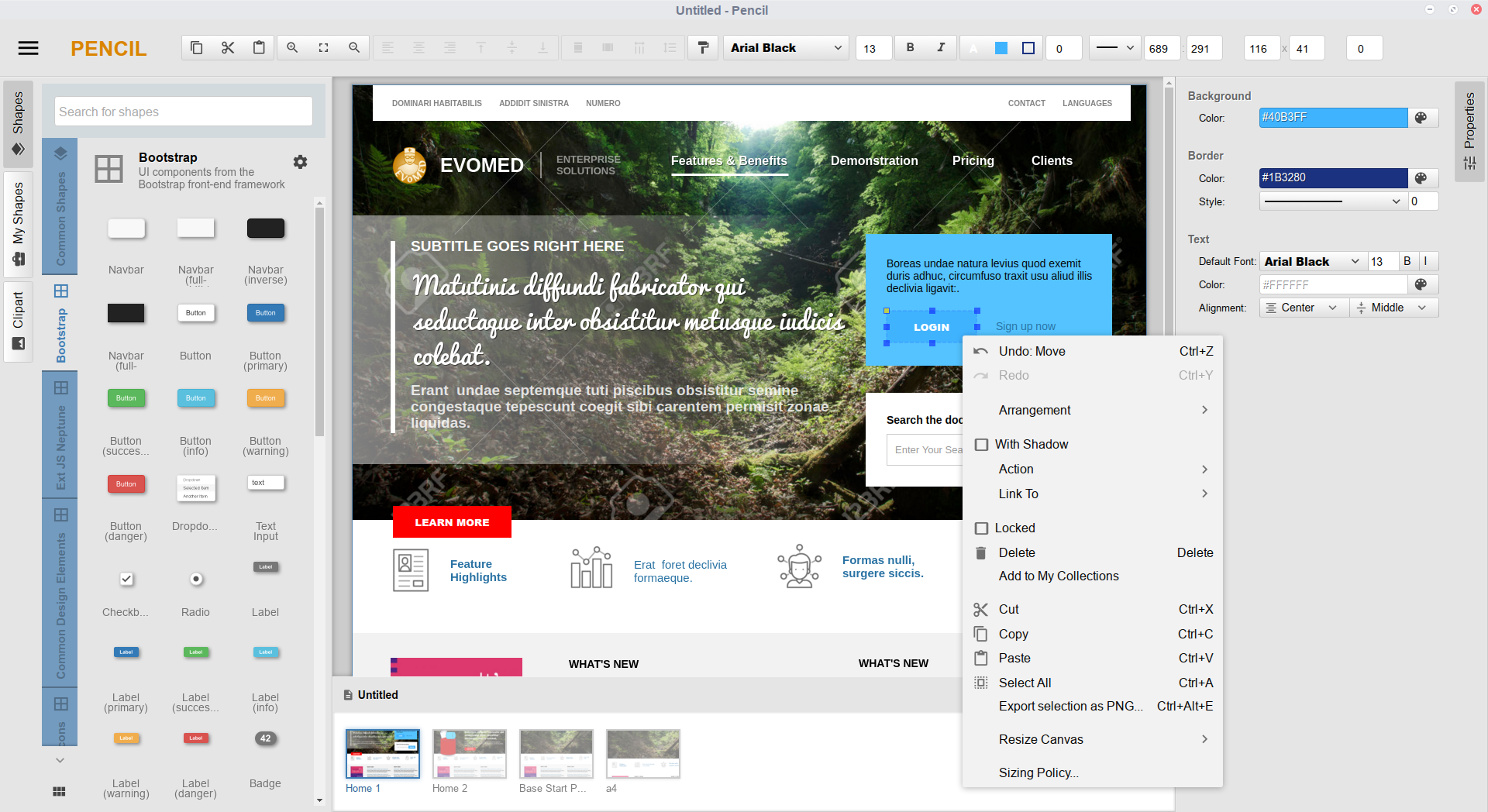
Overview
Pencil is a free, open-source, desktop-native wireframing and prototyping tool for macOS, Windows, and Linux (pencil.evolus.vn). Built for developers, UX designers, and product teams, it provides an intuitive vector canvas environment for constructing mockups, system diagrams, and user flows using standard vector stencil libraries.
Key Capabilities & Architecture in V4.0
Pencil V4.0 introduces native support for the Model Context Protocol (MCP). This enables any AI assistant or LLM client that supports standard MCP (including Claude Desktop, Cursor, Antigravity, VS Code, or custom agents) to inspect, create, and modify wireframes directly on your canvas using everyday language. Pencil runs a local server right inside the app at http://127.0.0.1:1919/mcp, with no extra background services or cloud setups required.
- Natural Language to Vector Canvas: AI assistants convert prompts (e.g. "Create a 3-tier pricing table using shadcn/ui") directly into canvas operations via MCP tools (
insert_shapes, shift_layout). Components are positioned with calculated bounds, not flat image overlays.
- True Vector Primitives: Generates native, fully editable vector stencils and shapes instead of raster bitmaps or static mockups. Every AI-created element can be resized, restyled, or reorganized on the canvas at any time.
- 100% Local-First & Private: All document data (
.ep, .epz) and MCP requests stay strictly on your local machine over loopback (127.0.0.1). No cloud syncing, third-party analytics, or telemetry.
- Autonomous Vision QA Loop: Exposes a visual snapshot mechanism (
render_preview), allowing LLMs to inspect the rendered canvas, verify spacing/alignment/contrast, and perform iterative layout corrections autonomously.
- Dynamic Layout & Spacing: Built-in container structures automatically manage padding, element distribution, and offsets, eliminating manual pixel math when appending or reordering components.
- Stencil & Icon Introspection: Connected assistants can query installed stencil libraries (shadcn/ui, Bootstrap, Material Design, iOS, Flowcharts) and search icon catalogs (Tabler, Lucide, FontAwesome) on demand.
Quick Start (Prebuilt Binaries)
For end users who do not require building from source:
- Download: Obtain the latest installer or package for your operating system from the Pencil Downloads Page or GitHub Releases.
- Launch: Open Pencil. You can immediately begin creating wireframes and diagrams using the built-in stencil collections.
- Connect AI (Optional): To enable AI-assisted prototyping, follow the setup in Connecting AI Clients below.
Connecting AI Clients
Pencil provides built-in configuration snippets for popular tools (Claude Desktop, Cursor, Antigravity, and VS Code), and works with any client or script that connects to standard MCP HTTP endpoints. Open Settings > MCP, select your assistant tab, and click Copy Configuration to paste directly into your client.
The internal server operates on http://127.0.0.1:1919/mcp (Streamable HTTP / JSON-RPC 2.0). Server status, port assignment, and restarts can be managed directly in the MCP settings pane. To verify endpoint responsiveness externally:
curl -I http://127.0.0.1:1919/mcp
Manual Client Configuration Reference
Claude Desktop
Add to claude_desktop_config.json (~/Library/Application Support/Claude/ on macOS, %APPDATA%\Claude\ on Windows, ~/.config/Claude/ on Linux):
{
  "mcpServers": {
    "pencil": {
      "command": "npx",
      "args": [
        "-y",
        "mcp-remote",
        "http://127.0.0.1:1919/mcp"
      ]
    }
  }
}
Cursor
Add to .cursor/mcp.json or configure under Settings > Features > MCP:
{
  "mcpServers": {
    "pencil": {
      "url": "http://127.0.0.1:1919/mcp"
    }
  }
}
Antigravity
Add to mcp_config.json:
{
  "mcpServers": {
    "pencil": {
      "serverUrl": "http://127.0.0.1:1919/mcp"
    }
  }
}
VS Code
Add to .vscode/mcp.json (or user settings under mcp.servers):
{
  "servers": {
    "pencil": {
      "type": "http",
      "url": "http://127.0.0.1:1919/mcp"
    }
  }
}
Example Interaction Prompts
AI assistants connected to Pencil can execute complex multi-step canvas workflows. Below are representative prompts:
[!TIP]
Prompting Best Practice: For the cleanest layouts, explicitly reference your desired stencil library (e.g., "Use shadcn/ui stencils..." or "Pick an icon from the Lucide collection..."). This instructs the assistant to reuse standardized design system components instead of generic raw rectangles.
Scaffolding New Screens
- "Use the shadcn/ui stencil collection to build a standard SaaS authentication screen with an email input, password field, 'Remember me' checkbox, and primary submit button."
- "Create a three-tier pricing comparison table (Free, Pro, Enterprise) on the active page, highlighting the Pro tier with a primary accent border."
- "Generate a mobile analytics dashboard page containing a top metrics card grid and a recent activity list below it."
Component Refinement & Styling
- "Select all primary call-to-action buttons on this page, update their background fill to #2563EB, and apply an 8px corner radius."
- "Adjust the horizontal spacing between the navigation header items to 24px and align them vertically to the center."
- "Convert the current card grid layout from 3 columns into a single-column list with 16px row gaps."
Icon & Asset Placement
- "Search the Tabler icon library for a 'settings' outline icon and place it in the top-right corner of the application bar."
- "Replace the placeholder circles next to the username labels with user avatar icons from the Lucide collection."
Structural Layout Shifts & Visual QA
- "Shift the page footer down by 120px to make room for an email newsletter subscription block above it."
- "Add a new page named 'Account Settings' with sub-tabs for 'General', 'Security', and 'Billing'."
- "Inspect the current canvas preview for contrast issues or overlapping elements and adjust misaligned bounds."
Pencil exposes its internal API through 5 catalog modules:
| Category |
Tools |
Description |
| Canvas Mutation |
insert_shapes, update_shapes, delete_shapes, move_shapes, align_shapes, distribute_shapes, shift_layout, select_shapes |
Create, modify, position, and reorder vector shapes, containers, and properties. |
| Document Management |
get_active_document, get_page_content, list_pages, create_page, update_page, rename_page, delete_page, switch_page, export_page |
Manage document structure, multi-page hierarchies, navigation, and exports. |
| Inspection & Vision |
render_preview, find_shapes, find_shapes_in_canvas, list_shapes |
Generate visual snapshots for LLM vision inspection and query shape hierarchies. |
| Stencils & Resources |
list_collections, list_shape_definitions, get_shape_definition, list_resource_collections, list_resource_dir, search_resources |
Discover installed stencil libraries, component templates, and vector icon collections. |
| Guidance & Skills |
list_skills, use_skill, read_knowledge_base_document |
Access embedded design rules, stencil construction guidelines, and best practices. |
Stencil & Icon Ecosystem
Pencil includes built-in collections and supports custom stencil installation:
- UI Framework Stencils: shadcn/ui, Bootstrap, Material Design, iOS UI, Android UI, Web Elements.
- Diagramming & Flowcharts: Flowchart shapes, UML diagrams, entity relationship symbols, mind mapping nodes.
- Vector Icon Catalogs: Tabler Icons, Lucide Icons, FontAwesome.
Stencil Repositories & Resources
Additional collections and export templates can be installed through multiple sources:
- Official Stencils & Templates Directory: Browse downloadable collections at pencil.evolus.vn/Stencils-Templates.html.
- Community Stencils Repository: Community-contributed collections are hosted on GitHub at evolus/stencils-repository.
- In-App Repository Browser: In Pencil, open Tools > Manage Collections to browse the online repository, install stencils directly from archive URLs, or load local
.zip packages created with the Stencil Generator.
Development & Building from Source
Prerequisites
- Node.js: Version 14 or higher (LTS recommended)
- Package Manager: npm or yarn
- Git
Installation
Clone the repository and check out the target branch:
git clone https://github.com/evolus/pencil.git
cd pencil
git checkout development
Install project dependencies:
yarn install
# or
npm install
Launch the development build:
yarn start
# or
npm start
For dev tools and inspection windows enabled:
npm run start:dev
Packaging & Distribution
To compile production bundles for your host platform:
# macOS (DMG, universal / arm64 / x64)
npm run dist:osx

# Windows (NSIS Installer)
npm run dist:win32

# Linux (deb, rpm, tar.gz)
npm run dist:linux
Output binaries are written to the dist/ directory.
macOS
- macOS 10.9 and later.
- Native builds available for Apple Silicon (arm64) and Intel (x64).
Windows
- Windows 7, Windows 10, and Windows 11 (64-bit).
Linux
- Tested distributions: Ubuntu 18.04+, Debian 10+, Fedora 30+, Arch Linux.
- Community packages:
Contributing
Contributions are welcome. Please refer to the following workflow:
- Fork the repository and create a descriptive feature branch (
feature/your-feature-name).
- Adhere to existing code conventions and formatting guidelines defined in
.editorconfig.
- Test your changes locally across standard canvas operations and MCP endpoints.
- Submit a pull request against the integration branch with a concise summary of changes.
For security concerns or defect reports, please open an issue using the provided issue templates.
Star History
License
Pencil is open-source software licensed under the GNU General Public License v2.0 (GPL-2.0).
Copyright © 2008–2026 Evolus and individual contributors.



 Pencil 是一款免费的开源桌面应用,用于 GUI 原型设计、线框图绘制和图表制作,支持 macOS、Windows 和 Linux。