


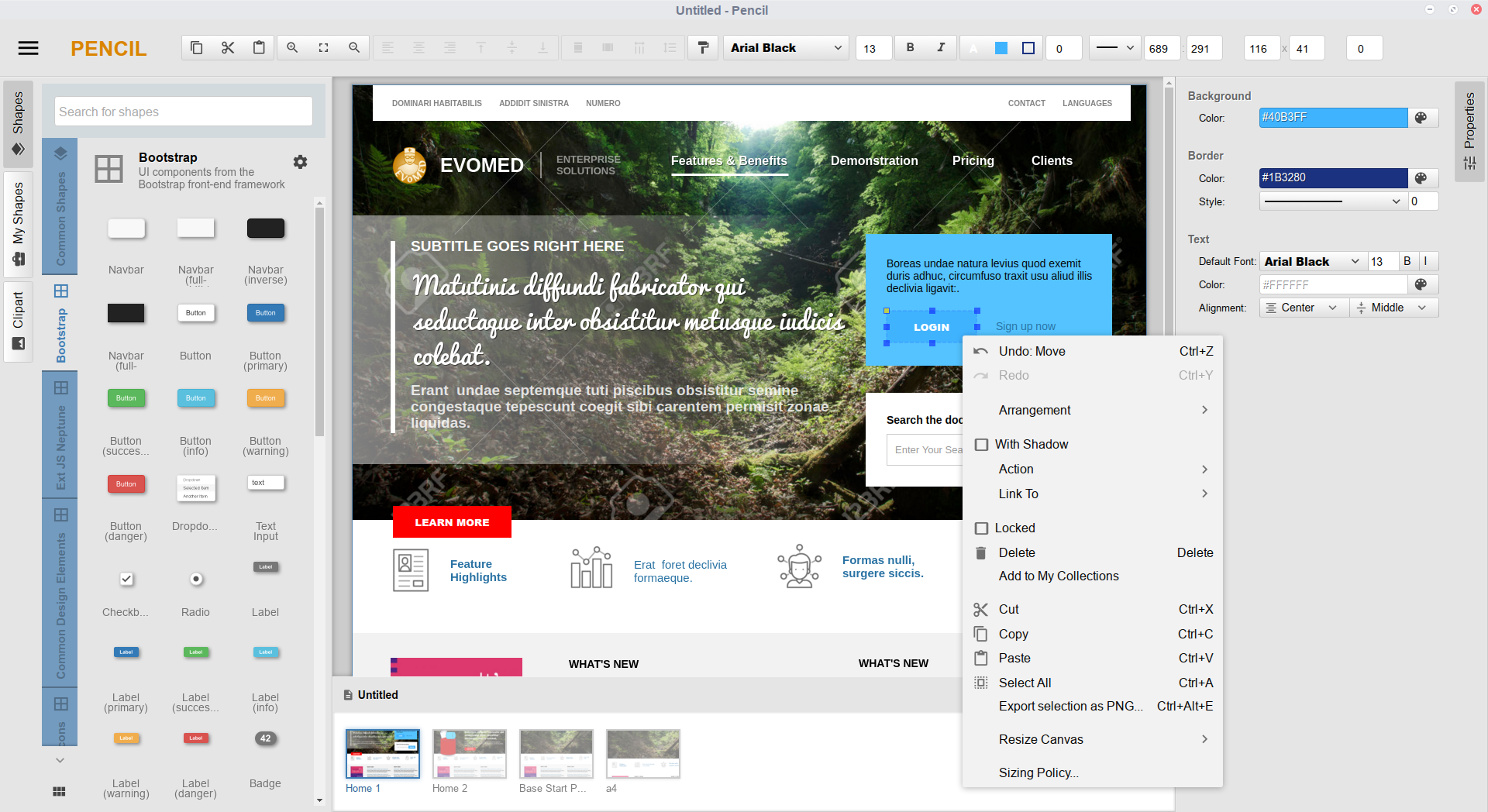
Что это такое?
 Pencil — бесплатное приложение с открытым исходным кодом для настольных компьютеров, предназначенное для прототипирования интерфейсов, создания каркасов (wireframes) и диаграмм на macOS, Windows и Linux.
Это самостоятельное настольное приложение или плагин для другой программы?Это самостоятельное настольное приложение на основе Electron с собственным векторным холстом, а не расширение для браузера и не плагин.
Это самостоятельное настольное приложение на основе Electron с собственным векторным холстом, а не расширение для браузера и не плагин.Как его запустить?Скачайте установщик для вашей ОС со страницы Pencil Downloads или из GitHub Releases и запустите его; также можно клонировать репозиторий и запустить приложение из исходного кода с помощью npm или yarn.
Скачайте установщик для вашей ОС со страницы Pencil Downloads или из GitHub Releases и запустите его; также можно клонировать репозиторий и запустить приложение из исходного кода с помощью npm или yarn.Нужно ли подключение к интернету или облачный аккаунт, чтобы пользоваться функциями ИИ?Нет: сервер MCP работает локально внутри приложения через loopback (127.0.0.1), а все данные документов остаются на вашем компьютере без облачной синхронизации и телеметрии.
Нет: сервер MCP работает локально внутри приложения через loopback (127.0.0.1), а все данные документов остаются на вашем компьютере без облачной синхронизации и телеметрии.Для кого это предназначено?Для разработчиков, UX-дизайнеров и продуктовых команд, которым нужно создавать макеты, диаграммы и пользовательские сценарии.
Для разработчиков, UX-дизайнеров и продуктовых команд, которым нужно создавать макеты, диаграммы и пользовательские сценарии.Pencil отправляет куда-либо мои каркасы или данные дизайна?Нет, всё остаётся локально через loopback, и никакая аналитика или телеметрия сторонних сервисов не отправляется.
Нет, всё остаётся локально через loopback, и никакая аналитика или телеметрия сторонних сервисов не отправляется.Какие ИИ-ассистенты могут подключиться к Pencil?Любой клиент, поддерживающий Model Context Protocol (MCP), включая Claude Desktop, Cursor, Antigravity и VS Code; готовые фрагменты конфигурации доступны в Settings > MCP.
Любой клиент, поддерживающий Model Context Protocol (MCP), включая Claude Desktop, Cursor, Antigravity и VS Code; готовые фрагменты конфигурации доступны в Settings > MCP.Что ИИ-ассистент может делать после подключения?Он может вставлять, перемещать, изменять размер и стилизовать векторные фигуры, управлять страницами, искать в библиотеках иконок и трафаретов, а также делать визуальный снимок холста, чтобы проверить выравнивание и контраст перед дальнейшими правками.
Он может вставлять, перемещать, изменять размер и стилизовать векторные фигуры, управлять страницами, искать в библиотеках иконок и трафаретов, а также делать визуальный снимок холста, чтобы проверить выравнивание и контраст перед дальнейшими правками.Какие библиотеки трафаретов и наборы иконок есть в комплекте?Библиотеки UI-фреймворков: shadcn/ui, Bootstrap, Material Design, iOS и Android, а также фигуры для блок-схем, UML и ER-диаграмм и каталоги иконок Tabler, Lucide и FontAwesome. Другие можно добавить из community-репозитория Stencils Repository.
Библиотеки UI-фреймворков: shadcn/ui, Bootstrap, Material Design, iOS и Android, а также фигуры для блок-схем, UML и ER-диаграмм и каталоги иконок Tabler, Lucide и FontAwesome. Другие можно добавить из community-репозитория Stencils Repository.Элементы, созданные ИИ, — это просто плоские изображения или их можно редактировать потом?Это настоящие векторные примитивы (а не растровые изображения), поэтому любую созданную ИИ фигуру можно изменить по размеру, перестилизовать или переместить так же, как нарисованную вручную.
Это настоящие векторные примитивы (а не растровые изображения), поэтому любую созданную ИИ фигуру можно изменить по размеру, перестилизовать или переместить так же, как нарисованную вручную.Какие есть похожие проекты?huashu-design, k-style-ui-ux, oil-ui, penpot, Awesome-Design-Tools, openpencil, effective-html, drawio-desktop
huashu-design, k-style-ui-ux, oil-ui, penpot, Awesome-Design-Tools, openpencil, effective-html, drawio-desktopВ каких он темах?prototype, prototyping, drawing, diagrams, design-tools, ui-design, gplv2, design, electron, model-context-protocol, ui, productivity
prototype, prototyping, drawing, diagrams, design-tools, ui-design, gplv2, design, electron, model-context-protocol, ui, productivity- Автор
- evolus
- Размер
- 38.1 MB
- Звёзды
- 9.9K
- Обновлён
- КоммитOct 22Релизv4.0.0Oct 24
- Возраст
- 12 г
- Коммиты · 90 дней