The Pencil Project's unique mission is to build a free and opensource tool for making diagrams and GUI prototyping that everyone can use.
pencil (evolus/pencil)
Searching Database…
The project's README from github.com/evolus/pencil. As one markdown file: README.md.

An open-source GUI prototyping and wireframing application for macOS, Windows, and Linux.
Website • Downloads • Stencils & Templates




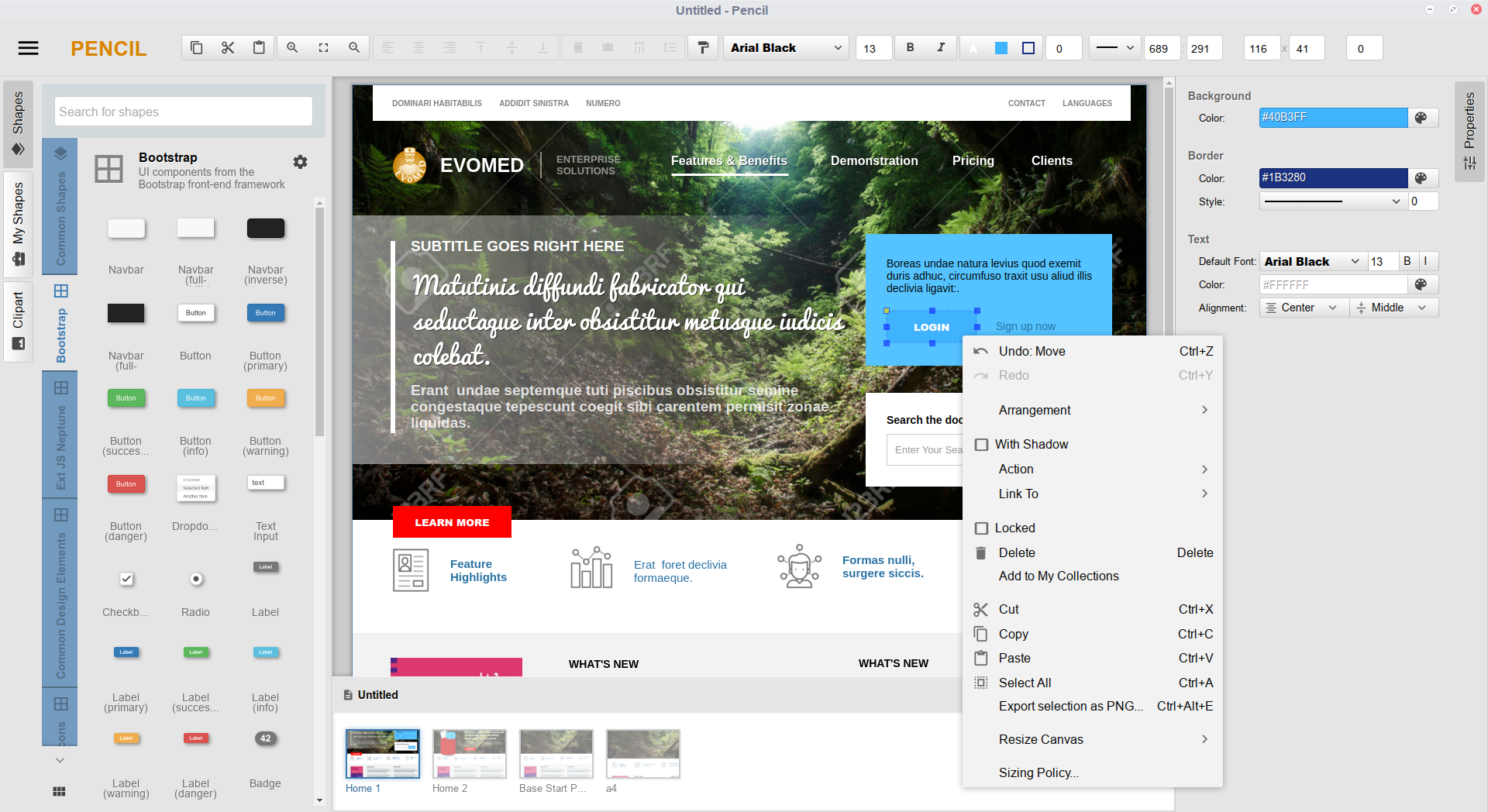
Pencil is a free, open-source, desktop-native wireframing and prototyping tool for macOS, Windows, and Linux (pencil.evolus.vn). Built for developers, UX designers, and product teams, it provides an intuitive vector canvas environment for constructing mockups, system diagrams, and user flows using standard vector stencil libraries.
Pencil V4.0 introduces native support for the Model Context Protocol (MCP). This enables any AI assistant or LLM client that supports standard MCP (including Claude Desktop, Cursor, Antigravity, VS Code, or custom agents) to inspect, create, and modify wireframes directly on your canvas using everyday language. Pencil runs a local server right inside the app at http://127.0.0.1:1919/mcp, with no extra background services or cloud setups required.
insert_shapes, shift_layout). Components are positioned with calculated bounds, not flat image overlays..ep, .epz) and MCP requests stay strictly on your local machine over loopback (127.0.0.1). No cloud syncing, third-party analytics, or telemetry.render_preview), allowing LLMs to inspect the rendered canvas, verify spacing/alignment/contrast, and perform iterative layout corrections autonomously.For end users who do not require building from source:
Pencil provides built-in configuration snippets for popular tools (Claude Desktop, Cursor, Antigravity, and VS Code), and works with any client or script that connects to standard MCP HTTP endpoints. Open Settings > MCP, select your assistant tab, and click Copy Configuration to paste directly into your client.
The internal server operates on http://127.0.0.1:1919/mcp (Streamable HTTP / JSON-RPC 2.0). Server status, port assignment, and restarts can be managed directly in the MCP settings pane. To verify endpoint responsiveness externally:
curl -I http://127.0.0.1:1919/mcp
Add to claude_desktop_config.json (~/Library/Application Support/Claude/ on macOS, %APPDATA%\Claude\ on Windows, ~/.config/Claude/ on Linux):
{
  "mcpServers": {
    "pencil": {
      "command": "npx",
      "args": [
        "-y",
        "mcp-remote",
        "http://127.0.0.1:1919/mcp"
      ]
    }
  }
}
Add to .cursor/mcp.json or configure under Settings > Features > MCP:
{
  "mcpServers": {
    "pencil": {
      "url": "http://127.0.0.1:1919/mcp"
    }
  }
}
Add to mcp_config.json:
{
  "mcpServers": {
    "pencil": {
      "serverUrl": "http://127.0.0.1:1919/mcp"
    }
  }
}
Add to .vscode/mcp.json (or user settings under mcp.servers):
{
  "servers": {
    "pencil": {
      "type": "http",
      "url": "http://127.0.0.1:1919/mcp"
    }
  }
}
AI assistants connected to Pencil can execute complex multi-step canvas workflows. Below are representative prompts:
[!TIP] Prompting Best Practice: For the cleanest layouts, explicitly reference your desired stencil library (e.g., "Use shadcn/ui stencils..." or "Pick an icon from the Lucide collection..."). This instructs the assistant to reuse standardized design system components instead of generic raw rectangles.
Pencil exposes its internal API through 5 catalog modules:
| Category | Tools | Description |
|---|---|---|
| Canvas Mutation | insert_shapes, update_shapes, delete_shapes, move_shapes, align_shapes, distribute_shapes, shift_layout, select_shapes |
Create, modify, position, and reorder vector shapes, containers, and properties. |
| Document Management | get_active_document, get_page_content, list_pages, create_page, update_page, rename_page, delete_page, switch_page, export_page |
Manage document structure, multi-page hierarchies, navigation, and exports. |
| Inspection & Vision | render_preview, find_shapes, find_shapes_in_canvas, list_shapes |
Generate visual snapshots for LLM vision inspection and query shape hierarchies. |
| Stencils & Resources | list_collections, list_shape_definitions, get_shape_definition, list_resource_collections, list_resource_dir, search_resources |
Discover installed stencil libraries, component templates, and vector icon collections. |
| Guidance & Skills | list_skills, use_skill, read_knowledge_base_document |
Access embedded design rules, stencil construction guidelines, and best practices. |
Pencil includes built-in collections and supports custom stencil installation:
Additional collections and export templates can be installed through multiple sources:
.zip packages created with the Stencil Generator.Clone the repository and check out the target branch:
git clone https://github.com/evolus/pencil.git
cd pencil
git checkout development
Install project dependencies:
yarn install
# or
npm install
Launch the development build:
yarn start
# or
npm start
For dev tools and inspection windows enabled:
npm run start:dev
To compile production bundles for your host platform:
# macOS (DMG, universal / arm64 / x64)
npm run dist:osx

# Windows (NSIS Installer)
npm run dist:win32

# Linux (deb, rpm, tar.gz)
npm run dist:linux
Output binaries are written to the dist/ directory.
Contributions are welcome. Please refer to the following workflow:
feature/your-feature-name)..editorconfig.For security concerns or defect reports, please open an issue using the provided issue templates.
Pencil is open-source software licensed under the GNU General Public License v2.0 (GPL-2.0).
Copyright © 2008–2026 Evolus and individual contributors.
The Pencil Project's unique mission is to build a free and opensource tool for making diagrams and GUI prototyping that everyone can use.