

What is this?
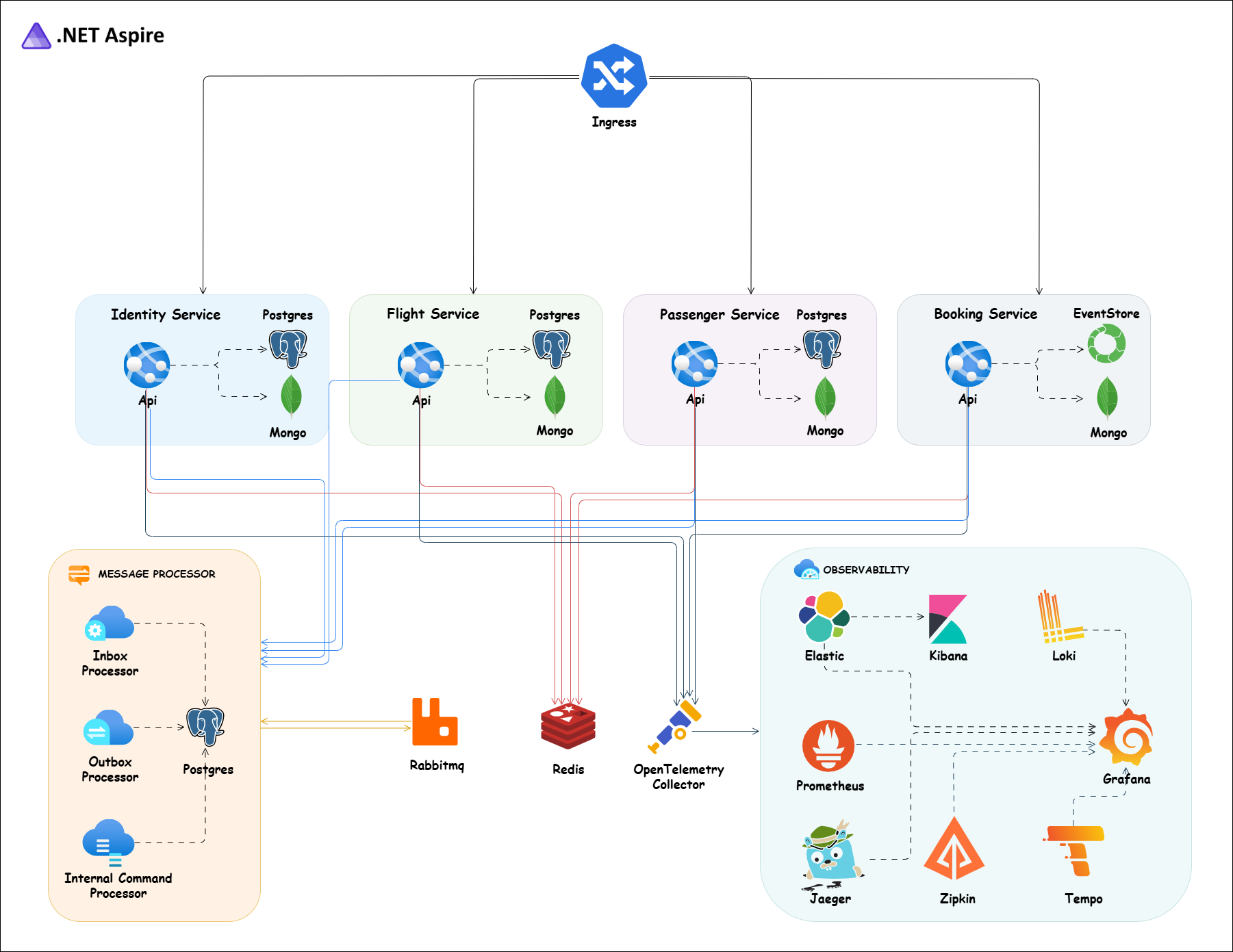
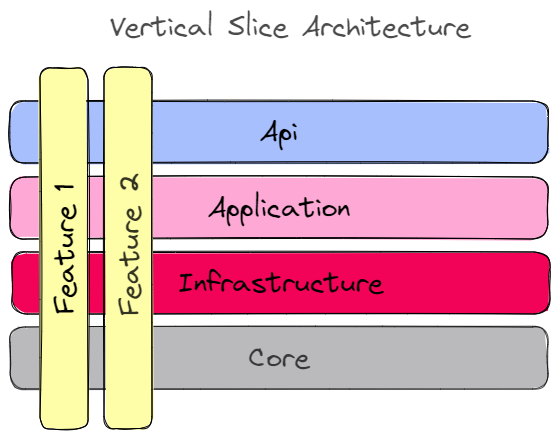
 A practical flight-booking system built as .NET 10 microservices, using Vertical Slice Architecture, DDD, CQRS, Event Sourcing, gRPC, RabbitMQ, Wolverine, PostgreSQL, MongoDB and .NET Aspire.
A practical flight-booking system built as .NET 10 microservices, using Vertical Slice Architecture, DDD, CQRS, Event Sourcing, gRPC, RabbitMQ, Wolverine, PostgreSQL, MongoDB and .NET Aspire.Is this a reusable framework or a full sample application?It is a complete, runnable sample system with five independent services (Identity, Flight, Passenger, Booking, ApiGateway), each owning its own database, meant to be run end to end and studied rather than imported as a library.
It is a complete, runnable sample system with five independent services (Identity, Flight, Passenger, Booking, ApiGateway), each owning its own database, meant to be run end to end and studied rather than imported as a library.How do I get the whole stack running?The fastest path is .NET Aspire, which starts every service plus a dashboard for logs, traces and metrics; alternatively use Docker Compose (infra-only or full stack) or apply the Kubernetes manifests after installing cert-manager.
The fastest path is .NET Aspire, which starts every service plus a dashboard for logs, traces and metrics; alternatively use Docker Compose (infra-only or full stack) or apply the Kubernetes manifests after installing cert-manager.What do I need installed before running it?You need the .NET 10 SDK and Docker Desktop; Node.js is required for the Husky commit hooks, and the .NET Aspire CLI/kubectl are optional extras for those workflows.
You need the .NET 10 SDK and Docker Desktop; Node.js is required for the Husky commit hooks, and the .NET Aspire CLI/kubectl are optional extras for those workflows.Can I deploy the Kubernetes manifests as-is?Not out of the box - the manifests point to Docker images under the author's own 'evangelosvlachos96/' Docker Hub namespace, so you need to build and push your own images (or rename them) before deployment will actually work.
Not out of the box - the manifests point to Docker images under the author's own 'evangelosvlachos96/' Docker Hub namespace, so you need to build and push your own images (or rename them) before deployment will actually work.Does the dev HTTPS certificate setup differ by OS?Yes, the README gives separate instructions for trusting the dev certificate on Windows (PowerShell) versus macOS/Linux before the containers can serve TLS.
Yes, the README gives separate instructions for trusting the dev certificate on Windows (PowerShell) versus macOS/Linux before the containers can serve TLS.Why does only the Booking service use Event Sourcing instead of a plain database?Booking is the write side that benefits most from a full history of state changes, so it uses EventStoreDB, while Flight and Passenger use regular PostgreSQL tables; all three project their data into MongoDB for fast reads.
Booking is the write side that benefits most from a full history of state changes, so it uses EventStoreDB, while Flight and Passenger use regular PostgreSQL tables; all three project their data into MongoDB for fast reads.How do reads and writes stay in sync across services?Commands write to PostgreSQL or EventStoreDB and publish events through Wolverine's durable outbox to RabbitMQ; consumers process them via a durable inbox and project the results into MongoDB, which is the only store queries read from.
Commands write to PostgreSQL or EventStoreDB and publish events through Wolverine's durable outbox to RabbitMQ; consumers process them via a durable inbox and project the results into MongoDB, which is the only store queries read from.How can I log in and try the API without creating an account?The system ships two seeded users, van1/Admin@123456 (admin) and van2/User@123456 (user), and every service exposes OpenAPI docs at /swagger and /scalar/v1.
The system ships two seeded users, van1/Admin@123456 (admin) and van2/User@123456 (user), and every service exposes OpenAPI docs at /swagger and /scalar/v1.What kinds of automated tests does the project include?It has unit, integration, end-to-end and contract tests built with xUnit, NSubstitute, Testcontainers and PactNet; the integration and e2e tests spin up their own dependencies via Testcontainers, so Docker needs to be running.
It has unit, integration, end-to-end and contract tests built with xUnit, NSubstitute, Testcontainers and PactNet; the integration and e2e tests spin up their own dependencies via Testcontainers, so Docker needs to be running.What are similar projects?modular-monolith-with-ddd, awesome-software-architecture, AspNetCore-Developer-Roadmap, Smartstore, eShop, nopCommerce, domain-driven-hexagon, eShopOnWeb
modular-monolith-with-ddd, awesome-software-architecture, AspNetCore-Developer-Roadmap, Smartstore, eShop, nopCommerce, domain-driven-hexagon, eShopOnWebWhich topics is it in?cqrs, domain-driven-design, ddd, event-sourcing, microservices-architecture, rabbitmq, opentelemetry, event-driven, api-gateway, grpc, oauth2, mongodb
cqrs, domain-driven-design, ddd, event-sourcing, microservices-architecture, rabbitmq, opentelemetry, event-driven, api-gateway, grpc, oauth2, mongodb