etcd README

The project's README from github.com/etcd-io/etcd. As one markdown file: README.md.

etcd

Go Report Card Coverage Tests codeql-analysis Docs Godoc Releases LICENSE OpenSSF Scorecard

Note: The main branch may be in an unstable or even broken state during development. For stable versions, see releases.

etcd logo

etcd is a distributed reliable key-value store for the most critical data of a distributed system, with a focus on being:

etcd is written in Go and uses the Raft consensus algorithm to manage a highly-available replicated log.

etcd is used in production by many companies, and the development team stands behind it in critical deployment scenarios, where etcd is frequently teamed with applications such as Kubernetes, locksmith, vulcand, Doorman, and many others. Reliability is further ensured by rigorous robustness testing.

See etcdctl for a simple command line client.

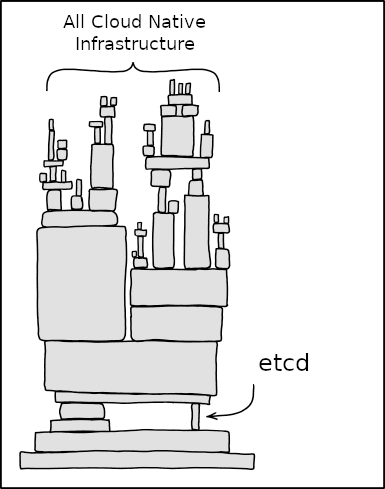
etcd reliability is important

Original image credited to xkcd.com/2347, alterations by Josh Berkus.

Documentation

The most common API documentation you'll need can be found here:

Maintainers

Maintainers strive to shape an inclusive open source project culture where users are heard and contributors feel respected and empowered. Maintainers aim to build productive relationships across different companies and disciplines. Read more about Maintainers role and responsibilities.

Getting started

Getting etcd

The easiest way to get etcd is to use one of the pre-built release binaries which are available for OSX, Linux, Windows, and Docker on the release page.

For more installation guides, please check out play.etcd.io and operating etcd.

Running etcd

First start a single-member cluster of etcd.

If etcd is installed using the pre-built release binaries, run it from the installation location as below:

/tmp/etcd-download-test/etcd

The etcd command can be simply run as such if it is moved to the system path as below:

mv /tmp/etcd-download-test/etcd /usr/local/bin/
etcd

This will bring up etcd listening on port 2379 for client communication and on port 2380 for server-to-server communication.

Next, let's set a single key, and then retrieve it:

etcdctl put mykey "this is awesome"
etcdctl get mykey

etcd is now running and serving client requests. For more, please check out:

etcd TCP ports

The official etcd ports are 2379 for client requests, and 2380 for peer communication.

Running a local etcd cluster

First install goreman, which manages Procfile-based applications.

Our Procfile script will set up a local example cluster. Start it with:

goreman start

This will bring up 3 etcd members infra1, infra2 and infra3 and optionally etcd grpc-proxy, which runs locally and composes a cluster.

Every cluster member and proxy accepts key value reads and key value writes.

Follow the comments in Procfile script to add a learner node to the cluster.

Install etcd client v3

go get go.etcd.io/etcd/client/v3

Next steps

Now it's time to dig into the full etcd API and other guides.

Contact

Community meetings

etcd contributors and maintainers meet every week at 11:00 AM (USA Pacific) on Thursday and meetings alternate between community meetings and issue triage meetings. Meeting agendas are recorded in a shared Google doc and everyone is welcome to suggest additional topics or other agendas.

Issue triage meetings are aimed at getting through our backlog of PRs and Issues. Triage meetings are open to any contributor; you don't have to be a reviewer or approver to help out! They can also be a good way to get started contributing.

The meeting lead role is rotated for each meeting between etcd maintainers or sig-etcd leads and is recorded in a shared Google sheet.

Meeting recordings are uploaded to the official etcd YouTube channel.

Get calendar invitations by joining etcd-dev mailing group.

Join the CNCF-funded Zoom channel: zoom.us/my/cncfetcdproject

Contributing

See CONTRIBUTING for details on setting up your development environment, submitting patches and the contribution workflow.

Please refer to community-membership.md for information on becoming an etcd project member. We welcome and look forward to your contributions to the project!

Please also refer to roadmap to get more details on the priorities for the next few major or minor releases.

Reporting bugs

See reporting bugs for details about reporting any issues. Before opening an issue please check it is not covered in our frequently asked questions.

Reporting a security vulnerability

See security disclosure and release process for details on how to report a security vulnerability and how the etcd team manages it.

Issue and PR management

See issue triage guidelines for details on how issues are managed.

See PR management for guidelines on how pull requests are managed.

etcd Emeritus Maintainers

etcd emeritus maintainers dedicated a part of their career to etcd and reviewed code, triaged bugs and pushed the project forward over a substantial period of time. Their contribution is greatly appreciated.

License

etcd is under the Apache 2.0 license. See the LICENSE file for details.

etcd (etcd-io/etcd)

Searching Database…

52.4K ·GitHub
这是什么?一个用 Go 编写的分布式、高可靠键值存储,专门存放分布式系统中最关键的数据,并通过 Raft 一致性算法保证多台机器之间的数据一致。
etcd 是我要部署的服务器,还是导入代码里的库?它是一个服务器,你可以以一个或多个集群成员的方式运行;应用程序通过它的 gRPC API 与之通信,另外还附带一个简单的命令行客户端 etcdctl。
最快让一个 etcd 节点跑起来的方法是什么?从发布页面下载 macOS、Linux、Windows 或 Docker 的预编译版本并运行——它会启动一个单节点集群,你马上就能读写数据。
单个 etcd 节点需要周围有其他服务吗?不需要——README 里带你做的第一件事就是直接用下载好的二进制文件启动单节点集群,不用部署任何其他东西。
main 分支上的代码能放心运行吗?不能——README 警告说 main 分支在开发期间可能不稳定甚至无法运行,正式使用请选择打了标签的稳定版本。
实际在生产环境里运行 etcd 的是哪些人?很多公司在关键部署场景中依赖它,经常与 Kubernetes、locksmith、vulcand 和 Doorman 这类应用搭配使用。
它每秒能处理多少次写入?项目官方基准测试显示 etcd 每秒可处理 10,000 次写入——这是它除了简单 API 和高可靠之外的招牌特性之一。
发往 etcd 的流量是加密的吗?是的——项目很注重安全,支持自动 TLS,还可选客户端证书认证。
我能在同一台机器上体验真正的多节点集群吗?可以——仓库里提供了一个基于 Procfile 的示例:用 goreman 启动三个本地成员(infra1、infra2、infra3),外加一个可选的 etcd grpc-proxy 来组成集群。
etcd 监听哪些端口?客户端通过 2379 端口连接,集群成员之间则通过 2380 端口互相通信——这是 etcd 的两个官方端口。
What are similar projects?rqlite, rook, nebula, tikv, vitess, rethinkdb, thanos, yugabyte-db
Creator
etcd-io
Size
97.3 MB
Stars
52.4K
Age
13y
Commits · 90 Days