open-pstack



Open Pstack brings Lauren Tan (@poteto)'s pstack to Claude Code and Codex. Its job is to stay as close to her original work as possible while translating the parts that depend on Cursor.
Lauren built pstack from the skills she uses to ship code at Cursor. In a 55-minute interview with Denis Labelle, she says that she shipped 1,000 pull requests in one month after steadily improving how her agents work and verify their results.
If you want to go fast, go deep first.
Open Pstack is an unofficial community project that makes pstack work in Claude Code and Codex. If Cursor is your main coding environment, use Lauren's original pstack. If Claude Code or Codex is your main coding environment, use this repository.
What pstack does
pstack is a plugin for coding agents. It is not a new model or a hosted service. It gives your agent engineering rules, step-by-step workflows for different kinds of work, focused skills, and small local tools.
The normal entry point is poteto-mode. You give it a task in plain language. It then:
- reads the task and chooses a workflow that fits;
- learns how the current system works before changing it;
- compares designs when the choice matters;
- favors small, simple changes over extra machinery;
- asks several models to challenge important decisions when useful;
- runs the code and checks real behavior instead of stopping at “the tests pass”; and
- carries the work through review, continuous integration (CI), and a ready-to-merge pull request when asked.
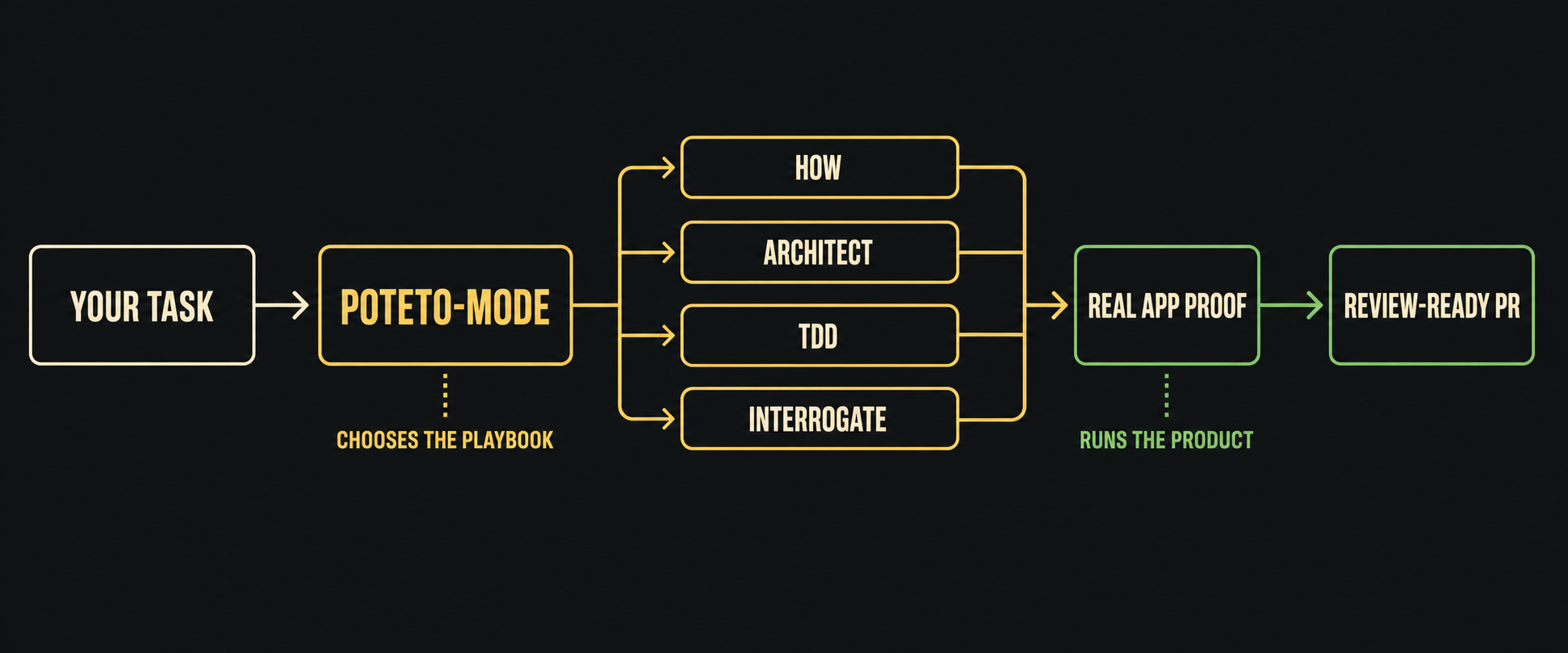
pstack does not ask you to trust an agent on day one. It helps the agent leave evidence you can inspect. Start with supervised work. Let it run more work in parallel only after its checks have earned that trust in your own repositories.
Install
You need a current Claude Code or Codex installation. For the full four-model review, install and sign in to the Claude Code, Codex, and Grok command-line tools. Bun runs the small local tool that starts models outside the app you are using. You can still use the core workflows with fewer models.
Claude Code
Run these commands inside Claude Code:
/plugin marketplace add ericlitman/open-pstack
/plugin install pstack@open-pstack
/reload-plugins
Codex
Run these commands in your shell:
codex plugin marketplace add ericlitman/open-pstack --ref main
codex plugin add pstack@open-pstack
Turn on Codex subagents in ~/.codex/config.toml so pstack can compare work in parallel:
[features]
multi_agent = true
Start a new Codex task after installation so it can discover the new skills and setting.
Get started
Lauren's original setup has two steps. Open Pstack keeps the same flow.
1. Set up the models
In Claude Code, run:
/pstack:setup-pstack
In Codex, ask:
Use pstack:setup-pstack to configure pstack.
Setup checks the models you can actually run, shows how each one will start, and asks before saving the choices. The current default group uses Fable, GPT-5.6 Sol, Grok 4.6, and Opus.
An older model sheet starts using the rolling aliases in memory as soon as this release is installed. Run setup once after updating to persist that migration. It replaces versioned Fable and Opus entries while preserving every role assignment and effort selection.
2. Use poteto-mode
Start any task that needs careful engineering with poteto-mode.
In Claude Code:
/pstack:poteto-mode Add saved filters to search. Keep the design simple, verify it in the real app, and open a pull request.
In Codex:
Use pstack:poteto-mode. Add saved filters to search. Keep the design simple, verify it in the real app, and open a pull request.
For that feature, poteto-mode should first understand how search works today. It should decide how the data should be represented before writing code, implement the smallest complete version, run the feature the way a user would, review the result, and prepare the pull request.
That is the main workflow. The other skills are there when poteto-mode needs them or when you want to call one directly.
Useful skills
| Skill |
Use it when |
how |
You want a clear explanation of how part of the system works. |
why |
You want evidence for why the system was built that way. |
architect |
A change crosses a function or module boundary and the design needs to be settled first. |
arena |
You want several complete attempts, followed by a comparison of their best parts. |
interrogate |
You want different models to try to break a design or diff. |
create-verification-skill |
Your project has no repeatable way for an agent to prove real behavior. |
maintain-verification-skill |
The project's verification instructions no longer match the product. |
babysit |
A pull request needs CI failures and review comments handled until it is ready. |
reflect |
A hard task is finished and its lessons should improve the next run. |
Plugin skills include pstack: in their name. In Claude Code, invoke a native skill such as /pstack:architect. In Codex, ask for the skill, such as Use pstack:architect for this design. See the technical reference for the full list.
Models and token use
Some pstack workflows use one model. Skills such as architect, arena, and interrogate can run several models in parallel. Each model run uses the subscription and token allowance of its own command-line tool.
setup-pstack lets you choose the models, one requested effort per model family, and how many run in parallel. A model from the app you are using runs inside that app. Other models run through their own command-line tools. Open Pstack does not quietly replace a failed model with a weaker one.
Claude Code and Codex
Both apps read the same pstack skills. Only the way they start those skills and models is different.
|
Claude Code |
Codex |
| Start poteto-mode |
Claude loads a small startup instruction that can route non-trivial work into it. You can also run /pstack:poteto-mode yourself. |
Ask for pstack:poteto-mode by name. Codex does not load the Claude startup instruction. |
| Runs inside the app |
Claude models stay inside Claude Code. |
The Sol model stays inside Codex. |
| Other models |
Codex and Grok run through their signed-in command-line tools. |
Claude and Grok run through their signed-in command-line tools. |
| Skills and workflows |
Shared with Codex. |
Shared with Claude Code. |
Grok can take part in a multi-model review. You cannot use Grok as the main app running pstack.
Learn from the original
Lauren's pstack guide walks through a real task, verification, and longer unattended runs. It uses Cursor's interface, but the ideas are the same. Use the translated skill invocations above in Claude Code or Codex.
This repository also keeps:
Staying close to Lauren's pstack
Open Pstack 1.4.0 tracks pstack 0.15.0 at Cursor commit 71ed0d1076fec562c1b74ee353121a8d00f75382.
The two projects have separate version numbers. The pstack version identifies Lauren's upstream content. The Open Pstack version identifies the Claude Code and Codex package built from it.
In this repository, “upstream” means Lauren's original pstack. Open Pstack does not promise instant updates. It records the exact version it follows, reviews new changes in order, and changes only what Claude Code and Codex require. New pstack behavior belongs in Lauren's project first whenever possible.
Contributing
Fixes for Claude Code or Codex and help bringing over new pstack releases are welcome. Search GitHub Issues before opening a new issue. For larger behavior changes, explain why the change belongs in Open Pstack instead of Lauren's original project.
Read UPSTREAM.md before changing content brought over from Lauren's pstack. Pull requests must keep one shared skill tree for Claude Code and Codex and pass the repository's tests, type checks, plugin validation, and static checks.
License
MIT. pstack was created by Lauren Tan. Open Pstack builds on Michael Denyer's pstack-claude port and includes attributed MIT-licensed work from Cursor Team Kit and Superpowers. See NOTICE.md and the preserved license files for details.

 Open Pstack 把 Lauren Tan(@poteto)的 pstack——面向编程智能体的工程规则、工作流、技能和小型本地工具——从 Cursor 移植到 Claude Code 和 Codex。