
Deep memory for agents over large datasets.
Index any table, export or log once; your agent gets the few records that answer the question.




Leviathan is a single binary that turns records (JSONL, JSON, CSV/TSV,
SQLite, or any database CLI's output) into a ranked full-text index. Agents
ask in plain words and get short, cited result cards: ~450 tokens per answer
at any dataset size, instead of grepping and reading raw history.
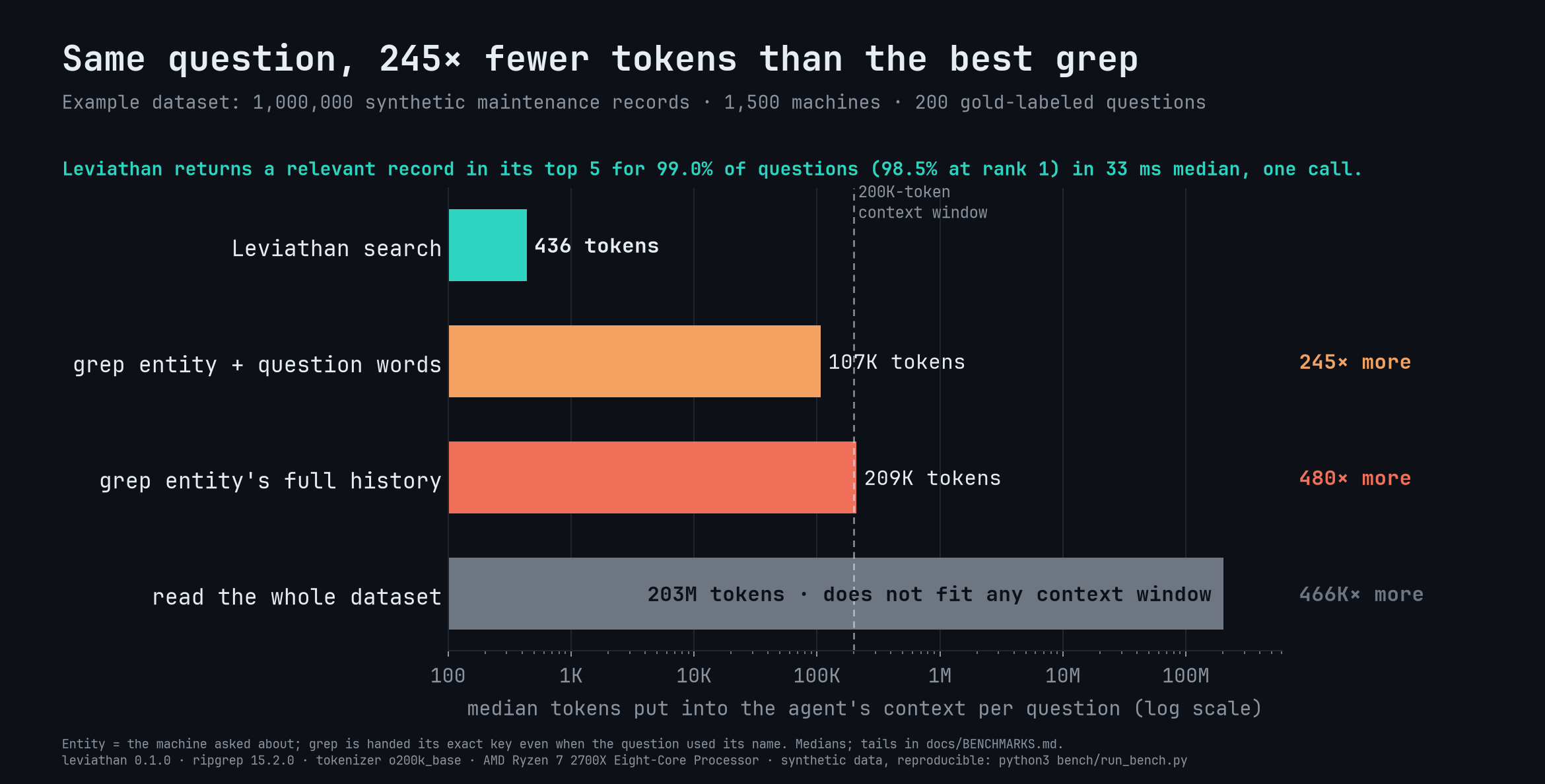
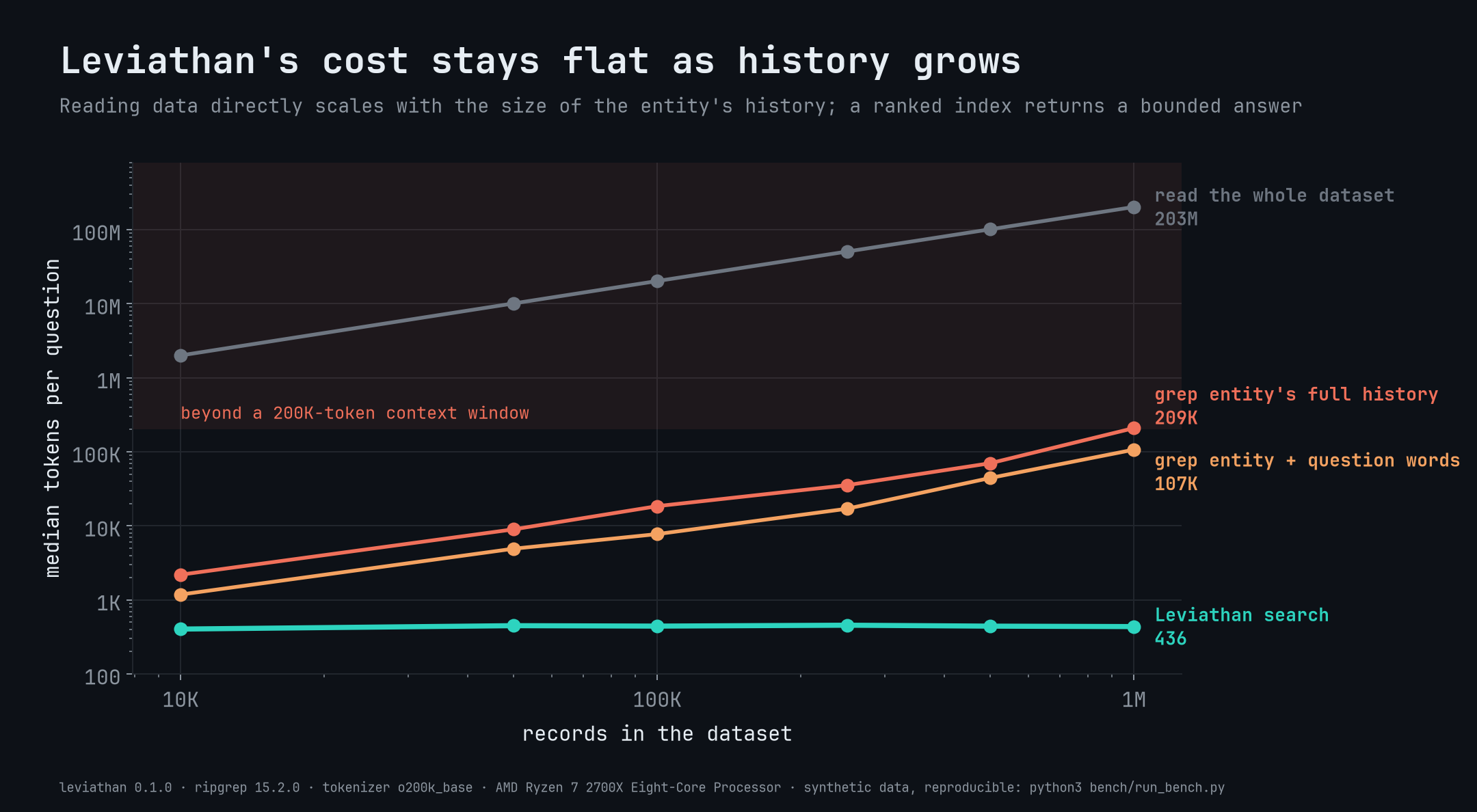
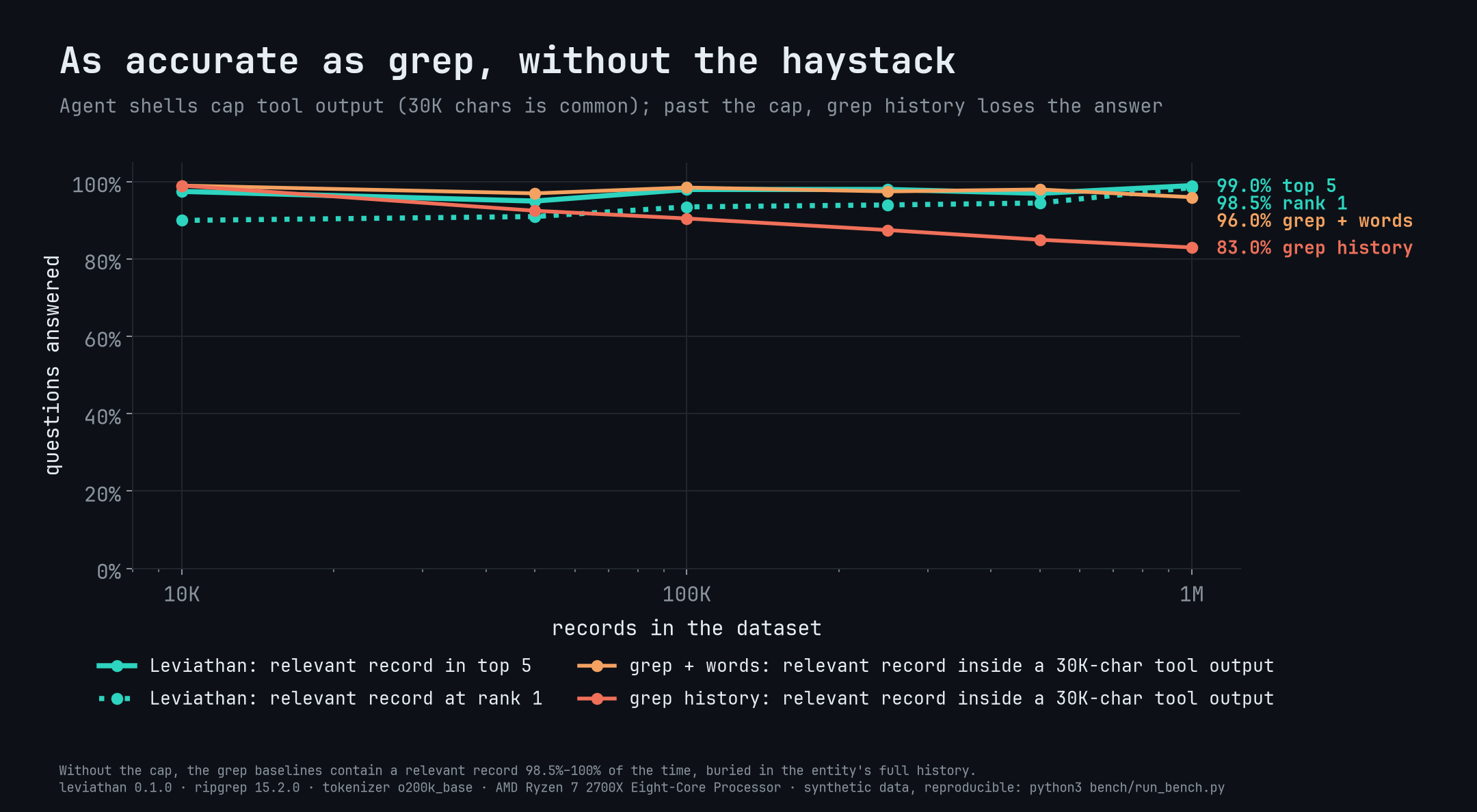
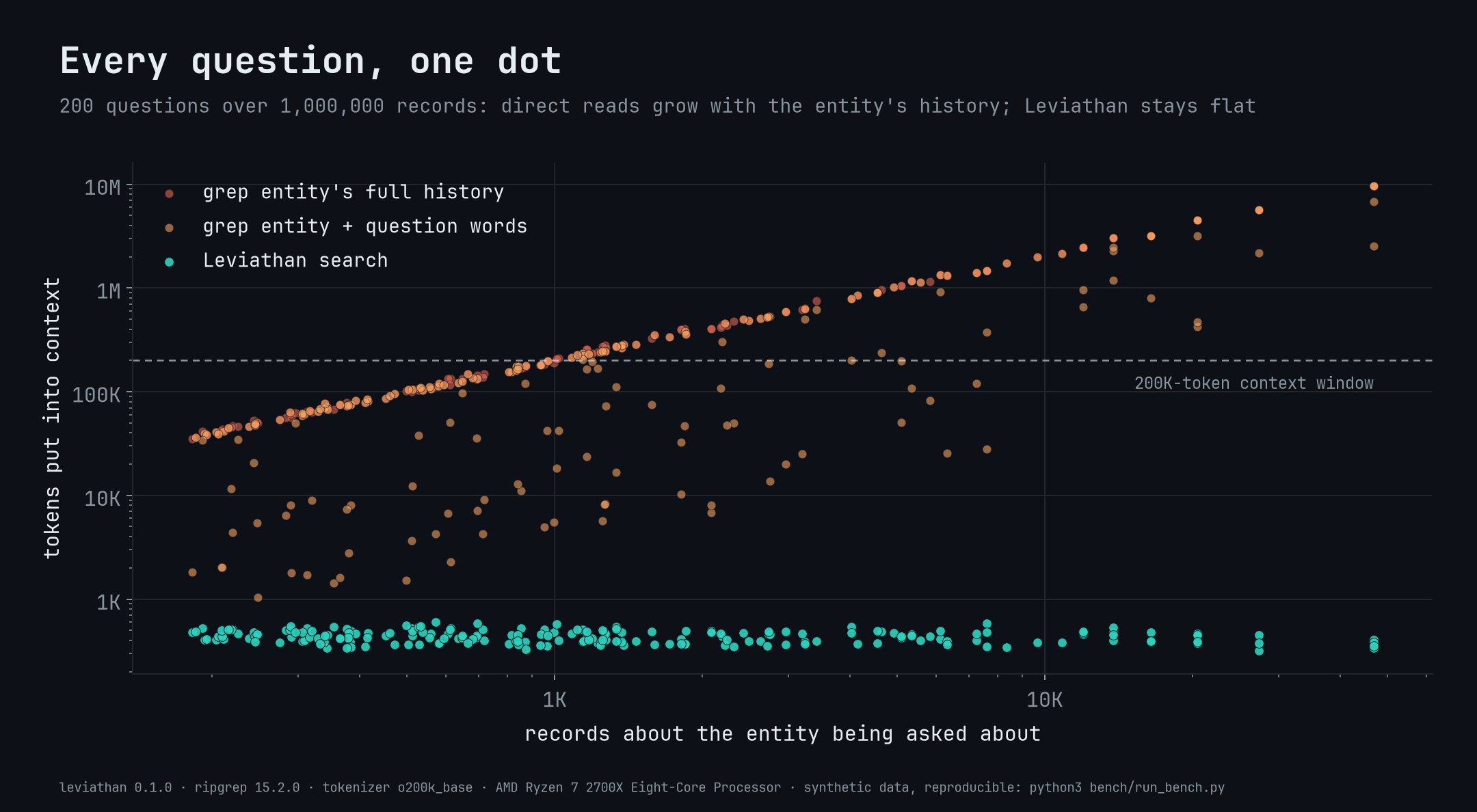
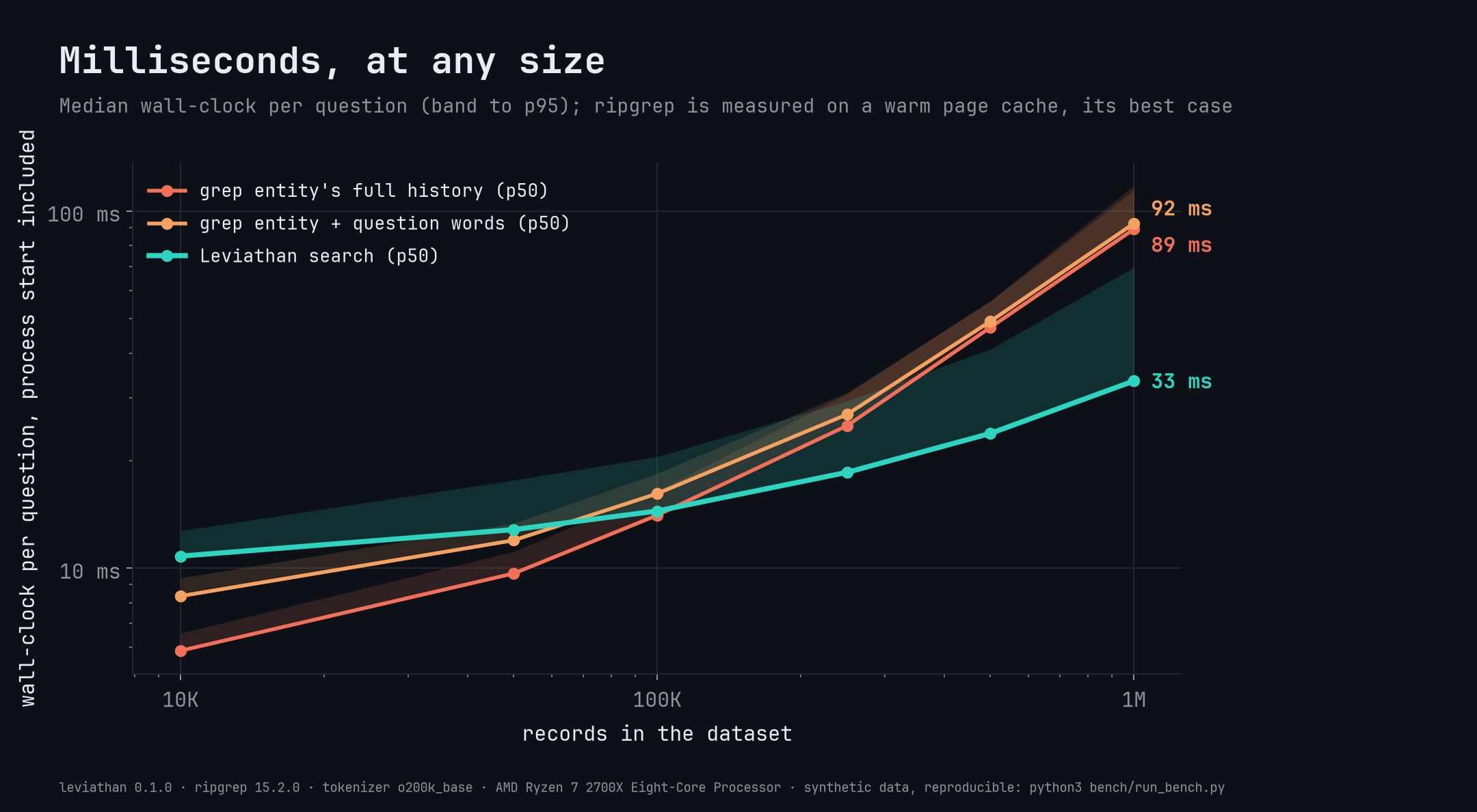
| At 1M records (678 MB) |
Leviathan |
best grep strategy |
| Median tokens per question |
436 |
107,122 (245×) |
| Relevant record returned |
99.0% top 5 · 98.5% rank 1 |
96.0% within a 30K-char output |
| Worst case (1,200 questions) |
602 tokens |
9.7M tokens |
| Median latency |
33 ms |
92 ms |
Measured on a synthetic maintenance log (one example dataset; nothing in
Leviathan is specific to it). Methodology, all six scales and caveats:
docs/BENCHMARKS.md.
Quickstart
cargo install leviathan-index       # or: cargo install --git https://github.com/elstongun/leviathan
cd examples/tickets && leviathan index
leviathan search -g acme "sso login loop after password reset"
leviathan search · customer C-ACME "Acme Corp" (7 tickets) · query "sso login loop after password reset" · shown 3 of 3 · 24 tickets indexed
[1] T-1001 · 2024-01-08 09:12 · rel 16.9
  Login loops back to sign-in page after password reset
  status: closed · priority: high
  resolution: Cleared stale session cookies on password reset; shipped in 4.2.1. Workaround: clear site data.
  match: Users who reset their password get redirected to the sign-in page again in an endless loop.
...
-g accepts a key, name or partial name. Ambiguous or unknown groups list candidates and exit 3, never guess.- No match in the group falls back to other groups, labeled
OTHER CUSTOMER.
- Combine
--where field=value, --since/--until, "phrases" and -exclusions.
Prebuilt binaries are on Releases. No runtime dependencies; the index is one SQLite file.
Map your data
Fields are paths (a.b, items[].name); only id is required.
| Field |
Enables |
id |
get, upsert, delete, citations |
title / text |
Card headline (weighted 2×) / searched text (default: all strings) |
group / group_name |
-g scoped search, name resolution, labeled fallback |
date |
--since, --until, recent |
filters / display |
--where facets / fields shown on cards |
empty_values / rank.boost |
Placeholders treated as missing / favor complete records |
leviathan init ./export                       # infer a commented leviathan.toml
leviathan index tickets.csv --id "Ticket ID" --group customer_id --date created_at   # or flags
leviathan index -c tickets.toml               # or a config your agent wrote from the schema
leviathan describe                            # fields, groups, filter values, example calls
Any database works through its own CLI; Leviathan never holds credentials:
psql "$DATABASE_URL" -At -c "SELECT row_to_json(t) FROM tickets t" | leviathan index - -c tickets.toml
leviathan index app.db --sql "SELECT * FROM tickets" -c tickets.toml
duckdb -json -c "SELECT * FROM 'events/*.parquet'" | leviathan index - -c events.toml
Builds are atomic and skipped when nothing changed; upsert and delete keep an index fresh. Full reference: docs/CONFIG.md.
Plug it into your agent
CLI + skill (recommended): any agent with a shell can call it. Copy
skills/leviathan into ~/.claude/skills/ or
paste it into AGENTS.md / .cursor/rules. Costs 0 tokens until used.
MCP (optional): leviathan mcp serves four read-only stdio tools
(search, resolve_group, get, describe) whose descriptions include a
summary of your dataset (~640 tokens per session). leviathan wrap <claude|cursor|codex|vscode|gemini|windsurf|generic> prints the config.
Commands
| Command |
Does |
init / index / upsert / delete |
Propose a mapping / build / update / remove records |
search [-g G] [words] |
Ranked records (--scope, --where, --since, --until, -n, --offset) |
recent [-g G] · resolve <g> · get <id…> · describe |
Newest · group candidates · full records · index summary |
mcp · wrap <agent> |
MCP server · agent config |
Global: --index PATH, --json, --max-chars N. Exit codes: 0 ok (zero hits included), 1 error, 2 bad request, 3 group unknown/ambiguous.
How it works
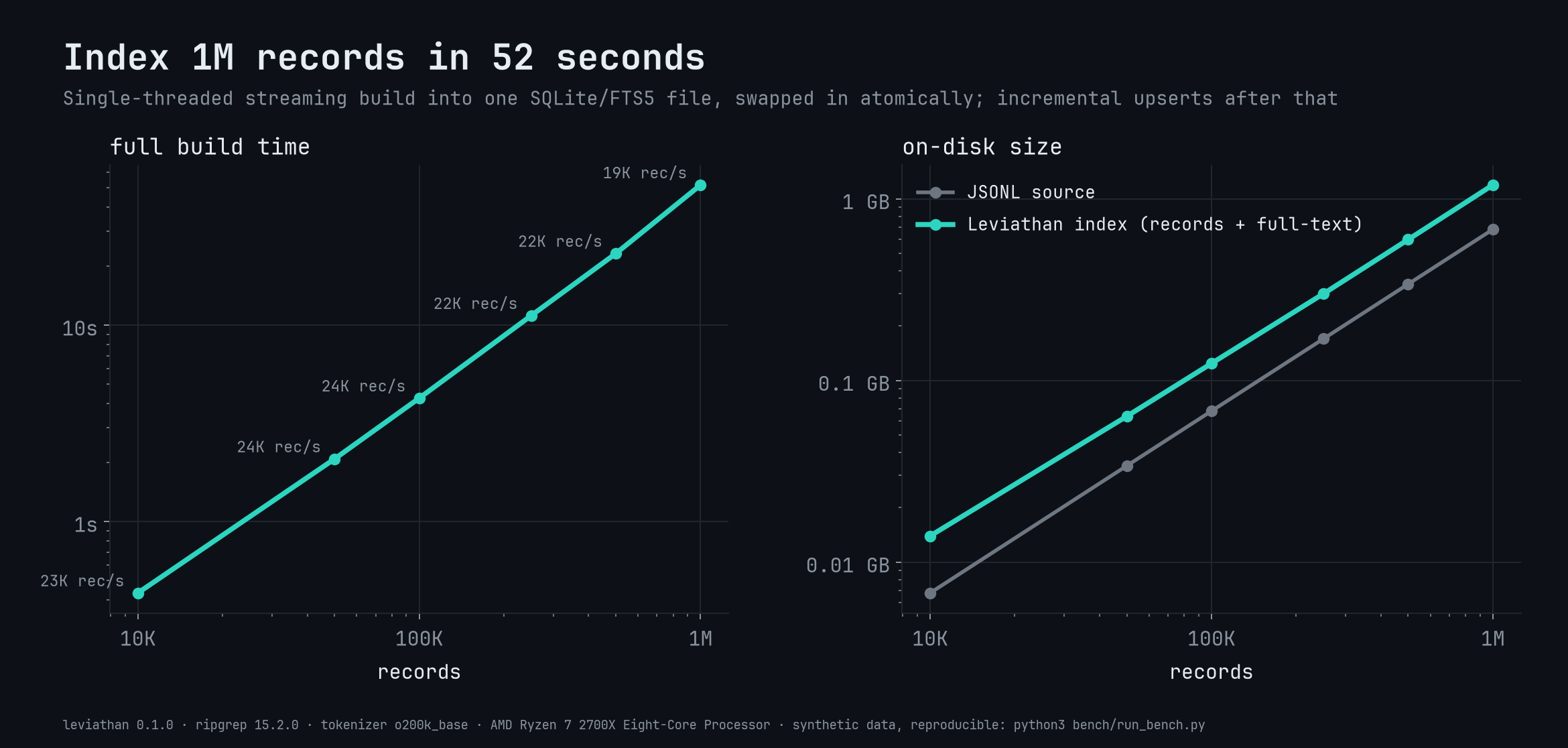
Records stream into one SQLite file with an FTS5 index. A search resolves the
group (exact → name → contains → fuzzy), runs one FTS5 match where group and
filter values are indexed tokens (no post-filtering), ranks by BM25 × boosts,
and decodes only the top N into capped cards. A record's own group name is
excluded from scoped matching, placeholders count as missing, and every
answer reports shown N of M so agents can tell "no match" from "no data".
Reproduce the benchmark
python3 -m venv bench/.venv && bench/.venv/bin/pip install -r bench/requirements.txt
bench/.venv/bin/python bench/run_bench.py && bench/.venv/bin/python bench/report.py   # ~30 min, ~4 GB
Contributing, security, license
See CONTRIBUTING.md (ranking changes need before/after
benchmark numbers) and SECURITY.md (read-only, offline,
unsafe-free; report privately). Licensed under Apache-2.0;
dependencies in THIRD_PARTY.md.

 Leviathan 把你的记录(JSONL、JSON、CSV/TSV、SQLite,或任何数据库 CLI 能导出的东西)变成一个单文件的、带排序的全文搜索索引,让 AI 代理直接拿到能回答问题的少数几条记录,而不用在原始历史记录里 grep。