DZNEmptyDataSet





Projects using this library
Add your project to the list here and provide a (320px wide) render of the result.
The Empty Data Set Pattern
Also known as Empty State or Blank Slate.
Most applications show lists of content (data sets), which many turn out to be empty at one point, specially for new users with blank accounts. Empty screens create confusion by not being clear about what's going on, if there is an error/bug or if the user is supposed to do something within your app to be able to consume the content.
Please read this very interesting article about Designing For The Empty States.
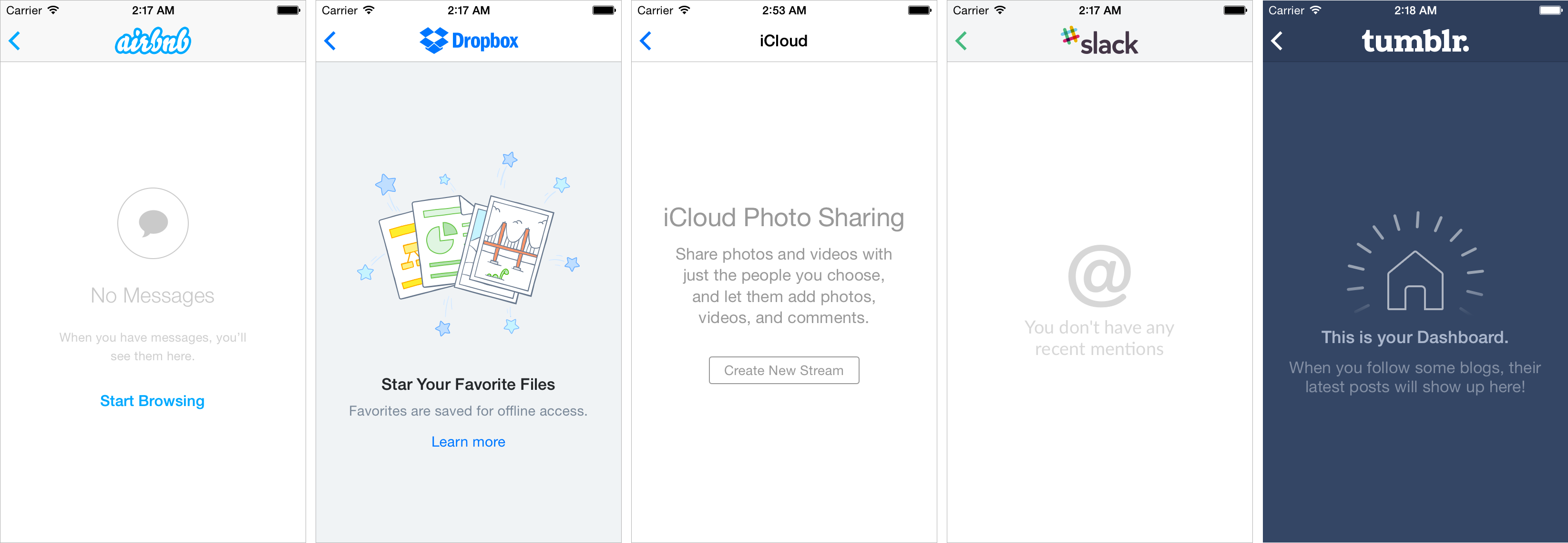
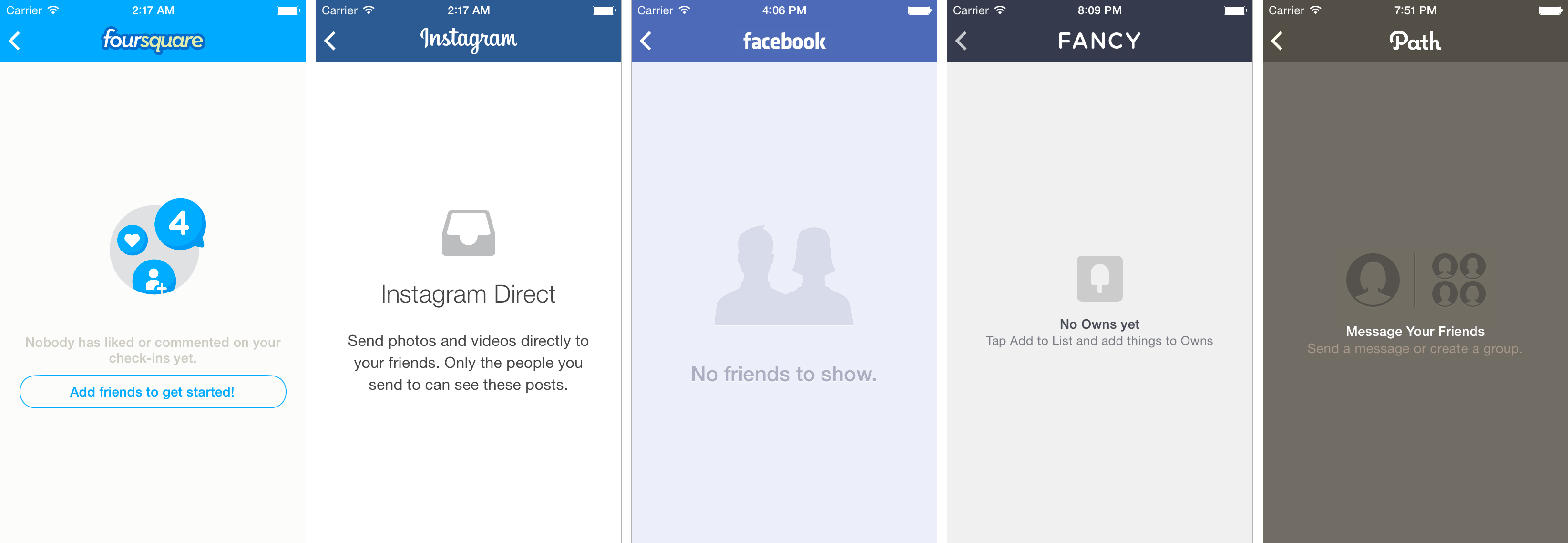 (These are real life examples, available in the 'Applications' sample project in the v2-Swift branch)
Empty Data Sets are helpful for:
- Avoiding white-screens and communicating to your users why the screen is empty.
- Calling to action (particularly as an onboarding process).
- Avoiding other interruptive mechanisms like showing error alerts.
- Being consistent and improving the user experience.
- Delivering a brand presence.
Features
- Compatible with UITableView and UICollectionView. Also compatible with UISearchDisplayController and UIScrollView.
- Gives multiple possibilities of layout and appearance, by showing an image and/or title label and/or description label and/or button.
- Uses NSAttributedString for easier appearance customisation.
- Uses auto-layout to automagically center the content to the tableview, with auto-rotation support. Also accepts custom vertical and horizontal alignment.
- Background color customisation.
- Allows tap gesture on the whole tableview rectangle (useful for resigning first responder or similar actions).
- For more advanced customisation, it allows a custom view.
- Compatible with Storyboard.
- Compatible with iOS 6, tvOS 9, or later.
- Compatible with iPhone, iPad, and Apple TV.
- App Store ready
This library has been designed in a way where you won't need to extend UITableView or UICollectionView class. It will still work when using UITableViewController or UICollectionViewController.
By just conforming to DZNEmptyDataSetSource & DZNEmptyDataSetDelegate, you will be able to fully customize the content and appearance of the empty states for your application.
Installation
Available in CocoaPods
pod 'DZNEmptyDataSet'
To integrate DZNEmptyDataSet into your Xcode project using Carthage, specify it in your Cartfile:
github "dzenbot/DZNEmptyDataSet"
To integrate DZNEmptyDataSet into your Xcode project using SPM, specify it in your Package.swift:
.package(
    url: "https://github.com/dzenbot/DZNEmptyDataSet",
    .branch("master")
)
For existing, go to "File Navigator" -> "Select Project" -> "Project Name" -> "Swift Packages" -> "+" -> Paste "https://github.com/dzenbot/DZNEmptyDataSet" and proceed to select your target.
How to use
For complete documentation, visit CocoaPods' auto-generated doc
Import
#import "UIScrollView+EmptyDataSet.h"
Unless you are importing as a framework, then do:
#import <DZNEmptyDataSet/UIScrollView+EmptyDataSet.h>
Conform to datasource and/or delegate.
@interface MainViewController : UITableViewController <DZNEmptyDataSetSource, DZNEmptyDataSetDelegate>

- (void)viewDidLoad
{
    [super viewDidLoad];

    self.tableView.emptyDataSetSource = self;
    self.tableView.emptyDataSetDelegate = self;

    // A little trick for removing the cell separators
    self.tableView.tableFooterView = [UIView new];
}
Data Source Implementation
Return the content you want to show on the empty state, and take advantage of NSAttributedString features to customise the text appearance.
The image for the empty state:
- (UIImage *)imageForEmptyDataSet:(UIScrollView *)scrollView
{
    return [UIImage imageNamed:@"empty_placeholder"];
}
The attributed string for the title of the empty state:
- (NSAttributedString *)titleForEmptyDataSet:(UIScrollView *)scrollView
{
    NSString *text = @"Please Allow Photo Access";

    NSDictionary *attributes = @{NSFontAttributeName: [UIFont boldSystemFontOfSize:18.0f],
                                 NSForegroundColorAttributeName: [UIColor darkGrayColor]};

    return [[NSAttributedString alloc] initWithString:text attributes:attributes];
}
The attributed string for the description of the empty state:
- (NSAttributedString *)descriptionForEmptyDataSet:(UIScrollView *)scrollView
{
    NSString *text = @"This allows you to share photos from your library and save photos to your camera roll.";

    NSMutableParagraphStyle *paragraph = [NSMutableParagraphStyle new];
    paragraph.lineBreakMode = NSLineBreakByWordWrapping;
    paragraph.alignment = NSTextAlignmentCenter;

    NSDictionary *attributes = @{NSFontAttributeName: [UIFont systemFontOfSize:14.0f],
                                 NSForegroundColorAttributeName: [UIColor lightGrayColor],
                                 NSParagraphStyleAttributeName: paragraph};

    return [[NSAttributedString alloc] initWithString:text attributes:attributes];
}
The attributed string to be used for the specified button state:
- (NSAttributedString *)buttonTitleForEmptyDataSet:(UIScrollView *)scrollView forState:(UIControlState)state
{
    NSDictionary *attributes = @{NSFontAttributeName: [UIFont boldSystemFontOfSize:17.0f]};

    return [[NSAttributedString alloc] initWithString:@"Continue" attributes:attributes];
}
or the image to be used for the specified button state:
- (UIImage *)buttonImageForEmptyDataSet:(UIScrollView *)scrollView forState:(UIControlState)state
{
    return [UIImage imageNamed:@"button_image"];
}
The background color for the empty state:
- (UIColor *)backgroundColorForEmptyDataSet:(UIScrollView *)scrollView
{
    return [UIColor whiteColor];
}
If you need a more complex layout, you can return a custom view instead:
- (UIView *)customViewForEmptyDataSet:(UIScrollView *)scrollView
{
    UIActivityIndicatorView *activityView = [[UIActivityIndicatorView alloc] initWithActivityIndicatorStyle:UIActivityIndicatorViewStyleGray];
    [activityView startAnimating];
    return activityView;
}
The image view animation
- (CAAnimation *)imageAnimationForEmptyDataSet:(UIScrollView *)scrollView
{
    CABasicAnimation *animation = [CABasicAnimation animationWithKeyPath: @"transform"];

    animation.fromValue = [NSValue valueWithCATransform3D:CATransform3DIdentity];
    animation.toValue = [NSValue valueWithCATransform3D:CATransform3DMakeRotation(M_PI_2, 0.0, 0.0, 1.0)];

    animation.duration = 0.25;
    animation.cumulative = YES;
    animation.repeatCount = MAXFLOAT;

    return animation;
}
Additionally, you can also adjust the vertical alignment of the content view (ie: useful when there is tableHeaderView visible):
- (CGFloat)verticalOffsetForEmptyDataSet:(UIScrollView *)scrollView
{
    return -self.tableView.tableHeaderView.frame.size.height/2.0f;
}
Finally, you can separate components from each other (default separation is 11 pts):
- (CGFloat)spaceHeightForEmptyDataSet:(UIScrollView *)scrollView
{
    return 20.0f;
}
Delegate Implementation
Return the behaviours you would expect from the empty states, and receive the user events.
Asks to know if the empty state should be rendered and displayed (Default is YES) :
- (BOOL)emptyDataSetShouldDisplay:(UIScrollView *)scrollView
{
    return YES;
}
Asks for interaction permission (Default is YES) :
- (BOOL)emptyDataSetShouldAllowTouch:(UIScrollView *)scrollView
{
    return YES;
}
Asks for scrolling permission (Default is NO) :
- (BOOL)emptyDataSetShouldAllowScroll:(UIScrollView *)scrollView
{
    return YES;
}
Asks for image view animation permission (Default is NO) :
- (BOOL) emptyDataSetShouldAllowImageViewAnimate:(UIScrollView *)scrollView
{
    return YES;
}
Notifies when the dataset view was tapped:
- (void)emptyDataSet:(UIScrollView *)scrollView didTapView:(UIView *)view
{
    // Do something
}
Notifies when the data set call to action button was tapped:
- (void)emptyDataSet:(UIScrollView *)scrollView didTapButton:(UIButton *)button
{
    // Do something
}
Refresh layout
If you need to refresh the empty state layout, simply call:
[self.tableView reloadData];
or
[self.collectionView reloadData];
depending of which you are using.
Force layout update
You can also call [self.tableView reloadEmptyDataSet] to invalidate the current empty state layout and trigger a layout update, bypassing -reloadData. This might be useful if you have a lot of logic on your data source that you want to avoid calling, when not needed. [self.scrollView reloadEmptyDataSet] is the only way to refresh content when using with UIScrollView.
Sample projects
Applications
This project replicates several popular application's empty states (~20) with their exact content and appearance, such as Airbnb, Dropbox, Facebook, Foursquare, and many others. See how easy and flexible it is to customize the appearance of your empty states. You can also use this project as a playground to test things.
Countries
This project shows a list of the world countries loaded from CoreData. It uses NSFecthedResultController for filtering search. When searching and no content is matched, a simple empty state is shown. See how to interact between the UITableViewDataSource and the DZNEmptyDataSetSource protocols, while using a typical CoreData stack.
Colors
This project is a simple example of how this library also works with UICollectionView and UISearchDisplayController, while using Storyboards.
Collaboration
Feel free to collaborate with ideas, issues and/or pull requests.
License
(The MIT License)
Copyright (c) 2016 Ignacio Romero Zurbuchen [email protected]
Permission is hereby granted, free of charge, to any person obtaining a copy of this software and associated documentation files (the 'Software'), to deal in the Software without restriction, including without limitation the rights to use, copy, modify, merge, publish, distribute, sublicense, and/or sell copies of the Software, and to permit persons to whom the Software is furnished to do so, subject to the following conditions:
The above copyright notice and this permission notice shall be included in all copies or substantial portions of the Software.
THE SOFTWARE IS PROVIDED 'AS IS', WITHOUT WARRANTY OF ANY KIND, EXPRESS OR IMPLIED, INCLUDING BUT NOT LIMITED TO THE WARRANTIES OF MERCHANTABILITY, FITNESS FOR A PARTICULAR PURPOSE AND NONINFRINGEMENT. IN NO EVENT SHALL THE AUTHORS OR COPYRIGHT HOLDERS BE LIABLE FOR ANY CLAIM, DAMAGES OR OTHER LIABILITY, WHETHER IN AN ACTION OF CONTRACT, TORT OR OTHERWISE, ARISING FROM, OUT OF OR IN CONNECTION WITH THE SOFTWARE OR THE USE OR OTHER DEALINGS IN THE SOFTWARE.

 一个即插即用的 iOS 库,当 UITableView 和 UICollectionView 没有内容可显示时,自动展示空数据集——也叫空状态(Empty State)或空白页(Blank Slate)。