
xiaoai-patch README

项目的 README,来自 github.com/duhow/xiaoai-patch。合并为一个 markdown 文件:README.md。

XiaoAi Speakers

XiaoAi Speakers patched


This repo contains custom scripts and patches, to make a custom rootfs image free of propietary software, and installing open source programs.
Patches and scripts can be tweaked, so if really want, you can keep the original functions of the Chinese XiaoAi assistant, and install new programs as well.

The main purpose of this toolset is to have your DIY Voice Assistant (Alexa-like) and Smart Speaker, with lots of integrations for music and automation.

By using MPD, Snapcast, Shairport-Sync, Upmpdcli, Squeezelite, you can make your speaker a full media player compatible with multiple cast protocols, and also have a voice assistant powered by Porcupine and Whisper that can interact with your Home Assistant.
Everything powered by Open Source Software!

Compatibility

🛒 The page contains affiliated links, if you would like to purchase the speaker and support this project, feel free to use it!

Model Name Target version
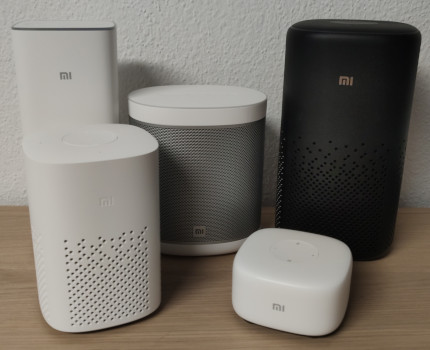
LX06 - supported 🛒 Xiaoai Speaker Pro (black, infrared) ⭐📝 1.74.10
L06A - supported 🛒 Xiaoai Speaker (white, no infrared) 📝 1.74.10
LX01 - supported Xiaomi Mi AI Speaker Mini 1.32.6
L09A - supported Xiaoai Speaker Art (China, white) 1.76.4
L09B - supported Xiaoai Speaker Art Battery (Black) - untested 1.69.54
L09G - not supported Xiaomi Mi Smart Speaker (Global, Google Assistant)
LX05 - encrypted, supported 🛒 Xiaoai Speaker Play 🔐
L05B - not supported Xiaoai Speaker Play Enhanced Edition, no Clock LED (NuttX) - details
L05C - not supported 🛒 Xiaoai Speaker Play Enhanced Edition, with Clock LED (NuttX)
L05G - not supported Xiaomi Smart Speaker IR Control (Global, Google Assistant)
L15A - encrypted, not fully supported 🛒 Xiaomi Mi AI Speaker 2 Gen 🔐
L16A - not tested 🛒 Xiaomi Sound by HARMAN AudioEFX
L17A - not tested 🛒 Xiaomi Sound Pro
L07A - not tested Redmi XiaoAI Speaker Play
M03A - not tested Xiaomi Sound Move
MDZ-25-DT - not tested Xiaomi Mi AI Speaker 1 Gen (?) - S12
XMYX01JY - not tested Xiaomi XiaoAI HD
YLAI01YL - blocked (not tested) Yeelight Voice Control Assistant

🔐 Encrypted speaker partitions

Some speakers such as LX05 or L15A, change the rootfs partition and include a DER certificate to verify the system. This may block any changes on non-signed squashfs. Recommended to NOT flash, you may have an invalid rootfs and potentially lock yourself! You can check this by running binwalk if it contains a Certificate entry:

DECIMAL       HEXADECIMAL     DESCRIPTION
--------------------------------------------------------------------------------
0             0x0             Squashfs filesystem, little endian, version 4.0, compression:xz, size: 32240378 bytes,
                              2430 inodes, blocksize: 262144 bytes, created: 2021-04-28 06:34:34
32243716      0x1EC0004       Certificate in DER format (x509 v3), header length: 4, sequence length: 830

Requirements

[!WARNING]
Supported and Tested setup is Linux OS with amd64 arch. Other hosts (Apple M1, Windows) are not tested nor supported. Feel free to make a PR if you have a fix for this.

[!IMPORTANT]
If using WSL, be sure to enable setCaseSensitiveInfo.

You will also need the following tools:

Usage

Get a copy of your rootfs filesystem from your speaker. It can also be from a system upgrade file. It should be something similar as this:

nc -vlp 8888 > $HOME/backup-image
# -----
dd if=/dev/mtd4 of=/tmp/image
nc $IP_ADDR 8888 < /tmp/image

Since the speakers filesystem is read-only format, we have to reflash it to add the new applications and patches. There are three steps to perform this: extract, patch, build.

Optionally but recommended, prepare the packages you want to install by editing the packages.sh script.

Build the docker image and run it to build all the packages. Probably it will take more than an hour.

[!CAUTION]
Run the build packages.sh process with Docker, since the package build performs some patching to the system, otherwise it could harm your GNU/Linux installation.

docker build -t xiaoai-patch packages
docker run -it -v $PWD:/xiaoai xiaoai-patch

You can now run the commands to prepare the new image.

sudo make clean
sudo make extract FILE=image-mtd4
sudo make patch MODEL=lx06
sudo make build MODEL=lx06

# or all at once :)
sudo make clean all FILE=image-mtd4 MODEL=lx06

[!TIP]
Ensure the image format is correct, by comparing the original and new images. Use file or other commands to check info.

After you have the new image ready, send it to the speaker, and flash the not-in-use rootfs partition, boot it and test.

:warning: Unbricking

You should have some wires soldered to the board to perform TTL in case it is required.
As long as you perform steps as described and not flashing content in wrong partitions, you can reverse failed boot with Uboot safely.

In order to enable Uboot menu, check in the environment partition that you have the setting bootdelay=3.
If is set to bootdelay=0 then Uboot will continue normal boot process and you won't be able to stop it unless you get into fastboot or recovery mode. (?)
In most cases, binary program is fw_setenv or fw_env and data is set into first partition as string.

Ensure you can access Uboot before writing changes, it is your rescue!

Hit any key to stop autoboot:  0

DISCLAIMER

YOU are responsible for any use or damage this software may cause. This repo and its content is intended for educational purposes only. Use at your own risk.

xiaoai-patch (duhow/xiaoai-patch)

正在搜索数据库…

这是什么?这是一套针对小爱音箱的补丁工具,可以移除其中的专有软件并安装开源程序,把原装音箱变成可以自己定制的语音助手和媒体播放器。
这是可以直接刷入的固件补丁,还是独立应用?这是一套自定义固件/rootfs 补丁工具:你需要先提取音箱现有的 rootfs 镜像,用新的软件包给它打补丁,再用 Docker 重新构建,最后把它刷写回音箱闲置的分区。
我该怎么给我的音箱打补丁?从音箱(或系统升级文件)中导出 rootfs 文件系统,可以选择编辑 packages.sh 来决定安装哪些软件包,然后构建 Docker 镜像并运行它,编译所有软件包,最后把生成的镜像刷写到未使用的 rootfs 分区。
我的构建电脑上需要准备哪些工具?你需要 squashfs-tools、mtd-utils(仅 S12 型号需要)、make、rsync、shasum 和 Docker;构建只支持 Linux amd64 系统,WSL 用户必须启用 setCaseSensitiveInfo。
所有音箱型号都能安全刷写吗?不能。LX05 和 L15A 等型号使用加密的 rootfs 分区并带有证书校验,因此不建议刷写,否则可能导致设备变砖;其他几款型号未经测试,或者根本不受支持。
哪些音箱型号真正能用于这个项目?LX06 和 L06A(Xiaoai Speaker Pro)是主要支持的目标,LX01 和 L09A 也受支持;L09G、L05B/C/G 和 L15A 等许多其他型号则被列为不受支持、未经测试或已被阻止。
我能在 macOS 或 Windows 上构建补丁吗?不能。构建流程只在 amd64 架构的 Linux 上经过测试并获得支持;Apple M1 和 Windows 主机未经测试,也不受支持。
音箱上会安装哪些开源软件?MPD、Snapcast、Shairport-Sync、Upmpdcli 和 Squeezelite 等软件包可以把音箱变成支持多种协议的媒体播放器,而 Porcupine 和 Whisper 则为一个能与 Home Assistant 对话的语音助手提供支持。
刷写时把音箱刷砖了怎么办?只要没有刷错分区,你仍然可以通过 U-Boot 恢复。你需要在主板上焊接导线以获得 TTL 访问,并确保 bootdelay 设置为 3,这样才能中断启动过程。
打补丁后能保留原装的小爱同学吗?可以。补丁和脚本都可以调整,因此你可以保留原装小爱同学的功能,同时与新加入的开源程序并存。
构建固件需要多长时间?通过提供的 Docker 镜像构建所有软件包需要一个多小时,需要耐心等待。
作者
duhow
大小
18.2 MB
星标
781
时长
5年
提交 · 90 天