Что это такое?
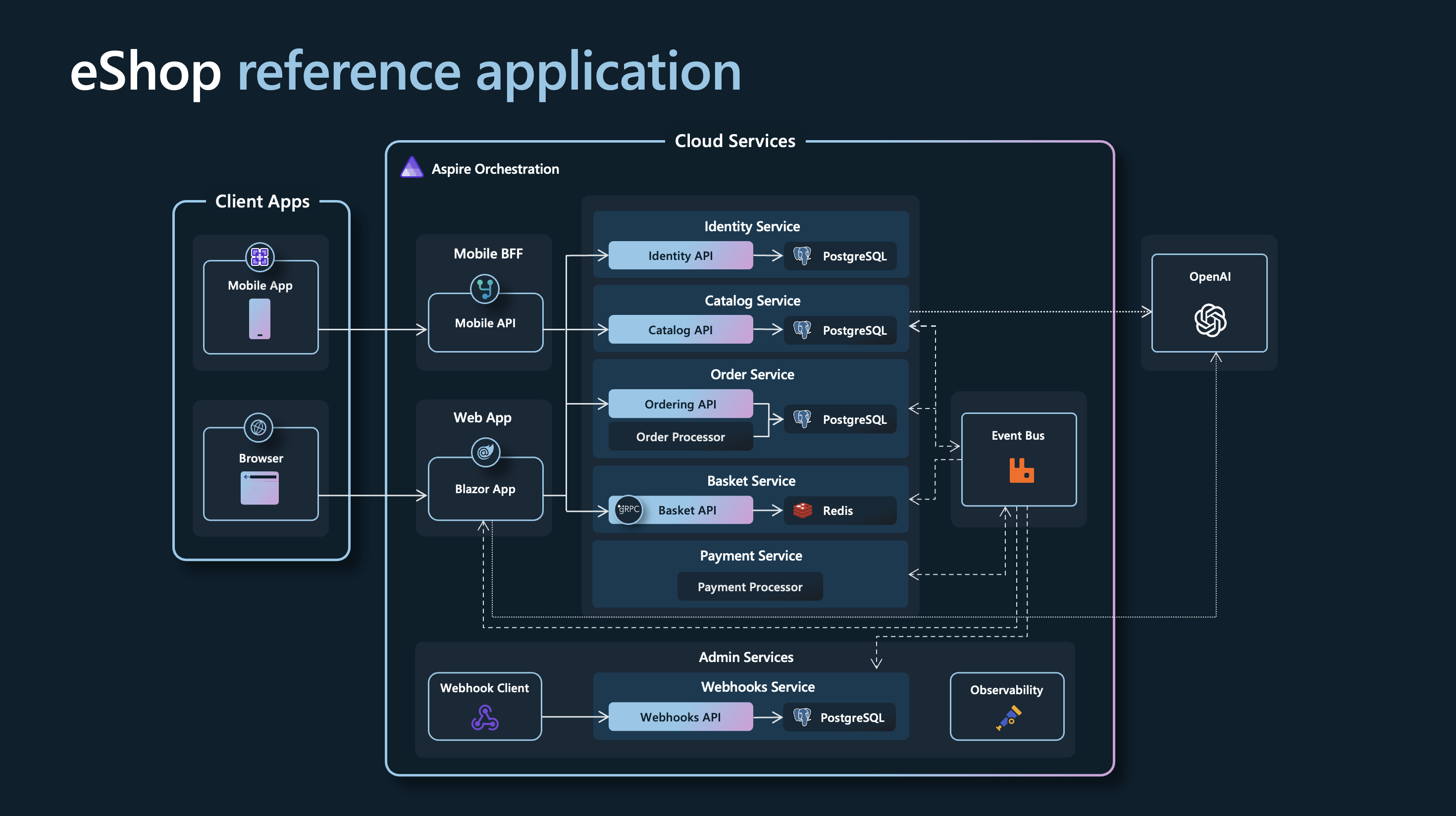
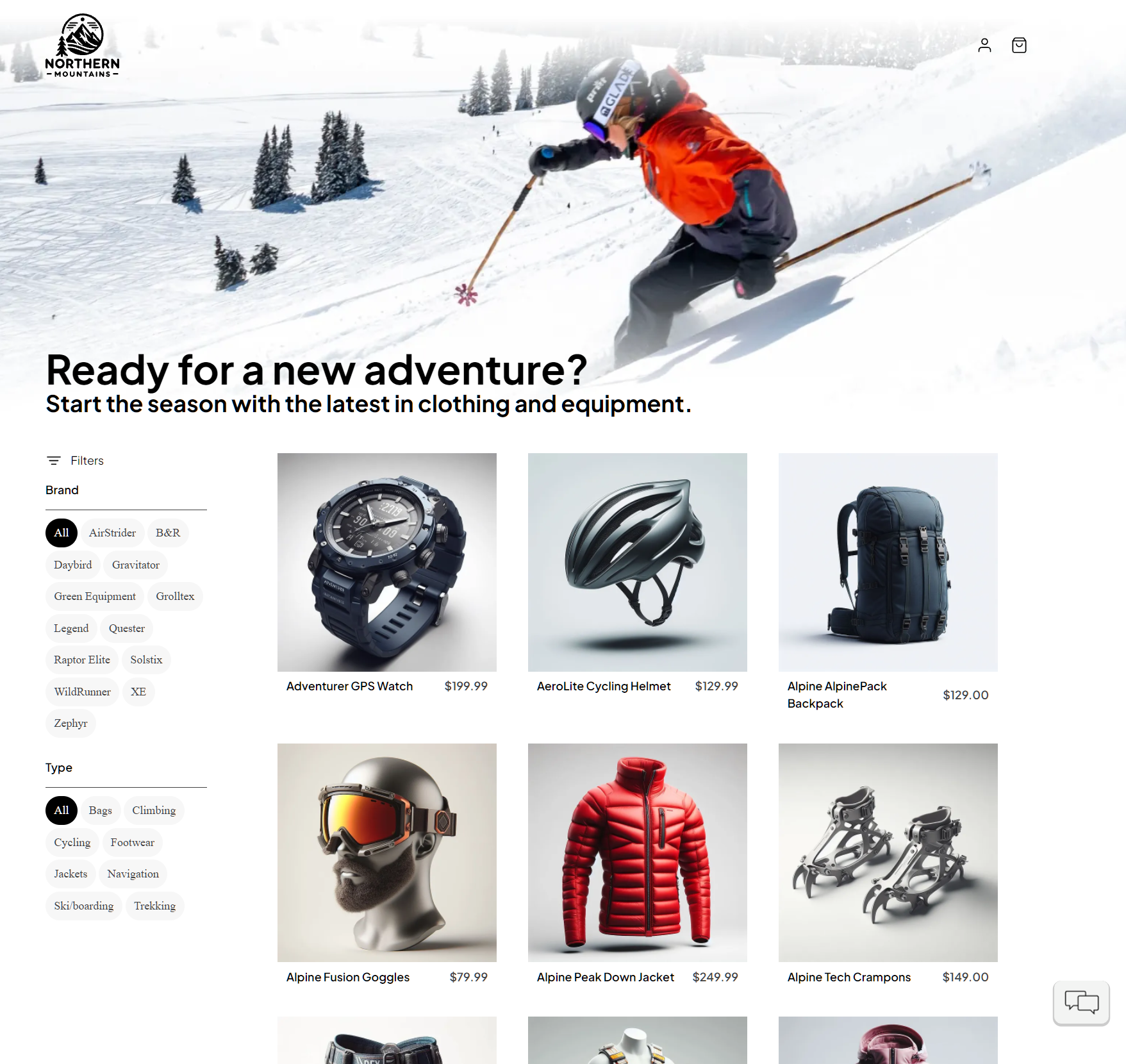
 Эталонное .NET-приложение, реализующее интернет-магазин ('AdventureWorks') на основе архитектуры микросервисов с сервисами, построенное на .NET Aspire.
Эталонное .NET-приложение, реализующее интернет-магазин ('AdventureWorks') на основе архитектуры микросервисов с сервисами, построенное на .NET Aspire.Это библиотека, которую я подключаю в проект, или готовое приложение, которое я запускаю?Это полноценное многосервисное демонстрационное приложение, а не пакет для импорта: вы запускаете весь AppHost, чтобы поднять все микросервисы eCommerce вместе.
Это полноценное многосервисное демонстрационное приложение, а не пакет для импорта: вы запускаете весь AppHost, чтобы поднять все микросервисы eCommerce вместе.Как это запустить?Клонируйте репозиторий, убедитесь, что контейнерная среда запущена, и выполните Aspire CLI из корня репозитория (или откройте eShop.Web.slnf в Visual Studio и нажмите Ctrl+F5), чтобы запустить AppHost и открыть панель Aspire.
Клонируйте репозиторий, убедитесь, что контейнерная среда запущена, и выполните Aspire CLI из корня репозитория (или откройте eShop.Web.slnf в Visual Studio и нажмите Ctrl+F5), чтобы запустить AppHost и открыть панель Aspire.Что нужно установить перед запуском?Сначала нужны .NET 10 SDK, соответствующий global.json, Aspire CLI и совместимая с OCI среда контейнеров (рекомендуется Docker Desktop, поддерживается также Podman).
Сначала нужны .NET 10 SDK, соответствующий global.json, Aspire CLI и совместимая с OCI среда контейнеров (рекомендуется Docker Desktop, поддерживается также Podman).Есть ли подводные камни при развёртывании этого в облаке?При развёртывании в Azure Container Apps поднимаются PostgreSQL, Redis и RabbitMQ как рабочие контейнеры; в README прямо сказано, что это предназначено только для оценки и демонстраций, но не для производственных данных.
При развёртывании в Azure Container Apps поднимаются PostgreSQL, Redis и RabbitMQ как рабочие контейнеры; в README прямо сказано, что это предназначено только для оценки и демонстраций, но не для производственных данных.Что за необязательная функция ИИ-чатбота?eShop может по желанию подключить ресурс Microsoft Foundry во время локальной разработки, чтобы добавить ИИ-чатбота. Используются модели gpt-4.1-mini и text-embedding-3-small, которые Aspire автоматически внедряет в приложение.
eShop может по желанию подключить ресурс Microsoft Foundry во время локальной разработки, чтобы добавить ИИ-чатбота. Используются модели gpt-4.1-mini и text-embedding-3-small, которые Aspire автоматически внедряет в приложение.Данные каталога товаров настоящие?Нет, названия товаров, описания, названия брендов и изображения в catalog.json вымышленные, созданы с помощью GPT-3.5-Turbo и DALL-E 3.
Нет, названия товаров, описания, названия брендов и изображения в catalog.json вымышленные, созданы с помощью GPT-3.5-Turbo и DALL-E 3.Могу ли я развернуть eShop в Azure прямо отсюда?Да, в AppHost уже настроено окружение Azure Container Apps, поэтому команда 'aspire deploy' развернёт приложение напрямую из модели приложения.
Да, в AppHost уже настроено окружение Azure Container Apps, поэтому команда 'aspire deploy' развернёт приложение напрямую из модели приложения.Есть ли версия для развёртывания в Azure в производственной среде?Проект ссылается на отдельный репозиторий 'eShop on Azure', который специально настроен для этой цели, так как развёртывание этой версии в Azure предназначено только для демонстраций.
Проект ссылается на отдельный репозиторий 'eShop on Azure', который специально настроен для этой цели, так как развёртывание этой версии в Azure предназначено только для демонстраций.What are similar projects?Smartstore, booking-microservices, aspnetcore, eShopOnWeb, nopCommerce, garnet, microservices-demo, abp
Smartstore, booking-microservices, aspnetcore, eShopOnWeb, nopCommerce, garnet, microservices-demo, abpWhich topics is it in?rabbitmq, azure, ecommerce, architecture, containers, cloud-native, playwright, microservices, dotnet, enterprise, c#, csharp
rabbitmq, azure, ecommerce, architecture, containers, cloud-native, playwright, microservices, dotnet, enterprise, c#, csharp