

What is this?
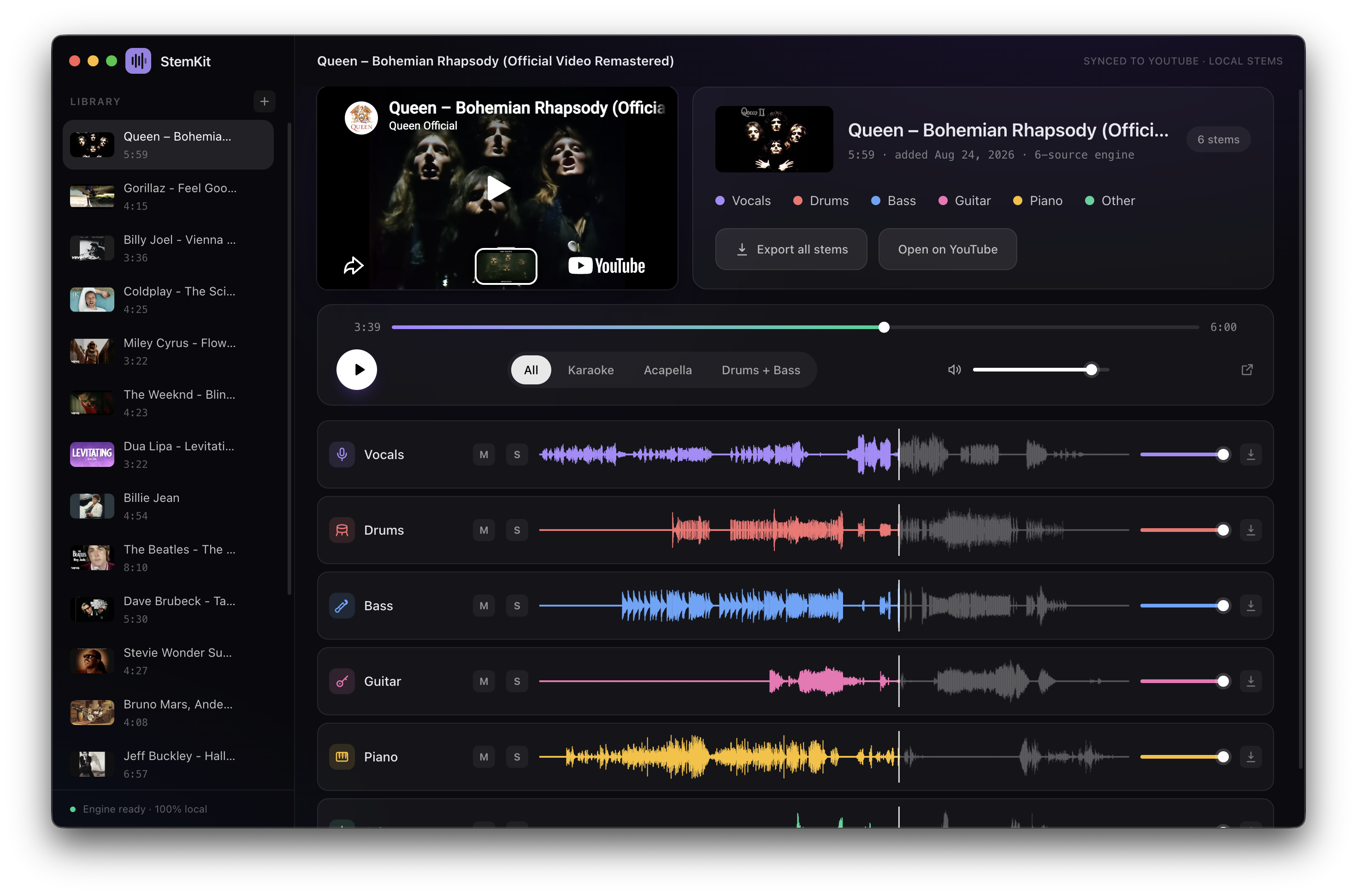
 StemKit splits any YouTube song into isolated stems — vocals, drums, bass, guitar, piano and more — running entirely on your own machine, with a mini DAW-style player to mix/mute/solo each stem.
StemKit splits any YouTube song into isolated stems — vocals, drums, bass, guitar, piano and more — running entirely on your own machine, with a mini DAW-style player to mix/mute/solo each stem.Is this a web app, or something I install on my computer?It is a native desktop app built with Electron and TypeScript, distributed as installers (DMG, EXE, AppImage/deb), not a web service.
It is a native desktop app built with Electron and TypeScript, distributed as installers (DMG, EXE, AppImage/deb), not a web service.How do I get it running?Download the matching installer from the GitHub Releases page — DMG for Apple Silicon Macs, an EXE installer or portable zip for Windows, or an AppImage/deb for Linux — and run it.
Download the matching installer from the GitHub Releases page — DMG for Apple Silicon Macs, an EXE installer or portable zip for Windows, or an AppImage/deb for Linux — and run it.Do I need to install Python or ffmpeg myself first?No — on first launch StemKit automatically downloads a private Python runtime if needed (a one-time ~2GB download for the separation engine), and ffmpeg is bundled with the app.
No — on first launch StemKit automatically downloads a private Python runtime if needed (a one-time ~2GB download for the separation engine), and ffmpeg is bundled with the app.Any install pitfalls I should know about?On macOS the app is signed but not notarized, so Gatekeeper will say it 'cannot verify the developer' until you allow it manually; on Windows, SmartScreen may warn on first run and needs 'Run anyway'.
On macOS the app is signed but not notarized, so Gatekeeper will say it 'cannot verify the developer' until you allow it manually; on Windows, SmartScreen may warn on first run and needs 'Run anyway'.Does it work on Intel Macs, or only Apple Silicon?Only Apple Silicon Macs are supported on macOS (12+); Windows 10/11 x64 and Linux x64 are also supported.
Only Apple Silicon Macs are supported on macOS (12+); Windows 10/11 x64 and Linux x64 are also supported.Does it need an internet connection after I've set it up?Once the one-time setup (runtime + separation engine) finishes, StemKit runs fully offline — you only need internet to initially search/download the YouTube audio itself.
Once the one-time setup (runtime + separation engine) finishes, StemKit runs fully offline — you only need internet to initially search/download the YouTube audio itself.Does my audio or YouTube link get sent anywhere?No — everything, including the separation itself, runs locally on your machine with no accounts, cloud services, or API keys involved.
No — everything, including the separation itself, runs locally on your machine with no accounts, cloud services, or API keys involved.Is downloading YouTube audio with this actually legal?The project itself is MIT licensed, but the README is upfront that pulling audio from YouTube violates its Terms of Service for public products, so it's meant for personal use only.
The project itself is MIT licensed, but the README is upfront that pulling audio from YouTube violates its Terms of Service for public products, so it's meant for personal use only.Do I need an NVIDIA GPU, or does it work on CPU too?A GPU speeds things up (Apple Silicon via MPS, NVIDIA via CUDA), but separation also runs on plain CPU if no GPU is available.
A GPU speeds things up (Apple Silicon via MPS, NVIDIA via CUDA), but separation also runs on plain CPU if no GPU is available.What instruments can StemKit separate?Vocals, drums, bass, guitar, piano and more — you pick the instruments and StemKit automatically selects the right separation engine for them.
Vocals, drums, bass, guitar, piano and more — you pick the instruments and StemKit automatically selects the right separation engine for them.What are the one-click presets?All, Karaoke, Acapella, and Drums + Bass presets instantly give you the stem combination you want without manual selection.
All, Karaoke, Acapella, and Drums + Bass presets instantly give you the stem combination you want without manual selection.Can I export the separated stems?Yes, any single stem or all of them can be exported as WAV files.
Yes, any single stem or all of them can be exported as WAV files.Are there higher-quality separation options?Yes, optional one-time downloads in the Settings gear icon add Mel-Band Roformer studio-quality vocals (+913MB), a fine-tuned Demucs model (+~320MB, up to 4x slower), and extra refinement passes (up to 3x slower).
Yes, optional one-time downloads in the Settings gear icon add Mel-Band Roformer studio-quality vocals (+913MB), a fine-tuned Demucs model (+~320MB, up to 4x slower), and extra refinement passes (up to 3x slower).What are similar projects?ISpotify, ultimatevocalremovergui, yovoice, ytDownloader, openspot-music-app, SCM, course2md, demucs
ISpotify, ultimatevocalremovergui, yovoice, ytDownloader, openspot-music-app, SCM, course2md, demucsWhich topics is it in?karaoke, music-downloader, yt-dlp, auto-update, linux-app, electron-app, audio-processing, youtube, music, installer, privacy-first, ffmpeg
karaoke, music-downloader, yt-dlp, auto-update, linux-app, electron-app, audio-processing, youtube, music, installer, privacy-first, ffmpeg